
iTechGuides is reader-supported. When you buy through links on our site, we may earn an affiliate commission. As an Amazon Associate I earn from qualifying purchases. Learn more
Best overall: Buy the TP-Link Tapo C120 if you want an inexpensive camera that works indoors or outdoors, supports local recording, and does not require a monthly subscription for its basic security experience. The Wyze Cam v4 is the better bargain if you want the most features and sharpest video for the money. For indoor pan-and-tilt coverage, choose the eufy Indoor Cam E220 or Reolink E1.
These are U.S. recommendations based on prices and product information checked in 2026. Prices are snapshots, not guarantees. A cheap camera is not necessarily cheap to own: the real cost may include a microSD card, a storage hub, an outdoor power adapter, or two years of cloud service.
Quick picks: the best cheap security cameras
The table compares the camera, not just the sale price. In particular, local recording means you supply storage, while cloud recording usually means a recurring plan.
| Camera | Typical 2026 price signal | Best for | Video and installation | Recording without a monthly plan | Main drawback |
|---|---|---|---|---|---|
| TP-Link Tapo C120 | $34.99 sale shown; $39.99 list | Best overall value | 2K, IP66, plug-in, 2.4-GHz Wi-Fi | Yes, with microSD card | Not battery-powered; cloud history requires Tapo Care |
| Wyze Cam v4 | About $36 in current buying-guide pricing | Best image quality and features per dollar | 2.5K, IP65, plug-in, 2.4-GHz Wi-Fi 6 | Yes, including 24/7 local recording with a compatible card | Cloud event videos require a Wyze service plan |
| eufy Indoor Cam E220 | $49.99 | Indoor pan-and-tilt | 2K, 360-degree pan, 96-degree tilt, plug-in | Yes, with microSD | Indoor-only |
| Reolink E1 | $45.99 | Low-cost local-storage setup | 4MP, pan/tilt, 2.4-GHz Wi-Fi | Local-storage options vary by exact model and setup | Less network flexibility than E1 Pro |
| Reolink E1 Pro | $69.99 | Indoor local/NAS-oriented use | 5MP, pan/tilt, dual-band Wi-Fi | Designed for local-storage flexibility; verify the exact configuration | Indoor-only and more expensive |
| Blink Mini 2 | $39.99 regular price; sales are common | Small camera for Blink or Alexa homes | 1080p, plug-in, spotlight, indoor/outdoor with separate adapter | Only with a Sync Module 2 and USB storage | Local recording adds hardware; cloud features are subscription-oriented |
| Arlo Essential Outdoor 2nd Gen | $49.99 sale; $99.99 regular price | Battery-powered outdoor coverage | 2K or HD, 130-degree view, integrated spotlight | Not the simple default; Arlo Secure is needed for cloud history and advanced features | Integrated, non-removable battery |
| Ring Indoor Cam 2nd Gen | $49.99 | Existing Ring households | 1080p, plug-in, 2.4-GHz Wi-Fi | No ordinary camera-level local storage | Recorded history and smart alerts require Ring Protect |
Price and availability are U.S. snapshots from 2026 manufacturer pages or current buying-guide pricing. Check the seller before ordering because promotions, bundles, taxes, hardware revisions, and plan prices change.
What should count as cheap?
Use three tests rather than one sticker-price cutoff:
#1 Best Overall

- 2024 PCMag Editor's Choice - Praised for its outstanding value, delivering sharp 2K resolution and a comprehensive feature set.
- Compact, Versatile, Weatherproof - The Tapo C120 is a compact camera suitable for indoor and outdoor use, featuring an IP66 rating for withstanding rain, dust, and rugged conditions.
- Magnetic Base for Flexible Mounting - Easily attach the C120 camera to any metal surface with its magnetic base. Versatile mounting on railings, frames, or even the refrigerator.
- 2K QHD 4MP Resolution - Crystal-clear detail in every shot. Capture every moment with stunning 2K quality that ensures even the finest details are never missed.
- Starlight Color Night Vision - The built-in Starlight sensor delivers bright, colorful video at night, with two spotlights for extra illumination in darker conditions.
- Upfront price: roughly under $60 for a plug-in camera or under $100 for a battery-powered outdoor model.
- Two-year ownership cost: camera plus a supported microSD card, hub, outdoor adapter, and any subscription.
- Usable security cost: whether the camera preserves footage you can retrieve after an event. Live view alone is not equivalent to recorded evidence.
A $20 camera that needs a proprietary $40 hub and a monthly plan can be more expensive than a $40 camera with a microSD slot. That is why the Tapo C120, Wyze Cam v4, eufy E220, and Reolink models rank ahead of some cheaper-looking cloud cameras.
Independent budget-camera coverage uses similar criteria, including image quality, night vision, motion detection, subscription costs, setup, connection stability, weather performance, and false triggers. See the testing criteria from Security.org, the budget picks from PCWorld, and the no-subscription comparisons from SafeWise.
Do these 3 things before closing this tab:
1Repair Windows errors before they cause bigger problems2Scan for outdated or missing drivers - takes under a minute3Clear out junk files and repair common Windows errorsBest overall cheap camera: TP-Link Tapo C120
The Tapo C120 is the strongest all-purpose recommendation because it combines a low price with features that usually require moving upmarket: 2K video, an IP66 indoor/outdoor rating, color night vision, local microSD recording, and person, vehicle, pet, and sound-detection options.
What you get
- 2K QHD 4MP video at up to 20 frames per second.
- IP66 weather resistance for the camera enclosure.
- Color night vision using a starlight sensor and spotlights.
- microSD support up to 512GB.
- Activity zones, two-way audio, a siren, and a magnetic base.
- Plug-in power and 2.4-GHz Wi-Fi.
TP-Link’s U.S. page showed a $39.99 list price and a $34.99 sale price when checked. The sale price makes it particularly attractive, but it should not be treated as permanent.
Subscription and storage
You can use local recording and ordinary camera functions without Tapo Care. Tapo Care adds cloud storage, richer snapshot notifications, and longer cloud history. TP-Link’s Tapo Care feature page and plan documentation distinguish local recording from cloud services, and note that features can vary by model and firmware.
In practical terms, install a compatible microSD card, format it in the Tapo app, and use the camera’s storage and recording settings to choose event or continuous recording. A 512GB maximum does not promise a specific number of days: retention depends on resolution, recording mode, motion activity, and whether old footage is overwritten.
Recommended Free Tools
Who should buy it?
Choose the C120 for an apartment, nursery, pet area, porch, garage, or small home when you have an outlet nearby and do not want a required monthly fee. It is also the safest recommendation when you have not yet decided whether the camera will ultimately be used indoors or outdoors.
Do not mistake IP66 for a complete outdoor wiring solution. The camera enclosure may be weather-resistant, but the power adapter, cable connection, and outlet still need protection and correct placement. The camera is also Wi-Fi-only, not an Ethernet camera.
Best bargain feature set: Wyze Cam v4
The Wyze Cam v4 is the best choice when maximum capability per dollar matters more than the simplest subscription policy. It records at 2.5K, supports color night vision, includes a spotlight and siren, and can record continuously to a microSD card.
Wyze lists a 2560 × 1440 resolution, 115.8-degree diagonal field of view, 99dB siren, two-way audio, IP65 weather resistance, a -4°F to 122°F operating range, and microSD support up to 256GB. It uses 2.4-GHz Wi-Fi 6 and requires wired power. The specifications are documented in Wyze’s technical support page.
The Tool Desk
Outbyte Driver Updater FREEScan for outdated or missing drivers - takes under a minuteDriver Scan →Outbyte PC Repair FREERepair Windows errors before they cause bigger problemsFix Now →The important Wyze recording catch
Do not describe the v4 as having free cloud recording. Wyze states that an active service subscription is required for event videos. Without one, the Events tab may show thumbnails rather than playable event videos. A compatible microSD card still enables 24/7 local recording without a subscription, according to Wyze’s local-recording support documentation.
Wyze currently lists Cam Plus at $2.99 per month for one camera, Cam Unlimited at $9.99 per month, and Cam Unlimited Pro at $19.99 per month. Plans and names can change, so verify the current service page before calculating your ownership cost.
Rank #2
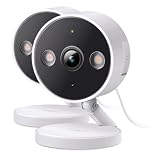
- The information below is per-pack only
- 2024 PCMag Editor's Choice - Praised for its outstanding value, delivering sharp 2K resolution and a comprehensive feature set.
- Compact, Versatile, Weatherproof - The Tapo C120 is a compact camera suitable for indoor and outdoor use, featuring an IP66 rating for withstanding rain, dust, and rugged conditions.
- Magnetic Base for Flexible Mounting - Easily attach the C120 camera to any metal surface with its magnetic base. Versatile mounting on railings, frames, or even the refrigerator.
- 2K QHD 4MP Resolution - Crystal-clear detail in every shot. Capture every moment with stunning 2K quality that ensures even the finest details are never missed.
Buy the Wyze v4 if you are willing to install and test a microSD card, or if you already pay for Wyze service. It is a strong bargain for a powered porch, room, pet area, or garage, but it is not a battery camera.
Best inexpensive indoor pan-and-tilt camera: eufy Indoor Cam E220
The eufy Indoor Cam E220 costs $49.99 on eufy’s U.S. indoor-camera collection and is a good fit for a nursery, apartment living room, pet room, or home office. Its motorized head provides 360 degrees of horizontal pan and 96 degrees of vertical tilt, and the camera can automatically track motion.
- 2K video at 2304 × 1296.
- 2.4-GHz Wi-Fi.
- Local microSD recording without a required monthly fee.
- Optional cloud storage.
- Product-page support for NAS/RTSP on supported configurations.
- Alexa, Google Assistant, and Apple HomeKit support, with HomeKit streaming limited to 1080p according to eufy’s page.
The E220 is indoor-only. Do not mount it outside or aim it through a window as a substitute for an outdoor camera. Glass can reflect infrared light at night, create glare, and reduce both image quality and motion-detection reliability.
Pan-and-tilt improves room coverage, but motion tracking can leave the lens pointed away from its normal position after an event. If that matters, check the current app controls for disabling tracking or returning the camera to a preset position.
Best for local, NAS, or NVR control: Reolink E1 or E1 Pro
Choose the Reolink E1 if the lowest purchase price is important, or the E1 Pro if you want dual-band Wi-Fi and a higher-resolution indoor pan-and-tilt camera. Reolink’s U.S. store lists the E1 at $45.99 with 4MP video and the E1 Pro at $69.99 with 5MP video. Both provide pan/tilt and two-way audio; the E1 is 2.4-GHz-only, while the E1 Pro supports 2.4- and 5-GHz Wi-Fi. See the E1-series comparison.
Reolink is especially appealing to technically inclined buyers who want to investigate microSD, NVR, NAS, FTP, RTSP, or ONVIF workflows instead of relying entirely on a vendor cloud. Storage and protocol support can differ by exact Reolink model, firmware, and configuration, so confirm the listing for your SKU before purchase. Reolink explicitly lists local microSD, NVR, Home Hub, FTP/NAS, RTSP, and ONVIF support for its E1 Outdoor model, which illustrates the brand’s broader local-storage orientation; it should not be used as proof that every E1 variant has identical features.
The Reolink E1 Zoom is worth considering only when optical zoom is important or a sale changes the economics. Reolink’s U.S. store lists it at $109.99, so it no longer fits a strict cheap-camera budget even though its pan/tilt, optical zoom, and local-storage features are useful.
Best compact option for Blink and Alexa homes: Blink Mini 2
The Blink Mini 2 is a small, inexpensive 1080p plug-in camera with color night view and a built-in spotlight. It makes sense for an existing Blink household or someone who values a compact Alexa-friendly camera more than high resolution or broad local-storage flexibility.
Blink describes the Mini 2 as suitable for indoor or outdoor use, but outdoor installation requires the separately sold Blink Weather Resistant Power Adapter. The camera itself is not a battery camera. Blink’s technical specifications and FAQ explain the adapter and storage requirements.
Why the total cost can surprise you
Local storage requires a Sync Module 2 and USB drive. Cloud storage and Person Detection are subscription-oriented. Blink currently lists Basic at $3.99 per month or $39.99 per year for one device, while Plus covers eligible devices at one location for $11.99 per month or $119.99 per year. Blink also has separate Basic AI and Plus AI tiers with higher pricing. Check the current plan information rather than assuming every Blink plan includes the same features.
Windows Errors? Fix Them Before They Spread
Repair common Windows errors and clear accumulated junk for a smoother, more stable PC - no reinstall needed.Free scan · no reinstallOutdated Drivers Are Slowing You Down
One free scan finds every outdated or missing driver and matches the right update for your exact hardware.Free scan · exact hardware matchWithout a plan, Blink’s current comparison says live view is limited to five minutes for Blink devices. That makes the Mini 2 a poor default recommendation for a buyer who wants a fully usable no-subscription recording system from one box.
Best cheap battery-powered outdoor camera: Arlo Essential Outdoor 2nd Gen
The Arlo Essential Outdoor 2nd Gen is the sale-dependent choice for a location where running a power cable is impractical. Arlo’s U.S. page showed a $49.99 sale price against a $99.99 regular price. At the sale price, it competes with inexpensive wired outdoor cameras; at the regular price, its subscription model makes it less compelling.
Depending on the version, it offers HD or 2K video, a 130-degree view, an integrated spotlight, color night vision, indoor/outdoor use, and battery power. The battery is integrated and cannot be removed, so the entire camera must be recharged in place or removed for charging.
Without Arlo Secure, live video and motion notifications continue, but cloud storage, interactive notifications, video object detection, and other premium features require a plan. Arlo supplies a 30-day trial with the camera according to its product page. Treat battery-life figures as estimates: activity level, temperature, Wi-Fi signal, live viewing, spotlight use, and detection settings all change runtime.
What’s actually slowing this PC down?
Pick the symptom - the matching free tool is one click away.
Rank #3

- 【2K High Definition】Capture every detail inside your home with crystal-clear 2K high definition video with this indoor security camera. Easily see what your baby is holding or what your pet is playing with.Controller Type:Amazon Alexa;Android;Google Assistant.Connectivity protocol:Wi-Fi.Power source type:Corded Electric, Power Adapter: 100–240 V. Connects via 2.4GHz Wi-Fi Band
- 【Up, Down, All Around】This Pan/Tilt camera see everything across an entire room or walkway with the 360° horizontal and 114° vertical range pan/tilt field of view.
- 【Detection & Instant Notification】Get instant push notifications when motion, person or baby crying is detected, there is no additional fee to use it as a baby camera monitor. Discern from notifications that matter, so you'll know if its your pet playing around or if someone is actually there.
- 【Works w/ Alexa & Google Assistant】Fully compatible with Amazon Alexa and Google Assistant, use your simple voice command to view Tapo indoor security camera live stream on Echo Show or Google Chrome Cast with a screen. Streaming via Google limited to display on Chromecast & Nest devices only.
- 【2-Way Audio w/ Built In Siren】Never truly leave home with the built-in 2-way audio. Use as a pet camera with phone app to comfort your pet from anywhere in the world. Keep your family safe with cameras for home security indoor by warding off intruders.
Best only for existing Ring households: Ring Indoor Cam 2nd Gen
The Ring Indoor Cam 2nd Gen is a sensible ecosystem purchase, not the best long-term bargain. It costs $49.99 and provides 1080p video, a 143-degree diagonal view, night vision, two-way audio with noise cancellation, 2.4-GHz Wi-Fi, plug-in power, customizable motion detection, and a manual privacy cover. Specifications are listed on Ring’s camera page and its product information page.
Useful recorded history and smart alerts are tied to Ring Protect. Ring’s current plan page lists Protect Solo at $4.99 per month or $49.99 per year for one camera or doorbell, with up to 180 days of video history, and Protect Multi at $9.99 per month or $99.99 per year for devices at one location. Ring changed plan names in 2026, so confirm current pricing at Ring’s plans page.
The Indoor Cam does not have ordinary camera-level local storage. Ring Alarm Pro can provide local-storage capabilities in certain configurations, but that is not a built-in feature of this $49.99 camera. Ring is therefore best when you already value the Ring app and ecosystem and are comfortable paying for Ring Protect.
Privacy context
The FTC sent refunds related to a 2023 settlement involving allegations that Ring failed to restrict employee access to customer videos and failed to adequately protect accounts, cameras, and videos from hackers. That enforcement history should be considered when comparing cloud-camera ecosystems, but it is not proof that every current Ring camera is insecure. Read the FTC enforcement announcement for the attributed details.
Quick wins for a faster PC:
Scan for outdated or missing drivers - takes under a minuteDriver Scan →Clear out junk files and repair common Windows errorsFree Scan →Fix the driver behind crashes, sound loss and screen glitchesFind Drivers →Best cheap cameras without a monthly subscription
Without a subscription can mean four different things:
- Live view only: you can open the app, but there may be no retrievable event video.
- Free notifications: the app warns you about motion, but the actual clip is stored nowhere unless you act quickly.
- Local event recording: motion clips are saved to a microSD card or hub.
- Continuous local recording: the camera records around the clock while it has power and available storage.
| Model | Live view without plan | Local recording | Cloud event video without plan | What you may need |
|---|---|---|---|---|
| Tapo C120 | Yes | Yes, microSD up to 512GB | Cloud history requires Tapo Care | microSD card |
| Wyze Cam v4 | Yes | Yes, microSD up to 256GB; 24/7 local recording supported | Event videos require Wyze service | microSD card |
| eufy E220 | Yes | Yes, microSD | Optional cloud service | microSD card |
| Reolink E1/E1 Pro | Yes | Local options vary by model; NAS/NVR support is a key Reolink strength | Optional service where supported | Storage configuration must be verified |
| Blink Mini 2 | Yes, with current time limits without a plan | Requires Sync Module 2 and USB storage | Subscription-oriented | Sync Module 2, USB drive, or plan |
| Ring Indoor Cam | Yes | Not ordinary camera-level local storage | Requires Ring Protect for history | Ring Protect for useful recorded history |
| Arlo Essential Outdoor | Yes | Not the simple default storage path | Arlo Secure for cloud history | Arlo Secure for advanced features |
Every manufacturer can change feature access through plans or firmware. Verify whether your intended combination includes event clips, snapshots, person detection, playback, and remote access before buying.
Two-year ownership cost
These rough calculations use the camera price and one-camera subscription cost for 24 months. They exclude tax and the price of a microSD card, USB drive, hub, outdoor adapter, shipping, and future price changes.
| Camera | Approximate hardware | Typical service calculation | Approximate two-year total before tax |
|---|---|---|---|
| Wyze Cam v4 | About $36 | $2.99/month Cam Plus for one camera | About $107.76 plus microSD card |
| Blink Mini 2 | $39.99 | $3.99/month Blink Basic | About $135.75 before local-storage hardware |
| Ring Indoor Cam 2nd Gen | $49.99 | $4.99/month Ring Protect Solo | About $169.75 |
| Tapo C120 | $34.99–$39.99 | No required plan for local recording | Camera plus microSD card |
| eufy Indoor Cam E220 | $49.99 | Local microSD recording without a required plan | Camera plus microSD card |
| Reolink E1 | $45.99 | Local-storage approach; verify exact storage configuration | Camera plus required storage |
Cloud service and local storage are not identical. A cloud plan keeps footage off-site and is easier to access if the camera is stolen, but it creates recurring cost and account exposure. An SD card is a one-time purchase and can be more private, but it may fail, be overwritten, or disappear with the camera.
Free tools Windows power users keep installed
One-click scans. No signup required.
How to choose by installation
For an apartment or rental
Choose the Tapo C120, Wyze Cam v4, eufy E220, or Reolink E1 depending on whether you need outdoor protection, maximum features, or pan/tilt. Use a removable indoor mount where permitted, avoid pointing into a neighbor’s private area, and use a privacy cover or privacy mode when the camera is not needed.
For a nursery or pet room
The eufy E220 is the most useful if pan/tilt and motion tracking matter. The Tapo C120 and Wyze v4 are better if you also want to move the camera outdoors later. Turn off audio when it is not needed and check how the camera handles baby-cry, bark, meow, and other sound alerts rather than assuming every alert category is equally accurate.
For a porch, driveway, or garage
Use the Tapo C120 or Wyze Cam v4 when an outlet is available. Choose the Arlo Essential Outdoor 2nd Gen when battery power is essential and the sale price is near $49.99. Do not put an indoor-only eufy E220 or Ring Indoor Cam outdoors. For a garage, test Wi-Fi strength, temperature limits, glare, and whether the camera’s power adapter is rated for the installation.
For a no-cloud or advanced network setup
Start with Reolink E1 or E1 Pro, then confirm whether the exact model supports the storage and protocol you need. If you use Home Assistant, an NAS, an NVR, RTSP, or ONVIF, check the model-specific documentation rather than assuming support from the brand name. The E1 Pro’s dual-band Wi-Fi is preferable when a 2.4-GHz-only camera would face congestion.
Important limitations before you buy
Plug-in does not mean wireless
Most inexpensive cameras use Wi-Fi for networking but still need constant power. A camera marketed as wireless may only be cable-free from the network. The Tapo C120, Wyze v4, eufy E220, Reolink E1, Blink Mini 2, and Ring Indoor Cam all require power near the installation point. Only the Arlo pick in this guide is designed around battery power.
Rank #4

- ENDLESS POWER FROM SOLAR ENERGY: Just 45 minutes of direct sunlight powers the camera for a full day of use, while the built-in battery lasts up to 180 days on a single charge during cloudy days. Solar charging requires temperatures above 32°F.△
- EASY WIRE-FREE INSTALLATION: Place the Tapo SolarCam C402 KIT where you need it without relying on nearby outlets. Install the camera and solar panel together or separately using the included 13 ft cable for flexible placement.
- PRIORITIZE WHAT MATTERS: Set activity zones to monitor specific areas for motion or people. Free person and motion detection helps reduce unwanted alerts and notifies you when activity is detected.
- VERSATILE VIDEO STORAGE: Store footage locally via a microSD card (up to 512GB)* or via cloud with a Tapo Care cloud subscription. Tailor your security to suit your needs, whether indoor or outdoor, you have the storage option you need.
- FULL-COLOR 1080P, DAY AND NIGHT: See clearly in low light with a large-aperture lens and built-in spotlights. Capture full-color night vision up to 30 ft away to monitor for possible intruders or motion.
2.4-GHz versus dual-band Wi-Fi
2.4-GHz Wi-Fi generally travels farther through walls but is more congested. Dual-band support can help on a compatible network, but it does not guarantee a stable connection at the edge of coverage. Test the camera in its final location and check signal strength after installation. A strong router connection also does not fix a weak or overloaded internet connection for remote viewing.
Outdoor ratings do not protect every part of the installation
IP65 and IP66 describe the rated camera enclosure under specified conditions. They do not automatically make an exposed power adapter, USB connection, cable junction, or indoor outlet safe in rain. Blink specifically requires its separate weather-resistant power adapter for outdoor use. An indoor camera behind a window is also not equivalent to an outdoor camera: infrared reflections, glare, rain on the glass, and reduced contrast can ruin night footage.
Resolution is not the same as identification
2K or 4MP video can show more detail than 1080p, but lens quality, field of view, exposure, compression, lighting, placement, and motion blur may matter more. A wide-angle camera may show a larger area while making a face or license plate smaller. Color night vision often depends on a spotlight or enough ambient light; it is not the same as full-color footage in darkness.
Do these 3 things before closing this tab:
1Clear out junk files and repair common Windows errors2Scan for outdated or missing drivers - takes under a minute3Repair Windows errors before they cause bigger problemsAI labels are not accuracy guarantees
Person, vehicle, pet, baby-cry, glass-break, and sound detection are feature labels supplied by manufacturers. They do not prove that every person will be detected or that false alerts will disappear. Shadows, headlights, trees, insects, rain, snow, reflections, pets, and passing vehicles can all trigger budget cameras. Use activity zones, sensitivity controls, and detection categories to reduce noise, then test the system in daylight and darkness.
Independent reader supportYour contribution helps us test, update, and keep practical guides available for everyone.Failure modes: what happens when something goes wrong?
Power failure
Plug-in cameras usually stop recording when their camera and router lose power. A UPS can keep a router and camera operating temporarily, but an ordinary plug-in camera does not provide battery backup. Battery cameras may continue operating, but their Wi-Fi access point and internet connection can still fail.
Internet outage
Remote viewing and push notifications generally require internet access. Some cameras can continue recording locally if the camera and router remain powered. Tapo supports local recording with local storage, while Reolink documents offline recording through certain Home Hub configurations. These are model- and setup-specific capabilities, not a universal property of Wi-Fi cameras. See Tapo’s local-recording guidance and Reolink’s Home Hub information.
SD-card failure or overwrite
Local storage is not a permanent archive. Cards can fail, fill up, or overwrite older clips. Use a supported high-endurance microSD card where appropriate, format it through the camera app, confirm that recordings are actually being created, and download important footage immediately. For valuable coverage, add a hub, NAS, NVR, or cloud backup.
Camera theft
An intruder who removes a camera may also take its microSD card. Local recording reduces recurring costs and cloud exposure, but it is not automatically the best evidence-preservation method. Mount outdoor cameras high enough to discourage casual removal and use off-site backup for important locations.
Battery runtime
Battery life depends on motion frequency, temperature, signal strength, recording duration, live views, spotlight use, and detection settings. Treat a manufacturer’s runtime estimate as a test-condition figure, not a guaranteed interval. A busy driveway in winter can consume power much faster than a quiet backyard in mild weather.
Privacy and security checklist
The FTC recommends researching camera encryption, securing the home network, installing updates, using unique passwords, enabling two-factor authentication, and considering a separate network for cameras. Its guidance on internet-connected devices also covers router security, updates, and access management.
- Change the camera-account password immediately.
- Never reuse a password from email, banking, or social media.
- Enable two-factor authentication.
- Use WPA2 or WPA3 Wi-Fi encryption and update the router firmware.
- Put inexpensive IoT cameras on a guest network or IoT VLAN when practical.
- Update the camera firmware and mobile app.
- Turn off the microphone if audio is unnecessary.
- Use a physical privacy cover, privacy mode, or privacy zones indoors.
- Review shared users and remove former tenants, installers, or guests.
- Download important clips instead of relying on indefinite cloud retention.
- Check the manufacturer’s support and security-update information before purchase.
Do not call local storage completely private. It reduces exposure to a vendor’s cloud, but the account, mobile app, router, remote access, shared users, and physical camera still need protection.
Quick wins for a faster PC:
Fix the driver behind crashes, sound loss and screen glitchesFind Drivers →Clear out junk files and repair common Windows errorsFree Scan →Scan for outdated or missing drivers - takes under a minuteDriver Scan →Models and categories to treat cautiously
TP-Link Tapo C110
SafeWise has identified the C110 as an inexpensive 2K no-subscription camera with microSD support. However, TP-Link’s lifecycle documentation lists hardware-version and regional differences, including one U.S. C110 version with a February 20, 2026 end-of-life date. Treat it as an ultra-cheap deal only after checking the exact hardware version and support status. For a primary 2026 recommendation, the newer C120 is safer. See the TP-Link lifecycle list.
Best Value

- COMPACT, VERSATILE, WEATHERPROOF: The Tapo C121 is a compact camera suitable for indoor and outdoor use, featuring an IP66 rating for withstanding rain, dust, and rugged conditions.
- MAGNETIC BASE FOR FLEXIBLE MOUNTING: Easily attach the C121 camera to any metal surface with its magnetic base. Versatile mounting on railings, frames, or even the refrigerator.
- 2K QHD 4MP RESOLUTION: Crystal-clear detail in every shot. Capture every moment with stunning 2K quality that ensures even the finest details are never missed. Connects via 2.4GHz Wi-Fi Band
- StARLIGHT COLOR NIGHT VISION: The built-in Starlight sensor delivers bright, colorful video at night, with two spotlights for extra illumination in darker conditions.
- INVISIBLE IR MODE: Get night vision up to 30ft with IR light. If the red light is distracting, switch to invisible mode for discreet monitoring.
SimpliSafe and other monitored systems
Affordable-camera coverage sometimes ranks SimpliSafe, ADT, or other alarm systems because hardware may be discounted or bundled with monitoring. That answers a different question from buying one cheap standalone Wi-Fi camera. Consider those systems when you need professional monitoring, entry sensors, or a complete alarm—not when you only need an inexpensive camera. Broader coverage from SafeHome illustrates this distinction.
Setup checklist for a reliable cheap camera
- Choose the location first: decide whether the camera needs an outlet, weather protection, pan/tilt, or a battery.
- Check Wi-Fi: test 2.4-GHz coverage at the final mounting position before drilling or using adhesive.
- Install storage: use a supported microSD card, Sync Module 2, NAS, or NVR if local recording is part of the plan.
- Format and verify: format the card through the manufacturer’s app and make a test recording. Do not assume the card is working because the app detects it.
- Set a useful view: avoid direct sun, reflective glass, bright lights, and excessive empty pavement that creates false alerts.
- Configure alerts: start with person detection or a smaller activity zone, then adjust sensitivity after observing several days of real conditions.
- Test failure behavior: briefly disconnect internet while leaving camera power on and determine whether local recording continues. Then test what happens after a power interruption.
- Secure the account: use a unique password, two-factor authentication, current firmware, and limited sharing permissions.
- Save important evidence: download clips immediately; do not depend on an SD card or a limited cloud-retention window indefinitely.
Frequently Asked Questions
What is the cheapest good home security camera?
The Tapo C120 is the best low-cost all-purpose choice when its $34.99 sale price is available. It offers 2K video, IP66 weather resistance, local microSD recording, and no required monthly plan for basic local recording. The Wyze Cam v4 is a strong alternative if you prioritize image quality and features.
What is the best cheap security camera without a subscription?
Choose the Tapo C120, Wyze Cam v4, eufy Indoor Cam E220, or Reolink E1/E1 Pro, depending on the installation. Each can use local storage, but you may need to buy a microSD card or other storage. No subscription does not necessarily include cloud clips, snapshots, or advanced alerts.
Do cheap cameras record without Wi-Fi?
Some can continue recording locally if the camera and router remain powered, but remote viewing and notifications generally require internet access. Capability varies by model and configuration. Reolink documents offline recording for certain Home Hub setups, while Tapo supports local recording to compatible storage.
Do I need an SD card?
You need one if you want local recording on cameras such as the Tapo C120, Wyze Cam v4, or eufy E220. Reolink may use a microSD card, NAS, NVR, or another supported storage path depending on the exact model. Blink Mini 2 requires a Sync Module 2 and USB storage for local recording.
Are 2K cameras worth buying over 1080p?
Usually, 2K is worthwhile when the price difference is small, but resolution alone does not guarantee better evidence. Field of view, lighting, lens quality, compression, placement, and motion blur can matter more. A well-positioned 1080p camera can outperform a poorly positioned 2K model.
Can I use an indoor camera outside?
No. Use a camera with an appropriate IP rating and verify the power adapter, cable, and connection are also suitable for the installation. Blink Mini 2, for example, needs a separate weather-resistant power adapter for outdoor use. An indoor camera behind glass can also suffer from infrared reflections and glare.
How long do cheap camera batteries last?
There is no universal answer. Motion frequency, temperature, Wi-Fi strength, live viewing, spotlight use, and detection settings all affect runtime. Treat manufacturer battery figures as estimates. The Arlo Essential Outdoor 2nd Gen uses an integrated, non-removable battery.
Can a cheap security camera replace an alarm?
No. A camera can provide video, motion alerts, and sometimes a siren, but it is not a complete alarm system with dedicated entry sensors, backup power, professional monitoring, or guaranteed emergency response. Use a monitored security system if those functions are required.
Is local storage safer than cloud storage?
Local storage can reduce cloud exposure and recurring fees, but it is not automatically safer. An SD card can fail, be overwritten, or be stolen with the camera. Cloud storage is easier to retrieve after camera theft but depends on account security, vendor policies, internet access, and subscription retention.
What happens when a camera’s free trial ends?
The camera usually keeps its basic live view, but cloud history, advanced detection, snapshots, or interactive notifications may stop or become limited. Wyze event videos, Blink cloud storage, Ring recorded history, and Arlo cloud features are particularly important to verify before a trial expires.
Is it legal to point a camera at a neighbor or shared space?
Rules vary by state, local law, lease, building policy, and whether audio is captured. Point cameras only at areas you have a legitimate reason to monitor, use privacy zones, avoid private interiors, and check applicable recording-consent rules before recording audio or shared spaces.
How often should I replace a cheap security camera?
Replace it when the manufacturer stops security updates, the app or cloud service is being retired, local recording becomes unreliable, the battery or power system fails, or the camera no longer meets the location’s needs. A low purchase price is not a bargain if the product has poor software support or an uncertain lifecycle.
The Bottom Line
Buy the TP-Link Tapo C120 for the best overall low-cost balance of price, 2K video, outdoor flexibility, local storage, and no required monthly fee. Choose the Wyze Cam v4 for the strongest feature-to-price ratio, the eufy E220 or Reolink E1 for inexpensive indoor pan/tilt, and the Arlo Essential Outdoor 2nd Gen only when you specifically need battery power and find it near its sale price. Treat Blink and Ring as ecosystem purchases, not automatically as the cheapest long-term options.
Before checkout, confirm the exact hardware version, storage requirement, outdoor adapter, subscription restrictions, and two-year cost. Then secure the account, test local recording, and download important footage instead of assuming a cheap camera will preserve evidence automatically.
The Tool Desk
Outbyte PC Repair FREERepair Windows errors before they cause bigger problemsFix Now →Outbyte Driver Updater FREEScan for outdated or missing drivers - takes under a minuteDriver Scan →
