
Quick wins for a faster PC:
Repair Windows errors before they cause bigger problemsFix Now →Fix the driver behind crashes, sound loss and screen glitchesFind Drivers →Microsoft Edge blocks pop-ups by default on desktop. If a legitimate site—such as an online banking, payment, printing, or sign-in page—needs to open a new window, Edge shows a pop-up blocked icon in the address bar. You can then allow that site without turning off protection everywhere.
The steps differ between desktop Edge and the Android app. Microsoft’s current iPhone and iPad help does not document an equivalent pop-up-blocking control, so the iOS section below avoids presenting Android instructions as if they applied to iOS.
Block pop-ups in Microsoft Edge on desktop
To check or enable Edge’s global pop-up blocker:
- Select Settings and more (…) at the top-right of Edge.
- Select Settings.
- Open Privacy, search, and services.
- Select Site permissions, then All permissions.
- Select Pop-ups and redirects.
- Turn on Blocked (recommended).
This setting prevents websites from automatically opening a new window, tab, or partial window over the page you are viewing. It does not remove advertising embedded directly in a webpage, including adverts designed to resemble pop-up windows.
Allow pop-ups for one website
It is safer to add an individual website to Edge’s allow list than to permit pop-ups globally. Use the site’s full URL, beginning with https://.
Windows Errors? Fix Them Before They Spread
Repair common Windows errors and clear accumulated junk for a smoother, more stable PC - no reinstall needed.Free scan · no reinstallCrashes, No Sound, or Screen Glitches?
Random freezes, missing sound and display glitches usually trace back to one bad driver. Find and replace yours safely.Free scan · under a minute#1 Best Overall

- The Humane Solution - Owltra is the humane solution for getting rid of large populations of rodents, as one set of 4AA batteries is enough to exterminate 60 rats. Featuring improved dual infrared sensors to protect kids and pets, Owltra ensures no false zaps. The no-escape design keeps the rodent in place while generating 6,000-9,000 of high-voltage shock for quick elimination
- Quick-Zap System - Our unique zap system guarantees 100% elimination without causing the rodent to suffer. It’s also a safer alternative to using poison and chemicals and can be placed anywhere inside your home or business
- Pet-safe Dual Infrared Sensor - The chamber is designed with two infrared sensors, one at the entrance and one at the back. Owltra only activates when it detects a rodent inside the trap—preventing false zaps while protecting children and small pets
- No-Mess Disposal - With magnetic latches, you’ll never have to touch or see the rodent. Simply pull off the trap's lid and empty the rodent in the trash. Owltra deactivates automatically when the the top is removed, allowing for safe and secure cleaning
- This set consists of 2 OWLTRA OW-2 Electric Mouse Traps. CAUTION: OWLTRA electric traps can only be used indoors. Please do not use this product outdoors to avoid damage of the product
- Select Settings and more (…) in Edge.
- Select Settings.
- Choose Privacy, search, and services.
- Select Site permissions > All permissions.
- Open Pop-ups and redirects.
- Under Allowed to send pop-ups and use redirects, select Add site.
- Enter the website address, including the
https://prefix—for example,https://example.com. - Select Add.
The address then appears in the site’s pop-up allow list. Return to this list if you later want to remove the permission.
Allow a blocked pop-up when Edge reports it
When Edge blocks a pop-up, a pop-up blocked icon appears in the address bar. Select that icon to review the blocked action and the available options. If the page is trustworthy and the pop-up is expected, use the site-specific permission route above rather than disabling the blocker for every website.
Keep in mind that Edge does not block a window opened after you deliberately select a button or link. That is expected behavior: the blocker targets automatic pop-ups, not every new window requested by the user.
Rank #2

- ELIMINATE MICE: Victor electronic mouse traps deliver a humane, high-voltage shock that quickly eliminates mice. The advanced smart circuit technology senses when a mouse enters the tunnel, triggering the system to deliver a shock
- NO-TOUCH DISPOSAL: Electronic mouse traps feature innovative no-see, no-touch design that allows hygienic removal without direct contact with rodents, making cleanup safe for use around people and pets when used as directed
- LED ALERT SYSTEM: Each electric mouse trap zapper includes a smart LED notification system with a green light indicating successful catch and red light signaling low battery, eliminating need for manual checks of your mice trap
- INDOOR PLACEMENT: Victor indoor mouse traps are specifically designed for indoor use only, along walls where rodent activity occurs to provide effective mice control that protects children and pets
- ESCAPE PREVENTION: These humane mouse traps feature beveled columns that hold mice in place over the trigger plates, preventing escapes and ensuring reliable elimination every time the rodent trap is used
Block or allow pop-ups in Edge on Android
The Android app uses a global switch rather than the desktop-style allow-list procedure documented by Microsoft:
- Tap the menu (…).
- Tap Settings.
- Tap Site permissions.
- Tap Pop-ups and redirects.
- Turn Pop-ups and redirects off to block them, or on to allow them.
Because this is a global control, allowing pop-ups on Android affects browsing generally rather than documenting a separate per-site exception.
What about Edge on iPhone and iPad?
Microsoft’s current Edge app-help page does not provide a valid iOS path for blocking or allowing pop-ups. Its iOS section under “How do I block pop-ups?” points to … > Settings > Privacy, followed by selecting data types and tapping Clear browsing data. That clears browsing data; it is not a pop-up-blocking setting.
Rank #3

- EFFECTIVE, EASY TO USE HOME MOUSE TRAP: Use the Tomcat Kill & Contain Mouse Trap as an effective way to eliminate mice in the home
- NO SEE, NO TOUCH MOUSE TRAP: The covered design of these rodent traps kills and contains the mouse with no-contact disposal, so you never have to see or touch a dead rodent again
- INDOOR MICE TRAPS: These enclosed mouse traps are perfect for tight spaces; place in areas where mouse activity has been noticed or suspected, like near refrigerators, stoves, and pantries, between washers and dryers, and along baseboards
- EASY TO USE MOUSE TRAP: To use, open the bait door and apply a small amount of bait or peanut butter, then set this mechanical mouse trap with just one touch; once the mouse has been caught, just toss entire trap
- DISPOSABLE RODENT TRAP: Each package Tomcat Kill & Contain Mouse Traps contains 2 disposable mouse traps
Do not assume that the Android path—Settings > Site permissions > Pop-ups and redirects—is available in the iPhone or iPad version. Microsoft’s current iOS help does not document it.
If pop-ups continue after you block them
First establish what you are seeing. A banner or advert placed inside the webpage is not a browser pop-up, and a notification appearing in Windows or another device’s notification center is handled separately from the pop-up blocker.
The Tool Desk
Outbyte Driver Updater FREEScan for outdated or missing drivers - takes under a minuteDriver Scan →Outbyte PC Repair FREERepair Windows errors before they cause bigger problemsFix Now →If genuinely automatic windows continue, work through these checks:
| Possible cause | What to do |
|---|---|
| Edge is out of date | Open Settings and more > Settings > About Microsoft Edge. If an update is available, apply it there. |
| An extension is generating or allowing the windows | Go to Settings and more > Extensions > Manage extension. Turn extensions off, then enable them one at a time to identify the problem. |
| Third-party cookies are affecting the site | Open Settings and more > Settings > Privacy, search, and services > Cookies, then enable Block third-party cookies. |
| Cached browser data is causing persistent behavior | Clear the browser cache and test the website again. |
| Unwanted software or malware is involved | Scan the device with Windows Security. |
These checks are particularly relevant when pop-ups appear on multiple unrelated websites, return after you close Edge, or continue even when the site is not open.
Rank #4

- 🐀【Reusable & Durable】The rat control is made of high-strength plastic ABS, which can be cleaned and is easy to remove peculiar smells and blood. A nail hole fixing clip is added to the tail to prevent displacement, guarantee mouse trap sensitivity, which can be used multiple times.
- 🐀【High Sensitivity & Quick Kill】 Best mouse traps for home adopts double spring design, strong bite force, compared with the original version mousetrap, the sensitivity and efficiency have been greatly improved, 0.025lbs can quickly trigger mouse snap trap. It does not take up space and can be placed flexibly.
- 🐀[Safe to Use] The new Human Power Mouse Killer non-toxic, safe, non-contact design, you can safely place the bait without worrying about getting your fingers caught. Say goodbye to ineffective pest control methods and protect your home from rats, mice, mouse, small mice, etc. It is recommended to use a small amount of peanut butter as a bait
- 🐀【Easy to Set Mouse Traps] Just put the bait in the bait cup and press the spring of rodent traps outside to complete the setting. You can use mouse traps indoors and outdoor. Do not touch the mice after setting, and keep them away from children, the elderly and pets to avoid injury.
- 🐀【Wide Applications】Our trap has the unique capability to catch both mice and small sized rats, suitable for both indoor and outdoor use, such as kitchen, living room, bathroom, warehouse, garden, garage etc.
Pop-ups versus website notifications
Website notifications are a separate feature. They appear in the device’s notification center and are not controlled by the pop-up blocker. If the problem is repeated alerts rather than new browser windows, review Edge’s notification settings instead.
Can you change the Edge pop-up setting from a command line?
Microsoft’s current desktop support instructions do not document a command-line command or syntax for changing the pop-up setting. Use Edge’s Settings interface unless your organization has a separate, supported management policy for browser configuration.
Recommended Free Tools
FAQ
Does Microsoft Edge block pop-ups by default?
Yes. The current new Microsoft Edge has its pop-up blocker enabled by default. It blocks websites from automatically opening new windows, tabs, or partial windows over the current page.
Best Value
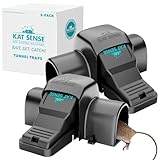
- Take Back Your Home from mice, rats, and other rodents with the effective large rat traps by Cat Sense. Designed to be clean, reusable, and reliable, with a high-performance trapping design for consistent results.
- Don’t want to deal with handling rodents after they’re caught? Our touch-free tunnel rat trap design does the hard work for you. Avoid direct contact with mice, rats, or other rodents with our clean, touch-free pest disposal system.
- Give your children and pets a rodent-free home with these tunnel traps designed for added security. All trapping mechanisms are enclosed within the device, helping reduce exposure and making it a safer pest control solution for households with kids and pets.
- Effective and reusable, designed with two entry points and a secure locking chamber to ensure rodents stay contained. Stop worrying about droppings or contaminated food with this easy-to-clean, reusable humane rodent trap.
- Help protect your home or workspace from rodents while minimizing potential contamination. Enjoy this reliable, touch-free, and reusable rat trap for safe and convenient pest control. trampas para ratas grandes
Why did Edge block a pop-up I needed?
The website probably attempted to open a window automatically. Look for the pop-up blocked icon in the address bar, then add the trusted site under Settings > Privacy, search, and services > Site permissions > All permissions > Pop-ups and redirects.
Does the pop-up blocker remove adverts inside webpages?
No. Edge’s blocker does not block advertisements embedded within a webpage, including adverts designed to look like pop-up windows.
Why do I still receive alerts after blocking pop-ups?
Those may be website notifications rather than pop-ups. Notifications appear in the device’s notification center and must be managed through Edge’s notification settings.
Can I allow pop-ups for only one desktop website?
Yes. Open Pop-ups and redirects, select Add site under Allowed to send pop-ups and use redirects, enter the URL including https://, and select Add.
Is there a per-site pop-up allow list in Edge for Android?
Microsoft’s documented Android instructions provide a global Pop-ups and redirects switch. They do not document a per-site allow-list procedure for Android.
The Bottom Line
On desktop, leave Blocked (recommended) enabled and add exceptions only for sites you trust. On Android, use … > Settings > Site permissions > Pop-ups and redirects. For iPhone and iPad, Microsoft’s current help page does not document a working pop-up-blocking control; its listed iOS procedure clears browsing data instead.
Quick Recap
Product prices and availability are accurate as of the date/time indicated and are subject to change. Any price and availability information displayed on Amazon at the time of purchase will apply.

