
Read this guide to learn how to set up self-service password reset for Active Directory users.
Step 0: Review Problem Background and Overview
Whenever users need to change their Active Directory password, they call the Service Desk team. This is time-consuming and unsustainable.
So, your manager asked you to configure a tool that allows users to change their passwords.
I will walk you through the steps to complete this task in this guide.
Outdated Drivers Are Slowing You Down
One free scan finds every outdated or missing driver and matches the right update for your exact hardware.Free scan · exact hardware matchWindows Errors? Fix Them Before They Spread
Repair common Windows errors and clear accumulated junk for a smoother, more stable PC - no reinstall needed.Free scan · no reinstall#1 Best Overall

- Easy to Use - Our USB wired numpad does not require any driver or battery; easy to install, plug and play, gives you a stable connection.
- Quiet & Soft Touch - Integrated ergonomic tilt provides comfortable typing, helps reduce the wrist strain. Low noise of the 19-key USB numeric keypad gives you a quiet and soft touch.
- USB Wired Number Pad - Full-size 19mm keys improve speed and accuracy by making it easier to locate and press the numbers you are looking for. Numeric keypad supports NumLock.
- Lightweight & Portable - The black numeric keypads are perfect for working on spreadsheet, you can works household, school, business trips, or daily use, very convenient number use.
- Wide Compatibility - Compatible for Windows 2000, XP, Vista, or Windows 7/8/10, Android operating systems. Works with PC, desktop, notebook and other devices with USB ports.
Step 1: Install Remote Desktop Web Access and IIS Web Server
- From the Server Manager Manage menu, select Add Roles and Features.

- When the Add Roles and Features wizard opens, click Next until you get to the Server Roles page. Then, check Remote Desktop Services and Web Server (IIS). When you check Web Server (IIS), the wizard dispays a pop-up, select Add Features in the pop-up.

- Confirm that the two roles are checked. Then, click Next.

- Continue clicking Next until you get to Remote Desktop Services Role Services. Check Remote Desktop Web Services, then, click the Add Features button in the pop-up.

- After that, click Next several times until you get to the Confirmation page. Click Install to install the Windows Server roles.

- Wait for the wizard to confirm that the roles have installed successfully, the close it.

Step 2: Enable the Password Reset Feature in IIS RDWeb
- Search for and open IIS.

- In the IIS Manager, expand the Server name, then navigate to Sites > Default Web Site > RDWeb and left-click Pages. On the details pane, double-click Application Settings.

- On the Application Settings page, double-click PasswordChangeEnabled and change its Value from false to true.

Step 3: Configure HTTPS Binding in the Remote Desktop Web Site
By default, the Remote Desktop Web Site in IIS is configured to use HTTPS. Meanwhile, to use HTTPS, you require a certificate.
If you’re configuring self-service password reset for production use, I recommend purchasing a publicly signed certificate from a certificate authority.
Rank #2

- All-day Comfort: The design of this standard keyboard creates a comfortable typing experience thanks to the deep-profile keys and full-size standard layout with F-keys and number pad
- Easy to Set-up and Use: Set-up couldn't be easier, you simply plug in this corded keyboard via USB on your desktop or laptop and start using right away without any software installation
- Compatibility: This full-size keyboard is compatible with Windows 7, 8, 10 or later, plus it's a reliable and durable partner for your desk at home, or at work
- Spill-proof: This durable keyboard features a spill-resistant design (1), anti-fade keys and sturdy tilt legs with adjustable height, meaning this keyboard is built to last
- Plastic parts in K120 include 51% certified post-consumer recycled plastic*
Since I am configuring mine for test purposes, I will be creating and using a self-signed certificate.
Task 3.1: Create a Self-signed Certificate
Open PowerShell as an administrator and run the command below to create a self-signed certificate.
The Tool Desk
Outbyte PC Repair FREERepair Windows errors before they cause bigger problemsFix Now →Outbyte Driver Updater FREEFix the driver behind crashes, sound loss and screen glitchesFind Drivers →Rank #3

- Widely Compatibility: This Bluetooth number pad is compatible with PC, laptop, desktop and computers running Windows systems. Note: This number pad does NOT support Mac OS systems
- Multi-function 26-key Keypad: With NumLock, ESC, Delete and a shortcut key which can open the computer calculator directly etc.The number keyboard is more unique in that it can be combined into 3 currency symbols through Fn+composite keys
- Bluetooth Number Pad Rechargeable: The wireless numeric keyboard with rechargeable lithium battery, avoid continuous battery consumption and battery replacement. This numeric keypad uses the latest stable buletooth 3.0 connection,plug and play, no delay and caton, fast data transmission, and working range is up to 33FT
- Comfortable Numeric Pad: With quiet SCISSOR-SWITCH KEYS provides a comfortable and smooth typing experience, quick response and good tactile rebound, keep the office quiet and improve work efficiency.15° tilt design fits the human body habits, great for spreadsheets worker, accounting staff and financial officer
- Long Using Time Keypad: The wireless numpad with a large capacity lithium battery, usually can use 1-2 months after fully charged (charged with the provided USB-A to USB-C cable). It will enter the sleep function after being idle for 1 hour, press any key to wake up
New-SelfSignedCertificate -FriendlyName ad-ss-cert -DnsName IPMvWAC -KeyUsage DigitalSignature

Task 3.2: Configure IIS HTTPS Binding to use the Certificate
- Back in the IIS Manager, left-click Default Web Site, then in the Actions menu, select Bindings.

- Then, on the Site Bindings pop-up, left-click https and then Edit.

- Finally, on the Edit Site Bindings pop-up, select the self-signed certificate from the SSL Certificate drop-down and click OK. If you receive a confirmation pop-up, select yes.

- Return to the PowerShell console and run the iisreset command.

Step 4: Test the Self-service Password Change Remote Desktop Web Site
- From a browser on the local server where you configured the self-service password reset, open the URL below:
https://127.0.0.1/RDWeb/Pages/en-US/password.aspx
- You’ll receive a certificate warning. Click Advanced, then Continue.


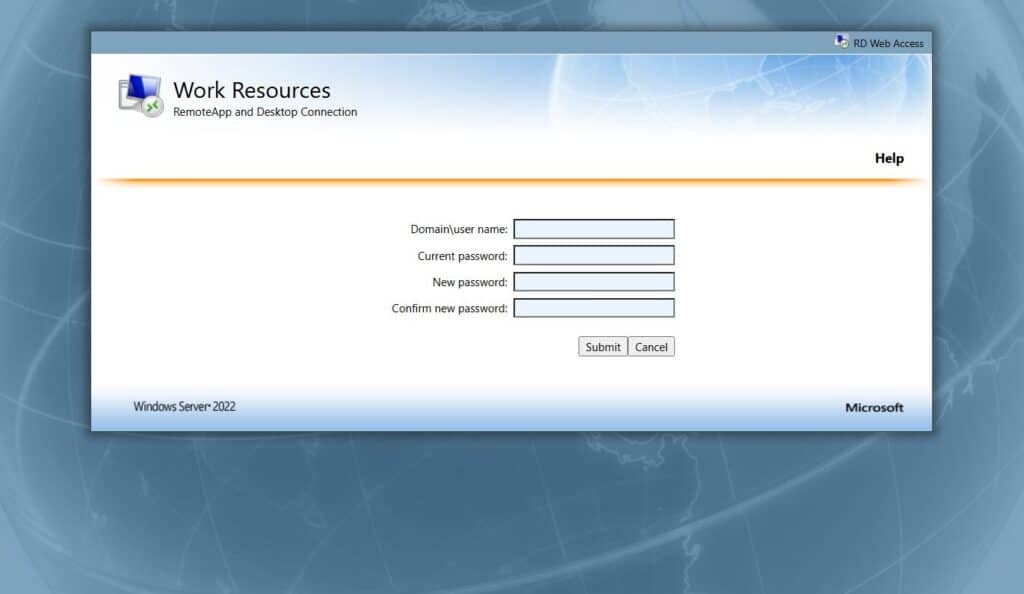
The site displays the page for changing an AD password.


If your users receive the error message – “Your new password does not meet the length, complexity, or history requirements of your domain. Try choosing a different new password.” – modify your domain password policy.
Rank #4

- Reliable 2.4GHz Wireless & Dual Adapters – Enjoy stable, lag-free connection with the included USB receiver and USB-C adapter, effortlessly switching between devices with different ports.
- Full 28-Key Layout with Shortcuts – Dedicated number keys, tab, esc, backspace, = + - * /, % () $, and more streamline financial accounting, spreadsheets, and data entry tasks, boosting your workflow.
- Universal Plug-and-Play Compatibility – Works right out of the box with Windows, PC, laptop, desktop, Surface Pro, and notebook; no driver installation required.
- Slim, Lightweight & Portable – The ultra-slim profile easily slips into a laptop bag or pocket, making it a perfect on-the-go companion for accountants, analysts, and students.
- Important System Note – All keys and hotkeys work seamlessly on Windows system. While on iOS and macOS, all number keys, = + - * / % () $ function perfectly, but hotkeys/shortcut like Numlock, Home, End, Pgup, PgDn,↑←↓→ keys are not supported due to system limitations; this does not affect standard numeric entry.
Conclusion
Providing your users with a way to reset their passwords without contacting the Service Desk is a time saver. In this hands-on guide, I have explained the steps to enable self-service password reset using Remote Desktop Web services.
The first step is to install the IIS web server and the Remote Desktop Web Access Windows Server roles. After that, configure the PasswordChangeEnabled feature of the RDWeb site in IIS.
Quick Recap
Finally, configure SSL and you’re good to go.


