
Crashes, No Sound, or Screen Glitches?
Random freezes, missing sound and display glitches usually trace back to one bad driver. Find and replace yours safely.Free scan · under a minuteWindows Errors? Fix Them Before They Spread
Repair common Windows errors and clear accumulated junk for a smoother, more stable PC - no reinstall needed.Free scan · no reinstalliTechGuides is reader-supported. When you buy through links on our site, we may earn an affiliate commission. As an Amazon Associate I earn from qualifying purchases. Learn more
You can read a YouTube transcript without the Data API when a video has captions: open its description and select Show transcript. The API is a different route: its list method returns caption-track metadata, while downloading caption text requires OAuth authorization and permission to edit the video. Neither YouTube’s player translation nor the API’s machine-translation option guarantees that every video can be translated into a fixed number of languages.
How do I get a YouTube transcript without the Data API?
For a viewer, use YouTube’s built-in transcript rather than an API. On a video that has captions, open the video description and choose Show transcript. YouTube says some transcripts also let you search for words; selecting a caption line jumps to that point in the video. The control depends on captions being available for that video, so it will not appear for every upload. See YouTube’s instructions for viewing video transcripts.
This workflow is for reading or navigating a video. It does not provide a documented public API for downloading arbitrary videos’ caption files. If you manage the video, YouTube Studio offers separate tools to add or edit captions. If you are building software, the official Data API has its own permission requirements.
Why doesn’t the YouTube Data API list call return transcript text?
The API separates caption-track discovery from caption-file retrieval. captions.list returns metadata about the tracks associated with a video, not the caption contents. The separate captions.download method returns a caption file. Google documents supported output formats including SRT, TTML, and VTT. See the Captions resource reference and download method reference.
#1 Best Overall
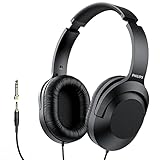
- Amplify Your Listening Experience with powerful 40mm drivers that consistently deliver crisp, clear sound. The over-ear fit ensures excellent passive noise isolation, letting you enjoy your music without disturbing others.
- Enjoy Ultimate Comfort for Long Listening Sessions: Soft, comfy ear-cup cushions and a cushioned adjustable headband make these wired over-ear headphones perfect for all-day use, providing the utmost comfort during extended sessions
- Versatile and Ready for Anything: Equipped with a 1/8” (3.5mm) jack and a snap-on 1/4” (6.3mm) adapter, these headphones are perfect for any device. Ideal for home or office use, professional studios, or on-the-go listening.
- Enjoy Flexible Listening With a 2m Cable: The 2 m headphone cable gives you the freedom to move around. Ideal for connecting to laptops or tablets, you can keep your device safely stowed in your bag or pocket while you listen hands-free.
- Inimitable Style, Quality You Can Trust: Featuring a lightweight headband for enhanced comfort and durability, along with 90-degree rotating earcups for easy one-ear DJ monitoring, our headphones are the perfect fusion of form and function backed by the iconic Philips brand heritage.
Downloading is permissioned: the caller needs OAuth authorization with an accepted scope and permission to edit the video. The API documentation describes permission and conversion errors, and lists a quota impact of 200 units for the download method. That makes this an option for an owner, editor, or appropriately authorized application—not an API-key-only way to fetch caption text from any public video.
Which route should you use?
| Question | YouTube transcript viewer | Official Data API |
|---|---|---|
| Who is it for? | A person reading or navigating a video | A video owner/editor or authorized application |
| Where do you access it? | Show transcript on the video page | captions.list for track metadata; captions.download for the file |
| Does it provide caption text? | Displays the transcript when captions are available | The list method does not; the download method retrieves the track |
| What access is required? | A video with captions exposed for viewing | OAuth and permission to edit the video for downloads |
| How does translation work? | The player may offer Auto-translate | tlang requests machine translation during an authorized download |
How do I translate a YouTube transcript?
In the video player
When captions are available, open the player’s caption settings and check whether Auto-translate is offered. YouTube Help documents this player option, but its presence is not a promise that every video or target language will work. The available choices depend on the video and its caption situation. See YouTube’s caption settings instructions.
Rank #2
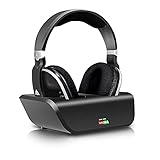
- No Audio delay - designed with intelligent auto-tune function, These top rated wireless 2.4Ghz RF headphones work with a low-latency supported RF transmitter for minimum Audio delay 32-40ms (human ear undetectable) for an advanced audio experience. Ideal for watching TV, gaming or PC
- Superior Hi-Fi sound - experience superb music and voice clarity with this wireless stereo headphone system. Wireless 2.4Ghz RF TV headphone with a frequency response of 25Hz - 20kHz delivers detailed and balanced sound with good clarity and bass response. Digital signal enables extra bass and crisp treble performance without distortion! Perfect digital headset for audio lovers
- No space limit - the wireless transmitter featuring breakthrough 2.4Ghz RF technology enables interference free reception for stereo sound through walls, ceilings & outdoors up to 100 feet away. Triple the wireless range than the traditional Bluetooth headphone (33ft). The expanded reception range allows the wireless headphones to be used when not in sight of the transmitter without skip or interruption
- Convenient charging - the intelligent transmitter featuring Smart auto power off function also works as a charging stock! Easily charge the headphone by simply placing it on the transmitter base. For protection of transmitter and power saving, the transmitter will auto turn off if there is no Audio signal received for about 5 minutes, and will auto turn on with LED glows in blue once signal returns. The headphone will auto turn off too If there is no signal from the transmitter for about 5 minute
- Comfortable & Super light - these over ear Wireless headphones come with super soft pads and adjustable headband providing lasting comfort. Best wireless and RF solution for up to 20 hours gaming or TV Use. Full-sealed ear pads effectively reduce the sound leakage. Return your family a sweet dream while you’re enjoying your TV time
Through an authorized API download
The API’s captions.download method accepts tlang, an ISO 639-1 two-letter language code, to request a machine-translated caption track. This applies to a particular track in the authorized download workflow; it does not bypass OAuth or the requirement for permission to edit the video. The method can also return a conversion error. Google documents the parameter and errors in its download reference.
Recommended Free Tools
For a video you manage
YouTube Studio lets creators add subtitles by uploading a file, entering them manually, or using auto-sync. For auto-sync, the transcript language must match the spoken language and be supported by speech recognition. YouTube says this approach is not recommended for videos longer than an hour or with poor audio quality. Automatic captions are created only in the video’s default language. See YouTube’s instructions for adding subtitles and captions.
Rank #3
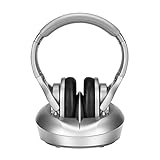
- 【SUPERIOR HI-FI SOUND&NO DELAY】Enjoy Hi-Fi stereo sound from TV wireless headphones without compromise! Large 40mm stereo drivers with built-in bass boost deliver detailed and balanced sound with good clarity and bass response. Virtually no audio lag - perfect for TV/movie watching and listening.
- 【PLUG AND PLAY & EASY CHARGING】This is a user-friendly wireless headphone to watch tv. Read the user manual carefully before connecting, after the connection, simply turn on both headphone and transmitter, they will auto connect(No wifi or Bluetooth required). Charge wireless tv headset 3-4 hours can last up 10 hours long battery life. (NOTE: Be sure to place the headphones on the charging dock correctly, please place headphone with two hands)
- 【COMPATIBILITY BEYOND YOUR IMAGINE 】Compatible with TVs, set-top DVD & Blu-Ray players, DVR's, satellite receivers, a/v receivers, laptops, mac/PC, computer, MP3 players, LCD, Plasma and standard televisions. These wireless TV headphones offer flexibility and compatibility with any devices with AUX/Digital Optical/Coaxial/3.5mm or RCA audio out ports.
- 【OVER EAR COMFORT & ADJUSTABLE】Ergonomically adjustable soft-padded headband and Over-Ear earmuffs and Lightweight material designed to provide maximum comfort. Fully-sealed ear pads effectively reduce the sound leakage(passive noise canceling), return a sweet dream to your families in bed, while you can watch television intently.
- 【330FEET LONG WORKING RANGE】Cordless remote headphones offer Interference-free reception through walls, ceilings and outdoors up to 100 meters (330 feet)! RF means stronger penetrability, further wireless range, steadier signal transmission, and lower distortion. Allow you to listen to music while walking around in your home without skip or interruption. Kindly note RF wireless is not compatible with Bluetooth technology.
Why is “translate to 100+ languages” usually a broken promise?
A language count can describe several different things, which are not interchangeable:
- Source-caption languages: the languages in which YouTube may create automatic captions. This is not the same as a list of guaranteed translation targets. YouTube publishes source-language information in its automatic captioning guidance.
- Translation targets: a player menu or API parameter may offer translation, but that does not establish that every target will work for every video or caption track.
- Availability per video: translation needs a usable caption source. If the video has no captions or its captions are incomplete, a large language menu cannot fix the missing source.
- Machine-generated versus verified: automatic captions and translations are not necessarily human-reviewed. YouTube warns that automatic caption quality varies and recommends review.
The official documentation reviewed does not substantiate a universal claim that every YouTube transcript can be translated into 100 or more languages. A service making that claim should explain whether it counts supported interface choices, source-caption languages, machine-translation targets, or languages actually available for each video—and what conditions apply.
Rank #4

- Hi-Res Sound Quality: Equipped with 40mm drivers, these wired over-ear headphones deliver exceptional sound clarity and depth, making them perfect for studio monitoring, mixing, and DJing. The high-resolution audio ensures every detail and nuance in your music is captured and reproduced with precision.
- Built to Stay Comfortable: The soft padded ear cushions are specifically designed for monitor headphones comfort and noise isolation. The headband is adjustable and stretchable for you to find the desired angle you like to fit in.
- No More Adapter: A long-style 6.6-9.8 ft coiled cord and standard-sized 6.35mm plug and a 3.5mm plug are included. These headphones can be easily connected to a variety of devices including AMPs, computers, keyboards, guitars, and laptops.
- Single-sided Monitoring: 90° swiveling earcups for single-ear monitoring anytime, keep one ear free for conversations with single-sided monitoring.
- Share Audio Port: With a shared audio port, easily connect another pair to share music or videos—no splitters or special cables needed.
Why might captions or auto-translate be missing or inaccurate?
YouTube identifies multiple reasons automatic captions may be unavailable or poor: the language may not be supported, processing may still be underway, the video may be too long, audio quality may be poor, speech may begin after a long silence, speakers may overlap, or several languages may be spoken at once. Mispronunciations, accents, dialects, and background noise can also cause errors. YouTube recommends reviewing and editing generated captions; see its automatic captioning guidance.
For creators, the Studio workflow can help supply or correct captions instead of relying on an automatic result. Upload a caption file, type captions manually, or use auto-sync when the transcript language and audio conditions are suitable. YouTube’s caption setup instructions describe those options.
Quick Recap
Best Value
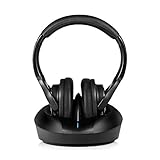
- 【SUPERIOR HI-FI SOUND&NO DELAY】Enjoy Hi-Fi stereo sound from Wireless Headphone to Watch without compromise! Large 40mm stereo drivers with built-in bass boost deliver detailed and balanced sound with good clarity and bass response. Virtually no audio lag - perfect for TV/movie watching and listening.
- 【PLUG AND PLAY & EASY CHARGING】This is a user-friendly wireless headphones for tv . Read the user manual carefully before connecting, after the connection, simply turn on both headphone and transmitter, they will auto connect(No wifi or Bluetooth required). Charge wireless tv headset 3-4 hours can last up 10 hours long battery life. (NOTE: Be sure to place the headphones on the charging dock correctly, please place headphone with two hands)
- 【COMPATIBILITY BEYOND YOUR IMAGINE 】Compatible with TVs, set-top DVD & Blu-Ray players, DVR's, satellite receivers, a/v receivers, laptops, mac/PC, computer, MP3 players, LCD, Plasma and standard televisions. These wireless TV headphones offer flexibility and compatibility with any devices with AUX/Digital Optical/Coaxial/3.5mm or RCA audio out ports.
- 【OVER EAR COMFORT & ADJUSTABLE】Ergonomically adjustable soft-padded headband and Over-Ear earmuffs and Lightweight material designed to provide maximum comfort. Fully-sealed ear pads effectively reduce the sound leakage(passive noise canceling), return a sweet dream to your families in bed, while you can watch television intently.
- 【330FEET LONG WORKING RANGE】Cordless remote headphones offer Interference-free reception through walls, ceilings and outdoors up to 100 meters (330 feet)! RF means stronger penetrability, further wireless range, steadier signal transmission, and lower distortion. Allow you to listen to music while walking around in your home without skip or interruption. Kindly note RF wireless is not compatible with Bluetooth technology.
What to do when you cannot get the transcript
- You are watching someone else’s video: check the description for Show transcript. If it is absent, captions may not be available for that video.
- You need another language: check the player’s caption settings for Auto-translate. Treat the result as machine-generated, not as a verified translation.
- You manage the video: use YouTube Studio to add or correct captions. Automatic captions can be delayed, inaccurate, or unavailable depending on the audio and language.
- You are developing an integration: use the API list method to inspect tracks, then request a download only in an OAuth-authorized context where the caller can edit the video.
Product prices and availability are accurate as of the date/time indicated and are subject to change. Any price and availability information displayed on Amazon at the time of purchase will apply.

