
What’s actually slowing this PC down?
Pick the symptom - the matching free tool is one click away.
iTechGuides is reader-supported. When you buy through links on our site, we may earn an affiliate commission. As an Amazon Associate I earn from qualifying purchases. Learn more
You can draw a camera frustum as a 2D schematic with Canvas, or render a true perspective camera with WebGL; those are different tasks. In either case, treat 60 frames per second as a target to measure, not a result guaranteed by the browser. Smooth output depends on the drawable size, pixel density, scene workload, device, and browser.
Choose between a 2D frustum diagram and a 3D camera
A 2D Canvas context provides drawing operations for shapes, text, images, and other objects. It is suitable for a presentation graphic showing a camera, its viewing rays, and the edges of a frustum. This is a schematic: it does not, by itself, project a 3D scene through a perspective camera.
For a 3D scene, use WebGL on a canvas. A perspective camera transforms scene geometry through model, view, and projection steps, then clips it against the camera frustum. The projection must use the drawable viewport’s width-to-height aspect ratio; otherwise, resizing can distort the scene. The near clipping distance must be positive, and an unnecessarily distant far plane can reduce depth precision.
Make the distinction explicit in the deliverable. A 2D drawing can explain a camera’s field of view and how systems relate spatially; a WebGL renderer is needed when the scene itself must behave as a perspective-projected 3D view.
#1 Best Overall

- 4K DIGITAL CAMERA WITH AUTOFOCUS: The newest 4K digital camera for photography captures videos in 4K resolution and snaps ultra HD 48MP images. With Autofocus and 16X digital zoom, every detail is crisp, clear, and vibrant even captured from a distance.
- 180° FLIP SCREEN AND PORTABLE: Our 4k camera for photography offers a 3.0-inch IPS 180° flip screen, ideal for selfie enthusiasts and vlogging creation. Designed for travel and everyday use, this compact travel camera for pictures is built to last. Its small size and durable construction make it a reliable companion for capturing memories on the go.
- MULTIFUNCTIONAL PHOTOGRAPHY CAMERA: The 4K digital video camera features a date stamp, exposure compensation (-3.0 to +3.0), video pause and playback, time-lapse, slow-motion, giving your videos a creative edge. Additional features like a fill light, Anti-shake, 3 continuous shooting, smile & face detection, beauty face, self-timer, and various filters encourage you to stretch your creative boundaries.
- WEBCAM AND EASY TRANSFER: This 4K vlogging camera for YouTube doubles as a webcam, perfect for live streaming, video chats, and vlogging. You can connect the photo camera to your computer via an USB cable for easy file download, sharing your experiences with friends instantly. With 2 spare rechareable batteries, never worry about power shortage.
- A PERFECT GIFT WITH A HASSLE-FREE WARRANTY: User-friendly and versatile, this portable digital camera for teens is an ideal gift for beginners, amateurs, teens, and seniors, fulfilling daily shooting needs easily. Enjoy our worry-free 18-month replacement and refund warranty. Our prompt customer support team is ready to assist you in under 12 hours!
Draw a readable 2D frustum
For a schematic, represent the camera as a point or small shape, draw two rays to indicate the field of view, and connect their endpoints to show the far edge of the viewing region. Add labels only where they clarify the diagram—for example, camera, near plane, far plane, or field of view. Keep text and connector lines legible at the presentation’s actual output size, not just in the editor.
If the diagram animates, separate its stable elements from changing ones. Static labels, repeated icons, or background geometry can be prepared once and reused, while the camera position or animated rays are redrawn as needed. Text and overlays are part of the rendering workload, so preserve necessary labels and measure the real presentation rather than removing useful content preemptively.
Rank #2

- 【4K Digital Camera for Photography & Everyday Moments】 Capture vibrant 64MP photos and 4K videos with a 3-inch 180° flip screen, 18X digital zoom, built-in fill light, microphone and speaker. Designed for beginners, students, families and anyone who wants an easy-to-use digital camera for daily photography, travel and memories.
- 【Vlogging Camera for YouTube, Streaming & Video Calls】 Record content, livestream or join online meetings with one compact camera. Switch to Webcam Mode by connecting via USB to your computer, or mount it on any standard 1/4-inch tripod for hands-free recording, video calls and content creation.
- 【Compact Travel Camera with WiFi Sharing】 Lightweight and portable at only 9.8 oz, this compact camera is easy to carry for vacations, family trips and everyday adventures. Built-in WiFi lets you transfer photos and videos instantly or control the camera remotely from your smartphone.
- 【18X Zoom with Built-in Flash for Day & Night】 Get closer to your subject with 18X digital zoom and capture clear photos indoors or outdoors. The built-in flash helps brighten low-light scenes, making it great for concerts, parties, travel nights and everyday photography.
- 【Complete Camera Kit & Gift for Beginners】 Everything you need is included: 4K camera, two rechargeable batteries, USB-C cable, camera bag, wrist strap and user manual. A thoughtful gift for kids, teens, students, parents and friends on birthdays, holidays and special occasions.
Schedule animation with requestAnimationFrame
MDN describes window.requestAnimationFrame() as a request to perform animation before the browser’s next repaint. It is a one-shot callback: an animation must request another frame from within its callback to continue. Use the callback’s timestamp to compute elapsed time, rather than advancing by a fixed amount per callback; this keeps motion from running faster on high-refresh displays.
Free tools Windows power users keep installed
One-click scans. No signup required.
MDN notes that 60 Hz is the most common display refresh rate, while 75 Hz, 120 Hz, and 144 Hz are also widely used. At 60 Hz, a frame interval is about 16.67 milliseconds, but that is not a guaranteed JavaScript-and-drawing budget: the browser, the rest of the page, and other work share the available time. requestAnimationFrame() aligns animation work with repaint scheduling; it does not promise 60 rendered frames per second.
Rank #3

- 【4K 64MP Digital Camera with Flip Screen】:VJIANGER photography camera with 4k 64MP high resolution, 3 inch flip screen,18X digital zoom, built-in fill light, internal microphone and speaker. Ideal gift camera for kids, adult, seniors, students
- 【Vlogging Camera for Youtube as Webcam】This photo camera not only for taking photos and recording videos, but also as a web camera, which by connecting to PC with the USB cable, choosing the "Camera mode", and equipment with1/4 standard size tripod screw
- 【Travel Camera with WIFI】:The compact camera is only 9.8 ounce. WiFi connectivity allows you to easily transfer photos and videos to your smartphone or tablet for instant sharing on social media. You can even use app to control your camera remotely
- 【18X Digital Zoom Camera with Flash】You can press the W/T button to zoom in or out on the subject when recording video and shooting still images. The vlog camera equipped with a built-in flash light, allows taking clear pictures in low light conditions
- 【Cheap Point and Shoot Camera with Accessories】You can get a 4k ultra hd small camera; 2 batteries; Type-C cable; a camera bag; a lanyard; a user manual. Pefect gift choice for anniversary, Christmas Day, Birthday, Father's Day, Mother's Day, Halloween
Match canvas resolution to the presentation output
A canvas has a CSS display size and a separate backing-store size, which determines how many pixels it can draw. MDN’s canvas optimization guidance shows sizing the backing store from the displayed dimensions and device pixel ratio, then scaling the drawing context. This can make a high-density display look sharper, but a larger backing store also increases the amount of pixel work.
For a 3840 × 2160 backing buffer, the canvas contains 8,294,400 pixels; that is arithmetic from the dimensions, not a measurement of memory use or performance. Higher device pixel ratios can multiply the backing dimensions and pixel count, so choose a resolution policy deliberately. MDN’s WebGL best-practices guidance cautions that direct device-pixel-ratio multiplication can create moiré artifacts at fractional scale factors. Test the chosen sizing method at the browser zoom levels and operating-system display scales you intend to support.
Rank #4

- Compatible with Nintendo Switch 2’s new GameChat mode
- Ultra HD 4K webcam: meet or stream in 4K resolution at 30fps or 1080p at 60fps, with our most advanced webcam sensor yet, with 70% larger pixels (1) for sharp image quality
- AI-enhanced image quality: Experience 2x better face visibility with finer image details in difficult light (2), with auto-exposure, auto white balance, noise reduction, and autofocus
- Curate Your Image: Fine controls (3) on this Ultra HD webcam let you adjust lighting and white balance, such as ISO, Shutter Speed, Tint, and Vibrance, or let Auto mode take care of it
- Let Them Hear Your Every Word: Integrated dual beamforming noise-reducing microphones minimize background noise with the aid of AI to make sure you are clearly heard
Canvas maximum dimensions and areas vary by browser and device. MDN specifically notes a 4096 × 4096 canvas size limit on iOS devices, and drawing commands can fail when a canvas exceeds a device’s limits. A 3840 × 2160 buffer is below those individual dimensions, but that alone does not establish that a particular device can handle it comfortably: pixel ratio, memory, browser limits, and other buffers still matter.
Quick wins for a faster PC:
Scan for outdated or missing drivers - takes under a minuteDriver Scan →Repair Windows errors before they cause bigger problemsFix Now →Fix the driver behind crashes, sound loss and screen glitchesFind Drivers →Reduce work without changing the presentation’s meaning
Canvas optimization is about doing less redundant work, not stripping out useful information. Start with the actual scene and consider the techniques below where they fit:
Best Value
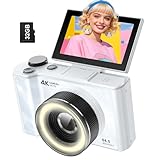
- 【4K Digital Camera for Kids and Teens】 The W & O digital camera captures 4K videos and ultra HD 64MP photos, featuring a CCD sensor that delivers rich colors and a unique nostalgic photography style. With simple controls and easy-to-use design, it allows teens,beginners,first-time photographers to capture great shots without complicated settings.
- 【Ready to Capture Out of the Box】This camara digital includes a 32GB SD card(no need to purchase extras)and includes USB-C phone card reader for easy photo transfer.(No app connection required).Use the card reader to connect the SD card to your phone. Open the Files/File Manager app to access your photos. Photos need to be imported before appearing in your Gallery or Photos app.
- 【Perfect Portrait Mode】Featuring a 180° flip screen, built-in beauty mode, and a front ring light, this digital camera helps you capture brighter selfies and flattering portraits with ease. The flip screen lets you clearly see yourself and easily frame your shots from the best angle. Whether you’re a YouTuber, TikTok creator, or simply capturing daily life, travel, and special moments, it delivers beautiful selfies and clear videos effortlessly.
- 【Fast & Intelligent Autofocus】 This 4K digital camera for photography features an advanced autofocus system that quickly locks onto your subject, helping you capture sharp and clear photos with ease. Whether you’re capturing fast-moving kids, playful pets, or unforgettable moments during travel and parties, the autofocus system makes it easier to take great shots without complicated settings.
- 【Explore More Creative Possibilities】 The W & O point and shoot digital cameras is packed with fun features that inspire creativity, including various photo effects, filters, self-timer, continuous shooting, and more. From capturing unique selfies to creating fun travel videos, it encourages user to explore photography in their own way. It’s a great gift for kids, teens, friends, and family for Back to School, Halloween, Thanksgiving, Christmas and birthdays.
- Reuse repeated geometry. Pre-render recurring primitives or complex static elements to an offscreen canvas rather than rebuilding them every frame.
- Batch drawing. Group compatible draw operations and avoid unnecessary canvas state changes.
- Redraw selectively. If only a small region changes and the scene design allows it, update that region instead of redrawing the entire canvas.
- Measure costly effects. Effects such as
shadowBlurcan be expensive; remove or simplify them when measurements show they are a bottleneck. - Keep the interface responsive. Consider
OffscreenCanvasand a worker when rendering work can move off the main thread. This may help keep other UI work responsive, but does not guarantee a particular frame rate.
These are optimization options, not proof of performance. The right choice depends on the implementation and its real scene, including labels and overlays.
Validate the 60fps target on the intended setup
No measured 4K Canvas camera benchmark is established here. A credible claim requires testing the implementation on its intended browsers and devices, with the real presentation content and the backing-store dimensions it will use. Record the browser and device, canvas size, display scaling, scene workload, and measurement method so the result has a clear scope.
Check both visual quality and responsiveness: verify that projection and labels remain correct after resizing; inspect for scaling artifacts at supported zoom and display scales; and confirm that rendering limits are not exceeded on target devices. Measure under the conditions the presentation will actually face, rather than treating a callback schedule or a single device result as universal evidence.
Quick Recap
Product prices and availability are accurate as of the date/time indicated and are subject to change. Any price and availability information displayed on Amazon at the time of purchase will apply.

