
Quick wins for a faster PC:
Fix the driver behind crashes, sound loss and screen glitchesFind Drivers →Clear out junk files and repair common Windows errorsFree Scan →Scan for outdated or missing drivers - takes under a minuteDriver Scan →iTechGuides is reader-supported. When you buy through links on our site, we may earn an affiliate commission. As an Amazon Associate I earn from qualifying purchases. Learn more
There is no fixed PS5 USB copy time: Sony does not publish a duration or guaranteed transfer rate. In independent tests, copying a large game can take many minutes. One Tom’s Hardware test took 26 minutes 30 seconds to copy 193 GB from an external SSD back to PS5 internal storage; Tom’s Guide reports that some HDD game transfers took more than 30 minutes. Those are examples from specific test setups, not promises for your console.
What “copying from USB” means on PS5
Sony calls the game-storage format USB extended storage. A PS5 game stored there is archived: you must copy it to PS5 console storage or an installed M.2 SSD before you can play it. PS4 games, by contrast, can be played directly from USB extended storage. Sony’s USB extended storage guidance explains the distinction.
This is different from plugging in an ordinary USB drive formatted as FAT or exFAT. Sony describes that kind of drive for uses such as PS4 saved data and media, not as the game-storage format; compatibility is not guaranteed for every USB device. See Sony’s storage-management guidance.
What’s actually slowing this PC down?
Pick the symptom - the matching free tool is one click away.
What transfer times have been measured?
The available figures come from different tests, hardware and transfer directions, so they should not be treated as a head-to-head comparison or a typical-time guarantee.
#1 Best Overall
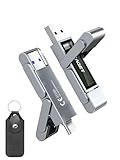
- 【Instantly Expand Your Storage – Plug & Play with Any Device】Say goodbye to “Storage Full” warnings! This 512GB flash drive features both USB-C and USB 3.2 ports, offering true plug-and-play compatibility. Instantly add massive space and transfer files directly between your iPhone 15/16/17 Pro, Android phone, Mac, Windows PC, tablet, or Smart TV — no cables, adapters, or internet required. The simplest solution for phone storage expansion.
- 【Blazing SSD-Like Speed – Transfer a Full Movie in Seconds】Experience the thrill of fast transfers. With USB 3.2 Gen 1 technology, achieve read speeds up to 560MB/s – dramatically faster than standard USB 3.0 flash drives. Move a 4K video or entire music library in moments. Ideal for photographers, gamers, and professionals who value their time.
- 【Durable & Compact Metal Design – Built for Your On-the-Go Life】Crafted from a premium zinc alloy metal body, this flash drive is built to withstand the rigors of daily life, offering enhanced resistance to shock and physical stress. The included stylish leather case provides scratch protection and effortless portability, making it the perfect travel companion.
- 【Your All-in-One Portable File Hub – Simplify Your Digital Workflow】More than a thumb drive, it’s your universal file hub. Use it as a USB-C flash drive for new laptops, a USB memory stick for PCs, extra storage for your PS5, a media library for your car audio, or a reliable external drive for backups. The ultimate tool for students, creatives, and tech enthusiasts.
- 【Complete Package with Premium Support】Get everything you need: 1x 512GB USB flash drive, 1x premium leather case, 1x user manual. Backed by a 30-day satisfaction guarantee and a dedicated reliable support team that responds within 24 hours. We ensure your data backup and storage experience is seamless and reliable.
| Test | Reported time | What was transferred |
|---|---|---|
| Tom’s Hardware, 2024 | 26 minutes 30 seconds | 193 GB from a Seagate external SSD back to PS5 internal storage. |
| Tom’s Hardware, 2024 | 16 minutes 14 seconds | 193 GB from the PS5 to the Seagate external SSD over the rear USB-A port; the report says the front USB-C port produced a similar time. |
| Tom’s Guide, year not established in its search metadata | More than 30 minutes in some cases | A PS5 game transfer using an HDD. The guide describes testing with the PS5, drive and a stopwatch; it does not establish a universal HDD duration. |
Tom’s Hardware reports these USB-drive figures in its Seagate Game Drive External SSD test. Tom’s Guide’s separate HDD example appears in its PS5 external-drive guide.
The same 193 GB dataset took longer to read back to the console than to write to the external SSD in that Tom’s Hardware test. Transfer direction can therefore matter; do not assume copying back will take the same time as moving a game onto USB.
Rank #2

- MOVE FILES IN A FLASH: Fast and convenient read speeds up to 300 MB/s* with the latest USB 3.1 standard give you more time to work, play, watch, and create; Send a 3GB 4K UHD video file from your Bar Plus to your PC in just 10 seconds**
- RUGGED REFINEMENT: As strong as it is stylish; The sturdy metal body keeps your data safe and intact, and the integrated keyring prevents accidental misplacement or loss; The Bar Plus is the ideal combination of stunning design and worry-free durability
- TOUGH & TRUSTED: The Bar Plus a trustworthy drive to store your valuable data; It works through it all with a waterproof, shock-proof, temperature-proof, magnet-proof, and X-ray-proof body, all backed by a 5-year limited warranty***
- WORLD'S #1 FLASH MEMORY BRAND: Experience the performance and reliability from the world's #1 brand for flash memory since 2003;**** All firmware & components, including Samsung's world-renowned DRAM & NAND, are produced in-house
Why your copy may take longer or less time
- Amount of data: A larger game or group of games takes longer to move than a smaller one.
- Drive and setup: The external drive, console connection and test conditions affect results. The cited tests do not establish a universal HDD-versus-SSD ranking.
- Direction: Moving data from PS5 storage to USB and copying it back are different operations, with the 193 GB test showing different times in each direction.
Sony publishes no standard copy duration, and the cited tests do not establish a dependable minutes-per-GB rate. Use the examples as context rather than calculating a guaranteed finish time for your game.
How to copy a PS5 game from USB extended storage
- Open Game Library on the PS5 and select the installed game stored on USB extended storage.
- Press the Options button on the controller.
- Choose Copy to copy the game to PS5 console storage. Sony’s storage-management instructions describe this route. If an M.2 SSD is installed, use the storage-location tabs to identify items that can be moved between locations.
Sony describes USB extended storage as a commercially available SuperSpeed USB drive with capacity from 250 GB to 8 TB. Check the current support page for your region and console model for connection and port requirements before setting up a drive.
Rank #3
- 【Instantly Expand Your Storage – Plug & Play with Any Device】Say goodbye to “Storage Full” warnings! This 256GB flash drive features both USB-C and USB 3.2 ports, offering true plug-and-play compatibility. Instantly add massive space and transfer files directly between your iPhone 15/16/17 Pro, Android phone, Mac, Windows PC, PS5, tablet, or Smart TV — no cables, adapters, or internet required. The simplest solution for phone storage expansion.
- 【Blazing SSD-Like Speed – Transfer a Full Movie in Seconds】Experience the thrill of fast transfers. With USB 3.2 Gen 1 technology, achieve read speeds up to 560MB/s – dramatically faster than standard USB 3.0 flash drives. Move a 4K video or entire music library in moments. Ideal for photographers, gamers, and professionals who value their time.
- 【Durable & Compact Metal Design – Built for Your On-the-Go Life】Crafted from a premium zinc alloy metal body, this flash drive is built to withstand the rigors of daily life, offering enhanced resistance to shock and physical stress. The included stylish leather case provides scratch protection and effortless portability, making it the perfect travel companion.
- 【Your All-in-One Portable File Hub – Simplify Your Digital Workflow】More than a thumb drive, it’s your universal file hub. Use it as a USB-C flash drive for new laptops, a USB memory stick for PCs, extra storage for your PS5, a media library for your car audio, or a reliable external drive for backups. The ultimate tool for students, creatives, and tech enthusiasts.
- 【Complete Package with Premium Support】Get everything you need: 1x 256GB USB flash drive, 1x premium leather case, 1x user manual. Backed by a 30-day satisfaction guarantee and a dedicated reliable support team that responds within 24 hours. We ensure your data backup and storage experience is seamless and reliable.
USB storage or M.2 expansion?
USB extended storage is useful for keeping PS5 games you are not currently playing; copy one back to console or M.2 storage when you want to play it. An installed M.2 SSD is a different storage path that can hold playable PS5 games. It is not required simply to copy a game from USB.
Sony says reinstalling a PS5 game from USB extended storage is faster than re-downloading it or copying it from a disc in its April 2021 update announcement. That is a qualitative comparison, not a measured transfer rate or time estimate.
Quick Recap
Best Value

- Dual Drive USB C + USB A: Equipped with an USB-C port and USB-A 3.2 port,the Dual USB SSD flash drive allows you transfer data between smartphone/tablet and computer more conveniently. Instantly release space or quickly move pictures or movies on your OTG enabled Android Type C phone, tablet, MacBook, Windows computer, car audio system, smart TV and more.
- Ultra Fast High Speed: SSK USB 3.2 GEN 2 flash drive up to 550mb/s read speeds and 500mb/s write speed, which is 10 times faster than traditional USB 3.0 memory stick. Let you move high-resolution photos, videos fast and large-capacity files. Based on internal testing, performance may vary slightly due to factors such as host equipment, interfaces, and usage conditions.
- Plug and Play: Ultra dual drive supports plug and play, without any software installation. At the same time, USB stick storage can expand the capacity of phones and computer. It is convenient for everyone to use the mobile phone to directly read the flash drive for file sharing, data transmission, and video playback when working or studying. Work with most systems such as Windows / Android/ Macbook Pro and Mac OS. (incompatible with lightning port)
- Safe & Reliable: USB SSD drive is made of high-grade zinc alloy shell, which is resistant to falling and abrasion. The design of the double-head protective cover better protects the two interfaces. External memory stick have excellent shock resistance and fast heat dissipation performance to better protect your data.
- Universal Compatibility: High speed USB stick external storage compatible with computer equipment, smart TV, car audio, smart phones, iPhone 15, iPad, Laptops, Macbook and more. Backward-compatible with USB 3.0 and USB 2.0 ports. Comes with default format EXFAT, it works with most systems such as Windows/Linux/Mac OS./Android(Incompatible with lightning port)
Rank #4

- Transfer files with style and USB 3.2 Gen 1 performance
- As stylish as it is durable
- Protect your files with Lexar DataShield
- USB 3.2 Gen 1 enabled; backwards compatible with USB 3.1 / USB 3.0 and 2.0 devices
- Compatible with PC and Mac systems
Product prices and availability are accurate as of the date/time indicated and are subject to change. Any price and availability information displayed on Amazon at the time of purchase will apply.
The Tool Desk
Outbyte Driver Updater FREEFix the driver behind crashes, sound loss and screen glitchesFind Drivers →Outbyte PC Repair FREERepair Windows errors before they cause bigger problemsFix Now →
