
Quick wins for a faster PC:
Repair Windows errors before they cause bigger problemsFix Now →Fix the driver behind crashes, sound loss and screen glitchesFind Drivers →iTechGuides is reader-supported. When you buy through links on our site, we may earn an affiliate commission. As an Amazon Associate I earn from qualifying purchases. Learn more
No, an Xbox One cannot pair directly with a Bluetooth speaker. Microsoft’s headset instructions say the console does not feature Bluetooth functionality. You can still hear Xbox audio through a Bluetooth speaker by routing it through a compatible TV or audio device, or by adding a suitable transmitter or HDMI audio extractor.
Why direct Bluetooth pairing does not work
A Bluetooth speaker will not appear as an audio device to pair with the Xbox One. Microsoft’s statement that the console “does not feature Bluetooth functionality” appears in its instructions for compatible headsets, so it supports the conclusion that Xbox One Bluetooth audio is not supported; it does not mean every detail about headset connections applies to speakers. Microsoft’s headset instructions also describe wired controller headset connections and an optical headset path.
Bluetooth support in an Xbox One controller, where applicable for using the controller with other devices, is separate from the console’s audio routing. It does not let the console send game sound to a Bluetooth speaker.
Choose an audio path that matches your setup
Xbox One sends audio to a TV over HDMI. The TV or another component can then pass that sound to a speaker. Microsoft’s home-theater guide describes HDMI and optical S/PDIF routes, but the ports and features available depend on the specific Xbox revision, display, and audio equipment. Microsoft’s home-theater guidance is a legacy guide, so check the documentation for your exact devices as well.
#1 Best Overall

- 【OLED Display and Effortless Device Information Access】 The screen simplifies pairing the Microsoft Xbox wireless adapter with all Bluetooth headphones, Headsets,earbuds/Airpods. It can intuitively display volume, codec format, mic status, and paired Bluetooth devices.⚠️ Important Pairing Tip:Pairing requires holding both Vol+ & Vol- simultaneously until "Searching" appears.
- 【aptX Low Latency】The codec ensures synchronized audio, stepping you into the world of wireless gaming with our Xbox One Bluetooth adapter. Low latency requires your headphones to also support this technology.
- 【Wide Compatibility】The Xbox audio adapter is designed for Xbox One, Series X, Series S, and Elite Series 2 Wireless Controllers with 3.5mm audio jack. It does not support the first-generation Xbox controller and the Elite 1 controller.
- 【Upgraded Tech】Powered directly by the controller, the Xbox headset adapter delivers low energy consumption. It further conserves power by automatically dimming the screen after 10 seconds of inactivity. This design is enhanced by two indicator lights, giving quick feedback on the adapter and mic status.
- 【Note】Even after the transmitter is powered off, the mic remains active when the mute switch is leftward. Sliding it right activates the mute indicator light, disabling the mic. The mic can function independently without paired headphones. Additionally, the adapter doesn't support the microphone of Bluetooth headhones.
| Your setup | Possible route | Check first |
|---|---|---|
| TV can transmit audio to Bluetooth speakers | Connect Xbox to the TV by HDMI, then pair the speaker with the TV. | Confirm the TV supports Bluetooth audio output; Bluetooth menus and capabilities vary by model. |
| Xbox, TV, or audio system has optical S/PDIF output | Connect an optical-input Bluetooth transmitter in transmit mode, then pair the speaker with the transmitter. | Verify the exact optical output, transmitter input, audio-format compatibility, and speaker pairing behavior. |
| TV or monitor has a 3.5 mm headphone output | Connect a compatible wired speaker, or use a 3.5 mm Bluetooth transmitter. | Confirm the output carries HDMI audio and that the accessory transmits Bluetooth rather than receiving it. |
| Display has HDMI input but no usable audio output | Use an HDMI audio extractor, then connect its audio output to a transmitter or wired speakers. | Check resolution, refresh rate, HDR and audio-format passthrough across the Xbox, extractor, and display. |
| Soundbar or receiver has HDMI or optical inputs | Route audio to the sound system by HDMI or optical, as supported. | Check audio-format support and whether the equipment adds noticeable delay. |
Set up the simplest compatible option
Pair the speaker with the TV
- Connect the Xbox One to the TV with HDMI and confirm that Xbox audio plays through the TV.
- Use the TV’s audio or Bluetooth settings to pair the speaker. The exact menu path depends on the TV model.
- Play a game or other audio and check whether sound comes from the speaker and stays acceptably synchronized with the picture.
Use an optical Bluetooth transmitter
- Check the Xbox, TV, or audio system for an optical S/PDIF output. Do not assume every Xbox One revision has the same ports.
- Choose a Bluetooth transmitter with an optical input and a transmit mode. A receiver-only adapter will not send audio to a speaker.
- Connect the optical output to the transmitter, select a compatible audio format on the source if needed, and pair the speaker using the transmitter’s instructions.
- Test game audio and lip-sync before relying on the setup. This is an adapter workaround based on the available optical route, not native Xbox Bluetooth support.
Add an HDMI audio extractor
- Place an extractor in the HDMI path between the Xbox and display, following its connection instructions.
- Connect the extractor’s audio output to a compatible Bluetooth transmitter or wired audio device.
- Confirm that the extractor passes the resolution, refresh rate, HDR, and audio formats your other devices need.
- Test both picture and sound. An extractor adds another component, so a mismatch in video or audio support can prevent the setup from working as intended.
Account for audio delay
Bluetooth audio may not stay perfectly synchronized with on-screen action; the amount of delay depends on the transmitter, speaker, and connection. Microsoft also warns that routing audio and video through an A/V receiver can introduce lag depending on the equipment. The available cited guidance does not establish a measured latency figure for Bluetooth transmitters or speakers.
If timing matters for gameplay, test the full chain before settling on it. A wired HDMI or optical route to a compatible soundbar or receiver avoids the Bluetooth leg, though other equipment can still affect synchronization.
Rank #2

- High fidelity low latency codecs - Ensures audio sync, enhances gaming performance
- Compatibility - Works with most Bluetooth headphones.
- Stable performance - Uninterrupted play with your favorite wireless headphones
- Built-in Mic - Supports voice chat independently without connecting a headphone (works same as PS5 controller)
- Powered directly by controllers - Uses less than 1W battery power
What to verify before buying an adapter
- Which audio outputs your exact Xbox One revision, TV, or audio system provides.
- Whether an adapter is a Bluetooth transmitter and has the input your setup can supply, such as optical or 3.5 mm.
- Whether the transmitter and speaker support compatible audio formats and pairing behavior.
- For HDMI extractors, whether video passthrough meets your resolution, refresh-rate, and HDR needs.
- Whether the complete setup has acceptable audio delay for your games.
Microsoft’s older home-theater article describes routing Xbox audio through a TV or sound system and recommends keeping connections direct and simple. It also cautions that an A/V receiver can introduce lag depending on the equipment. Device manuals are the best place to confirm current port and format compatibility.
What’s actually slowing this PC down?
Pick the symptom - the matching free tool is one click away.
Quick Recap
Best Value
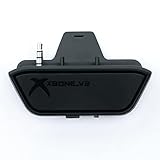
- 【Xbox One/X/S Bluetooth Stereo Audio Adapter】-This xbox one bluetooth adapter fits any version of bluetooth stereo Headset ,Speakers,True wireless headset (Do not support Airpods ),Make sure your controller have 3.5mm headphone jack
- 【Support Voice chat on/off 】- support voice chat on/off,NOTE: The built-in microphone is omnidirectional and has high sensitivity. When you turn on the microphone, the sound of pressing the buttons of the gamepad will also be recorded. This phenomenon is normal.
- 【Digital audio and ultra-low latency】- By low latency technology with game plot for XBOX ONE - Never be bound again to wire, a perfect solution to enable XBOX ONE Controller connected to bluetooth receivers like Headphones and Speakers (Do not Support Airpods )
- 【Portable design for xbox one controller】-Extremely small size and lightweight for portable use, fast pair and automatically re-pair with the last paired device. 15 meters barrier-free transmission without any loss
- 【Easy to Use】-Just set your earphone to bluetooth pairing status and hold the paring button of the adapter for 5 second,once connection is successful, plug this bluetooth audio transmitter to XBOX ONE controller.
Rank #4
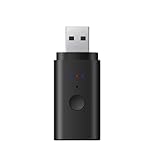
- [Please Note] This bluetooth adapter support all TV’s with 3.5mm AUX audio port. Before purchase, please check your TV output. The 3.5mm AUX port is the headphone jack. For Headphones: It is compatible with nearly all Bluetooth Headphone, including AirPods, but it is INCOMPATIBLE with AirPods Pro 2nd Gen.
- [VERSATILE BLUETOOTH TRANSMITTER]Say goodbye to tangled cords and embrace wirelss freedom! Listen to audio from TV, PC, in-flight entertainment, gym equipment, or any 3.5mm audio jack to your bluetooth earbuds, bluetooth speaker or wireless headphones.
- [APTX BRING LOW LATENCY AUDIO] With aptX-Adaptive and aptX-Low Latency codec support, enjoy crystal clear, high-quality stereo sound, whether you're listening to music, watching a movie, or play games, you'll experience perfect audio and video synchronization.
- [STABLE FAST CONNECTION]Adopts Bluetooth 5.2 to achieve low power consumption, fast, and stable signal transmission and impressive range of up to 33ft(10m) indoors. Enjoy distortion-free, uninterrupted sound.
- [NO DRIVER REQUIRED] When use on PC, PS4/5, power supply and audio transmission are achieved via the USB port, no 3.5mm audio cable / driver/software is required. *Just can transmit audio, not files. USB has power function, when use, power must be supplied through USB port.
Rank #3

- Advanced Bluetooth 6.0 Dual-Mode Audio Freedom:In TX mode, use this bluetooth transmitter to connect to any AUX/RCA audio source—from TV as a bluetooth transmitter for TV, to airplane seatback as a bluetooth transmitter for airplane—pairing with headphones for clear, lag-free audio. In RX mode, receives wireless audio from a smartphone, tablet, or computer and plays it through audio systems that lack Bluetooth functionality.Hands-free calling via an integrated microphone.
- Smart Auto-Pairing & Universal Compatibility:Instant plug‑and‑play starts at power‑on. System memory enables quick reconnection with all models of AirPods, Bose, Sony, and other Bluetooth audio gear. Perfect as a Bluetooth adapter for various setups. Includes a dual‑prong AirFly‑style Bluetooth airplane adapter and QR guide for easy use.Note: Not compatible with live music, instruments, karaoke, 2.4G‑sync devices, or Bluetooth hearing aids.
- All-Day 20+ Hours Playback & Fast USB-C Charging An essential among plane travel essentials and travel accessories, our battery provides over 20 hours of playback—ideal for long flights. Recharge fully in 1.5 hours via USB-C while continuing to use. Stay powered anywhere.
- Compact Travel Design with Intuitive Control Engineered for life on the move, this ultra-lightweight device is a must-have travel gift. Easily adjust volume and switch modes with dedicated buttons. Clear LED indicators show battery and connection status, making it a reliable aux bluetooth adapter for any journey.
- Certified Safe & Versatile Everyday Companion Certified to global safety standards (FCC/CE/RoHS/BQB) with multi-layer protection. Whether you're watching TV, flying internationally, working out, or gaming, this adapter ensures safe and high-quality audio everywhere, truly living up to its name as a travel essential and airplane travel essential.
Product prices and availability are accurate as of the date/time indicated and are subject to change. Any price and availability information displayed on Amazon at the time of purchase will apply.

