
Quick wins for a faster PC:
Clear out junk files and repair common Windows errorsFree Scan →Fix the driver behind crashes, sound loss and screen glitchesFind Drivers →Repair Windows errors before they cause bigger problemsFix Now →iTechGuides is reader-supported. When you buy through links on our site, we may earn an affiliate commission. As an Amazon Associate I earn from qualifying purchases. Learn more
If Minikube reports that “VT-X/AMD-v Enabled is Mandatory” and you want to avoid a Minikube-managed virtual machine, use the Docker driver on Linux: minikube start --driver=docker. It runs Kubernetes in an existing Docker installation and, according to Minikube’s documentation, does not require virtualization to be enabled on Linux.
What the VT-x/AMD-V error means
The message is associated with Minikube’s VirtualBox driver, which checks whether the CPU’s hardware virtualization capability is available. VT-x is Intel’s name for that capability; AMD-v is AMD’s. A VirtualBox-based Minikube setup needs the relevant virtualization support exposed to it.

The Minikube start reference describes --no-vtx-check as disabling the availability check before a VM starts, and scopes it to the VirtualBox driver. It does not enable virtualization. In an issue report, using the flag got past the preflight check, but VirtualBox still failed with “VT-x is not available.” Skipping a check cannot supply a capability the host or outer hypervisor does not expose.
Do these 3 things before closing this tab:
1Clear out junk files and repair common Windows errors2Scan for outdated or missing drivers - takes under a minute3Repair Windows errors before they cause bigger problemsStart Minikube with Docker instead
For a Linux setup that should not depend on virtualization being enabled, Minikube’s documented alternative is its Docker driver. The driver installs Kubernetes into an existing Docker installation rather than creating a Minikube-managed VM.
#1 Best Overall

- THE VAULT (V1610): Secure your network with a compact & quiet appliance. Comes with US-based Support & 30-day money back guarantee!
- CPU: Intel N6005 Quad Core CPU at 2.0 GHz (Turbo 3.3 GHz), Intel AES-NI hardware support
- PORTS: 6 ports (6x Intel I226-V 2.5G NICs), 4x USB 3.2 Type A, 1x USB Type C Console, 1x HDMI
- COMPONENTS: 16GB LPDDR4 RAM on-board, 32GB eMMC on-board, 500GB NV2 NVMe SSD
- COMPATIBILITY: No OS pre-installed. All hardware tested with various firewall software (OPNsense, other *senses, VyOS etc.), and other popular open-source software solutions. Ships with AMI BIOS.
- Install Docker and confirm it is usable from the same environment where you run Minikube.
- Start Minikube with the Docker driver:
minikube start --driver=docker - Wait for Minikube to complete startup, then use your usual Kubernetes commands against the active Minikube cluster.
The Docker driver documentation lists Docker 18.09 or later, recommends 20.10 or later, and specifies amd64 or arm64. Its statement that virtualization need not be enabled applies to Linux; do not assume it removes platform-specific requirements on every operating system or host configuration. For Windows, the documentation says Docker Desktop must use Linux containers. Windows and WSL2 setups can also have networking and environment-specific considerations.
If you already have a Minikube profile
A profile created with a different driver does not automatically become a Docker-driver profile. The Minikube FAQ describes deleting the existing cluster and creating it with Docker, or creating a separate profile with another driver. Deleting a cluster removes its Minikube-managed state, so choose the profile approach that fits any data or configuration you need to keep.
Rank #2
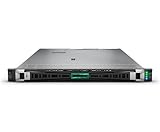
- HPE PROLIANT DL360 GEN11 SERVER - MODEL P71678-005: Powered by 1x Intel Xeon Gold 6526Y processor (16 cores, 2.80 GHz) for scalable performance in compute-dense, virtualized, and containerized environments
- 128 GB DDR5 SMART MEMORY INCLUDED: Configured with 4x 32 GB Registered DDR5 Smart Memory, expandable up to 8 TB for bandwidth-heavy enterprise applications
- BOOT-OPTIMIZED NVME STORAGE CONTROLLER: Includes HPE NS204i-u Gen11 NVMe Hot Plug Boot Device and support for 8x SFF drives for high-speed, reliable storage flexibility
- ENERGY-EFFICIENT POWER SUPPLY: Dual 1000W Flex Slot Titanium Hot Plug Power Supply Kits provide reliable, redundant power for continuous operation
- SECURE MANAGEMENT & EXPANDABILITY: Integrated iLO6, SGX, and Silicon Root of Trust security plus PCIe Gen5 and OCP slots enable high-speed expansion and trusted management
Docker and none drivers compared
| Consideration | Docker driver | none driver |
|---|---|---|
| Creates a Minikube VM? | No; runs Kubernetes in an existing Docker installation. | No; runs directly on a Linux host or user-supplied Linux VM. |
| Intended audience and setup | Recommended by Minikube for most users seeking this no-VM approach; uses an existing Docker installation. | Advanced users and system integrators; requires more host-level setup. |
| Platform and prerequisites | Documented for multiple platforms; Linux does not require virtualization enabled. Linux requirements include Docker 18.09 or later (20.10 or later recommended) and amd64 or arm64. | Linux only, with an init system, container runtime, networking plugins, and Kubernetes prerequisites. |
| Permissions and host impact | Uses Docker; the cited driver guidance presents this as the easier option and says it does not require root access. | Has a confusing permissions model; services may be exposed on the host, containers may access host files, and services can interfere with other software. |
| Resource limits and deletion risks | Not specified in the cited driver guidance. | No built-in resource-limit mechanism; minikube delete erases specified system paths. |
| Needs virtualization enabled? | No on Linux, according to Minikube’s Docker driver documentation. | It skips VM creation; the cited none-driver guidance does not describe it as a general replacement for every host or runtime requirement. |
Minikube’s none driver documentation recommends that most users consider Docker because it is easier to configure and does not require root access. The none driver can be appropriate when you specifically need Kubernetes running directly on a Linux host or a Linux VM you supply, but it is not the simple default workaround for a local developer.
Outdated Drivers Are Slowing You Down
One free scan finds every outdated or missing driver and matches the right update for your exact hardware.Free scan · exact hardware matchPC Slower Than It Used to Be?
A free scan shows the junk files, broken settings and background clutter dragging Windows down - then fixes them in one click.Free scan · Windows 10 & 11Check whether virtualization is hidden by a nested VM
If you are troubleshooting a VM-based driver rather than switching to Docker, first determine whether Minikube is running on a physical Linux machine or inside another virtual machine. Minikube’s KVM2 troubleshooting guide suggests checking for CPU virtualization flags on Linux:
Rank #3
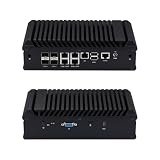
- Main Port: 1 VGA + 1 SIM Slot + 1 Type C + 1 Mini SAS + 1 COM + 1 USB 3.0 + 1 USB 2.0 + 5 LAN + 4 SFP(+)
- CPU: Intel Atom C3758 Denverton Processor (8 Core, 8 Threads, 16M Cache, 2.2GHz, 25W TDP.)
- Configuration: Barebone-S20 (NO DDR4 RAM, NO M.2 NVME SSD, NO 2.5" SATA HDD, NO OS)
- We can provide Win drivers download link and motherboard user manual download link.
- [Versatile OS & Open-Source Compatibility] A barebone/configured DIY-ready hardware architecture. Fully tested and perfectly compatible with leading open-source routing, firewall, and virtualization systems including pfSense, OPNsense, Proxmox VE, TrueNAS, Untangle, Linux (Ubuntu/Debian), and Windows.
grep -E -q 'vmx|svm' /proc/cpuinfo && echo yes || echo no- If it prints “no” inside a VM: the outer hypervisor is not exposing nested virtualization. The guide recommends the none driver in this situation.
- If it prints “no” on a physical machine: check the machine’s firmware settings and enable hardware virtualization in the BIOS or UEFI if available.
- If your goal is specifically to avoid a Minikube-managed VM on Linux: use the Docker-driver route instead of trying to bypass VirtualBox’s check.
The Docker route avoids relying on a Minikube-managed VM, but it does not guarantee that Docker or Kubernetes can run in every constrained or nested environment; the host platform still has its own requirements.
Quick Recap
Best Value
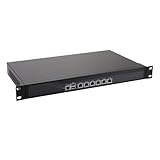
- HUNSN RS06p equipped with Intel i7 12700t processor, compatible with many freebsd based router systems, linux distros, or win.os supported, easy configuration and management, support intel aes new instructions
- Compatibility, firewalls for pfsense, opnsense and other popular open-source software solutions, supports UEFI only
- Standard 19 inch 1u cabinet, 300w power, with power cord, all use the big brand memory and ssd with quality assurance, ready to run straight out of the box
- Designed with console, 2 x usb3.0, 6 x 2.5gbe lan, vga, power switch, size at 430 x 250 x 50mm
- Original industry network motherboard, low power consumption, low heat, use dedicated turbo silent cooling fan to ensure long-term operation
Product prices and availability are accurate as of the date/time indicated and are subject to change. Any price and availability information displayed on Amazon at the time of purchase will apply.

