
The Tool Desk
Outbyte PC Repair FREEClear out junk files and repair common Windows errorsFree Scan →Outbyte Driver Updater FREEFix the driver behind crashes, sound loss and screen glitchesFind Drivers →iTechGuides is reader-supported. When you buy through links on our site, we may earn an affiliate commission. As an Amazon Associate I earn from qualifying purchases. Learn more
Add a plus sign and a tag before @gmail.com—for example, name+news@gmail.com—to receive mail at your existing Gmail inbox under a recognizable variation. You do not need another account. Create a Gmail filter that matches the variation in the message’s To field to label, archive, or otherwise handle those messages automatically.
How Gmail plus addresses work
A plus address keeps your usual Gmail username and adds a tag after it: name+tag@gmail.com. Google says mail sent to that variation arrives in the inbox for name@gmail.com. For example, you might use name+receipts@gmail.com for purchase confirmations and name+news@gmail.com for newsletters. These are variations of one address, not separate mailboxes. Google Gmail Help gives yourname+news@gmail.com as an example for signing up for newsletters.



How to set up a plus-address filter
- Choose a short tag that identifies the source or purpose, such as
receiptsornews. - Enter your variation, such as
name+receipts@gmail.com, wherever you want to receive mail at that address. - In Gmail, start creating a filter and enter the full plus address in the To field.
- Choose what Gmail should do with matching messages, such as applying a label or archiving them, and save the filter.
Google documents using an address variation with a filter to organize incoming mail. Available filter actions may depend on the page or context; the key is to match the variation and select the handling you want. Google Workspace Learning Center also describes this workflow for organization addresses on custom domains.
Plus signs, dots, and “Send mail as” are different
| Option | What it does | What to know |
|---|---|---|
| Plus address | Adds +tag before @gmail.com for receiving and filtering incoming mail. |
Messages go to the existing Gmail inbox; it is not a separate account. |
| Dotted variation | Changes where dots appear in the username. | For consumer @gmail.com addresses, dots do not create a distinct username or inbox. Google says dots do matter for work, school, and other organization-managed domains. Google explains the distinction here. |
| “Send mail as” | Configures Gmail to send outgoing messages from another address. | This is separate from using a plus address to receive and sort mail. Google says that beginning January 2027, Gmail will stop supporting “Send as” for third-party addresses such as Yahoo and Outlook; Google Workspace aliases and other Gmail addresses owned by the user are unaffected. Check Google’s current guidance because this is a dated product notice. Google’s setup and notice |
What plus addressing does not guarantee
A plus address is not a separate private mailbox, and it should not be treated as a way to conceal your identity. Google warns that aliases are not private and may sometimes be visible to others. That warning appears in its broader alias guidance, including organization group aliases; it does not establish exactly how every website or recipient handles every plus-tagged address. See Google’s alias guidance.
Quick Recap
Rank #2
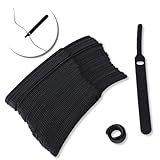
- ✅【Reusable】One amazing feature of our cable straps is that you can take them off and reuse them any time.
- ✅【Strong Grip】Our wire ties have a strong and stable grip which will ensure your cables stay organized!
- ✅【Easy to Use】Unlike other unfriendly designs on the market, our hooks and fabrics are on different sides, allowing the easiest way to wrap on anything you want!
- ✅【Wraps Every Cord】 No matter it is charging cable, multimedia systems, computer cable, or A/V wires, you will have all of them neatly organized.
- ✅【Ties with Endless Applications】We heard tons of unexpected applications for our cable ties, including fishing rods, camping tents, garden plants! And when you combine multiple ties together, the possibilities are endless!
#1 Best Overall
Product prices and availability are accurate as of the date/time indicated and are subject to change. Any price and availability information displayed on Amazon at the time of purchase will apply.
Independent reader supportYour contribution helps us test, update, and keep practical guides available for everyone.
