
Quick wins for a faster PC:
Fix the driver behind crashes, sound loss and screen glitchesFind Drivers →Repair Windows errors before they cause bigger problemsFix Now →iTechGuides is reader-supported. When you buy through links on our site, we may earn an affiliate commission. As an Amazon Associate I earn from qualifying purchases. Learn more
When an idea is still half-formed, I can start talking to ChatGPT before I know how to phrase the question. That is the voice-mode use case that works better for me than typing: I can explain what I am trying to understand, hear a response, and ask the next question without first turning my thoughts into a polished prompt. It is a personal workflow preference, not proof that Voice is faster or better for everyone.
Why a live conversation helps with an unfinished idea
Typing works well when I already know what I want to ask. But when I am still discovering the question, writing can turn into an editing task: I stop to organize the thought before I have figured out what matters.
With ChatGPT Voice, I can begin with the uncertainty itself. I might say what I am trying to figure out, what I already understand, and where I get stuck. ChatGPT answers aloud, and I can follow up or redirect it while the thought is developing. OpenAI describes Voice as a spoken conversation that remains in a chat, where users can also follow responses in text, type, and review earlier messages. OpenAI’s ChatGPT Voice help article says the Live option supports a natural back-and-forth; availability can depend on account and workspace conditions.
PC Slower Than It Used to Be?
A free scan shows the junk files, broken settings and background clutter dragging Windows down - then fixes them in one click.Free scan · Windows 10 & 11Outdated Drivers Are Slowing You Down
One free scan finds every outdated or missing driver and matches the right update for your exact hardware.Free scan · exact hardware matchFor example, I once started by asking what might happen if the Moon stopped stabilizing Earth’s tilt, then asked for a non-technical explanation. That was a useful way to explore an initial question aloud, not a verified scientific account: check scientific claims against reliable sources before relying on them.
#1 Best Overall

- 【Crystal Clear Audio Quality】Our Omnidirectional pattern condenser microphone accurately captures your voice, making it perfect for dictation, online classrooms, and more.
- 【Active Noise-Cancelling】Come in CMTECK CCS2.0 SMART CHIP with Omnidirectional Polar Pattern, which can effectively block the background noise. The pop filter prevents plosives from overloading the microphone, ensuring only your voice is heard.7
- 【Convenient Mute Button with LED Indicator】You can quickly mute/un-mute the microphone with the Mute Button and the built-in LED light lets you know the working status(Greenlight: Connected; Red light: Mute mode).
- 【Easy to use】 No drivers needed, just plug and record without external power supply, directly connect the microphone to a USB compatible device, well compatible with Windows(7, 8 and 10), Mac OS and PS4 (NOT compatible with Raspberry Pi/Linux/Android)
- 【Mini size with Adjustable Gooseneck】Adopted flexible and adjustable gooseneck metal pipe, easily adjust position 360 degrees to suit user comfort. The compact and stable base maximizes your desktop space.
How I use Voice to work through a question
- Start with the goal. Say what you are trying to understand rather than trying to write the perfect prompt.
- Give it context. Explain what you already know and what part is unclear.
- Ask for the kind of help you need. For example, request a plain-language explanation, a few possibilities, or questions that will help you narrow the issue.
- Use follow-ups to address the actual gap. If an answer is too broad or technical, say what is missing and ask again.
- Review the text and verify important claims. Voice conversations remain in the chat, but neither the spoken answer nor the transcript should be treated as infallible.
You can ask ChatGPT to wait until you finish thinking before responding. OpenAI cautions that long pauses or background sounds can still prompt a reply, so this will not necessarily behave like a perfect recording pause.
Voice, typing, or Dictation?
These options suit different stages of thinking. Voice is for a live exchange; Dictation records a prompt that you can review and edit before sending; typing is a written exchange you compose directly.
Rank #2

- CONDENSER MICROPHONE: High sensitivity, low noise, and low distortion with a large 14mm diaphragm and clear sound pickup
- FOR STREAMING & MORE: 360° rotation adjustable stand mic is ideal to track your voice in real-time conference, online streaming, podcasting, music recording, solo vocals or instruments and more
- CARDIOID PICKUP PATTERN: Cardioid pickup pattern microphone effectively isolates background noise, ensuring clear and clean sound for recording and broadcasting
- ONE TAP SILENT MODE: Stylish design USB microphone built-in convenient one-tap mute function that syncs with your laptop or PC. Compatible with Windows OS 7, XP, 8, 10 or higher, Mac OS 10.10 or higher, streaming and broadcasting applications
- PLUG AND PLAY: Easy to use with no additional drivers required and connect with USB data transfer cable; it can be detached and installed on tripods, boom arm or microphone stands that with a standard 5/8 inch thread
| Option | Best fit | Interaction and editing |
|---|---|---|
| Live Voice | Thinking aloud, exploring an unclear idea, or asking follow-up questions as you go. | Spoken back-and-forth; you can interrupt or continue speaking while ChatGPT responds. The conversation also appears in the chat as text. |
| Typing | When you know what you want to ask or prefer a written exchange. | Compose and send text, then follow up in writing. You can also type within a Voice conversation. |
| Dictation | When you want to speak a single prompt but review it before sending. | Record the prompt, then edit it before it is sent; it is not the same as a live conversation. |
There is no universal speed or quality winner established here. Choose according to the job: use Live Voice to talk through ideas, Dictation to turn speech into an editable prompt, and typing when written composition suits you better. OpenAI’s Voice FAQ also explains when to choose Voice rather than Dictation.
What to keep in mind while using Voice
Spoken answers and transcripts can be wrong
OpenAI’s help article says, “ChatGPT can make mistakes.” It also warns that a Voice transcript may not exactly match what was said. Treat the transcript as a useful record of the conversation, not a verbatim guarantee, and independently check important, technical, or time-sensitive facts. Live Voice can use web search and memory where those features are available to your account, and it can work with text and images in the same chat; that does not remove the need to verify consequential claims.
Rank #3

- [Crystal Clear Audio Quality] Our computer microphone accurately captures your voice, making it perfect for dictation, online classrooms, and more. Come in CMTECK CCS2.0 SMART CHIP with Omnidirectional Polar Pattern, which can effectively block the background noise. The pop filter prevents plosives from overloading the microphone, ensuring only your voice is heard.
- [Convenient Mute Button with LED Indicator] Instantly mute your PC microphone with a simple tap. The intuitive LED (Green: On; Red: Muted) keeps you in control. Plus, enhance your setup with the stylish RGB breathing light that adds a dynamic flair to your desk.
- [Dynamic RGB Ambient Light] Elevate Your Setup, Elevate Your Game Smooth gradient RGB lighting transforms your gaming rig or streaming space with a vibrant, customizable glow. Tap once to cycle between three stunning color modes—no app or remote needed. Set the mood, sync with your session, and dive deeper into the experience.
- [Easy to use] No drivers needed, just plug and record without external power supply, directly connect the computer microphone for desktop to a USB compatible device, well compatible with Windows(7, 8 and 10), Mac OS and PS4 (NOT compatible with Raspberry Pi/Linux/Android)
- [Mini size with Adjustable Gooseneck] Adopted flexible and adjustable gooseneck metal pipe, easily adjust position 360 degrees to suit user comfort. The compact and stable base maximizes your desktop space.
Interruptions can have several causes
Overlapping speech, background noise, network conditions, and microphone settings can affect what ChatGPT hears. If the exchange keeps getting interrupted, OpenAI suggests trying headphones, moving to a quieter setting, or increasing your device’s volume. Headphones are an optional troubleshooting step, not a requirement for Voice. See OpenAI’s Voice troubleshooting guidance.
Voice limits vary
Voice availability and usage limits depend on the plan and can change. OpenAI says Chat usage is measured over a rolling 24-hour period and users are notified when they reach a limit. A conversation may also end because of a maximum session length or context limit; you can continue in text or start Voice again. Check your current plan information for the allowance that applies to you. OpenAI’s Voice FAQ has the current general guidance.
Quick Recap
Best Value

- Compatibility: Not a speaker!!! The mic is perfect for online meeting/teaching and distance learning by using Zoom/Skype/GoToMeeting/WebEx/Hangouts/Fuze, etc.
- Superior Sound Quality: Built-in noise reduction technology can effectively block the noise and eliminate echo to pick up clear sound.
- Designed for Meetings: TM20 adopts an omnidirectional pickup pattern to capture the subtle sound from 360°. The mic can pick up the voices of all speakers around it with a wide pickup range(5m/16.4ft). When you move within the room, there are no differences in timbre.
- Plug and Play: TM20 is a USB 2.0 mic, compatible with Windows and macOS. Just plug it into a laptop/desktop and get started, no driver software is required.
- One Button Mute: The built-in indicator light informs the status(blue: working, red: mute). It makes your meeting more efficient while you multitask during a call to mute your mic with only one soft touch.
Rank #4
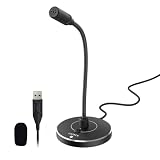
- 【Crystal Clear Audio Quality】Our cardioid condenser microphone precisely captures your voice while effectively filtering out distracting background noises, like keyboard clicks and air conditioner hum, making it perfect for dictation, online classrooms, live streaming and more.
- 【ENC Noise Cancellation】Powered by the CMTECK CCS3.0 smart chip and paired with a Cardioid pickup pattern, this pc microphone actively blocks ambient noise for pristine vocal capture. Compared with the original version, this upgraded model incorporates ENC (Environmental Noise Cancellation) to deliver even fuller, richer sound. The pop filter prevents plosives from overloading the microphone, ensuring only your voice is heard.
- 【Convenient Mute Button with LED Indicator】You can quickly mute/un-mute the microphone with the Mute Button and the built-in LED light lets you know the working status(Greenlight: Connected; Red light: Mute mode).
- 【Easy to use】 No drivers needed, just plug and record without external power supply, directly connect the microphone to a USB compatible device, well compatible with Windows(7, 8 and 10), Mac OS and PS4 (NOT compatible with Raspberry Pi/Linux/Android)
- 【Mini size with Adjustable Gooseneck】Adopted flexible and adjustable gooseneck metal pipe, easily adjust position 360 degrees to suit user comfort. The compact and stable base maximizes your desktop space.
Product prices and availability are accurate as of the date/time indicated and are subject to change. Any price and availability information displayed on Amazon at the time of purchase will apply.

