
iTechGuides is reader-supported. When you buy through links on our site, we may earn an affiliate commission. As an Amazon Associate I earn from qualifying purchases. Learn more
To get a Flutter app through Apple’s App Review, prepare the app and its review information in App Store Connect, choose the intended build, then complete both Add for Review and Submit for Review. Apple’s guidance describes the standard App Store submission process, not a separate Flutter review lane: the framework does not change the need to meet the rules that apply to your app’s features, audience, business model, and regions.
Prepare the app and its review information
Before submitting, check the submitted build against Apple’s current App Review Guidelines and any requirements that apply to its category and distribution regions. There is no universal checklist that guarantees approval: requirements depend on what the app does, how it works, what it claims, and where it will be available.



Explain the app and what reviewers should test
In App Store Connect’s App Review Information, describe what the app does, who it is for, and how its important features work. For a new app, explain its concept and business model. For an update, identify what changed and where reviewers can find new or significant features. Include the device models and operating-system versions on which you tested the build.
What’s actually slowing this PC down?
Pick the symptom - the matching free tool is one click away.
Disclose outside services or platforms that provide core functionality, such as authentication, payment processing, data, or AI services. Explain regional differences, or state that the relevant features and content work consistently across regions. These details help reviewers understand the build; disclosure alone does not guarantee acceptance. See Apple’s App Review Information guidance.
Provide working access to gated features
If reviewers need an account, provide a username and password that will still work when the review starts. If the app has different account types, include credentials for each and explain what each can access. Supply any required authentication codes or setup instructions in advance. For an app with auto-renewable subscriptions, Apple asks for a demo account with an expired subscription so reviewers can inspect the complete purchase flow.
For sensitive information or a highly regulated service, Apple says a demonstration mode using demonstration data may be appropriate instead of a demo account. It should let reviewers see the app’s full features and functionality. If the app requires hardware, provide a video showing it running on a physical Apple device while pairing with and interacting with that hardware. Apple specifies a video, not a screen recording. These access and demonstration details are covered in Apple’s App Review Information guidance.
Attach category-specific documents where needed
Required documentation depends on the app’s functions, claims, and availability. Apple gives examples including regulatory clearance for medical diagnostic or treatment claims; exchange licenses and partner documents for cryptocurrency exchanges; proof of partnership with a licensed financial institution for financial services; gambling or lottery licenses; and permission for third-party intellectual property. Some documents may be required for each country or region where the app is distributed. Check the requirements that actually apply to your app rather than assuming every example applies.
Free tools Windows power users keep installed
One-click scans. No signup required.
Submit the intended build in App Store Connect
-
Open your app in App Store Connect and choose the version you intend to submit.
-
Complete the required metadata and select the build for that version. Check that the selected build is the one you mean to send to Apple.
-
Select Add for Review and choose an existing draft submission or create one. The item becomes Ready for Review; Apple has not yet received it for review.
-
Open the draft submission and select Submit for Review. When review begins, the status changes to In Review.
The Tool Desk
Outbyte Driver Updater FREEScan for outdated or missing drivers - takes under a minuteDriver Scan →Outbyte PC Repair FREERepair Windows errors before they cause bigger problemsFix Now →Special offer. See more information about Outbyte and uninstall instructions. Please review EULA and Privacy policy.
If a submission contains additional items, Apple says all submitted items must be accepted for the submission to be complete. See Apple’s submission instructions.
Best Value
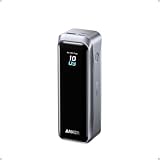
- 220W Total Output Power: Keep your office setup running strong with 220W total output from two USB-C ports and one USB-A port.
- Flight-Ready 20K Power: Carry 20,100mAh (72.36Wh) of portable, TSA-approved power, enough for up to 4.2 days of video streaming on an iPhone 17 Pro Max.
- 140W Max Fast Charging: Delivers up to 140W high-speed output for fast laptop charging when connected to a 5A cable. Charge a 16" MacBook Pro (M4 Pro) to 50% in 28 minutes.
- High-Speed 100W Max Recharging: Recharge Anker Prime Power Bank to 50% in 25 minutes using the 100W max USB-C input.
- What You Get: Anker Prime Power Bank (20K, 220W), 3.3 ft USB-C to USB-C charging cable (240W), travel pouch, welcome guide, 24-month warranty, and our friendly customer service.
Read App Store Connect statuses correctly
- Ready for Review: Required metadata is present and the item is staged, but it has not been submitted to Apple.
- Waiting for Review: Apple has received the submission but has not started reviewing it.
- In Review: The review is underway.
- Rejected: Apple did not accept the app or submission; read the issue notice for the reason.
- Unresolved Issues: One or more items in the submission were rejected. Address and resubmit those items, or remove them if you can continue with the accepted items.
Apple’s status definitions distinguish a staged submission from one Apple has received. In particular, Ready for Review does not mean review is underway.
Respond to a rejection
Read Apple’s message, identify the cited guideline or metadata problem, and respond through the App Review section in App Store Connect. Explain what you changed or clarify how the app works; attach screenshots or supporting documents when they help establish the point. Apple says a metadata-only rejection can be addressed by correcting the metadata and resubmitting the same build.
If the issue concerns a missing account, test path, setting, hardware dependency, or document, resolve that specific access or evidence problem before resubmitting. Apple’s response workflow and reviewer-information guidance are explained in its instructions for replying to App Review messages and App Review Information guidance.
Appeal only if clarification does not resolve the disagreement
First reply to the rejection message with a clarification. If that does not resolve the issue and you believe the decision conflicts with the App Review Guidelines or Apple Developer Program License Agreement, file one appeal for the rejected or removed app. Address the specific requirement and explain point by point why the app complies.
An appeal is not a way to request a status update or expedited review, and it is not the right route for a request for additional information that you can answer in the review conversation. Apple says a complete appeal does not guarantee that the decision will be reversed. See Apple’s appeal guidance.
Quick Recap
Product prices and availability are accurate as of the date/time indicated and are subject to change. Any price and availability information displayed on Amazon at the time of purchase will apply.

