
iTechGuides is reader-supported. When you buy through links on our site, we may earn an affiliate commission. As an Amazon Associate I earn from qualifying purchases. Learn more
Abode says its standard Security Kit takes about 10 minutes to set up, but that is the company’s estimate—not an independently timed result. To follow the documented process, have the Abode app on an iOS or Android phone or tablet, the kit’s Activation Key card, an outlet near your router, and a spare Ethernet port on the router. The kit is a lean starting point, too: it includes just one door/window sensor, so check how many entry points you want to protect before deciding whether it fits.
What to have ready
Abode’s Security Kit Setup Guide, dated May 21, 2026, estimates setup at about 10 minutes. That figure comes from Abode; it is not a reported independent test or a guarantee that every installation will take that long.

- An iOS or Android phone or tablet with the Abode app installed.
- The Activation Key card included in the box.
- A power outlet near your internet router.
- A spare Ethernet port on the router for the hub’s initial setup.
Install the app, find the card, and check the outlet and Ethernet port before you begin. If one of these prerequisites is missing, Abode’s guide does not support promising the advertised setup time.
Quick wins for a faster PC:
Scan for outdated or missing drivers - takes under a minuteDriver Scan →Clear out junk files and repair common Windows errorsFree Scan →What comes in the standard Security Kit
Abode’s setup guide lists one Security Hub, one Mini Door/Window Sensor, one Key Fob, a power adapter, and an Ethernet cable. Abode’s Security Kit FAQ also mentions a window sticker.
#1 Best Overall

- INDUSTRY LEADING WHOLE HOME SECURITY - Abode’s Smart Security System is expandable to meet your exact needs, and works with more security accessories and smart home products than any competitor. The 8-piece kit includes a central security hub (with a built-in 93dB siren, backup battery, and reliable ethernet connectivity), 2 motion sensors, a key fob, and 4 mini door/window sensors. Works with Alexa, Google Assistant, and Siri.
- WORKS WITH APPLE HOMEKIT - the Smart Security System remains the only home security system (DIY or pro) that has been tested and certified for Works with Apple HomeKit, and can be monitored and controlled via the iOS Home app.
- CUSTOMIZE YOUR SECURITY SYSTEM -- add additional Abode sensors or cameras to monitor all accessible doors/windows, water leaks, smoke detectors, CO2 alarms and more.
- Z-WAVE & ZIGBEE SMART HOME HUB - In addition to the large ecosystem of Abode products you can add to this system, the Smart Security Hub controls Z-Wave and Zigbee compatible smart accessories like locks, lights and devices with sensors.
- PROFESSIONAL MONITORING -- add 24/7 professional monitoring for as little as 60 cents per day to automatically dispatch police, fire and medical help when needed. Qualifies for insurance discount.
One entry sensor is a modest starting bundle, not coverage for every door and window in a home. Before buying, list the exterior entry points you want monitored and compare that count with the included sensor. You may need compatible additional sensors to cover the rest.
How setup proceeds
The guide takes you through the Abode app and the hub’s initial wired connection. In practical terms, the process starts with the app and Activation Key, then uses the nearby outlet and router Ethernet connection to bring the hub online. Follow the prompts in the app for the current setup flow.
Rank #2
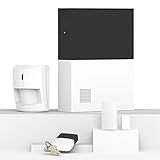
- INDUSTRY LEADING WHOLE HOME SECURITY - Abode’s Smart Security System is expandable to meet your exact needs, and works with more security accessories and smart home products than any competitor. The 4-piece kit includes a central security hub (with a built-in 93dB siren, backup battery, and reliable ethernet connectivity), a motion sensor, a key fob, and a mini door/window sensor to get you started. Works with Alexa, Google Assistant, and Siri.
- WORKS WITH APPLE HOMEKIT - the Smart Security System remains the only home security system (DIY or pro) that has been tested and certified for Works with Apple HomeKit, and can be monitored and controlled via the iOS Home app.
- CUSTOMIZE YOUR SECURITY SYSTEM -- add additional Abode sensors or cameras to monitor all accessible doors/windows, water leaks, smoke detectors, CO2 alarms and more.
- Z-WAVE & ZIGBEE SMART HOME HUB - In addition to the large ecosystem of Abode products you can add to this system, the Smart Security Hub controls Z-Wave and Zigbee compatible smart accessories like locks, lights and devices with sensors.
- PROFESSIONAL MONITORING -- add 24/7 professional monitoring for as little as 60 cents per day to automatically dispatch police, fire and medical help when needed.
Abode’s published estimate is about 10 minutes, but the documentation does not establish a time for every home, network, or user. Having the prerequisites ready avoids preventable delays; it does not turn the estimate into a measured guarantee.
What’s actually slowing this PC down?
Pick the symptom - the matching free tool is one click away.
Check compatibility before choosing this kit
The standard Security Kit Hub is not Apple HomeKit compatible. Abode’s FAQ states, “The Security Kit Hub does not support Apple HomeKit,” and directs people seeking HomeKit support to its Smart Security Kit or Iota Kit. Do not assume capabilities of those other kits apply to the standard Security Kit.
Rank #3

- POWERFUL WHOLE HOME SECURITY BUNDLE: Includes 1 Abode Security Hub (with built-in 93dB siren, backup battery, ethernet and WiFi to connect up to 160 wireless devices), 2 Abode Key Fob, 1 Keypad with Motion Sensor, 1 Abode Motion Sensor, and 7 Abode Door/Window Sensors
- ARM + DISARM WITH ONE TOUCH: the included Key Fob is a quick and easy way to arm and disarm your system remotely. Add it to your key ring or throw it in your pocket and simply press the button of the status you’d like to set on your way in or out. Keypad features a built-in motion sensor to alert you to your system status every time you walk by. Motion sensor captures all motion with a wide detection radius (110° field of view and 35 feet of detection range).
- PROTECT YOUR FRONT DOOR: includes an easy-to-install (with simple adhesive peel & place) Mini Door/Window Sensor to protect almost any door or window in your home. The sensor detects when doors and windows open or close and sends you an immediate notification if anything occurs while your system is armed.
- EASY TO INSTALL & CUSTOMIZE : Set it up in 30 minutes without any tools by using the self-guided app, and easily add additional Abode wireless sensors to monitor all accessible doors/windows, water leaks, smoke and/or CO2 alarms, and security cameras to meet your exact security needs.
- PROFESSIONAL MONITORING -- add 24/7 professional monitoring for as little as 60 cents per day to automatically dispatch police, fire and medical help when needed. Qualifies for insurance discount.
Abode says the hub works with its AbodeRF security devices and supports integrations through named platforms including Alexa, Google Nest, Google Home, Sonos, and Bose, subject to the platform and device support described in the FAQ. The standard hub does not directly support Z-Wave or Zigbee devices. If your setup depends on a particular smart-home device or platform, check that specific device’s support rather than inferring compatibility from a platform name.
Self-monitoring, professional monitoring, and ongoing costs
Abode describes the system as having no contract and offers free self-monitoring, with optional professional monitoring. Current dollar prices and the detailed entitlements of each plan—including any cellular-backup, recording, or automation limits—are not established here. Check Abode’s live plan terms and product information before budgeting or relying on a specific service feature.
Independent reader supportYour contribution helps us test, update, and keep practical guides available for everyone.Is the standard kit the right starting point?
The standard Security Kit is worth considering if you want a hub-based alarm starter bundle, can use its app and initial Ethernet setup, and are comfortable with its smart-home compatibility limits. It is a less direct fit if Apple HomeKit or direct Z-Wave or Zigbee support is essential, or if one sensor is not enough for the entry points you need to monitor.
Free tools Windows power users keep installed
One-click scans. No signup required.
Abode’s FAQ points HomeKit-seeking buyers toward the Smart Security Kit or Iota Kit, but the available information here does not establish a complete current comparison of those models’ hardware, sensor bundles, cameras, or prices. Compare their live specifications and costs before choosing among them.
Quick Recap
Best Value

- POWERFUL WHOLE HOME SECURITY BUNDLE: Includes 1 Abode Security Hub (with built-in 93dB siren, backup battery, ethernet and WiFi to connect up to 160 wireless devices), 1 Abode Key Fob and 4 Abode Door/Window Sensors
- ARM + DISARM WITH ONE TOUCH: the included Key Fob is a quick and easy way to arm and disarm your system remotely. Add it to your key ring or throw it in your pocket and simply press the button of the status you’d like to set on your way in or out.
- PROTECT YOUR DOOR & WINDOWS: includes 4 easy-to-install (with simple adhesive peel & place) Mini Door/Window Sensor to protect almost any door or window in your home. The sensor detects when doors and windows open or close and sends you an immediate notification if anything occurs while your system is armed.
- EASY TO INSTALL & CUSTOMIZE: set it up in 30 minutes without any tools by using the self-guided app, and easily add additional Abode wireless sensors to monitor all accessible doors/windows, water leaks, smoke and/or CO2 alarms, and security cameras to meet your exact security needs
- PROFESSIONAL MONITORING: add 24/7 professional monitoring for as little as 60 cents per day to automatically dispatch police, fire and medical help when needed. Qualifies for insurance discount.
Product prices and availability are accurate as of the date/time indicated and are subject to change. Any price and availability information displayed on Amazon at the time of purchase will apply.

