
iTechGuides is reader-supported. When you buy through links on our site, we may earn an affiliate commission. As an Amazon Associate I earn from qualifying purchases. Learn more
Secure a physical access control system by treating its controllers, management software, administrator accounts, network connections, and access policies as parts of one connected operational technology (OT) system. Require secure defaults, strong administrator authentication, useful logs, controlled configuration changes, vendor vulnerability support, and a planned update process; then restrict communications to what the system needs and verify that its rules work as intended.
Current OT procurement guidance sets out these expectations, but the sources cited here do not establish a quantified rise in attacks against access controllers. The pressure is clearer as a higher bar for connected products and the people responsible for operating them.
Why access controllers need cybersecurity controls
A networked access-control environment may include door controllers, readers, credentials, central or cloud management, administrator accounts, logs, and supporting network services. The components and routes used to manage them belong in the organization’s asset inventory and security review. Architecture and risk vary by product and site, so the security plan should reflect the actual system rather than assume every deployment works the same way.
NIST’s 2017 publication on access-control policies and models states, “Access control systems are among the most critical of computer security components.” Its focus is policy models and their verification—not physical controller hardware—but the point applies to the decisions these systems enforce: an incorrect rule, misconfiguration, or implementation flaw can undermine intended access. NIST SP 800-192
#1 Best Overall

- Control 4 doors, get in door by swiping card, get out door by exit button or by swiping card,support 4 readers.Can Store/download/check Entry Detail records.
- User capacity: 20,000 user, record capacity:100,000. Auto open/close at any pre-set time during any day. Support "who" can enter which door at certain time, authorized access control.Also support swipe 4 times continuously to keep door open.
- Record never lost in case of power failure.The power supply box with 110-240V input, 5A output, powers the whole system,also act as the cabinet for the control board.Input format of reader Wiegand 26/Wiegand34 (all card reader with compatible protocol, RFID/Mifare/HID).
- Network communication via TCP/IP. Software supportable database: access & SQL server. Support Win7/Win8/Win10/Win11 both 32 & 64 bit ALL Windows system.
- This is Core part of a complete access control system, if you need full kits for lock/reader/exit button, etc,contact us freely, we have 20 years experience.
For product selection, the joint Secure by Demand guidance from CISA, NSA, and international partners identifies weaknesses relevant to OT procurement, including weak authentication, known software vulnerabilities, limited logging, insecure defaults, default credentials, and legacy protocols. It is general OT guidance, not a certification or a list of tested access-control products.
What to ask vendors before buying or renewing
Assess the product’s security capabilities and lifecycle evidence, not only its feature list or a broad “secure by design” claim. The joint Secure by Demand guidance makes procurement a chance to ask how the product is secured, maintained, and recovered.
| Area | Questions to ask | What to verify |
|---|---|---|
| Secure defaults and authentication | Does deployment require changing default credentials? Can unnecessary interfaces and services be disabled? What authentication is available for administrators and service personnel? | Documented secure configuration, unique credentials, strong authentication, and support for disabling unused or insecure options where operationally safe. |
| Communications and data protection | How are peers authenticated, and how are credentials, configuration, logs, and operational data protected in transit and at rest? | Specific product and protocol details, rather than an unsupported general assurance. |
| Logging and configuration history | Which authentication, privilege, policy, and configuration events are recorded? Can logs be exported to central monitoring? Are changes attributable to an account? | Logging available in the baseline product, usable export options, and records sufficient to investigate changes and security events. |
| Configuration management and recovery | Can authorized configurations be backed up and restored? How are changes tracked, and how can unauthorized modification be detected? | A documented process and tools for tracking, checking, backing up, and restoring configuration. |
| Vulnerability handling and upgrades | Where are security advisories published? How can vulnerabilities be reported? What update tools are provided, and how long is the product supported? | A defined vulnerability-handling process, support lifecycle, upgrade method, and recovery plan. |
| Ownership and interoperability | Can the operator maintain, configure, and migrate the system without unnecessary dependence on one supplier? Which open standards are supported? | Clear operational responsibilities and realistic options for exporting data or changing systems. |
| Resilience and essential functions | What happens after a component or account is compromised, and how are essential operations restored? | Recovery procedures that account for the site’s operational and safety requirements. |
Ask for product-specific documentation, lifecycle commitments, and a clear account of operator responsibilities. A vendor statement alone does not demonstrate that a particular installation is secure.
Quick wins for a faster PC:
Fix the driver behind crashes, sound loss and screen glitchesFind Drivers →Repair Windows errors before they cause bigger problemsFix Now →Scan for outdated or missing drivers - takes under a minuteDriver Scan →Rank #2
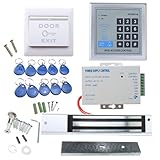
- [Modern Technology for Home Security] This RFID Proximity door access control system kit is one of the modern electronic access control systems
- [Safely and Reliable] The state-of-the-art CPU and integrated circuit techniques are applied to keep all the data from loss due to power failure.
- [Easy To Access] AGPtEK door security system is powerful and can open the door using proximity cards, passwords, or the hybrid.
- [More Convenient] The rfid lock kit access controller can provide users with more convenience by connecting to terminals, including the button for opening the door, doorbell, and electric lock that is normally open or closed.
- [Wide Application] The door lock installation kit offers a method for controlling access safely and automatically, qualifying it as ideal equipment for businesses, offices, factories, and communities. Get the full set of door security system to update your home security!
How to harden an installed system
1. Inventory assets and access paths
Record controllers, management servers or services, interfaces, remote-access routes, dependencies, software and firmware versions, and responsible vendors. Assign an owner to each asset and note which external, cloud, or administrative connections are enabled. CISA’s ICS Recommended Practices page collects resources with different dates and scopes; use relevant material as general control-system guidance, not as a product-specific checklist.
2. Restrict network communications
Allow only the sources, destinations, and services the system requires. Where practical, place management interfaces on a controlled management network or zone, and segment access-control equipment from general IT according to the site’s architecture and risk. The Security Industry Association’s 2025 Operational Security Technology report recommends segmentation for operational security technology. CISA’s communications-infrastructure guidance supports separated management and strict access controls as broader hardening practices, not controller-specific instructions: Enhanced Visibility and Hardening Guidance for Communications Infrastructure.
3. Control remote and vendor maintenance
Remove external exposure and remote-access paths that are not needed. For necessary maintenance, require authorized and monitored access, record enabled routes, and confirm how the connection is authenticated. Review whether each vendor or cloud connection is necessary and who is accountable for it.
Rank #3

- ✅ 【Wireless Access Control System】Integrated wireless access control keypad allows you to control the keypad share, modify and delete passwords/ID cards, remote Unlock doors/gates, view access logs, manage users, and assign temporary or permanent access from your phone, anytime and anywhere
- ✅ 【Multiple Access Options】Come with 5PCS ID key fobs, support 2000 users capacity. Swipe card or password or TUYA APP multiple unlocking methods to open the door. Equipped with doorbell button, compatible with all electric locks.
- ✅ 【Reliable and Practical】The access control keypad with strong zinc alloy electroplated technology, epoxy to completely encapsulated, anti-prying hexagonal star screw, anti-vandal and weatherproof. Suitable for mounting either indoor or outdoor. Backlight design(non-turn-off), in dark locations or night you can read numbers.
- ✅ 【Widely Used】Wiegand access control keypad system can prevent unauthorized personnel from entering. Built in buzzer and light dependent resistor (LDR) for anti tamper. Can be as a standalone reader or keypad. Very suitable for garage, hotel, shops, warehouses, laboratories, other private spaces. Note: Models whose connection protocol is Wi-Fi, learn buttons, safety sensors, rolling code are not currently supported! Keypad uses 2-wire connection directly to the opener's push button switch terminals.
- ✅ 【Simple Setup for Use】Connect the access controller to the power supply and the electric lock, Keypad enter "*master code#73#" code, turn on wireless pairing, add the keypad to the TUYA APP, you can remotely manage the access control system. Attention: The password keypad working on 2.4 GHz network, when adding keypad, make sure the keypad must be connected to the same Wi-Fi network as your smartphone. Powered by 12V DC power supply (not included)
4. Protect administrator accounts
Use unique accounts, least privilege, and strong authentication for management interfaces. Require phishing-resistant multifactor authentication (MFA) for sensitive administration where supported. CISA and its partner agencies give hardware-based PKI and FIDO authentication as examples in their broader infrastructure guidance. A FIDO2 security key may be one way to provide that factor, but confirm compatibility with the identity provider and the access-control management system before selecting a device.
Free tools Windows power users keep installed
One-click scans. No signup required.
5. Remove insecure defaults and unnecessary services
Change default credentials, prevent their reuse, and disable unused services or insecure legacy protocols when the product supports doing so safely. Follow the vendor’s secure configuration instructions and assess operational effects before changing settings.
6. Maintain supported software and firmware
Review vendor advisories, prioritize vulnerabilities that apply to the installed product and its exposure, and plan updates through a controlled process. Where operationally feasible, test changes, retain a rollback or recovery plan, and record installed versions and change approvals. The cited guidance supports vulnerability management and upgrades; it does not prescribe one patch interval that fits every controller or site.
Rank #4
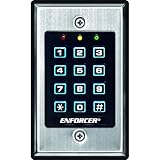
- 12-button, always-on backlit keypad with stainless-steel face
- Supports 1,000 permanent codes, 50 guest codes (4-8 digits)
- Auto-disable access at specific times with built-in clock
- Egress input allows exit without code entry
- Auto-adjusting operation - 12-24 VDC/VAC
7. Enable logs and assign review responsibility
Record authentication attempts, privilege changes, policy and configuration changes, security events, and relevant system faults. Protect logs from unauthorized changes, define who reviews them, and set retention in line with applicable organizational and legal requirements. Confirm that the product can send or export the records needed for central monitoring.
8. Review policies and identities
Periodically review access policies, accounts, cards or mobile credentials, role assignments, and revocation for people who have left or changed roles. Check that the rules the system enforces match the organization’s intended policy. NIST SP 800-192 describes verification and testing methods for access-control policies and models; the enduring lesson is to test implementation, not rely only on written rules.
9. Prepare for incidents and recovery
Coordinate response planning among facilities, physical security, IT, OT, and the vendor. Preserve relevant configurations and logs, identify safe isolation steps, and document how doors, egress, life-safety systems, and manual operations are handled under approved site procedures. Do not assume a universal fail-secure or fail-safe setting: the appropriate behavior depends on facility conditions, life-safety requirements, and applicable codes.
Best Value

- Multiple Access Options - This access control system offers a variety of ways to enter and exit a secure area including password input, card swiping and remote control.
- Enhanced Security - The 600LBS electromagnetic lock ensures that the door is tightly secured, enhancing the safety and security of the premises.
- Visitor Management - Visitors can easily press the doorbell on the access keypad, letting those indoors know when someone has arrived. The indoor unit comes with a remote control that allows easy entry for visitors without the need to go outside.
- Easy Installation - The system is user-friendly and can be installed with ease, requiring minimal time and effort.
How to compare access-control options
There is no universal best controller established by the sources cited here. Compare specific products and system architectures against the site’s requirements, and ask vendors to substantiate their answers.
| Comparison area | What to examine |
|---|---|
| Administrator and service authentication | Available authentication methods, MFA support, unique accounts, and controls for service access. |
| Default security posture | Whether credentials and settings are secure at deployment, and whether unnecessary interfaces or protocols can be disabled. |
| Logs and configuration history | Which events are captured, how easily records can be exported, and whether changes can be attributed and reviewed. |
| Vulnerability and update support | Advisory and reporting processes, support lifecycle, update tooling, and recovery options. |
| Network and management architecture | Segmentation options, management paths, and the role of cloud or vendor connections. |
| Operator control and migration | Interoperability, standards, configuration and data access, and practical migration choices. |
| Operational and recovery impact | Documented behavior during disruption or recovery, assessed against facility operations and safety requirements. |
What the current guidance does—and does not—show
The joint Secure by Demand guidance, published on 14 January 2025, calls for security-conscious OT product selection, including attention to authentication, logging, vulnerability handling, and upgrade tooling. NSA described the guidance as a way to help critical-system operators secure OT procurement and encourage manufacturers to build more resilient products in a 13 January 2025 press release.
These sources support stronger qualitative expectations for connected OT products and their operators. They do not provide a verified statistic showing that access-controller attacks are rising, quantify incident rates for this product category, or rank particular controller brands or models.
Recommended Free Tools
Quick Recap
Product prices and availability are accurate as of the date/time indicated and are subject to change. Any price and availability information displayed on Amazon at the time of purchase will apply.

