
iTechGuides is reader-supported. When you buy through links on our site, we may earn an affiliate commission. As an Amazon Associate I earn from qualifying purchases. Learn more
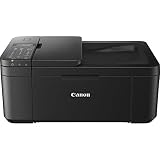
The Canon PIXMA TR4720/TR4722 is a wireless inkjet all-in-one for home and light office use, with print, copy, scan, and fax functions. Its useful combination of automatic two-sided printing, a 20-sheet document feeder, and mobile-printing support comes with an important catch: the ADF cannot scan both sides automatically. Canon’s U.S. shop listing marks the TR4720 as no longer available through that listing, so check current local stock before choosing it.
What the TR4720/TR4722 offers
Canon describes the TR4720 as a 4-in-1 printer: it prints, copies, scans, and faxes. Its U.S. specifications list Wi-Fi printing, Apple AirPrint, Mopria support, and use with Canon’s mobile app. A flatbed scanner is paired with an automatic document feeder (ADF) for multi-page originals. These are manufacturer-listed features, not independently verified performance claims. Canon’s TR4720 specifications
Published specifications
| Feature | Canon’s published figure |
|---|---|
| Black, simplex letter document speed | Approximately 8.8 images per minute (ipm), Canon U.S.A. |
| Color, simplex letter document speed | Approximately 4.4 ipm, Canon U.S.A. |
| Borderless 4 × 6-inch photo print time | Approximately 65 seconds, Canon U.S.A. |
| Maximum print resolution | Up to 4800 × 1200 dpi, Canon U.S.A. |
| Plain-paper input | 100 sheets, Canon U.S.A. |
| Photo-paper input | 20 sheets of 4 × 6-inch paper or 10 sheets of 5 × 7-inch paper, Canon U.S.A. |
| ADF capacity | 20 sheets of letter plain paper or 5 sheets of legal plain paper, Canon U.S.A. |
| Optical scan resolution | 600 × 1200 dpi, Canon U.S.A. |
The speeds and photo time above are Canon’s published specifications; they are not measurements from an independent test of this printer. Actual throughput can vary with the document, settings, connection, and workflow. The listed paper and ADF capacities also make this a modest-capacity device rather than a fit for large recurring print or scan batches.
Do these 3 things before closing this tab:
1Scan for outdated or missing drivers - takes under a minute2Clear out junk files and repair common Windows errors3Fix the driver behind crashes, sound loss and screen glitchesDoes it print and scan both sides?
Automatic two-sided printing
Canon lists automatic two-sided printing for letter-size plain paper. This can reduce manual page turning when printing compatible documents. It does not mean the scanner can automatically capture both sides of an original.
#1 Best Overall

- Product 1: PRINT, COPY, SCAN, FAX: The PIXMA TR4720 is a true 4-in-1 printer that is compact, versatile and easy-to-use..In The Box : PIXMA TR4720 Wireless All-in-One Printer, Set of Starter (PG-275/CL-276) Ink Cartridges, RJ-11 Telephone/Modem Cable, Power Cord, DocumentationFor numbers listed in product description see “specification sheet” in technical specification section below
- Product 1: EASY SETUP: Enjoy simple setup through the Canon PRINT Inkjet/SELPHY app[1].
- Product 1: EASY TO INSTALL: Designed for easy ink cartridge installation and replacement.
- Product 2: Product Type: Inkjet Printer Ink
- Product 2: Package Quantity: 1
Scanning two-sided originals
RTINGS reports that the scanner has an ADF but does not support duplex scanning. For a two-sided original, expect to handle the pages manually to capture the reverse sides; the ADF does not complete a two-sided scan in one pass. RTINGS’ TR4720/TR4722 review
Which ink does the Canon TR4720 use?
The TR4720 uses two cartridge families: PG-275 pigment black and CL-276 dye color. Canon also lists the higher-capacity options PG-275 XL black and CL-276 XL color as compatible.
Rank #2

- PRINT, COPY, SCAN, FAX: The PIXMA TR4720 is a true 4-in-1 printer that is compact, versatile and easy-to-use
- EASY SETUP: Enjoy simple setup through the Canon PRINT Inkjet/SELPHY app[1].
- EASY TO INSTALL: Designed for easy ink cartridge installation and replacement.
- FRONT PAPER TRAY: A fast and easy to load front paper tray with 100 sheet plain paper capacity.
- QUALITY DOCUMENTS AND PHOTOS: Produce quality documents, photos and boarderless[11] prints up to 8.5" x 11"
Canon’s replacement guidance says both a black and a color cartridge must be installed, and standard and XL cartridges can be mixed. The reviewed specifications do not establish cartridge page yields or cost per page, so the XL designation alone is not enough to determine whether a cartridge will be economical for your volume. Check current cartridge prices and Canon’s guidance before buying. Canon cartridge compatibility and replacement guidance
Free tools Windows power users keep installed
One-click scans. No signup required.
Is the TR4720/TR4722 a good fit for your work?
It may suit occasional home or small-office jobs
The feature set covers routine printing, copying, scanning, and faxing, plus wireless and mobile printing. Automatic two-sided printing and a small ADF can help with everyday paperwork, while the flatbed accommodates originals that should not go through a feeder.
Consider another type of printer if volume or scanning is the priority
- Frequent printing: The input tray holds 100 sheets of plain paper. Compare paper capacity and verified ink cost or page yield if you print often; those ownership figures are not established here.
- Large document batches: The ADF holds 20 letter sheets, or 5 legal sheets. A higher-capacity feeder may be more convenient for recurring batches.
- Two-sided scanning: The ADF does not duplex-scan, so a model with automatic duplex scanning is a better match if you regularly digitize double-sided documents.
- No need for fax: Fax is included, but buyers who will not use it may prefer to compare simpler or more compact models. Current comparative prices are not established here.
Availability and Windows setup
Availability depends on retailer and region
Canon’s U.S. shop listing says the PIXMA TR4720 is no longer available through that listing. That does not establish whether the TR4720 or TR4722 is in stock at other retailers or in other regions. Check live local listings and confirm the exact model number before purchasing. Canon U.S. shop listing
Windows wireless setup
Canon’s Windows setup guide describes connecting the printer to Wi-Fi with Easy Wireless Connect, then downloading and installing the setup file and drivers. The process installs MP Drivers and IJ Scan Utility. Canon notes that a Windows computer’s wireless connection may temporarily drop during connection setup. Follow the current guide for your Windows version; setup steps for other operating systems and devices may differ. Canon TR4700 series online manual
Rank #4

- The PG-275 black ink cartridge XL produces, 275xl ink cartridges for canon printers crisp, sharp black text for all your documents. The CL-276XL Color Ink Cartridge for cannon ink 275 276 produces colorful photos and images.
- XL capacity for cannon ink 275 276, canon 275 and 276 ink cartridges can help you print more when you need to and extend the time between replacing ink cartridges
- This 275xl black and the 276xl color replacement for canon 275 and 276 ink cartridges provide peak performance that is specifically designed for canon tr4720 ink cartridges compatible Canon printers
- Higher Page Yield: 450 pages for canon pg-275 black ink cartridge, 400 pages for 276xl ink cartridges for canon printers
- Package List: 1 x PG-275 black ink cartridge, 1 x CL-276XL color ink cartridge, 1 x user guide
Verdict
The TR4720/TR4722’s appeal is its broad home-office feature set: wireless printing, copy, scan, fax, automatic two-sided letter printing, and an ADF. Its main practical trade-offs are modest paper and feeder capacity, no automatic two-sided scanning, and ink costs that cannot be judged from the specifications alone. It makes most sense if you need the included functions for occasional work and can verify availability and cartridge costs where you live.
Recommended Free Tools
Quick Recap
Best Value

- Affordable Versatility - A budget-friendly all-in-one printer perfect for both home users and hybrid workers, offering exceptional value
- Crisp, Vibrant Prints - Experience impressive print quality for both documents and photos, thanks to its 2-cartridge hybrid ink system that delivers sharp text and vivid colors
- Effortless Setup & Use - Get started quickly with easy setup for your smartphone or computer, so you can print, scan, and copy without delay
- Reliable Wireless Connectivity - Enjoy stable and consistent connections with dual-band Wi-Fi (2.4GHz or 5GHz), ensuring smooth printing from anywhere in your home or office
- Seamless Multi-Page Handling - Tackle multi-page documents with ease using the Auto Document Feeder (ADF) for quick scanning and copying
Product prices and availability are accurate as of the date/time indicated and are subject to change. Any price and availability information displayed on Amazon at the time of purchase will apply.

