
iTechGuides is reader-supported. When you buy through links on our site, we may earn an affiliate commission. As an Amazon Associate I earn from qualifying purchases. Learn more
The best 2-in-1 laptop for digital art depends on how you draw. A detachable tablet such as the Surface Pro gives you a screen you can use without a permanently attached keyboard; a 360-degree convertible such as the Lenovo Yoga 9i 2-in-1 Aura Edition folds its keyboard behind the display. For drawing and illustration on the go, prioritize the pen, screen and tablet posture you will actually use. For desk-based design work, a larger display, performance and ports may matter more.
There is no single winner for every creative workflow. The models below are a practical shortlist, with verified differences called out and gaps left explicit rather than filled with guesses.
Which 2-in-1 form is better for creative work?
Detachable: a tablet first
A detachable 2-in-1 separates its keyboard from the screen. That makes it easier to hold or lay the display flat for direct pen work, and it avoids having a keyboard folded underneath your hand while drawing. The trade-off is that the keyboard and pen may be optional purchases, and the screen needs a stand or other support when you want a laptop-like setup.
Crashes, No Sound, or Screen Glitches?
Random freezes, missing sound and display glitches usually trace back to one bad driver. Find and replace yours safely.Free scan · under a minuteWindows Errors? Fix Them Before They Spread
Repair common Windows errors and clear accumulated junk for a smoother, more stable PC - no reinstall needed.Free scan · no reinstallThe current Surface Pro 12th Edition is a detachable design. Microsoft lists 12-inch and 13-inch models, with processor, display and accessory options that vary by configuration.
#1 Best Overall

- Dell Latitude 7420 2-in-1 Laptop, with 16GB DDR4 RAM, 512GB SSD.Fast, powerful and can accommodates any work style.Hold the Latitude 7420 2-in-1 in your hands to use as a tablet.Greatly improved video viewing experience and better screen sharing.
- This refurbished Dell Latitude 7420 2-in-1 Laptop, with Intel Core i5-1145G7, 2.6GHz up to 4.4GHz. The classic 11th generation Intel CPU accelerates instantly and runs smoothly.
- Display: 14 "FHD (1920 x 1080) resolution. The renewed Dell Latitude 7420 2-in-1 Laptop comes with a Touchscreen for faster and more efficient completion of your work and learning.
- The reconditioned Dell Latitude 7420 2-in-1 Laptop has rich ports and multiple extensions to meet the needs of any workplace scenario.
- Windows 11 pro:You can enjoy faster performance, a more beautiful interface, higher security, and better cloud service integration. In addition, Windows 11 provides new features and experiences that enable you to complete tasks more efficiently and have a better user experience.
360-degree convertible: a laptop that folds
A convertible keeps its keyboard attached and folds it behind the touchscreen. It can move quickly between laptop and tablet postures without separating parts, which suits people who alternate between typing and touching the screen. In tablet mode, however, the folded keyboard remains behind the display; consider whether that feels comfortable and stable for your drawing habits.
The Lenovo Yoga 9i 2-in-1 Aura Edition is a 360-degree convertible. Tom’s Guide describes a 14-inch 2.8K OLED touchscreen with a 120Hz refresh rate and a 360-degree hinge.
Rank #2
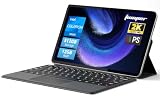
- 2-in-1 Tablet & Laptop Design:This versatile 2-in-1 device integrates tablet portability with laptop productivity, equipped with a detachable magnetic leather keyboard and multi-angle adjustable stand. Crafted with premium metal body at only 0.64kg, ultra thin and lightweight for easy backpack storage, perfect for business, study, office and daily portable use.
- 12 Inch 2K Touch IPS Display:Features 12-inch 2000×1200 FHD IPS touchscreen with 16:9 cinematic ratio, delivering vivid and delicate visual effects. Adopts in-cell full-fit anti-glare technology and 10-point capacitive touch, brings smooth touching operation and eye-friendly protection for working, studying and video watching.
- Intel N5095 Processor & Upgraded Storage:Powered by Intel N5095 4-core 4-thread processor, up to 2.9GHz turbo frequency with 4MB smart cache, running smoother than regular Celeron processors. Built-in 12GB RAM and 512GB SSD, effortlessly handle multi-tasking, web browsing and daily office software.
- 4300mAh Battery & Full-Featured Connectivity:Built-in upgraded 4300mAh large capacity battery supports up to 8 hours of video playback for all-day outdoor use. Comes with dual-band WiFi and Bluetooth 5.0 for faster and more stable wireless connection. Dual full-function Type-C ports support charging, data transfer and video output, paired with 3.5mm audio jack and built-in cooling fan for efficient heat dissipation and stable long-time operation.
- Dual Cameras & Windows 11 Home System:Equipped with front 200W and rear 500W HD cameras, ideal for online classes, video conferences and Zoom calls. Matched with dual stereo speakers for clear sound quality. Pre-installed Windows 11 Home system with multi-language support, ready to use out of the box, great choice for students, office workers and home entertainment.
Shortlist: current 2-in-1 laptops for creatives
| Model | Form and verified details | What to check before choosing |
|---|---|---|
| Microsoft Surface Pro 13-inch (12th Edition) | Detachable tablet-laptop. Microsoft lists OLED or LCD at 2880 × 1920 and 120Hz, with Snapdragon X2 Plus or X2 Elite processor options. Its support documentation lists 4,096 pressure points for supported pen use. | Confirm the exact display and processor SKU, and budget for the pen and keyboard if needed; Microsoft says both are sold separately. The product page also lists a 12-inch model, which has a different display. |
| Lenovo Yoga 9i 2-in-1 Aura Edition (14-inch) | 360-degree convertible with a 14-inch 2.8K OLED touchscreen, 120Hz refresh rate and folding hinge, as described by Tom’s Guide. | Confirm pen support and what is included with the specific regional configuration. The cited comparison does not establish a full, directly comparable pen-latency or color-accuracy result. |
| LG gram Pro 2-in-1 16 (2026) | RTINGS named it the best 2-in-1 overall in its list updated October 1, 2026. | An overall ranking does not by itself establish the best drawing experience. Verify the exact display and pen configuration for the model you are considering. |
| ASUS ProArt GoPro Edition PX13 | A creative-branded convertible included in Tom’s Guide’s 2026 comparison. | Confirm pen behavior, regional specifications and included accessories for the exact configuration; the cited battery result is not a pen or color-accuracy test. |
| HP OmniBook X Flip 14 | A convertible included in Tom’s Guide’s 2026 comparison. | Check the display, active-pen support and configuration available in your region. Its battery figure below is a result from one stated test method, not a universal runtime guarantee. |
RTINGS’ October 1, 2026 update also names the Surface Pro 13 12th Edition as its upper mid-range tablet-style pick. These are editorial recommendations for different categories, not proof that one model is best for every art application or working style. See RTINGS’ 2026 2-in-1 roundup and Tom’s Guide’s 2026 comparison for their respective selections.
Check pen compatibility before you buy
A touchscreen is not enough to establish that a laptop supports the active pen features you need. Check the laptop generation and exact configuration against the pen maker’s compatibility information, then confirm which pen is included or sold separately. Microsoft’s Surface Pen compatibility chart lists supported Surface models and features. Microsoft documents 4,096 pressure points for pen and inking support on the Surface Pro 12-inch and Surface Pro (12th Edition).
Rank #3

- 【RAM & Storage】This computer comes with 16GB RAM DDR5 | 512GB SSD
- 【AMD Ryzen AI 5 340 Processor】It is a powerful mobile processor from the Krakan Point family that was announced at CES in early 2025. The APU integrates 6 CPU cores (3x Zen 5 with up to 4.8 GHz and 3x Zen 5c with less cache and a maximum of 3.4 GHz) and a big 16 MB L3-Cache.
- 【16 " (1920x1200) touch Display with IPS】Bigger is always better with a vibrant 1920 x 1200 resolution screen and 178-degree wide-viewing angles. Intuitive touchscreen technology lets you control your PC right from the screen. To make what you create look even better, AMD FreeSync optimizes refresh rates for flawless sync with your graphics. Multitouch-enabled, IPS (in-plane switching), edge-to-edge glass.
- 【Other features】AMD Radeon 840M Graphics,Copilot+ PC,Poly Studio audio with dual speakers,DTS: X Ultra Technology,HP 5MP IR Camera with HDR Switch,Windows 11 Home OS.
- 【Bundle with Capacitive Stylus with Magnetic Cap】Stylus pen is made of aluminum alloy, which is light weight and very comfortable to hold, and it does not need to connect Bluetooth and does not need to be charged. The cap is magnetic and can absorb in the end of stylus pens.
Pressure response is only one part of drawing feel. For your intended apps, look for independent testing of tilt behavior, latency and line response as well as pressure support. The cited comparisons do not provide an apples-to-apples pen test across every model in this shortlist, so they do not support ranking these laptops by drawing feel alone.
Compare the screen to your actual work
For the Surface Pro 12th Edition, Microsoft lists a 12-inch LCD at 2196 × 1464 and 90Hz. The 13-inch version is listed with OLED or LCD at 2880 × 1920 and 120Hz; do not assume every 13-inch unit has OLED. Check the configuration you are pricing, not just the family name.
Rank #4

- Laptop Size: This renewed Lenovo Latitude 7420 2 in 1 Business Laptop, has a screen size of 14 "and a length to width ratio of 16:9. The touchscreen FHD anti-glare screen, mostly reduces fatigue when using it, allowing you to focus on work. This Dell Latitude touchscreen refurbished laptop is a great choice for your Business.
- Processor: This Renewed Dell Latitude 7420 2-in-1 touch laptop is installed with Intel Core i7-1165G7 (4.7GHz Max Turbo Frequency, 4 Cores, 8 Threads, 12 MB Smart Cache), meeting the fast and stable operation of most programs.
- Powerful Memory: This refurbished Laptop computer has installed 16GB of RAM running memory and 512GB of Solid State Drive for you, allowing you to run multiple software and browsers at the same time with confidence, the Dell Latitude powerful hard drive gives you enough space to download files!
- System: Windows 11 Pro is recognized as the most stable operating system, which is mostly for both commercial and professional users. Windows 11 Pro provides more security and management features for this used Laitude 2in1 touch Laptop notebook, as well as supporting virtualization and remote access. Meanwhile, it supports multiple languages, including English, French, Spanish, German, etc.
- [Refurbishment] - The power supply and charger of refurbished products may not be original, but they are compatible with the computer and fully functional. The product is delivered in an ordinary packaging box, not the original packaging box.
Resolution and refresh rate do not tell the whole story for visual work. Check independent information on color coverage and accuracy, brightness and reflectivity for the exact panel where those characteristics matter to your projects. The cited sources do not establish directly comparable color measurements for every model here, so a general “best screen” ranking would overstate what is known.
Match performance and portability to the workload
Choose processor and memory for the applications, canvas sizes, layers and other projects you expect to use. A lightweight sketching workflow and a large, complex project can place very different demands on a laptop. Compare the available configuration against the requirements of your own software; the model names alone do not establish which configuration will be sufficient.
Best Value

- 【Processor】Intel Core Ultra 7 256V 8-Core Processor (Up to 4.8 GHz with Intel Turbo Boost Technology,12 MB Intel Smart cache. 8 Cores: 4 Performance Cores + 4 Efficient Cores, 8 Threads). AI-Powered performance for multitasking with Intel AI Boost NPU offering up to 47 TOPS for AI task processing, and Intel Arc 140V Graphics for smooth visuals.
- 【Display】16" diagonal 2K (1920 x 1200) 16:10 aspect ratio IPS LED 120Hz Touchscreen (DisplayHDR, 400 nits, 100% DCI-P3, Blue Light). Transform your content with 1920 x 1200 resolution and 178-degree wide-viewing angles. Multi-touch enabled, IPS (in-plane switching), edge-to-edge glass, micro-edge, Corning Gorilla Glass 3. Scratch and damage resistant.
- 【Memory & Storage】16GB LPDDR5x-8533 MT/s Memory, 1TB PCIe Gen4 Solid State Drive (Boot SSD), Original Factory Box will be opened and resealed for Upgrade.
- 【Tech Specs】Slim, sleek, thin and lightweight 2 in 1 design. Intel Evo Platform Powered by Intel Core Ultra 7 256V (8-Core), Built-in NPU (47 TOPS. Windows 11 Copilot+ PC: Boost Creativity & Productivity with AI Assistance. Long Battery Life Up to 22.75 hours. HP 5MP IR Camera With HDR Switch: Enhanced by AI Noise Reduction & Poly Studio Audio Tuning. Backlit Keyboard. DTS: X Ultra Technology.
- 【Operating System】 Weight Only 3.06 lbs, 0.58 Inch Thin. Stylus included. Windows 11 Hom. Wi-Fi 6E (2x2). 3-cell 65 Wh Li-ion polymer battery up to Up To 22 Hours And 45 Minutes Video Playback Battery LifeD. 5MP IR webcam. HDMI. Thunderbolt 4. Bluetooth 5.3.
For a portable setup, also consider the full working arrangement: screen, keyboard, pen, stand if needed, chargers and any adapters required by your workspace. Count the ports you use regularly and check whether the particular model has them. The product details cited here do not provide a complete, comparable port inventory across all shortlisted configurations.
Independent reader supportYour contribution helps us test, update, and keep practical guides available for everyone.How to interpret the battery figures
Tom’s Guide reports the following results from its test with screens set to 150 nits and continuous Wi-Fi browsing. These are hours and minutes from that review procedure, not manufacturer-rated figures or a promise of runtime during drawing, rendering or other creative work.
| Model | Tom’s Guide battery test |
|---|---|
| Lenovo Yoga 9i 2-in-1 Aura Edition | 12:47 |
| ASUS ProArt GoPro Edition PX13 | 11:12 |
| HP OmniBook X Flip 14 | 08:32 |
Use these results to compare the three laptops under the same review’s conditions, not to predict your own battery life. Display brightness, application workload and other usage conditions can differ from the test.
The Tool Desk
Outbyte Driver Updater FREEFix the driver behind crashes, sound loss and screen glitchesFind Drivers →Outbyte PC Repair FREEClear out junk files and repair common Windows errorsFree Scan →Calculate the complete setup cost
Compare the configuration you will actually use, not only the base laptop price. Microsoft says the Surface Slim Pen and Surface Keyboard are sold separately. Some 13-inch keyboard variants store and charge the pen, but accessory details depend on the variant. Check the current local listing for the laptop, display, processor, pen, keyboard and storage you need, then include any necessary adapters or stand in your total.
- Choose the posture: decide whether you want a detachable tablet or a 360-degree convertible.
- Verify the exact screen: check panel type, resolution and refresh rate for the specific configuration.
- Confirm the pen: check compatibility and features for that generation, plus whether the pen is included.
- Match the configuration to your apps: compare processor and memory options with your project needs.
- Price the complete setup: add keyboard, pen, storage and any accessories you need, and compare local availability.
Which one should you choose?
- Choose the Surface Pro 13-inch (12th Edition) if you want a detachable tablet posture and value a configuration with a documented 120Hz display option and supported pen input. Verify whether the unit you want has OLED or LCD and include the separately sold pen and keyboard in your budget.
- Choose the Lenovo Yoga 9i 2-in-1 Aura Edition if you prefer a conventional laptop that folds into a touchscreen tablet and the reviewed 14-inch OLED configuration fits your needs. Confirm pen and accessory details for the exact unit.
- Consider the LG gram Pro 2-in-1 16 (2026) if you want to investigate RTINGS’ current overall pick, while treating that category ranking as a starting point rather than evidence of superior pen performance.
- Compare the ASUS ProArt GoPro Edition PX13 and HP OmniBook X Flip 14 if their configurations suit your creative workload; verify display, pen and regional details before deciding.
For additional creative-workflow context, Microsoft’s 2-in-1 creative-workflow page describes a stylus and high-resolution display as part of a digital drawing setup. Treat that as manufacturer guidance, not independent evidence that a particular model will feel natural for every artist.
Quick Recap
Product prices and availability are accurate as of the date/time indicated and are subject to change. Any price and availability information displayed on Amazon at the time of purchase will apply.

