
The Tool Desk
Outbyte PC Repair FREERepair Windows errors before they cause bigger problemsFix Now →Outbyte Driver Updater FREEFix the driver behind crashes, sound loss and screen glitchesFind Drivers →iTechGuides is reader-supported. When you buy through links on our site, we may earn an affiliate commission. As an Amazon Associate I earn from qualifying purchases. Learn more
A Samsung Galaxy Watch battery can drain quickly because the watch is still setting up, an app is active in the background, the display or notifications wake often, or the watch is searching for a network or using GPS. Frequent health measurements and voice wake features can also add to power use. Start with the checks below; the right fix depends on your model, software version, and which features you rely on.
Why a Galaxy Watch battery may drain quickly
Setup and usage learning on a new or reset watch
App installation and device setup can use more power than normal. Samsung says a newly configured watch may also take about the first week to learn usage patterns and optimize battery performance. Treat that as a qualified adjustment period, not a guarantee that every watch will normalize on a fixed schedule. If the watch has been set up for longer and still drains unusually fast, continue troubleshooting.
Screen, notifications, and wake features
A bright display, long screen timeout, Always On Display, and frequent screen wake-ups can increase consumption. Notifications that light the screen add activity, as can voice wake features that keep the watch ready to respond.
Apps, connections, and location
Apps can continue working in the background after you stop using them. An app problem or outdated software may also contribute. Wi-Fi or mobile-network searching—particularly where reception is weak—and GPS use can draw power.
#1 Best Overall
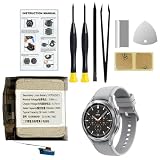
- Compatible Smartwatch Model: This battery kit is specifically designed for Samsung Galaxy Watch 4 44mm (with model SM-R870 series) and Watch 4 Classic 46mm (with model SM-R890 series), please double confirm your smartwatch model before purchasing
- Quality Li-Po Cell: Built with brand new zero cycle original Li-Po cell, manufactured and tested under UL2054 test standards to ensure the best performance and long-lasting battery life. NOTE: A new battery requires at least three full charge and discharge cycles to properly calibrate the battery management system
- Detailed Repair Guide: The package includes a complete and detailed repair guide, allowing you to easily handle the repair yourself with convenience and peace of mind
- Professional Repair Toolkit: Carefully selected by our expert repair team, this kit includes every tool you need for the repair process. It's professional, safe, and easy to use, giving you the confidence to complete your repair quickly and efficiently
- Extra Protection: Each smartwatch battery is packaged in a custom hard plastic case with anti-static foam inside, providing effective protection against bumps and pressure during shipping, ensuring your item arrives safely
Health tracking and environmental or hardware issues
Frequent automatic heart-rate or stress measurements may use more power than less frequent or manual checks. Physical or liquid damage, a problem with charging equipment, or temperature extremes can also affect operation. Samsung does not provide a universal runtime or a guaranteed battery-life improvement for any individual setting, so compare the watch’s behavior before and after a change rather than expecting a fixed number of hours.
How to troubleshoot battery drain
-
Allow setup to settle if the watch is new
If you recently bought or reset the watch, let setup and app installation finish. Samsung describes usage-pattern learning as lasting about the first week; persistent drain beyond that is a reason to check settings and apps rather than assume the watch is still learning.
-
Update software and apps
Install available watch software and app updates. Samsung notes that app bugs can cause excessive battery use. Menu labels and update paths vary by Galaxy Watch model and software version.
Recommended Free Tools
Special offer. See more information about Outbyte and uninstall instructions. Please review EULA and Privacy policy.Rank #2
![Senpinkboo for Samsung Galaxy Watch 6 Battery Upgraded [320mAh] EB-BR935ABY Battery for Watch 6 SM-R930 SM-R935 SM-R935U 40mm Replacement with Repair Tool Kit+Screws](https://m.media-amazon.com/images/I/51cyykrSp3L._SL160_.jpg) Senpinkboo for Samsung Galaxy Watch 6 Battery Upgraded [320mAh] EB-BR935ABY Battery for Watch 6 SM-R930 SM-R935 SM-R935U 40mm Replacement with Repair Tool Kit+Screws
Senpinkboo for Samsung Galaxy Watch 6 Battery Upgraded [320mAh] EB-BR935ABY Battery for Watch 6 SM-R930 SM-R935 SM-R935U 40mm Replacement with Repair Tool Kit+Screws- Compatible Model:This Replacement Battery model is SM-R930 SM-R935 SM-R935U. please carefully examine your device model and old battery if it fits before purchasing.
- HIGH QUALITY GRADE A PREMIUM BATTERY:Each battery is tested to strict quality control standards and includes a built-in IC chip to prevent overcharging, overheating, and other defects.You can choose it with confidence.
- Easy To Install:The installation process is not complicated,most people can replace it by themselves. And YouTube also has many installation tutorials videos to reference.
- Quality Assurance:Before shipment, every item was thoroughly tested and packaged. Brand new and high quality. Perfect for SM-R930 SM-R935 SM-R935U battery.
- Good After-sales Service:We are very focused on the customer experience.Please contact us if you have any questions, whether pre-sales or after-sales. We will try our best to solve it for you.
-
Find apps using power in the background
Where your model offers app battery reporting, review which apps use the most power. Close apps you are not using, and uninstall ones you no longer need. If drain began after installing or updating a particular app, check whether its battery use stands out.
-
Reduce display and notification activity
Try lowering screen brightness, shortening the screen timeout, or turning off Always On Display. Disable notifications you do not need and, where available, prevent notifications from automatically waking the screen. Change one or two settings at a time so you can tell which change helps.
-
Check Wi-Fi, mobile service, and GPS
Turn off Wi-Fi or mobile connections when they are not needed, and disable GPS when you are not using location-based features. This may interrupt services that depend on those connections; turning off mobile service on an LTE watch can disconnect it from its carrier. Weak-network searching may be a reason to test a connection setting, but do not disable a feature you need for calls, messages, or location tracking.
Rank #3
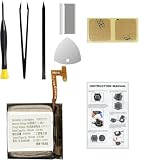 Replacement Battery for Galaxy Watch 4 (40mm) & Galaxy Watch 4 Classic (42mm), EB-BR880ABY Battery for SM-R860 & SM-R880, with Repair Tools & Instruction
- Compatible Smartwatch Model: This battery kit is specifically designed for Samsung Galaxy Watch 4 40mm (with model SM-R860 series) / Watch 4 Classic 42mm (with model SM-R880 series), please double confirm your smartwatch model before purchasing
- Quality Li-Po Cell: Built with brand new zero cycle original Li-Po cell, manufactured and tested under UL2054 test standards to ensure the best performance and long-lasting battery life. NOTE: A new battery requires at least three full charge and discharge cycles to properly calibrate the battery management system
- Detailed Repair Guide: The package includes a complete and detailed repair guide, allowing you to easily handle the repair yourself with convenience and peace of mind
- Professional Repair Toolkit: Carefully selected by our expert repair team, this kit includes every tool you need for the repair process. It's professional, safe, and easy to use, giving you the confidence to complete your repair quickly and efficiently
- Extra Protection: Each smartwatch battery is packaged in a custom hard plastic case with anti-static foam inside, providing effective protection against bumps and pressure during shipping, ensuring your item arrives safely
-
Adjust automatic health measurements and voice wake
If your model offers the option, consider measuring heart rate or stress less frequently or manually. Turn off voice wake if you do not use it. Keep any health tracking you rely on; reducing measurement frequency changes how often the watch records information.
Do these 3 things before closing this tab:
1Repair Windows errors before they cause bigger problems2Fix the driver behind crashes, sound loss and screen glitches3Clear out junk files and repair common Windows errorsSpecial offer. See more information about Outbyte and uninstall instructions. Please review EULA and Privacy policy. -
Use a restrictive power mode only when its trade-offs work for you
Power Saving can extend use by limiting some combination of connectivity, background activity, display behavior, or performance. Watch only mode is more restrictive and is intended for timekeeping when smart features are unnecessary. Exact behavior varies by model and software version, so check the mode description on your watch before enabling it.
-
Inspect the watch and charger
Check for visible damage or signs of liquid exposure, and inspect the charger and charging connection. Samsung advises using approved chargers and accessories designed for the device and avoiding very hot or cold conditions. A compatible charger supports proper charging, but replacing one will not resolve a software problem or worn battery capacity.
Rank #4
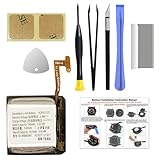 GREEN FUSION for Galaxy Watch 4 (40mm) & Watch 4 Classic (42mm) Battery Replacement, EB-BR880ABY Battery for SM-R860/865 SM-R880/885 with Repair Toolkit, Instruction Manual
- COMPATIBILITY: The battery model is EB-BR880ABY, it is only compatible with Samsung Galaxy Watch 4 (40 mm), SM-R860 SM-R865 series and Galaxy Watch 4 Classic (42mm) SM-R880 SM-R885, please carefully confirm the model of your smartwatch before purchase.
- Premium Battery Cell Upgrade: Designed with a brand new, original SDI Li-ion cell, this battery ensures top-tier performance, reliability, and extended battery life. Engineered for durability, it delivers a consistent power supply to keep your device running at peak efficiency for longer.
- Included Adhesive: Battery adhesive is included for effortless installation. Tips: A new battery needs at least three full charging and full discharging cycles to complete the calibration
- Step-by-step Instruction: The battery comes with a detailed instruction manual to help you walk through each repairing process, you'll find it is an easy task for you to complete the repair yourself
- Comprehensive Toolkit: The kit has every tool you need for repairing, it's professional, safe and easy to use, help you to perform your repair efficiently
-
Run a diagnostic or contact support if drain persists
If the steps above do not help, use the Samsung Members battery diagnostic if it is available to you, including when the watch is paired with a Samsung phone. Otherwise, contact Samsung support for model-specific guidance.
Choose battery-saving changes by what you can give up
| Change | Potential benefit | Trade-off |
|---|---|---|
| Turn off Always On Display, lower brightness, or shorten screen timeout | Less display activity | The screen may be less immediately visible or turn off sooner. |
| Limit screen-waking notifications | Fewer automatic screen wake-ups | You may miss alerts you chose not to receive or see immediately. |
| Reduce automatic health-measurement frequency | Less frequent monitoring activity | Fewer measurements are recorded; retain tracking you need. |
| Disable Wi-Fi, mobile service, or GPS when not needed | Less network searching or location activity in some situations | Features that depend on the disabled connection or location may stop working; LTE service may disconnect. |
| Power Saving or Watch only mode | Lower power use through restricted activity | Connectivity, background work, display behavior, performance, or smart features may be limited, depending on mode and model. |
Samsung’s official troubleshooting guidance covers these causes and remedies, but available settings and exact menu paths differ across models, software versions, and regions. See Samsung Canada’s Galaxy Watch battery guidance, Samsung India’s battery troubleshooting page, Samsung US troubleshooting, Samsung Watch5 and Watch5 Pro guidance, and Samsung Watch7 and Watch Ultra power-mode guidance for guidance relevant to your device and region.
What’s actually slowing this PC down?
Pick the symptom - the matching free tool is one click away.
Quick Recap
Product prices and availability are accurate as of the date/time indicated and are subject to change. Any price and availability information displayed on Amazon at the time of purchase will apply.

