
iTechGuides is reader-supported. When you buy through links on our site, we may earn an affiliate commission. As an Amazon Associate I earn from qualifying purchases. Learn more
You can send a simple newsletter from Gmail with Compose and a recipient list. Use Bcc when you want to hide recipients’ addresses in one shared email; use Gmail’s mail merge when you need individualized copies, merge fields, or separate reply threads. The right method depends on your audience, account type, and sending volume.
Choose the right Gmail method
| Method | Best for | Personalization | Address visibility and replies | Main constraint |
|---|---|---|---|---|
| Bcc on a regular message | A small, simple newsletter sent as one shared message | No individualized merge fields | Bcc recipients do not see one another; normal group-message reply behavior applies | Gmail’s sending and recipient limits still apply |
| Contact label or group address | Reusing a managed audience | Does not provide individualized merge fields by itself | Depends on recipient fields and group configuration | Check group membership and privacy before sending |
| Gmail mail merge | Personalized newsletters and announcements sent as individual copies | Supports merge tags and spreadsheet fields | Recipients cannot see other recipients; replies arrive in separate threads | Availability, quotas, and feature restrictions vary by account and workflow |
Google’s help pages describe these Gmail features and their limits; check the current guidance for your account before a large send. Google’s instructions for sending Gmail messages and mail merge documentation explain the relevant controls.


Send a basic newsletter to a group in Gmail
- Open Gmail and select Compose.
- Add recipients in To, Cc, or Bcc. Use Gmail’s recipient controls to add individual addresses or a contact label.
- Enter a clear subject and write your newsletter in the message body.
- Check the recipient field, subject, links, and message content. Select Send when everything is correct.
For a recurring audience, a contact label or group address can save you from entering addresses one by one. It is still a group email, not a personalized message to each subscriber.
Outdated Drivers Are Slowing You Down
One free scan finds every outdated or missing driver and matches the right update for your exact hardware.Free scan · exact hardware matchWindows Errors? Fix Them Before They Spread
Repair common Windows errors and clear accumulated junk for a smoother, more stable PC - no reinstall needed.Free scan · no reinstallHide recipients’ addresses with Bcc
Put the audience in Bcc if everyone should receive the same newsletter but should not see one another’s email addresses. Gmail says Bcc recipients cannot see other Bcc recipients. Addresses placed in To or Cc remain visible to the recipients. See Google’s explanation of sending and recipient fields.
#1 Best Overall

- UNDATED PLANNER NOTEBOOK: This personal organizer works great with any planning style! Use it for notes, plans or goals. Works great as a daily journal, weekly planner or to do list notebook. Features a durable plastic cover that will last all year.
- CREATE YOUR OWN daily, weekly or monthly planner with a useful date tracker on every page. Also includes a section with fill-in circles and blank lines for a checklist, habit tracker or agenda planner.
- NO MORE INK GHOSTING: Our premium 80 gsm acid-free paper is thicker than average planners, so you can confidently use most pens without fear of bleed-through. Includes 104 lined pages for note taking and journaling.
- PLAN AHEAD: Perfect daily agenda and planner notebook for school, college, work or home. This productivity planner is ready to be packed full of big plans and busy schedules. Available in a variety of colors.
- PERFECT SIZE: This 8.5 x 11 spiral planner lays flat on your desk and is the perfect size for students, teachers, work or personal use. Lightweight and easy to carry in your tote bag or backpack.
- Use Bcc for a modest-sized audience receiving one shared message.
- Before sending, verify that the audience is in Bcc—not To or Cc—if address privacy is important.
- Remember that Bcc does not personalize the message. Everyone receives the same content, and replies follow ordinary group-email behavior.
Send personalized newsletters with Gmail mail merge
Mail merge sends each recipient a unique copy, can insert fields such as first or last name, keeps recipients from seeing the rest of the audience, and puts replies into separate threads. You can supply recipient details and custom merge fields from a spreadsheet. Google’s mail merge help page describes the feature and its account-specific limits.
Understand mail merge quotas
Google’s currently documented daily limits distinguish account types: standard Gmail accounts have a limit of 500 outgoing messages per day; work, school, and Workspace Individual accounts have a limit of 2,000 outgoing messages per day. Mail merge allows up to 1,500 recipients in the To line per message and up to 1,500 recipients per day, subject to the account’s overall sending capacity. These are Google-documented limits, not a guarantee that every account has identical access or quota.
Rank #2
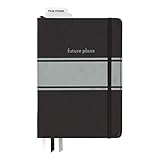
- Includes (1) journal planner and (1) stencil ruler.
- Measures 6" W x 8.5" L and contains 240 pages.
- Let your creativity flow with our personal planner! Keep yourself on task and organized with half of the pages, while drawing, doodling, note taking, or reflecting with the other half.
- Personal journal planner has an elastic band closure and 3 ribbon place markers.
- Comes with a stencil ruler to help with organizational planning and artistic masterpieces.
Mail merge allows one recipient each in Cc and Bcc; those copies count toward the daily sending limit. Google also says a mail merge adds a unique unsubscribe link. Unsubscribe data and behavior differ for work or school accounts and among senders in the same domain, so review the details for your account on Google’s mail merge page.
Know what mail merge cannot do
Google documents that mail merge cannot be used for replies or forwards, scheduled send, confidential mode, or plain-text messages. It also cannot send from a different domain, including secondary domains and aliases. If your message needs one of these options, use a regular Gmail message instead.
Rank #3
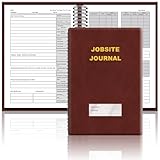
- The Jobsite Journal: this offering features a single black construction planner ensures you have a streamlined tool for organized recording at the jobsite, allowing you to document ideas, create sketches, and monitor progress in one centralized place. Crafted with quality in mind, this journal is a daily essential for jobsite scheduling, serving as a reliable partner for all your documentation needs
- Portable Design: measuring approximately 7 x 10 inches, the construction notebook fits seamlessly into work bags or briefcases, making it a go-to accessory for architects, engineers, and field professionals. Its ample page space ensures notes and sketches remain comprehensive and legible, while its lightweight design supports mobility during site visits and meetings
- Productive Layout: featuring a clear, efficient layout, the construction daily log book eliminates organizational challenges, enabling effortless documentation of critical details-including jobsite activities, task timelines, and milestone dates. It serves as a trustworthy archive for referencing, verifying, and reviewing site information, essential for project accountability and compliance
- Premium Materials for Durability: constructed with high-quality PU leather and premium paper, this project management notebook is built to endure daily use, while offering a smooth writing experience.The sleek, solid-black cover combines modern style with long-lasting durability, preserving its pristine appearance even after frequent use-all while safeguarding your work records. Designed with a spiral binding, it allows for easy, flat-page access, making note-taking effortless
- Versatile Utility: engineered to meet the demands of anyone requiring systematic and dependable note-taking, drafting, or sketching, this Record Construction Planner adapts to various roles-from architects and engineers to site supervisors. Its thoughtful size and design make it suitable for individual use or collaborative teams, ensuring it caters to diverse needs in field observations, project planning, and progress tracking
Check Gmail sending limits before a large send
Google’s general limits page says a personal Gmail account may encounter the “You have reached a limit for sending mail” error if a single message has more than 500 total recipients or if more than 500 emails are sent in a day. Google says sending may resume within 1 to 24 hours and suggests using a Google Group for a group of recipients. These general limits are not interchangeable with the separate account-specific mail merge quotas. Check Google’s sending and receiving limits and the mail merge limits for the method and account you plan to use.
Meet Gmail’s sender requirements for bulk email
Google’s sender guidelines apply to email sent to personal Gmail accounts. Baseline requirements include SPF or DKIM authentication, valid forward and reverse DNS, TLS, acceptable spam rates, and RFC 5322-compliant message formatting. Senders sending more than 5,000 messages per day to Gmail accounts have additional requirements, including SPF and DKIM, DMARC, alignment for direct mail, and unsubscribe support for marketing and subscribed messages. Google’s guidelines specify a reported spam rate below 0.3%; Google says enforcement for non-compliant traffic began ramping up in November 2025. Read the current Email sender guidelines and guidelines FAQ. These are Google’s delivery requirements, not a complete statement of legal obligations in every jurisdiction.
Independent reader supportYour contribution helps us test, update, and keep practical guides available for everyone.Handle newsletter attachments
Personal Gmail accounts have a 25 MB attachment limit. For larger files, Gmail removes the attachment and adds a Google Drive link. In mail merge, an attachment is copied into every recipient’s message, which can consume substantial storage for a large audience. When it suits the content, share a Drive link instead, and check that its permissions let recipients open it. See Google’s attachment instructions and mail merge guidance.
Quick Recap
Product prices and availability are accurate as of the date/time indicated and are subject to change. Any price and availability information displayed on Amazon at the time of purchase will apply.

