
Windows Errors? Fix Them Before They Spread
Repair common Windows errors and clear accumulated junk for a smoother, more stable PC - no reinstall needed.Free scan · no reinstallOutdated Drivers Are Slowing You Down
One free scan finds every outdated or missing driver and matches the right update for your exact hardware.Free scan · exact hardware matchiTechGuides is reader-supported. When you buy through links on our site, we may earn an affiliate commission. As an Amazon Associate I earn from qualifying purchases. Learn more
Prepare for smartphone theft before it happens: turn on your phone’s theft and finding features, strengthen its lock screen, make sure your data and account can be recovered, and keep its identifiers and response contacts somewhere you can reach without the phone. The menus and feature availability differ between iPhone and Android, so check your own device rather than assuming every option is present.
1. Turn on theft protection and remote finding
These settings work best when configured before a phone goes missing. Remote finding can help you locate or lock a device, while theft-specific protections add safeguards to selected actions. No feature guarantees recovery or prevents every kind of account compromise.
iPhone: check Stolen Device Protection and Find My
On an iPhone, go to Settings > Face ID & Passcode > Stolen Device Protection and check whether it is on. Apple says the feature requires iOS 17.3 or later, a passcode, Face ID or Touch ID, two-factor authentication, Significant Locations, and Find My. It may already be enabled on some phones, so verify the setting rather than assuming.
Stolen Device Protection requires biometric authentication for selected sensitive actions and can add a security delay before changes to critical settings or the Apple Account. Its additional checks are normally tied to locations away from familiar places such as home or work; Apple also provides an “Always” option. See Apple’s Stolen Device Protection requirements and behavior. Confirm that Find My is enabled as well, since it is central to locating a missing iPhone and using Lost Mode.
#1 Best Overall

- Smart Design and Large Capacity: Our Anti-theft Travel Bag is designed for convenience and functionality, streamlining your travel experience with ample space for essentials. Customers love its secure storage, making travel stress-free.
- Superior Quality and Durability: Crafted from premium materials, the WANDER PLUS travel purse is known for its durability and secure zippers. Customers appreciate its well-made fabric and reflective band for nighttime safety, perfect for urban adventurers.
- Ideal for All Occasions: Made from high-quality Oxford textile, the WANDER PLUS Travel Bag is 100% waterproof, ensuring protection in any weather. Whether for travel, day trips, or sightseeing, it offers peace of mind and reliability.
- Slim, Snug, and Comfortable: Our crossbody bag fits your body perfectly, with an adjustable strap for comfort. Its slim profile is stylish yet unobtrusive, ideal for various activities while ensuring security and comfort.
- Exceptional Customer Support and warranty : At WANDER PLUS, we stand behind the quality of our products. That's why we offer a one-year warranty for any quality issues, ensuring you can shop with confidence. Additionally, our dedicated customer service team guarantees a response to all inquiries within 24 hours, providing you with reliable and timely support whenever you need it.
Android: check Theft protection and Find Hub
On Android, check Settings > Google > All services > Theft protection. Also confirm that the phone is signed in to the Google Account you can access, Location is enabled, and Find Hub is ready. Google says a screen lock is required for theft protection, and availability varies by device model and Android version; some features require Android 15 or newer. Menu names and available controls can differ. Google’s theft-protection setup guide explains the options on supported devices.
Google announced expanded safeguards for Android 16 and later on January 27, 2026, including updates to theft-protection features. An announcement does not mean every feature is already available on every handset: check the settings actually shown on your phone and consult its maker’s guidance if a menu is missing. Google’s announcement describes the Android 16+ updates.
Rank #2
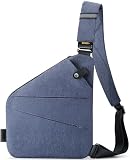
- Smart Design and Large Capacity: Our Anti-theft Travel Bag is designed for convenience and functionality, streamlining your travel experience with ample space for essentials. Customers love its secure storage, making travel stress-free.
- Superior Quality and Durability: Crafted from premium materials, the WANDER PLUS travel purse is known for its durability and secure zippers. Customers appreciate its well-made fabric and reflective band for nighttime safety, perfect for urban adventurers.
- Ideal for All Occasions: Made from high-quality Oxford textile, the WANDER PLUS Travel Bag is 100% waterproof, ensuring protection in any weather. Whether for travel, day trips, or sightseeing, it offers peace of mind and reliability.
- Slim, Snug, and Comfortable: Our crossbody bag fits your body perfectly, with an adjustable strap for comfort. Its slim profile is stylish yet unobtrusive, ideal for various activities while ensuring security and comfort.
- Exceptional Customer Support and warranty : At WANDER PLUS, we stand behind the quality of our products. That's why we offer a one-year warranty for any quality issues, ensuring you can shop with confidence. Additionally, our dedicated customer service team guarantees a response to all inquiries within 24 hours, providing you with reliable and timely support whenever you need it.
2. Make unauthorized access harder
Use a strong screen lock
Choose a strong PIN rather than an easy-to-guess code or a swipe pattern, and use Face ID, Touch ID, or Android biometrics where available. Biometrics make routine unlocking more convenient, but the screen-lock credential still matters. The FBI’s cybersecurity best practices recommend a strong PIN and advise against patterns.
What’s actually slowing this PC down?
Pick the symptom - the matching free tool is one click away.
Reduce what a locked phone reveals
Consider hiding sensitive message previews on the lock screen so a passerby cannot read one-time codes, private messages, or account alerts without unlocking the phone. For especially sensitive apps, an app-level lock may add another hurdle where the app supports it. These are optional layers, not substitutes for the device passcode or a guarantee that data is inaccessible.
Rank #3

- Smart Design and Large Capacity: Our Anti-theft Travel Bag is designed for convenience and functionality, streamlining your travel experience with ample space for essentials. Customers love its secure storage, making travel stress-free.
- Superior Quality and Durability: Crafted from premium materials, the WANDER PLUS travel purse is known for its durability and secure zippers. Customers appreciate its well-made fabric and reflective band for nighttime safety, perfect for urban adventurers.
- Ideal for All Occasions: Made from high-quality Oxford textile, the WANDER PLUS Travel Bag is 100% waterproof, ensuring protection in any weather. Whether for travel, day trips, or sightseeing, it offers peace of mind and reliability.
- Slim, Snug, and Comfortable: Our crossbody bag fits your body perfectly, with an adjustable strap for comfort. Its slim profile is stylish yet unobtrusive, ideal for various activities while ensuring security and comfort.
- Exceptional Customer Support and warranty : At WANDER PLUS, we stand behind the quality of our products. That's why we offer a one-year warranty for any quality issues, ensuring you can shop with confidence. Additionally, our dedicated customer service team guarantees a response to all inquiries within 24 hours, providing you with reliable and timely support whenever you need it.
3. Back up data and keep account recovery within reach
Check that routine backups are working
Enable your phone’s built-in backup for important device data and photos, then verify that it is using the account you expect. A backup can preserve data if you need to reset or replace a phone, but it does not locate or secure a stolen device. Google recommends backing up before using a remote reset; Apple’s theft-response guidance also emphasizes securing the Apple Account. See Google’s guidance and Apple’s stolen-device instructions.
Make sure you can recover the account without that phone
Confirm that you can sign in to your Apple Account or Google Account from another trusted device or use a recovery method that will still be available if the phone is gone. If your only route to account access is a prompt or code on the missing phone, recovery can become difficult just when you need remote-finding and account-security controls.
Rank #4

- 5-Point Anti-Theft security system
- THE METRO CONVERTIBLE SMALL CROSSBODY GIVES YOU FREEDOM OF MOVEMENT while keeping your items close at hand and is bursting with appeal. The main locking zipper compartment features a zippered wall pocket, 4 RFID protected card slots, a RFID Passport pocket and a tethered key clip. The front zipper compartment is great for quick grab items and is accented with a trendy plastic zipper and the rear slash pocket is ideal for a smartphone.
- TRAVEL SECURELY AND STRESS-FREE with Anti-Theft features like locking zippers, slash-resistant body panels, a slash-resistant shoulder strap that can be attached to a stationary object to prevent a grab-n-go theft and RFID protection to keep your personal information secure from high-tech electronic readers trying to steal your identity.
- BEAUTIFULLY DESIGNED in Polyester material, accented in raw gun-metal hardware and comes with a 2 year guarantee.
- Size: 8.5"W x 5.25"H x 2"D, Strap Drop Length: 13" - 26", Strap Length: 49", Weight: 0.55 Lbs.
Keep a second copy if the data warrants it
For an extra copy of important files or photos, you can back them up to a computer or external drive as well as to the cloud. This is an optional data-preservation measure, not an anti-theft feature. Check connector and file-transfer compatibility with your phone before choosing storage; the Associated Press consumer advice describes an external hard drive as one possible backup destination.
Do these 3 things before closing this tab:
1Clear out junk files and repair common Windows errors2Scan for outdated or missing drivers - takes under a minute3Repair Windows errors before they cause bigger problems4. Record device identifiers and response contacts
Store the IMEI and serial number somewhere separate
Keep your phone’s IMEI and serial number in a place you can access without the device, such as its original packaging or an account/device record. Google notes that police may ask for these identifiers and advises contacting your carrier. A carrier may suspend service and block the IMEI on its own network, but that does not guarantee the handset will be blocked everywhere or recovered. Procedures differ by carrier and location. See Android’s guidance on what to do if a phone is lost or stolen and Police.uk’s phone-safety advice.
Best Value

- Built-in 5-Point Anti-Theft security system will protect your valuables from pickpockets and thieves
- The Classic Mini Shoulder Bag will carry and keep more items organized than everyday bags
- Includes slash-resistant mesh barrier in all 4 sides and bottom body panels; slash-resistant and lock-down strap; locking compartments; and RFID blocking organizer
- Interior organizer with RFID blocking passport and card slots. Front zippered pocket locks under magnetic snap flap. Front and rear zippered pockets for quick grab items. Adjustable shoulder strap
- Product Size: 8.5'W x 8.5'H x 2.25'D, Strap Drop Length: 15'-28', Strap Length: 59', Weight 0.90 lbs
Know which contacts and accounts to reach
Before you need them, know how to contact your mobile carrier and your local police service from another device. Be ready to secure important accounts and payment methods from a trusted device if the phone is stolen. Carrier and police reporting steps vary, so follow the instructions for your location.
Quick Recap
If your phone is stolen: act in this order
- Use remote finding or locking. From another trusted device, try Find My and Lost Mode on iPhone, or Find Hub and Remote Lock on supported Android phones. Follow the platform’s current instructions for the account and device.
- Contact your carrier. Ask it to suspend service and whether it can block the device’s IMEI on its network.
- Report the theft to police. Provide the device identifiers if requested and follow local procedures.
- Secure important accounts and payment methods. Use a trusted device to protect accounts that could expose personal or financial information.
- Consider erasing only after weighing the trade-off. Google warns that after a remote erase, Find Hub can no longer track the device. For iPhone, Apple says a device covered by AppleCare+ with Theft and Loss may be eligible for a replacement claim; see Apple’s instructions for a stolen iPhone or iPad.
Product prices and availability are accurate as of the date/time indicated and are subject to change. Any price and availability information displayed on Amazon at the time of purchase will apply.

