
What’s actually slowing this PC down?
Pick the symptom - the matching free tool is one click away.
iTechGuides is reader-supported. When you buy through links on our site, we may earn an affiliate commission. As an Amazon Associate I earn from qualifying purchases. Learn more
In Call of Duty: Modern Warfare III on Xbox Series X|S, the exact button assignments depend on your selected game mode and controller preset. To view or change them, press the controller’s Menu button, open the Settings tab, then open the controller settings. Activision says these options are available both from the menus and during a match. Check the in-game layout display for the precise assignments active in your game.
How to view or change controller settings
- Press the Menu button on your Xbox controller.
- Scroll to the Settings tab.
- Open the controller settings and choose the layout or control option you want to review.
- Use the in-game button layout display to confirm what each button does for your selected mode and preset.
These steps follow Activision’s official Modern Warfare III controls guide, which says controller options can also be changed during a match. Menu labels and available options may shift with game updates, so use the labels shown by your installed version.
Which Xbox controller options change the controls?
Button Layout Preset
This changes which actions are assigned to the controller’s buttons. Activision names Lefty and Tactical as examples of button-layout presets. Choose a preset that suits how you reach common actions, then verify each assignment in the in-game display before relying on it.
Quick wins for a faster PC:
Fix the driver behind crashes, sound loss and screen glitchesFind Drivers →Repair Windows errors before they cause bigger problemsFix Now →Stick Layout Preset
This changes the functions of the left and right sticks. Southpaw and Legacy are examples in Activision’s guide. If you prefer a different stick arrangement, inspect the available presets and confirm their effects in-game.
#1 Best Overall
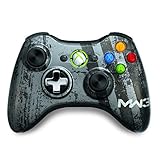
- Custom Call of Duty: Modern Warfare 3 artwork designed in collaboration with Infinity Ward and Sledgehammer Games
- Transforming d-pad that switches from plus to disc
- Xbox LIVE download code for exclusive avatar item
Sensitivity and dead zones
Sensitivity affects how quickly your view or aim responds to stick movement; dead-zone settings affect crosshair behavior. Activision describes sensitivity as a personal preference and notes that dead-zone preferences differ. There is no single value established as best for every player, so adjust these settings to your preference and check how the controls feel in the game.
Interact/Reload Behavior
When the same button can reload or interact, this setting determines which action takes priority. Activision suggests Prioritize Reload in Multiplayer, and Prioritize Interact in non-Multiplayer modes where players often use Supply Boxes and Buy Stations. Treat those as the guide’s mode-specific suggestions, not universal rules: choose the priority that better fits the situations you encounter.
Rank #2

- Call of Duty: Modern Warfare II - Xbox One/ Xbox Series X
How many layouts are available?
Activision’s guide describes a default button layout and 11 additional button-layout presets; its Controller Basics card refers to 12 button-layout presets and six stick-layout presets. These are configuration counts, not performance measures. What appears in your game can depend on the selected mode and current version, so inspect the available presets in-game rather than assuming every option is present in every context.
Why there is no universal button-by-button chart here
The indexed text of Activision’s guide does not provide a complete default Xbox button-by-button chart. A chart could also mislead if it did not account for a changed preset or mode. For reliable assignments, open the button layout display in your installed game and check the selected mode and preset directly.
Rank #3

- MODERNIZED DESIGN — Experience the modernized design of the XBOX Wireless Controller with sculpted surfaces and updated geometry that enhances comfort and control during long gaming sessions.
- PRECISION PERFORMANCE — Stay on target with a hybrid D-pad and textured grips on triggers, bumpers, and back case for improved accuracy and handling.
- SHARE BUTTON: Seamlessly capture and share content such as screenshots, recordings, and more with the new Share button.
- VERSATILE CONNECTIVITY — Connect via USB-C for plug-and-play on console and PC, or quickly pair and switch between supported devices with XBOX Wireless and Bluetooth support.
- BUILT-IN AUDIO SUPPORT — Plug in compatible headsets using the 3.5mm audio jack for direct voice chat and immersive in-game sound.
Xbox version note
This guide covers Xbox Series X|S. Activision’s Modern Warfare III editions FAQ says the game is available for Xbox Series X|S and Xbox One; if installing a cross-gen bundle, choose the version for your console. Controller examples elsewhere in Activision’s guide do not amount to an endorsement of a specific controller brand or model.
Quick Recap
Best Value

- New officially-licensed Call of Duty MWIII design
- No-slip material stays in place during intense gaming
- Made of extra-soft, ultra-grippy, proprietary material
- Durable rubber doesn’t tear when stretched Universal fit with PlayStation, Xbox and Switch Pro controllers
- Includes exclusive in-game weapons charm
Rank #4

- BREAKER SERIES — Hold nothing back. Storm Breaker lets nothing stop its style with classic grays and blacks, offset with whites. Part of the collective debut of the Breaker special edition series.
- BOLD STYLE, BUILT TO PERFORM — Define your swagger with a wild, head-turning design. Stay elegantly on target with textured triggers built for every moment.
- RUBBERIZED GRIPS — Hold on to the action with rubberized grips on the back cases, designed for comfort and control during long gaming sessions.
- UP TO 40 HOURS OF BATTERY LIFE — Get up to 40 hours of battery life so you can keep playing without stopping to recharge.
- PLAY ACROSS EVERY SCREEN — Quickly pair with, play on, and switch between devices including console and PC. Stream games across mobile, gaming handhelds, Smart TVs, and supported VR headsets with XBOX Cloud Gaming.
Product prices and availability are accurate as of the date/time indicated and are subject to change. Any price and availability information displayed on Amazon at the time of purchase will apply.

