
iTechGuides is reader-supported. When you buy through links on our site, we may earn an affiliate commission. As an Amazon Associate I earn from qualifying purchases. Learn more
In one reported run, a single prompt produced annotated captions for all 33 frames of a DNS capture: an annotated PDF, an interactive viewer with packet field trees, and Markdown captions. The author, Sandeep Ahluwalia, reports that the run took about six minutes and 14 VisualEther tool calls, and that each caption was checked against packet fields. The captions are still an AI draft. The capture itself is worth reading closely, because it shows a resolver retrying root queries over TCP after truncated replies.
What the one-prompt run produced
The setup was a folder containing Chris Greer’s dns_full_recursion.pcapng and the prompt annotate dns_full_recursion.pcapng. According to the author’s account of that run, the work went roughly like this:
- Tool path: Claude Code worked through VisualEther’s MCP server.
- Templates: The run generated DNS templates, including one for truncated replies, before captioning.
- Reading order: The flow was read as a whole before any caption was written.
- Outputs: An annotated PDF, an interactive viewer with packet field trees, and Markdown captions.
- Scale: About six minutes and 14 VisualEther tool calls, with matches validated for all 33 frames.
These figures describe one reported run. They are not a benchmark, and they do not show how the same prompt would perform on other captures.
What’s actually slowing this PC down?
Pick the symptom - the matching free tool is one click away.
How the captions were checked
The author ties specific statements to specific packet fields. The table lists the checks described in the article.
#1 Best Overall

- 【1080P HD High Quality】Capture resolution up to 1080p for video source and it is ideal for all HDMI devices such as PS4, PS3, Xbox One, Xbox 360, Wii U, DVDs, DSLR, Camera, Security Camera and set top box. Note: Video input supports 4K30/60Hz and 1080p120/144Hz. Does not support 4K120Hz/144Hz. Output supports up to 2K30Hz.
- 【Plug and Play】No driver or external power supply required, true PnP. Once plugged in, the device is identified automatically as a webcam. Detect input and adjust output automatically. Won't occupy CPU, optional audio capture. No freeze with correct setting.
- 【Compatible with Multiple Systems】suitable for Windows and Mac OS. High speed USB 3.0 technology and superior low latency technology makes it easier for you to transmit live streaming to Twitch, Youtube, Facebook, Twitter, OBS, Potplayer and VLC.
- 【HDMI LOOP-OUT】Based on the high-speed USB 3.0 technology, it can capture one single channel HD HDMI video signal. There is no delay when you are playing game live.
- 【Support Mic-in for Commentary】Rybozen capture card has microphone input and you can use it to add external commentary when playing a game. Please note: it only accepts 3.5mm TRS standard microphone headset.
| Check | Frames | What was verified |
|---|---|---|
| EDNS UDP buffer of 512 bytes and DO=1 | 2, 3, 21, 24 | Matched against packet fields |
| Truncation flag (TC) set | 4, 5 | Matched against packet fields |
| UDP length versus DNS message size | Draft caption | Error caught: the draft gave 392 bytes; the DNS message was 384 bytes |
The corrected error is a useful model for DNS captions. The 392 figure is the UDP length field, which counts the 8-byte UDP header along with the DNS message. The DNS message itself is 384 bytes. A caption that mixes these two layers states something true about the wrong part of the packet.
The author’s own caveat is direct: “The captions are an AI draft. Each claim was checked against the packets, but the result still deserves an expert read before anyone publishes it.” Treat the output the same way: useful for navigating a trace, but not a substitute for a reviewer who knows DNS.
What the capture shows
The capture was taken at the resolver. The client sees one request and one answer, while the other 31 frames take place behind the resolver as it works through the lookup for the A record of b2b.infoblox.com. The EventHelix walkthrough of the same trace identifies the servers the resolver contacts as G-root (the root), g.gtld-servers.net (a .com server), and ns5.infoblox.com (the authoritative server for infoblox.com). The final address returned was 8.39.143.138.
Rank #2

- AV TO USB Converter: Capture videos and audios from VHS, VCR, Hi8, DV tapes to a PC, with the help of our USB Video Converter. Save room while digitizing your favorite old memories
- Quality Capture Card: Our USB Video Capture Card converting anolog RCA composite input into HD 720P USB output and capturing audio without any sound card. Advanced signal processing technology provides you with great precision, colors, resolutions, and details.
- Plug and Play: Automatically install the driver once you hook up this RCA to USB Converter to a PC. No external power is needed. User-friendly and easy to operate
- Wide Compatibility: The Video Capture Card can work with video devices with RCA connector or S-Video connector, such as VHS, VCR, Hi8, camcorder, compatible with Windows and Mac OS. Support video formats like NTSC, PAL, and support brightness, contrast, hue, and saturation control
- Note: The Video Converter is used with acquisition software. We recommend OBS Studio or PotPlayer for Windows, and QuickTime Player for Mac. They can be downloaded for free online. Please operate according to the steps in User Manual or contact us if you have any questions
Client to resolver
The client’s query advertises a 1,232-byte UDP buffer and does not set the DNSSEC OK (DO) bit. Its RD bit is set to 1, which asks the resolver to perform recursion on the client’s behalf. The client does not see the upstream work, which is why a resolver-side capture is the more informative vantage point for this lookup.
Resolver’s upstream queries
The resolver’s upstream queries are different. They advertise a 512-byte EDNS UDP size and set DO=1, and they use RD=0 because the resolver is walking the delegation chain itself rather than asking another resolver to do it. The 512-byte limit applies to these upstream queries in this trace. It is not a property of the client’s query.
Truncation and the TCP retry
The root’s two initial replies carry TC=1, meaning they were truncated. A server sets TC when its full answer will not fit in the UDP size the requester advertised, and it expects a retry over TCP. The resolver repeats those queries over TCP, and the full answers arrive at 1,109 and 1,179 bytes. In this capture, the 512-byte advertisement and DO=1 coincide with the truncated root replies and the TCP retries.
Rank #3
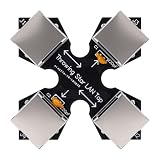
- COMPACT MONITORING DEVICE: The throwing star LAN tap is a small and straightforward device designed for monitoring Ethernet communication without complicating your network setup.
- CAPTURE NETWORK TRAFFIC: Use your favorite software, such as fit for tcpdump or fit for , at the monitoring station to effectively capture and analyze network traffic for comprehensive insights.
- EASY CONNECTION: Connect the network packet capture mod (J1 and J2) to the target network using Ethernet cables, ensuring a simple setup for monitoring without complex configuration.
- DIRECTIONAL MONITORING: Connect one or two monitoring ports (J3 and J4) to the ports of one or multiple monitoring stations, with each port monitoring traffic in only one direction for accurate data collection.
- PASSIVE OPERATION: As a passive Ethernet Tap, the Ethernet throwing star monitor operates without needing a power source, providing a portable and efficient solution for network monitoring that appears just like a regular cable.
Referrals and glue
Each upstream server answers with a referral rather than a final answer. The root refers the resolver to the .com servers. The .com server refers it to the infoblox.com nameserver, and glue records supply that nameserver’s address, so the resolver can query it directly without a separate lookup. The authoritative server’s reply carries AA=1, which marks it as the zone’s own answer.
The answer returned to the client
Once the resolver has the authoritative answer, it returns the address to the client. The client’s response has AD clear (AD=0), which matters for the DNSSEC question covered below.
Timing in this capture
| Measurement | Value | Scope |
|---|---|---|
| Client query-to-answer duration | 159 ms | This capture only (recorded November 2025) |
| Root TCP retry phase | About 56 ms | This capture only (recorded November 2025) |
| Time for the other phases | Not stated | The EventHelix walkthrough gives no per-hop breakdown |
The retry phase accounts for roughly a third of this lookup’s total time. That proportion comes from one trace. It is not a typical figure for DNS lookups, and it does not show that DNSSEC routinely causes TCP fallback.
Rank #4

- 【4K Clarity, 1080P Performance】Enjoy stunning clarity with our USB 3.0 Video Capture Card—featuring 4K input and smooth 1080P@60Hz output. Featuring YUY2 technology, it delivers richer colors than MJPEG for lifelike live streaming and recording. Plus, it delivers high-quality video with minimal latency, making it perfect for gamers and content creators.
- 【Mic-in for Easy Commentary】Plug in a headset or mic directly to stream/record voice easily—no extra adapters. Great for real-time gaming commentary, online classes, or vlog dubbing. Paired with its low-latency tech, it keeps voice synced perfectly with video, eliminating post-editing hassle from mismatched audio-visuals. Fits most 3.5mm devices—ideal for gamers, teachers, creators.
- 【Plug and Play, no Extra-Drivers】No extra drivers or external power—just plug in and start capturing instantly. Small and lightweight, it fits easily in your bag for outdoor live streams, on-the-go recordings, or emergencies. Ideal for game capture, video conferences, and online teaching, it saves hassle while delivering smooth results.
- 【Wide Compatibility: Apps & Devices】No extra adapters—works flawlessly with your go-to platforms and gear. It pairs with streaming/recording apps like Twitter, YouTube, Facebook, OBS, XSplit, and VLC, plus devices including Switch/Switch2, PS5/PS4, Xbox, DSLR cameras, PC, macOS, and Android. Whether gaming, streaming, or hosting video calls, it keeps HD quality intact, eliminating "compatibility headaches".
- 【Worry-Free After-Sales Support】We are committed to delivering exceptional quality products that combine sophisticated design with affordable pricing, offering you the best solutions for seamlessly connecting your work and life. Whether you're a newcomer or a seasoned user, feel free to reach out anytime with any questions—your satisfaction is our top priority.
What the trace does not prove
DNSSEC data is visible in the upstream responses: the signatures are present and the DO bit was requested. However, the capture contains no DNSKEY queries, and the client’s response has AD clear. The trace therefore shows DNSSEC-related data being requested and returned. It does not establish that the resolver validated the chain of trust for this answer, and the article should not be read as saying that validation succeeded.
Independent reader supportYour contribution helps us test, update, and keep practical guides available for everyone.Reading the same capture yourself
To find the events described above in a capture, start with two Wireshark display filters:
The Tool Desk
Outbyte PC Repair FREERepair Windows errors before they cause bigger problemsFix Now →Outbyte Driver Updater FREEFix the driver behind crashes, sound loss and screen glitchesFind Drivers →dns.flags.truncated == 1shows truncated replies, such as the root’s initial TC=1 responses.tcp.port == 53shows DNS carried over TCP, which covers the retries.
Comparing the UDP query and the TCP retry for the same name shows the difference in advertised buffer sizes and in the answer lengths.
Best Value

- Network Topology Mapping: Automatically discover and instantly generate a topology map of your networks using the Link-Live reporting and analysis platform
- Comprehensive AutoTest Validation: Validates and troubleshoots all aspects of network connectivity and services including DHCP and DNS, as well as response time of cloud and on-premises HTTP and FTP services
- Link Speed and Duplex Verification: Verifies link speed/duplex for 10/100 Mbps and 1 Gbps, with detection of NBASE-T and Multigigabit 2.5G, 5G and 10 Gbps links; Discovers nearest connected switch name and port information via CDP/LLDP/EDP, including VLANs; monitors VLAN trunk traffic
- Advanced PoE and Cable Testing: Validates Power over Ethernet PoE switching and cabling up to 90W 802.3bt with TruePower loading; Advanced twisted-pair cable tests for length, wiremap, and faults such as shorts, opens, mis-wires (split pairs, crossovers), fiber optic link signal strength power measurement and SFP diagnostics; Locate cable endpoints with optional WireView adapters
- In-Depth Analysis and Collaboration Tools: Path Analysis and packet capture help solve complex issues; Automate reporting/documentation and enable collaboration with test result uploads, management, and tester remote control via Link-Live
Capture formats: PCAPNG versus C-DNS
IETF RFC 8618, published in September 2019, describes Compacted-DNS (C-DNS) as a format intended to make collections of DNS messages more efficient to store and transmit. It notes that PCAP and PCAPNG files often include data beyond what DNS traffic analysis requires, and it treats privacy-related filtering as a consideration for capture formats.
The same RFC says conversion back to PCAP can be lossy. Some optional fields may not be recorded, and original IP fragmentation and TCP stream structure may not be recoverable. A C-DNS file is therefore a DNS-message collection, not a full packet capture. If you need transport-level detail such as the TCP exchange in this trace, keep the original PCAPNG.
VisualEther editions for this kind of analysis
VisualEther is EventHelix’s downloadable command-line software for Windows, macOS, and Linux. Its protocol templates include DNS. The vendor’s product page describes three editions and a 45-day trial. Because EventHelix also publishes the walkthrough discussed above, the two are related; Chris Greer has not reviewed or endorsed that walkthrough.
| Edition | Price | Suited to | Stated capabilities | Capture size or page limits |
|---|---|---|---|---|
| Community | Free | Small captures | PDF sequence diagrams | Not stated |
| Professional | Not stated on the product page used here | Individual developers | AI analysis and browser-based triage | Not stated |
| Server | Not stated on the product page used here | Teams running unattended regression analysis | Unattended regression analysis | Not stated |
When comparing editions, the relevant axes are budget, capture size, whether you need AI and triage features, the number of users, and whether you need server or CI use. The trial terms come from the vendor page as it stood when this article was written. Check the official EventHelix site for current terms before you buy or rely on them.
Quick Recap
Product prices and availability are accurate as of the date/time indicated and are subject to change. Any price and availability information displayed on Amazon at the time of purchase will apply.

