
Do these 3 things before closing this tab:
1Fix the driver behind crashes, sound loss and screen glitches2Repair Windows errors before they cause bigger problems3Scan for outdated or missing drivers - takes under a minuteiTechGuides is reader-supported. When you buy through links on our site, we may earn an affiliate commission. As an Amazon Associate I earn from qualifying purchases. Learn more
The easiest smart-home upgrades for an apartment are the ones that use the sockets, outlets, and hardware you already have. Smart bulbs, smart plugs, and an ecosystem-matched speaker are simple starting points; cameras, video doorbells, locks, and thermostats need a closer check of your lease, building rules, device fit, privacy, and installation requirements.
Below are 16 practical gadget types and examples to consider—not a claim that one lineup suits every apartment. Confirm the current model’s compatibility and requirements before buying, since features vary by generation and can change.
Start with your smart-home platform
Before adding devices, decide whether you want to use Alexa, Google Home, or Apple Home. Products do not all work with every platform, and some functions require a compatible speaker or hub. Matter support can help devices work across supported ecosystems, but it does not mean every model supports every feature or can operate without additional equipment.
PCWorld’s July 3, 2025 guide for apartment dwellers and renters recommends choosing portable devices that use existing sockets and outlets. TechRadar’s March 20, 2026 smart-home guide likewise emphasizes ecosystem fit and checking hub needs, installation, and subscription requirements.
#1 Best Overall
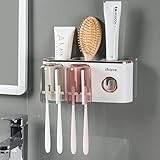
- Large Capacity: The toothbrush holder bathroom organizer has super storage capacity to keep the bathroom clean and tidy. The top tray can neatly place cosmetics and bathroom accessories, and the hidden drawers can store lipstick, sanitary napkins, etc. Smart home products are not only bathroom gadgets must haves but also beautiful bathroom decor for your new home or apartment.
- Multifunction: This bathroom storage with an automatic toothpaste dispenser, easy to squeeze toothpaste without waste, can hang 4 toothbrushes and 2 magnetic cups with covers, dust-proof and waterproof.
- Easy to Install: No holes and no drill. Wall mount installation does not hurt the wall. Just clean the wall and press the adhesive strip to bond the wall for 24 hours entirely, then you can hang the tooth brushing holder.
- Sturdy: The toothbrush holders for bathrooms use a patented non-marking adhesive strip with an excellent caulking effect. No matter metal, wood, mirror, and ceramic tile can be bonded firmly and has good durability in a humid environment. The test load of the toothbrush holder wall mounted is 13 pounds.
- Easy to Use: These beautiful mouthwash cups are available in different colors for each person for easy distinction. It is suitable for all toothpaste with a hole diameter of fewer than 0.47 inches. You can quickly get the length of the toothpaste you want by changing your strength. The toothbrush holder and toothpaste dispenser bathroom set can be disassembled and washed directly with water.
16 apartment-friendly smart-home gadgets
1. Smart bulb for a standard socket
A smart bulb is an easy first upgrade: screw it into a compatible existing socket, then use its app or a supported voice assistant to control it. PCWorld identifies bulbs as a renter-friendly option and notes that Wi-Fi or Bluetooth models can keep initial setup simple. Check the bulb’s base, brightness, dimmer compatibility, and platform support against your lamp or fixture.
2. Bluetooth smart bulb for a no-hub start
A Bluetooth bulb can be a good fit if you want basic control without buying a separate hub first. PCWorld’s renter pick is the Philips Hue White Ambiance A19, which supports Bluetooth and Zigbee. Its guide says Bluetooth use avoids needing a Hue Bridge initially, but without the Bridge, room assignments and scene controls are more limited. Verify the current model’s capabilities before choosing it.
3. Hub-free Wi-Fi color bulb
TechRadar describes Govee Wi-Fi LED bulbs as a lower-cost, hub-free category option compatible with Alexa and Google Home. It notes that their colors are not as bright as Hue bulbs. Check the specific bulb’s current platform support, socket fit, and brightness for the room where you plan to use it.
Recommended Free Tools
Rank #2

- ULTRA HEAT RESISTANCE: Featuring a heat-resistant silicone exterior and a soft cotton lining, Kitsure oven gloves offer superior protection and comfort. The oven mitts are premium, safe, and BPA-free, ensuring they can hold the food directly and withstand temperatures up to 500℉. No more burns and scalds!
- NON-SLIP FOR A GREAT GRIP: The textured silicone surface with the honeycomb pattern provides a non-slip secure grip, even when holding wet or greasy foods or cookware. Whether you're lifting a heavy roasting pan or grabbing a hot baking sheet, Kitsure cooking gloves provide excellent control and stability.
- EASY TO CLEAN & DRY: Unlike traditional fabric oven mitts, Kitsure silicone oven mitts are waterproof, stain-resistant, and easy to clean. Simply rinse them under running water or wipe them with a damp cloth to remove food residue or stains. Besides, the built-in hanging loops allow quick drying and easy storage.
- VERSATILE FOR LONG-LASTING USE: The flexibility of the silicone allows easy grasping of various shapes and sizes, maximizing the versatility of the oven mitt. Kitsure oven mitts are not just limited to oven use but are also used for baking, grilling, barbecuing, and handling hot pots on the stovetop. They are one of your must-have home essentials.
- PERFECT GIFT FOR LOVED ONES: Kitsure oven mitts come in lovely packaging, making them a thoughtful gift for any home baker or cooking enthusiast. Whether it's a birthday, Thanksgiving day, or any other holiday, the oven mitts set is one of the ideal kitchen accessories for gifting. Show your loved ones you care about their safety and passion in the kitchen!
4. Smart plug for a lamp
A smart plug lets you control or schedule a compatible device without replacing it. Plug a lamp into the smart plug, then connect the plug to the appropriate app or platform. PCWorld names the TP-Link Tapo P125M Mini Smart Wi-Fi Plug as its renter pick, describing it as compact and Matter-certified; its guide says it lacks energy monitoring and a Thread radio. Check the exact plug’s electrical rating and appliance guidance before use.
5. Smart plug with energy monitoring
If you want to see power use as well as control an outlet, look for a plug that explicitly includes energy monitoring. TechRadar identifies Eve Energy as an Apple HomeKit-oriented option with power monitoring and says it is not compatible with Alexa or Google Assistant. Confirm current compatibility and regional availability, and do not assume a smart plug will reduce your bill: scheduling and control do not establish a particular amount of savings.
6. Compact mini smart plug
A mini plug can help preserve access to neighboring outlets, especially in a crowded power strip or behind furniture. PCWorld describes its Tapo P125M pick as compact. Compare the plug’s dimensions with the outlet location and adjacent plugs, and check whether it blocks an outlet you need.
Rank #3

- Ideal Size for Closet: Each hanger is 16 inch long when vertical and 9.25 inch long when horizontally, which fits most closets. Hang horizontally for a tidy look or vertically to quadruple your storage capacity
- Unassembled design: Assemble only when needed, takes up minimal space before assemble. These closet organizers are easy to use, no tools required. Align the hooks to the corresponding holes, press the plastic screw, snap it into place, and repeat the same step on the other side. (Make sure 2 hooks face toward each other)
- Daily Use Set: Each set includes 8 pcs of black space saving hangers. One hanger can hold up at least 5 clothes, and one 8-pack set magic hangers easily hang up 40 items even more. Great space saver for T-shirt, suit, jeans, pants, dress, coat, jacket, sweater, scarfs, purse or accessories
- Heavy Duty & Sturdy: With strengthened hooks, AMKUFO Hanger Organizer won't stretch or sag easily. Sturdy plastic with no sharp edges protects clothes. Thickened bar prevents sagging. Closed hole keeps your clothes from falling off
- Closet Organization: These closet hangers can hang horizontally for a tidy look, or vertically to quadruple your storage capacity. With these cascading organizer, your clothes can be organized well, getting rid of chaos and wrinkles. Hangers space saving is house organization must haves
7. Smart speaker for voice control
A smart speaker can bring voice control, music, timers, and alarms into a room. PCWorld recommends selecting other speakers in the same ecosystem and names the Amazon Echo Dot (5th Gen) as its renter pick. Choose the speaker based on your preferred assistant and check whether its current model offers the hub functions you need.
Crashes, No Sound, or Screen Glitches?
Random freezes, missing sound and display glitches usually trace back to one bad driver. Find and replace yours safely.Free scan · under a minuteWindows Errors? Fix Them Before They Spread
Repair common Windows errors and clear accumulated junk for a smoother, more stable PC - no reinstall needed.Free scan · no reinstall8. Smart display as a visual controller
A smart display adds a screen for viewing controls and other supported information, while also providing voice control. TechRadar describes displays as visual control surfaces. Check the assistant and device support before buying; a display is not automatically a hub for every smart-home standard or product.
9. Additional ecosystem-matched speaker
A second speaker can extend voice control to another room, but it is most useful when it fits the same ecosystem as your existing devices. PCWorld advises keeping speakers in one ecosystem. Confirm that the specific speaker can control the devices and functions you want rather than relying on the brand name alone.
Rank #4

- WiFi DOOR SENSOR WITH APP ALERTS: No hub required and No fees charge. Control with the "Tuya Smart" or "Smart Life" app. Get instant app free notification alerts on your smartphone when doors or windows open or close. Note: door sensor only works with 2.4GHz WiFi, not works with 5G.
- SPPPORTS VOICE CONTROL: Door alarms for home compatible with Amazon Alexa and Google Assistant. Alexa/Google is able to answer the question, "Alexa/Google, is the 'Device Name' Closed/Opened?"
- LINK WITH OTHER TUYA SMART DEVICES: The smart window sensor can control other Tuya smart connected devices as the status of the door or window changes. For example, Automatically turn on your smart wall switches or smart lights when door opened.
- LOW POWER WARNIGN & BATTERIES INCLUDED: Door open alert powered by 2*AAA batteries(INCLUDED). Enjoy over six months of battery life with this door alarm sensor. When the battery is running low, it will automatically push messages through App to remind you to change battery, never worry about running out of battery.
- EASY INSTALLATION AND WIDELY USE: Install the smart door sensor with the included 3M sticker for a firm and durable hold. Install the sensor on gates, mailboxes, refrigerators, drawers, bedrooms, garages, yards, pet doors, and more. Gaoducash provides a 24-month warranty for the door detector, please feel free to contact if you have any questions.
10. Battery-powered video doorbell
A battery-powered doorbell may avoid wiring changes, and PCWorld notes that some models use adhesive-backed mounts suited to renters. Battery models need periodic charging. Before mounting one, check lease and building rules, confirm the mounting method can be removed cleanly, and consider where its camera will point—especially in a shared hallway.
11. Video doorbell with wired or wireless use
TechRadar describes the Philips 7000 Series Video Doorbell as offering built-in storage and wired or wireless use. That description does not establish that every unit or installation is suitable for every apartment. Check the current model’s power and mounting requirements, storage features, platform compatibility, and any plan fees. Do not assume existing wiring is available or permitted for your unit.
What’s actually slowing this PC down?
Pick the symptom - the matching free tool is one click away.
12. Indoor security camera
An indoor camera can monitor a space inside your apartment, but placement and recording options matter. Check whether recordings are stored locally or require a subscription, what features are included without payment, and whether the camera can be aimed away from doors, windows, or shared spaces. Camera and doorbell rules vary by model, building, and jurisdiction; ask the landlord or building management when rules are unclear.
Best Value
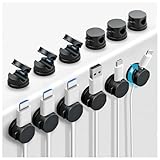
- MINIMALIST DESIGN SUIT FOR MULTIPLE SCENARIOS - Our minimalist design spring cord clips have a compact size(0.74"×0.74"×0.62") to fit multiple scenarios like office, home, bedroom, kitchen, desk, nightstand, game station, car, etc. Say goodbye to messy cords, keep your desk organized, cable management, and workspace aesthetics.
- 360° ROTATABLE DESIGN – This spring charger cord holder features a 360° rotatable design, letting you easily spin or reposition your cords, charging cables, or wires without removing or reattaching the clips. Ideal for desk cable management, nightstand organization, and kitchen appliance cords, these cord organizers offer a more practical and flexible solution for keeping your cables neat, tidy, and always within reach.
- SPRING LOCKING DESIGN – The cord holder clips feature a spring open-close mechanism and a 90° rotation shaft that lets you add or remove cables with just one hand! With the quick 1-second spring lock, cords snap securely into place and stay neatly organized.
- RESIDUE-FREE STRONG ADHESIVE - Our upgraded strong, residue-free acrylic adhesive sticks firmly to almost any clean, flat surface—wood, glass, metal, ceramic tiles, or marble—without causing damage or leaving sticky residue. A bonus replacement adhesive pad is included so you can reuse the cord holder anytime.
- EASY to INSTALL & USE - Just clean the surface, stick the clips, and let the adhesive set for 30 minutes—then it's ready to go. No tools, no hassle! The spring closure lets you add or remove cords with one hand, making cord organization quick and effortless.
13. Camera with local-storage option
If you want to avoid relying entirely on a cloud plan, compare cameras by whether they offer local storage and which features remain available without a subscription. TechRadar notes that recording and subscription features differ among camera and doorbell products, including some alternatives such as Arlo and Ring. Check the current model’s storage method and plan terms rather than assuming a brand-wide policy.
14. Retrofit smart lock for an existing thumb-turn
A retrofit lock can operate an existing interior thumb-turn without replacing the complete lock. TechRadar describes SwitchBot Smart Lock as such an option, while warning that it can be bulky. Check the shape and clearance of your door hardware, whether the lock can be removed without damage, and whether your lease or building policy allows it. Also consider how household members and building staff will retain access.
15. Smart thermostat, if your apartment supports one
A smart thermostat is a conditional upgrade, not a plug-and-play apartment accessory. Compatibility depends on the existing heating and cooling system, wiring, and who controls the building’s equipment; replacement can require professional installation. TechRadar’s thermostat guide notes that its reviewed Google Nest Learning Thermostat (Gen 4) listing was US-only at the time of that guide. Confirm local availability, system compatibility, permission, and installation responsibilities before buying.
16. Smart-home hub, only if your setup needs one
A hub can connect devices or enable functions that a phone or speaker alone cannot provide, but it is not automatically necessary. Some bulbs offer Bluetooth control, while other products rely on a compatible hub or speaker for particular features. Check the device’s current requirements and your chosen platform before adding a hub; avoid buying one just because another product in the same family uses it.
Independent reader supportYour contribution helps us test, update, and keep practical guides available for everyone.Check fit, cost, and removal before you buy
- Installation: Prefer devices that use existing sockets and outlets when you cannot alter fixtures. For mounts or replacement hardware, confirm that installation is permitted and reversible.
- Compatibility: Confirm support for your chosen assistant or platform, and check which functions—not just basic control—are supported.
- Hub requirements: Look for the exact hub or speaker requirement for the features you plan to use.
- Ongoing costs: Check whether recording, cloud storage, or other desired features require a paid subscription.
- Physical fit: Measure bulbs, plugs, and door hardware where clearance is tight. A retrofit lock may not fit every thumb-turn.
- Upkeep: Account for recharging a battery doorbell and any other recurring maintenance.
- Shared-space privacy: For cameras and doorbells, consider what their lenses capture and verify applicable building rules before installation.
What is the easiest smart-home device to install in a rental?
A smart bulb or smart plug is usually the most straightforward starting point because each uses an existing socket or outlet rather than requiring a fixture or building-hardware change. Check socket or outlet fit, device compatibility, and electrical guidance before use.
Can you use a video doorbell in an apartment?
Possibly, if the model’s mounting and power options suit the door and your lease or building rules allow it. Battery-powered models may avoid wiring work, but you still need to consider charging, shared-hallway privacy, recording features, and any subscription requirements. Permission and legal requirements depend on the building and location.
Quick Recap
Product prices and availability are accurate as of the date/time indicated and are subject to change. Any price and availability information displayed on Amazon at the time of purchase will apply.
Free tools Windows power users keep installed
One-click scans. No signup required.

