
Do these 3 things before closing this tab:
1Clear out junk files and repair common Windows errors2Fix the driver behind crashes, sound loss and screen glitches3Repair Windows errors before they cause bigger problemsiTechGuides is reader-supported. When you buy through links on our site, we may earn an affiliate commission. As an Amazon Associate I earn from qualifying purchases. Learn more
Skype alternatives now depend on what you need: Microsoft Teams Free is the closest migration path after Skype retired on May 5, 2025; WhatsApp, Signal, or FaceTime replace free app-to-app calls; Viber Out handles calls to ordinary phone numbers; and Teams Phone, Google Voice, Zoom Phone, RingCentral, Nextiva, or Vonage replace business telephony.
Microsoft directed existing Skype users toward Teams Free, where contacts and many chats generally transfer when users sign in with their Skype credentials. However, Teams Free does not recreate Skype’s paid telephone calling, Skype Numbers, or Skype Credit. Microsoft’s support information also states that Skype subscription service ended on May 1, 2026. The right replacement therefore depends on whether you need personal calls, browser meetings, international calls to landlines and mobiles, or a managed business phone system.
Key takeaways
- Microsoft Teams Free is the closest Skype migration option because Skype contacts and many chats can transfer when users sign in with their Skype credentials.
- WhatsApp, Signal, FaceTime, ordinary Zoom Meetings, Google Meet, and Jitsi Meet mainly support calls between users of the same service rather than arbitrary landlines or mobile numbers.
- Viber Out, Google Voice, Zoom Phone, Microsoft Teams Phone, RingCentral, Nextiva, and Vonage can provide telephone-network calling, but availability and pricing depend on country and plan.
- Skype retired as a standalone service on May 5, 2025, while Microsoft’s current support information says Skype subscription service ended on May 1, 2026.
- Keep an old Skype service active until number porting, inbound calls, outbound calls, voicemail, SMS, and international destinations have been tested successfully.
Which Skype alternative should you choose?
Choose the service by the Skype function you actually used rather than by the word “VoIP.”
Free tools Windows power users keep installed
One-click scans. No signup required.
| Your main need | Best starting choices | Important limitation |
|---|---|---|
| Free calls with friends and family | WhatsApp, FaceTime, Signal, or Viber | Most participants must use the same app. |
| Preserve Skype contacts and chats | Microsoft Teams Free | Some Skype data and paid telephony do not migrate. |
| Simple browser meeting links | Google Meet, Zoom, Webex, or Jitsi Meet | Meeting services do not automatically provide a telephone number. |
| Call landlines or mobile numbers internationally | Viber Out or a suitable VoIP provider | Rates, destinations, and number availability vary by country. |
| U.S. business number, voicemail, and forwarding | Google Voice | Country availability and business features are limited by region and plan. |
| Full business phone system | Teams Phone, Zoom Phone, RingCentral, Nextiva, or Vonage | Expect per-user costs, configuration, taxes, fees, and possible carrier requirements. |
| Private personal communication | Signal | Signal is not a replacement for calling ordinary telephone numbers. |
| No-account browser meeting | Jitsi Meet | Hosted and self-hosted deployments have different support and trust models. |
Why is Skype no longer the normal standalone service?
Microsoft retired Skype on May 5, 2025, and directed users toward Microsoft Teams Free. Microsoft says that users who sign in to Teams Free with their Skype credentials can generally see their Skype contacts and chats, although some content does not migrate. Microsoft’s Skype retirement and migration guidance is the authoritative place to check the current status of data, subscriptions, credits, and numbers.
#1 Best Overall

- HEADSET FEATURES: This Package includes a VoicePro 80 (by TruVoice) Headset that offers premium features that include a Noise Cancelation Microphone, High-Definition Speakers, Busy Focus Light for Teams Calls, Premium Breathable Leather Cushions and Padded Adjustable Headband. Headset also includes a USB-A and USB-C connection.
- WEBCAM FEATURES: This Bundle also includes a Webcam with premium features that include 1080P resolution with a 2MB image, Wide angle lens with Auto Light Correction. Easily adjustable to fit all laptops and computer monitors. Webcam includes a USB-A Type Connection.
- EASY SETUP: Both products include standard USB connections and a plug and play setup. Simply connect both devices to an available USB port on your PC or laptop and both devices will be recognised automatically by the operating system.
- COMPATABILITY: both devices are universally compatible and will connect to any PC or Laptop and will work on all major call platforms such as Microsoft, Teams, Skype, Zoom, Cisco Jabber, WebEx, Vonage, RingCentral, Avaya One X + many more simply ask our team if you are unsure on any compatibility.
- SERVICE AND WARRANTY: Both devices come with a full 12 month manufacturer warranty which is covered by TruVoice. Once both products are connected make sure the headset is set as your primary audio input and output device on bith windows and your call platform and make the the webcam is setup as the main Video device. Both items should be recognized automatically when plugged into the USB port. If you have any issues regarding setup pleas reach out to our team for support.
The migration does not mean that every Skype function became a Teams Free function. Microsoft ended new purchases of Skype Subscriptions, Skype Numbers, and Skype Credit. Microsoft also states that Skype subscription service ended on May 1, 2026. Users who relied on Skype to call ordinary phone numbers should select a PSTN-capable service rather than assuming that a free messaging or meeting app will work.
What is the difference between app-to-app calling and PSTN calling?
App-to-app calling connects users who have accounts or compatible access to the same service. PSTN calling connects a service to the public telephone network, allowing a caller to reach an ordinary landline or mobile number. Skype supported both models, but many popular “Skype alternatives” support only the first.
| Service type | Examples | Can normally call an ordinary phone number? |
|---|---|---|
| Personal app-to-app messenger | WhatsApp, Signal, FaceTime | No, or not as a normal consumer feature. |
| Meeting platform | Google Meet, Zoom Meetings, Jitsi Meet | Not with the ordinary free meeting product; separate telephone products may exist. |
| Consumer international calling add-on | Viber Out | Yes, where the destination and product are supported. |
| Cloud business phone system | Google Voice, Teams Phone, Zoom Phone, RingCentral, Nextiva, Vonage | Yes, subject to country, plan, carrier, and regulatory rules. |
1. Microsoft Teams Free: the closest Skype migration
Best for: former Skype users who want messaging, file sharing, communities, calendars, and personal or small-group video calls in Microsoft’s ecosystem.
The Tool Desk
Outbyte PC Repair FREERepair Windows errors before they cause bigger problemsFix Now →Outbyte Driver Updater FREEFix the driver behind crashes, sound loss and screen glitchesFind Drivers →Teams Free is the most direct answer for people asking what replaces Skype because Microsoft explicitly positioned Teams Free as Skype’s transition destination. Signing in with Skype credentials can bring contacts and many chats into Teams. Microsoft’s transition guidance says Teams Free supports one-to-one and group calls, with group calls of up to 300 people for up to 30 hours under the relevant Microsoft 365 transition information; account and product limits can change.
What it replaces: Skype messaging, contacts, personal calling, group calls, file sharing, and communities for many users.
What it does not replace: Teams Free is not a complete replacement for Skype Subscriptions, Skype Numbers, or Skype Credit. Microsoft directs organizations needing telephone-network calling toward paid Teams Phone products. Some Skype-to-work or school chats, private conversations, and bot or Copilot content may not migrate.
Main drawback: Teams feels more like a collaboration suite than Skype’s simpler consumer interface. See Microsoft Teams for home and Microsoft’s migration instructions before starting.
Outdated Drivers Are Slowing You Down
One free scan finds every outdated or missing driver and matches the right update for your exact hardware.Free scan · exact hardware matchPC Slower Than It Used to Be?
A free scan shows the junk files, broken settings and background clutter dragging Windows down - then fixes them in one click.Free scan · Windows 10 & 112. Zoom: the best all-purpose meeting replacement
Best for: scheduled meetings, client calls, screen sharing, webinars, and groups whose contacts already use Zoom.
Zoom Meetings is a strong Skype replacement when the important function was joining a meeting from a link, sharing a screen, or speaking with clients across devices. The free and paid limits for meeting duration, participants, recording, and other features change, so check the current Zoom pricing and plan page before choosing a tier.
Zoom Meetings is not the same as Zoom Phone. Zoom Phone is the separate cloud-telephone product for business numbers, number porting, SMS, and phone-system features. Country availability, emergency calling, international rates, and number availability depend on the plan and location.
3. Google Meet: the simplest browser-based meeting option
Best for: families, schools, freelancers, and Google Workspace users who want a meeting link with minimal setup.
What’s actually slowing this PC down?
Pick the symptom - the matching free tool is one click away.
Google Meet works naturally with Google Accounts, Gmail, Calendar, and Workspace. A host can create a meeting link and send it to participants, making Meet easier to introduce than a full business phone system. The free version commonly supports meetings of up to 100 participants, while duration and features depend on the account and plan. TechRadar reports a 60-minute limit for free group meetings; confirm the live limit on Google Meet or the Google Workspace pricing page before publication or purchase.
Meet is primarily a meeting service. It does not, by itself, recreate Skype’s ability to call arbitrary landlines or mobile numbers. Users who need both meetings and phone service may need Google Meet alongside Google Voice.
4. WhatsApp: the easiest everyday personal-calling choice
Best for: families and friends who already use WhatsApp, particularly for international app-to-app voice and video calls.
WhatsApp combines text messaging, voice calls, video calls, group chats, desktop access, and web access around a mobile phone number. WhatsApp is often the least disruptive choice when the people you call already have the app installed.
WhatsApp generally calls other WhatsApp users rather than arbitrary landlines and mobile numbers. A phone number is used for account setup, and businesses may need WhatsApp Business or the WhatsApp Business Platform instead of the consumer app. End-to-end encryption protects message and call content, but account information, metadata, backups, device security, and business integrations require separate consideration.
Rank #2

- Digital Stereo Sound: Fine-tuned drivers provide enhanced digital audio for music, calls, meetings and more
- Rotating Noise Canceling Mic: Minimizes unwanted background noise for clear conversations; the rotating boom arm can be tucked out of the way when you’re not using it
- Handy In-line Controls: Simple in-line controls on the headset cable let you adjust the volume or mute calls without disruption
- Plug-and-Play USB Computer Headset: Simply plug the USB-A connector into your computer and you’re ready to talk or listen without the need to install software
- Padded Comfort: Comfortable headphones with adjustable headband features swivel-mounted, leatherette ear cushions for hours of comfort and is easy to clean
5. Viber: a consumer app with paid international calling
Best for: people who want free Viber-to-Viber calls plus an option for calling ordinary telephone numbers.
Viber provides free text, voice, and video calls between Viber users. Viber Out adds paid calls to supported landlines and mobile numbers from desktop or mobile. Credit, packages, destinations, subscriptions, and rates vary by country, so check the destination before buying.
Viber Out is closer to Skype Credit than to a business PBX. It is useful for occasional international calls but does not provide the complete routing, administration, queues, and CRM functionality that a business phone system provides. The Associated Press reported that Viber users can buy credit or packages for calls to phone numbers, while Viber Numbers are no longer generally available for receiving calls.
Quick wins for a faster PC:
Clear out junk files and repair common Windows errorsFree Scan →Fix the driver behind crashes, sound loss and screen glitchesFind Drivers →Repair Windows errors before they cause bigger problemsFix Now →6. Google Voice: a straightforward U.S. business-number replacement
Best for: U.S.-based individuals and small businesses that need a business number, forwarding, voicemail, texting, and basic call handling.
Google Voice provides number management, call forwarding, three-way calling, call transfers, recording, and desk-phone or ATA support on relevant plans. On August 18, 2026, Google’s displayed U.S. business pricing showed Voice Starter at $10 per user per month and Standard at $20 per user per month. Prices, taxes, billing terms, eligibility, and included features must be checked at the Google Voice pricing page.
The displayed Starter information describes up to 10 users, one number across devices, unlimited domestic calling, and U.S. texting. Business Voice requires Google Workspace for multi-user organizational use. Google Voice is much more useful in the United States than as a global Skype replacement, and it does not replace video meetings without pairing it with Google Meet.
7. RingCentral RingEX: a full business communications platform
Best for: established businesses needing business numbers, voice, SMS, meetings, team messaging, integrations, analytics, and administration.
RingCentral RingEX is closer to Skype’s business-telephony role than consumer messaging apps are. The platform combines business calling, messaging, meetings, routing, administration, and integrations. RingCentral also promotes features such as transcriptions, summaries, action items, text drafting, translation, and meeting highlights on its RingEX plans and pricing page.
RingCentral is usually excessive for a family or casual caller. Seat count, contract term, region, promotions, taxes, usage charges, numbers, international calling, and add-ons can change the total cost. Businesses should request the complete recurring and usage-based price before porting numbers.
8. Nextiva: a strong small-business phone option
Best for: small and midsize businesses prioritizing business calling, customer communications, analytics, reporting, and support.
Nextiva is designed around business phone service and customer communications rather than casual personal chat. Relevant capabilities can include integrations, analytics, reporting, workforce management, and customer-engagement workflows. Review the current Nextiva pricing and package information to confirm whether the selected plan includes video, SMS, recording, international calling, and required integrations.
Nextiva is a poor fit for a family looking for free calls. Pricing may require a sales consultation, and buyers should distinguish business communications packages from separate contact-center or customer-experience offerings.
9. Vonage Business Communications: flexible business calling
Best for: businesses wanting desktop and mobile calling, SMS/MMS, voicemail, video meetings, team messaging, and optional desk-phone support.
Vonage’s Mobile plan lists desktop and mobile apps, unlimited domestic calling, SMS/MMS, and voicemail. Its Premium plan adds desk-phone support, video meetings for up to 200 participants, team messaging, integrations, and single sign-on. On August 18, 2026, the U.S. pricing page displayed promotional pricing of $13.99 per line per month for Mobile for 12 months, from a listed regular price of $19.99, and $20.99 per line per month for Premium for 12 months, from $29.99. Taxes and fees apply. Treat those figures as observed promotional pricing, not a universal or permanent rate; verify the current Vonage pricing page.
Businesses should separately check post-promotion pricing, international calling, number porting, regulatory fees, emergency calling, and add-ons.
10. Microsoft Teams Phone: the business Skype migration
Best for: organizations already invested in Microsoft 365 that need Teams meetings plus actual telephone-network calling.
Rank #3

- 1080P Webcam with Cover for Video Calls - EMEET computer webcam provides design and Optimization for professional video streaming. Realistic 1920 x 1080p video, 5-layer anti-glare lens, providing smooth video. C960 computer camera delivers 1920x1080 video with fixed focus (11.8–118.1 inches), so as to provide a clearer image. C960 USB webcam has a cover and can be removed automatically to meet your needs for privacy. For optimal image performance, use the webcam in a well-lit environment.
- Built-in 2 Omnidirectional Mics - EMEET webcam with microphone for desktop features 2 built-in omnidirectional microphones, picking up your voice to create clear audio for communication. When installing the webcam, select EMEET C960 as the default microphone input device in your computer and video applications and select C960 as the default device in Zoom/Teams and ensure microphone permissions are enabled for proper use. Please note that C960 does not include built-in speakers.
- Automatic Light Adjustment - Automatic exposure adjustment is applied in EMEET HD webcam 1080p so that the streaming webcam can deliver stable image performance. EMEET C960 camera for computer also features color adjustment and exposure optimization to help you look your best. For optimal video quality, it is recommended to use the webcam in normal or well-lit environments and select suitable video settings in your application. Proper lighting helps achieve a clearer and more balanced image.
- Plug-and-Play & Upgraded USB Connectivity - New C960 webcam features both USB Type-A & A-to-C adapter connections for wider compatibility. For stable performance, connect the webcam directly to the computer's main USB port and ensure the device is recognized correctly. If a hub or docking station is used, please ensure it provides sufficient power and stable data transmission, as limited ports may affect performance. 90° wide-angle lens captures more participants without frequent adjustments.
- High Compatibility & Multi Application - C960 webcam for laptop is compatible with Windows 10/11, macOS 10.14+, and Android TV 7.0+. Not supported: Windows Hello, TVs, tablets, or game consoles. It works with Zoom, Teams, Facetime, Google Meet, YouTube and more. Please select C960 webcam as the default camera and microphone device in your application and ensure camera/microphone permissions are enabled, especially on macOS. (Tips: Incompatible with Windows Hello)
Teams Free handles messaging and meetings, while Microsoft Teams Phone is the Microsoft product for cloud call control, business numbers, routing, and external telephone calling. A deployment may involve Microsoft 365 or Teams licensing, Teams Phone, calling plans, Operator Connect, Direct Routing, numbers, and regional rules.
Teams Phone is not automatically included with Teams Free. Administrators must verify country availability, emergency calling, number porting, carrier requirements, licensing, and whether the organization needs an auto attendant, call queue, voicemail, SMS, or desk-phone support. Teams Phone is usually a poor economic choice for a household that only needs occasional international calls.
11. Cisco Webex: business meetings and administration
Best for: businesses, training providers, customer meetings, and organizations that value administration and enterprise controls.
Webex supports meetings, screen sharing, annotation, whiteboards, recordings, calendar integration, messaging, and business plans. The Webex pricing page displayed a free plan at $0 with unlimited meetings of up to 40 minutes, up to 100 attendees, screen sharing with annotation, local recording, whiteboards, and calendar integration. Webex also states that participants do not need host licenses merely to attend and that browser participation is available for many functions. Check the current Webex plan details because products and limits differ.
Webex may feel heavier than Meet or WhatsApp for casual calls. PSTN calling and business telephony may require paid products or additional fees, and enterprise features may require a sales process.
12. Jitsi Meet: free, open-source browser meetings
Best for: users who want browser calls without creating an account, open-source software, or the option to self-host.
Jitsi Meet advertises its hosted service as free, open source, encrypted, and usable without an account. The service supports screen sharing, custom meeting URLs, integrated chat, and collaborative document editing. Users can try the hosted service at meet.jit.si or run their own instance using the project’s source code.
Recommended Free Tools
Jitsi Meet is primarily a meeting service, not a replacement for Skype Numbers or Skype Credit. Hosted use and self-hosting create different trust, reliability, support, and administration models. Self-hosting requires updates, monitoring, server capacity, and technical responsibility. “Encrypted” should not be treated as a complete security verdict without considering the deployment, signaling, metadata, device security, and any recordings or integrations.
13. Signal: the privacy-focused personal messenger
Best for: private one-to-one or group messaging and calls when every participant is willing to use Signal.
Signal is a privacy-focused messaging application with voice and video calling. Signal is a strong Skype replacement when Skype was mainly used for private conversations rather than public telephone numbers or business workflows.
Signal generally requires callers to have Signal accounts and compatible devices, and it does not normally replace calls to ordinary landlines or mobile numbers. Registration has traditionally involved a phone number; users should check the current Signal support documentation for the latest account and username options. End-to-end encryption is important, but it does not mean that every form of metadata is invisible or that a device, backup, notification, or recipient cannot expose information.
Do these 3 things before closing this tab:
1Scan for outdated or missing drivers - takes under a minute2Clear out junk files and repair common Windows errors3Fix the driver behind crashes, sound loss and screen glitches14. FaceTime: the best Apple-household option
Best for: iPhone, iPad, and Mac users whose contacts are also in the Apple ecosystem.
FaceTime supports audio and video calls, group calling, screen sharing, SharePlay, captions, and related in-call features on supported devices and in supported regions. Apple explains that FaceTime can use Wi-Fi or cellular data and that data charges may apply in its FaceTime availability and support information.
FaceTime is less attractive for mixed Windows, Android, and Apple groups, although Apple provides browser participation in supported scenarios. FaceTime is not a business phone system and does not replace Skype’s paid calls to ordinary telephone numbers. Device, operating-system, country, and regional support should be checked before relying on a particular feature.
Which alternatives support telephone-network calling?
For calls to ordinary landlines and mobile numbers, start with Viber Out for consumer international calling, Google Voice for supported U.S. use, or a business provider such as Zoom Phone, Teams Phone, RingCentral, Nextiva, or Vonage.
| Product | Telephone-network role | Best fit | What to verify |
|---|---|---|---|
| Viber Out | Paid calls to supported phone numbers | Personal international calling | Destination rates, packages, and number availability |
| Google Voice | Business number and calling | Supported U.S. users and small businesses | Country eligibility, Workspace requirement, texting, international rates |
| Zoom Phone | Cloud business telephone service | Organizations already using Zoom | Country, number, SMS, emergency-calling, and porting support |
| Teams Phone | Cloud business calling inside Microsoft’s ecosystem | Microsoft 365 organizations | Licenses, calling plans, carrier, region, and routing model |
| RingCentral, Nextiva, or Vonage | Managed business phone systems | SMBs needing routing, voicemail, SMS, and administration | Seat price, term, taxes, fees, international usage, and add-ons |
Do participants need an account?
Account requirements vary by product and host settings. Teams, WhatsApp, Signal, FaceTime, Google Voice, RingCentral, Nextiva, and Vonage are normally account-based. Google Meet, Zoom, Webex, and Jitsi can support browser or link participation in appropriate configurations. Jitsi specifically advertises its hosted Meet service as usable without an account; browser support and host settings can still affect the experience.
Rank #4
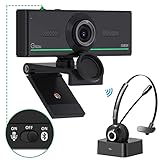
- ❤【High Sound Quality】Unlike the other webcams with built-in microphone in the market, you often can not hear or hear clearly from the other party during video conference when in noisy surroundings or some open public places. Connect the Bluetooth headset, pairing with our 1080p Bluetooth webcam, benefit from the Bluetooth 5.0 chipset, our Gsou webcams ensure stable connection and outstanding listening in a video conference, and what's more protect your privacy. (Only for audio not for video)
- ❤【The bluetooth function is only for headsets】The audio bluetooth headset adopts the latest Bluetooth 5.0 technology, features the newest noise cancelling tech,which can pick up your voice exactly and block the noise from the surroundings. Best video conference kit with our webcam. Webcam with Privacy Cover: Gsou PC webcam with privacy cover allows you to enjoy safety digital web life when not in use and prevent hackers from spying on you.To control what your video displays at any time, protecting your privacy
- ❤【How to connect audio Bluetooth】 1.Switch to bluetooth 2.Press and hold the pairing button for>3s, then the indicator light flashes blue. 3.Turn on your bluetooth audio device to pairing state and close to the camera. 4.Wait for seconds, the status indicator turns blue, connect successfully. 5.Your audio output is the device W20-AUDIO. 6.Audio device reconnection: just press once pairing, connect successfully. Note: Connect audio device via bluetooth, please select W20-AUDIO as the audio output.
- ❤【Full HD 30FPS 1080P Webcam】Equipped with high-quality 2 megapixel CMOS image sensor, Gsou Bluetooth web camera produces exceptionally sharp and clear video at resolutions up to 1920x1080. And 30 FPS makes the video more stable and smooth, keeps up with your every move with no noise and broken images. With manual focus design, you can freely rotate the lens right or left to focus remarkly crisp and smooth images
- ❤【Built-in Microphone & Plug and Play】Built-in digital stereo microphone with auto noise cancellation and superior stereo audio for clear and natural sound recordings. The streaming webcam works with USB, no additional drivers or software required. Ready to use in less than 1 min with any compatible devices. The 5 ft USB cord is long enough for any task, just plug it in and you are ready to go!
Which devices do these Skype alternatives support?
Most major services provide some combination of Windows, macOS, iPhone or iPad, Android, and browser access, but “cross-platform” does not mean every feature works everywhere. Browser participation is most relevant for Meet, Zoom, Webex, and Jitsi. FaceTime is strongest on Apple hardware, while WhatsApp and Signal commonly begin with mobile registration before desktop use. Businesses should test Linux support, browser features, recording, screen sharing, desk phones, and mobile notifications on the exact devices used by staff.
How private and encrypted are the alternatives?
Do not reduce security to a single “encrypted” label. Transport encryption protects data while it travels, while end-to-end encryption can prevent a service from reading call content. Group calls, recordings, cloud transcripts, meeting summaries, backups, integrations, metadata, and device security create separate questions.
Signal is the clearest privacy-oriented personal-messenger choice in this list. Jitsi’s security depends partly on whether the reader uses a hosted service or controls a self-hosted deployment. Business platforms may provide administration, retention, compliance, recordings, and integrations, but those same features can create additional copies of communications. Before recording a meeting or enabling transcription, check consent rules, retention settings, storage location, access permissions, and organization policy.
Quick wins for a faster PC:
Fix the driver behind crashes, sound loss and screen glitchesFind Drivers →Repair Windows errors before they cause bigger problemsFix Now →Scan for outdated or missing drivers - takes under a minuteDriver Scan →What happens to a Skype Number?
Teams Free does not automatically recreate a permanent public phone number. Microsoft ended new purchases of Skype Numbers and other paid Skype products, so a user who needs to keep an existing number should begin porting through a new carrier and confirm eligibility, deadlines, documentation, and geographic restrictions.
Microsoft specifically advises users to contact the new carrier to start the porting process. Do not cancel the old service first. Keep the old account active until the new carrier confirms completion, then test inbound calls, outbound calls, caller ID, voicemail, SMS if applicable, forwarding, and emergency calling. A port can fail because of a number-type or geographic restriction, incomplete account information, an unpaid balance, a missing transfer PIN, a business-versus-personal mismatch, carrier rejection, or local regulatory requirements.
How much should a replacement cost?
Free app-to-app calling and paid business telephony are different purchases. Calculate the complete cost rather than comparing only an advertised monthly license.
- Base license and number of users, lines, or extensions.
- Monthly versus annual billing and contract term.
- Promotional price versus renewal price.
- Phone-number, toll-free-number, and number-porting charges.
- Taxes, regulatory fees, emergency-calling charges, and carrier fees.
- International calling, SMS/MMS, voicemail, recording, transcription, and storage.
- Call queues, auto attendants, IVR, integrations, SSO, retention, and administration.
- Desk phones, adapters, headsets, implementation, and support services.
For a concrete example, Google’s displayed U.S. business pricing showed Google Voice Starter at $10 per user per month and Standard at $20 per user per month on August 18, 2026. Vonage displayed U.S. promotional pricing of $13.99 per line per month for Mobile and $20.99 per line per month for Premium for 12 months on the same observed date, with taxes and fees additional. Those prices are not universal: geography, billing, promotion, eligibility, and renewal terms matter.
How to migrate from Skype safely
- Identify the old Skype functions. Separate personal calls, group meetings, messaging, Skype Credit, subscriptions, voicemail, forwarding, caller ID, and public phone numbers.
- Try the Microsoft migration path. Sign in to Teams Free with Skype credentials if preserving contacts and chats is important, then check which conversations and files are present.
- Inventory every number and paid service. Record Skype Numbers, subscriptions, credit balances, voicemail greetings, forwarding rules, and recurring meeting links.
- Choose a PSTN provider if needed. Select Viber Out for occasional consumer calls or compare Google Voice, Zoom Phone, Teams Phone, RingCentral, Nextiva, and Vonage for business use.
- Start number porting before cancellation. Supply the exact account name, service address, account number, transfer PIN, and any documents requested by the new carrier.
- Keep the old service active. A functioning old account can receive calls and resolve a rejected or delayed port.
- Test real workflows. Test inbound and outbound calls, mobile and landline destinations, caller ID, voicemail, SMS, forwarding, queues, emergency calling, and international destinations.
- Notify contacts. Send the new app, number, or meeting links to family, clients, and recurring participants. Contacts will not automatically follow you to WhatsApp, Signal, FaceTime, Zoom, or Meet.
- Recreate meetings and automations. Replace recurring Skype invitations, calendar links, voicemail greetings, forwarding rules, and team integrations.
- Cancel only after confirmation. Cancel old subscriptions and services after the number port and replacement workflows are confirmed.
Consumer, freelancer, and business recommendations
| Reader | Recommended starting point | When to choose something else |
|---|---|---|
| Family calling relatives abroad | WhatsApp, FaceTime, Signal, or Viber; Viber Out for non-users’ phone numbers | Choose a phone provider when relatives use landlines or do not share an app. |
| Freelancer meeting clients | Google Meet or Zoom | Add Google Voice or another phone service when clients need a public number. |
| Former Skype user preserving history | Teams Free | Choose another app if the needed Skype data did not migrate or if telephone calling is central. |
| Small business needing numbers, voicemail, routing, and SMS | Google Voice, Zoom Phone, Vonage, Nextiva, or RingCentral | Choose Teams Phone when Microsoft 365 integration and Teams administration are priorities. |
| Enterprise or compliance-focused organization | Teams Phone, RingCentral, Nextiva, Vonage, Webex Calling, or Zoom Phone | Evaluate retention, SSO, audit, emergency calling, carrier coverage, and support before signing. |
| Privacy-focused individual | Signal or Jitsi | Use a PSTN provider separately when ordinary telephone numbers must be reached. |
What are the main trade-offs?
“Free” usually means free calls between users of one service, not free telephone service. Consumer apps are easy to use but require convincing contacts to install the same app. Meeting platforms are excellent for links and screen sharing but may have duration, participant, recording, or storage limits. Business systems solve numbers, queues, voicemail, routing, SMS, and administration but introduce contracts, per-user pricing, taxes, carrier rules, and setup work.
Open-source software does not automatically mean private, and a business platform with strong security controls may still create recordings, transcripts, metadata, or integration copies. The best replacement is the one that matches the communication path, not the one with the longest feature list.
Frequently Asked Questions
Is Skype still available?
Skype retired as a normal standalone consumer service on May 5, 2025. Microsoft directed users toward Teams Free, and Microsoft’s current support information says Skype subscription service ended on May 1, 2026.
What is the closest replacement for Skype?
Microsoft Teams Free is the closest replacement for former Skype users because Skype contacts and many chats can transfer when users sign in with Skype credentials. Teams Free does not replace Skype’s paid telephone calling, Skype Numbers, or Skype Credit.
Which Skype alternative can call landlines and mobile numbers?
Viber Out can provide paid consumer calls to supported landlines and mobile numbers, while Google Voice, Zoom Phone, Teams Phone, RingCentral, Nextiva, and Vonage provide telephone-network calling through eligible plans and regions. Check destination coverage and rates before buying.
Can I keep my Skype Number?
You may be able to port an eligible Skype Number to a new carrier, but Teams Free does not automatically recreate it. Contact the new carrier, provide the requested account details, and keep the old Skype service active until the port completes and inbound calling works.
What is the best free alternative to Skype?
The best free alternative depends on the use case: Teams Free is best for Skype migration, WhatsApp or Signal for personal app-to-app calls, Google Meet or Zoom for meetings, and Jitsi Meet for a browser meeting without an account. None should be assumed to provide free calls to arbitrary telephone numbers.
The Bottom Line
Bottom line: Choose Microsoft Teams Free if you want the closest Skype migration, WhatsApp or Signal for personal app-to-app calling, Google Meet or Zoom for meetings, Viber Out for occasional international calls to ordinary numbers, and Google Voice, Teams Phone, Zoom Phone, RingCentral, Nextiva, or Vonage for business telephony. If preserving a Skype Number matters, start porting before canceling the old service.
Windows Errors? Fix Them Before They Spread
Repair common Windows errors and clear accumulated junk for a smoother, more stable PC - no reinstall needed.Free scan · no reinstallOutdated Drivers Are Slowing You Down
One free scan finds every outdated or missing driver and matches the right update for your exact hardware.Free scan · exact hardware matchQuick Recap
Product prices and availability are accurate as of the date/time indicated and are subject to change. Any price and availability information displayed on Amazon at the time of purchase will apply.

