
iTechGuides is reader-supported. When you buy through links on our site, we may earn an affiliate commission. As an Amazon Associate I earn from qualifying purchases. Learn more
良い自画像や自撮りは、高価なカメラや強い美肌加工より、顔から距離を取り、柔らかい光を当て、目線付近の高さで撮るだけで大きく改善します。まず撮影条件を整え、その後に構図、表情、編集を調整してください。
まず直すべき5つの条件
- スマホを顔に近づけすぎず、可能なら少し離して撮る。
- 窓の正面または斜め前、屋外の日陰などの柔らかい光を使う。
- カメラを目線と同じ高さ、または数センチ高い位置に置く。
- 背景の線、散らかった物、個人情報を画面から外す。
- 一枚で決めず、角度と表情を変えて複数枚撮る。
顔の歪みや「鼻だけ大きい」という印象は、顔立ちよりもカメラとの距離と遠近感が原因であることが多いものです。
自撮りと自画像(セルフポートレート)の使い分け
| 方法 | 向いている用途 | 長所 | 注意点 |
|---|---|---|---|
| フロントカメラの手持ち | SNSの気軽な投稿 | 表情と構図を確認しながらすぐ撮れる | 顔に近づきやすく、画角と背景が制限される |
| スマホ固定+タイマー | プロフィール、全身写真 | 距離を取れ、両手を自由にできる | 立ち位置とピントを先に決める必要がある |
| 背面カメラ+三脚 | 自然な人物写真 | 機種によっては高画質で、歪みを抑えやすい | 撮影中に画面を直接見られない |
| カメラ+リモコン | 作品制作、計画的な自画像 | 光、背景、焦点、ポーズを細かく設計できる | 設置と試行に時間がかかる |
| 鏡越し | 服装や日常の記録 | 表情と構図を確認しやすい | 鏡の汚れ、反射、スマホの位置、逆向きの文字を確認する |
Nikonも、カメラを三脚や安定した場所に置き、セルフタイマーで撮る方法を案内しています。Nikonのセルフポートレート解説では、機種ごとにタイマーやリモート撮影の操作が異なる点にも注意が必要です。
What’s actually slowing this PC down?
Pick the symptom - the matching free tool is one click away.
スマホで自然な写真を撮る手順
- レンズを拭く。指紋や皮脂は逆光で白っぽいフレアを生み、コントラストを下げます。
- 光の場所を選ぶ。窓に顔を向けるか、斜め前に立ちます。屋外なら直射日光より建物の影や日陰が扱いやすいでしょう。
- 背景を整理する。頭から生えて見える柱や枝、水平線、散らかった机、住所ラベル、PC画面などを外します。
- 距離を取る。腕を伸ばしても近すぎる場合は自撮り棒、三脚、台を使います。
- 画角を調整する。距離を取ったうえで、対応機種なら2倍前後のズームを試します。Adobeは、数フィート離れて2倍または3倍相当を使う方法を紹介しています。Adobe Expressのスマホポートレート解説
- 顔をタップしてピントと明るさを確認する。窓が背後にある場合は顔が暗くなりやすいため、顔の露出を調整します。
- 目線の高さに固定する。低すぎるとあご下や鼻孔が強調され、高すぎると目線が不自然になります。
- タイマーを使う。3秒または10秒を選び、シャッターを押した直後の硬さを減らします。
- 5〜10枚以上撮る。顔を左右に10〜30度振り、肩や手の位置、表情を少しずつ変えます。
- 保存後に拡大確認する。目のピント、髪の輪郭、白飛び、背景の写り込み、左右反転を確認します。
顔の歪みを抑える距離とレンズ
近距離の広角撮影では、レンズに近い鼻や顔の中心が大きく見え、画面端の顔は伸びやすくなります。歪みを抑える鍵は焦点距離の数字そのものではなく、カメラと顔の距離を離すことです。
#1 Best Overall

- 【Best Light Effect CRI 97+】This slim and lightweight LED light will brighten up your beauty in front of the pictures, webcam, makeup, selfies, video conferencing, vlogging, live streaming, video recording, zoom meetings, filming, studio podcast, on camera photo light, etc.. The high CRI of 97+ is equal to a professional photography lighting to create your favorite light effects to complement your skin glowing, natural even like a baby.
- 【3 Light Modes & 10 Brightness Levels】The selfie light has 3 Light Modes (White, Natural, Warm) from 2500K-6500K color temperature adjustable to meet all your needs, allowing you to be charming in any surroundings. Built-in 60 LED lighting beads with 10 levels brightness adjustable, compatible with phones, tablets, laptops, computers, tripods, and cameras. Works on TikTok, Facebook, YouTube, Twitter, Snapchat, FaceTime no matter indoor or outdoor, daytime or at night.
- 【Multi-Function Design】With 160° rotation adjustable LED light panel for precise light positioning on your mobile phone, desktop computer, laptop, or bedside, it is suitable for all scenarios that need fill light, such as mobile phone shooting, zoom lighting or reading lamp; An adapter embedded with ¼-inch thread of 180° rotatable head for cameras (hot shoe mount included), tripods, selfie sticks. Fill lighting effect is better than small selfie ring light.
- 【2200mAh Battery& 15 Hours Standby Time】The selfie light for iPhone Lasts about 15 hours of light at 10% brightness, Lasts 4 hours of light at 50% brightness, battery is fast rechargeable. Compatible with all phones, tablets, laptops, computers, tripods, and cameras. 24 Months Warranty, please feel free to contact us with any problems or issues, we will 100% try our best to satisfy you, ASAP within 24 hours.
- 【Compact Pocket Size】Portable phone light clip only weighs 95g, perfectly fits in your pocket or pouch (Dimension: 3.9*2.8*0.78in). This mobile phone fill light can be a perfect gift for friends, family, colleagues, lovers who like to take selfies or post a lot of videos, I believe they will like it very much. Package Contents: 1* LED Video Light, 1* Clip, 1* USB-C Cable, 1* 1/4’’ Nut Adapter, 1* 1/4’’ Hot Shoe Mount, 1* Storage Pouch, 1* User Manual.
- スマホを顔から離し、画面いっぱいに顔を入れず、後でトリミングする。
- 距離を取ってから2倍前後のズームを試す。3倍が常に最適とは限らず、機種、光量、実際の焦点距離で画質は変わります。
- 超広角を使う場合は顔を画面端に置かない。
- 背面カメラとタイマーに切り替え、さらに距離を取る。
カメラでは、Nikonが35mm判換算でおおむね50〜200mmをポートレートの候補とし、17mmのような広角は顔が不自然に歪みやすいと説明しています。これはスマホの表示倍率にそのまま置き換えられる基準ではありません。Nikonのポートレート撮影のヒント
窓光、屋外、ライトの選び方
窓光
- 正面光は顔全体を均一に明るくします。
- 斜め前からの光は、片側に穏やかな立体感を作ります。
- 薄いカーテン越しなら直射日光の硬い影を和らげられます。
- 片側が暗すぎるときは、反対側に白い壁や白紙を置いて反射光を足します。
- 窓を背にすると顔が暗くなりやすいため、顔をタップして露出を上げても明部の白飛びを確認します。
屋外
晴天の正午の直射日光は目を細め、鼻やあごに硬い影を作ります。建物の影、日陰、朝夕の比較的柔らかい光を試し、太陽が顔の正面に来すぎない位置を選びます。
人工光とフラッシュ
ライトを購入するなら、明るさと色温度を調整できるものが扱いやすいでしょう。リングライトを強く正面から当てると顔が平面的になり、目に円形の反射が出ます。顔の斜め前に小型LEDを置くと立体感を残しやすいです。暗い室内の内蔵フラッシュは顔だけ明るく背景が暗くなりやすく、明るい背景とのバランスにも注意が必要です。Nikonの人物撮影ガイド
Rank #2

- 【Steplessly Dimmable】 Our selfie ring light for phone camera is made of 200 high-brightness LED beads, the color temperature can be adjusted steplessly between 3000-9000K (warm, neutral, cold), and the brightness can be adjusted steplessly between 1-100% to meet your different environmental needs. The handheld iphone light for pictures has a color rendering index of up to 95+ for perfect fill light effect
- 【Built-in Rechargeable Battery】 This cordless square iphone ring light battery powered has a built-in 8000mAh high-capacity battery and can be used continuously for 4 hours at maximum brightness. The led phone light ring for content creators can not only be used while charging, but also can be used as a temporary power source to charge mobile phones or other devices (Type-C input/USB output)
- 【Wide Compatibility】 This handheld cell phone stabilizer for video recording is equipped with a 1/4" screw and a dual-hole phone holder, compatible with most phones, cameras, action cameras, GoPro, etc. There are three cold shoe interfaces on the top of the iphone video rig, which can be used to install fill lights, microphones or handle brackets, etc. There are 2 1/4" screw holes on the bottom and side of the camera ring light for attaching to a tripod
- 【Multi-Scene Use】 The portable ring light for phone weighs 1.2 pounds and is equipped with a built-in base, making it lightweight and flexible. The lighting for video recording is widely used in indoor and outdoor scenes such as interviews, live broadcasts, photography, beauty makeup, video recording, video calls, film production, etc. This phone video stabilizer is a must-have for content creators, influencers, Vlog bloggers, YouTube and TikTok users
- 【Detachable Remote Control】 The cell phone selfie light comes with a detachable remote control. Just push to turn it on, and you can take photos and videos after connecting your phone (it is also perfect to just press and shoot without removing it). The photography light remote control supports a wireless shooting distance of 20 meters/65 feet, making your outdoor travel shooting easier
カメラの高さ、構図、背景
高さと向き
- まず目線と同じ高さに置き、そこから数センチずつ上下を比較する。
- あごを軽く引き、額を前に出しすぎない。
- 顔だけでなく肩も少し斜めにすると、正面で固まった印象を減らせます。
- 左右どちらの顔が良いという普遍的なルールはありません。光と角度を組み合わせて数枚比較します。
顔・半身写真
頭頂部を不必要に切らず、目を画面中央より少し上に置きます。肩や胸元を少し含め、SNSのトリミング用に周囲の余白を残すと使いやすくなります。
全身・環境を含む写真
人物を主役にするのか、旅行先など場所を説明するのかを先に決めます。全身だからといってカメラを低くしすぎると体の比率が変わるため、目線付近の高さを基準にし、垂直線の傾きも確認します。
3×3グリッドは配置と水平・垂直の確認に便利です。対応するPixelではカメラの構図設定から有効にできます。Google Pixelの撮影ヒント
Rank #3

- Complete Vlogging Kit: This vlogging kit is designed specifically for content creators on platforms such as TikTok and YouTube. The complete starter kit combines a selfie stick tripod, dual fill lights, a wireless mic, and a smart remote—professional essentials for vlogging, live streaming, interviews, and social media videos. As a one-stop mobile studio kit, it helps you effortlessly launch high-quality creation—shoot anywhere.
- Pro Dual-Mic Wireless System: This plug-and-play wireless mic delivers studio-quality sound—no app required. Perfect for vloggers and creators, it offers 12-hour runtime on a 2-hour fast charge. The dual-receiver (Type-C/Lightning) works seamlessly across iPhone & Android. With a 79ft stable transmission range, you can move freely while maintaining crystal-clear audio. Your simplest pro audio solution.
- Detachable Fill Lights & Smart Remote: This content creator essential tripod with light features detachable dual LED fill lights, with 3 color modes (Warm/Cool/Natural) and 3 brightness levels to enhance low-light shots. Studio-grade lighting control lets it adapt effortlessly to diverse scenes and moods. Also included is a Bluetooth remote (33ft range) for wireless shutter control, plus Type-C rechargeability for on-the-go use.
- Adjustable Aluminum Tripod: Crafted from premium aluminum alloy, this stable, versatile tripod is essential for content creators. Its 5-stage telescopic legs adjust from 11.6–71 inches, and its universal phone holder (270° tilt/360° rotation)—paired with a smooth 360° balance handle for easy multi-angle shooting. Supports stable recording, and precise composition control. Ideal as a phone tripod or for YouTube starter kits (vlogging, live streaming, photography).
- Universal 1/4" Thread Tripod: The phone tripod included universal phone holder fits 4-4.7" devices, with a standard 1/4" thread compatible with cameras, GoPros, ring lights and other recording devices. This selfie stick features a compact design for easy portability. Content creator kit includes: selfie stick tripod*1, LED lights*2, wireless remote*1, mic transmitter*1, receiver*2, Type-C cable*2, storage bag*2, user manual*2
背景は人物を引き立てる程度に簡潔にします。柱や枝が頭から生えたように見えないか、家具の線が首を横切っていないか、他人の顔や車のナンバープレート、郵便物が写っていないかを確認してください。
表情、視線、手の置き方
硬さを減らす
シャッターの直前に笑顔を作るより、いったんレンズから目を外し、息を吐いて肩を下げます。口を軽く閉じ、口角を少し上げた状態から表情を変えながら撮ると、選択肢が増えます。完全に静止せず、顔や体をわずかに動かしてください。
視線
- レンズを見ると、見る人と目が合う印象になります。
- 画面を見ると自分の姿は確認しやすい一方、視線が少し下がります。
- レンズの少し横を見ると、自然な視線を作りやすくなります。
- 背面カメラなら、レンズの近くに小さな目印を置きます。
手
あごに軽く添える、髪を整える、襟や袖に触れるなど、目的のある動作を使います。レンズに近い手は大きく写るため、手のひらを向けすぎず、指を軽く曲げます。ポーズは欠点を隠すためだけでなく、写真に動きと意味を与えるものです。
Rank #4

- 【All-in-One Vlogging Kit】Designed for vloggers, content creators, this all-in-one kit includes an auto face tracking tripod, professional microphone, dual LED lights, a remote control, and two storage bags. It enables smooth hands-free shooting, crystal-clear audio, professional-level lighting, and neat storage—perfect whether you're vlogging, live streaming, remote work, video conference, online classes or creating content for social media.
- 【360° AI Face Tracking & Hands-Free Gesture Control】Our Android/iPhone tripod features advanced AI-powered tracking that follows your movements and rotates 360° smoothly. Command your recording completely hands-free—simply show an "OK" gesture to start tracking, and open your palm to stop tracking. Perfect for cooking demos, workouts, or solo vlogs when you can't touch your phone.
- 【Studio-Quality Sound】Our cell phone tripod is equipped with a 3-in-1 receiver (USB-C/Lightning/3.5mm) and two lavalier mics (2.4 inches long). Plug in, press power, the mini mic connects instantly—no apps, no Bluetooth, just plug‑and‑play, with a recording range of up to 79ft. Charge 2 hours, recording 12 hours. It captures crystal-clear audio and cuts through background noise, even outdoors, thanks to the windshields like high-density foam and and AI noise reduction system.
- 【Adjustable Fill Light & Wireless Remote】The tripod for iPhone with light and remote(tripod also works with Android, cameras)features two adjustable fill lights with Natural, Soft, and Warm modes, ensuring perfect brightness and helping you look your best in any setting. And the remote—it not only controls the shutter but also lets you scroll through TikTok, turn iPad pages, and even double-tap likes from up to 33 feet away. Both the lights and the remote support charging via USB Type-C.
- 【Flexible Angles & Stability】The content creator kit with a phone holder, it fits smart phone from 2.4 to 3.7inches, spins 360°, and tilts 270° for killer shooting angles. Our 360° rotation selfie stick tripod is made of high-quality aluminum alloy and features a sturdy four-leg design ensuring excellent stability during video recording. The tripod bottom has a one-click switch for easy opening or folding, providing convenience and ease of use.
背面カメラとタイマーで品質を上げる
- スマホを三脚または倒れにくい台に固定する。
- 可能なら背面カメラを選ぶ。画質は機種によって異なるため、必ず保存画像を確認する。
- 画面内の立ち位置にテープなどで印を付ける。
- 顔の位置にピントと露出を合わせ、露出を固定できる機種では固定する。
- 3秒または10秒タイマーを設定する。リモコンや対応するスマートウォッチが使える場合もあります。
- 立ち位置を大きく変えず、顔、肩、手だけを変えて連続撮影する。
- 縦、横、少し広い構図をそれぞれ撮り、拡大してピントと背景を比較する。
iPhoneでは前面カメラ、音量ボタン、タイマーなどが使えます。保存画像を画面の鏡像にしたい場合は、「設定」→「カメラ」→「前面カメラを左右反転」を確認してください。機種やOSによって表示は異なります。Appleの自撮りガイド、Appleのカメラツールガイド
Pixelでは前面カメラへの切り替え、機種・設定によっては端末を2回ひねる操作や音声撮影が利用できます。Google Pixel Cameraヘルプを確認してください。メニュー名と対応機能は機種、OS、地域、アプリのバージョンで変わります。
ポートレートモード、左右反転、編集
背景ぼかし
ポートレートモードは人物と背景を分離したいときに便利ですが、髪、眼鏡、指、レースの輪郭で切り抜きの不自然さが出ることがあります。暗所、複雑な全身写真、場所も見せたい写真では通常モードの方が自然な場合があります。ぼかしは必要最小限にしてください。
Best Value
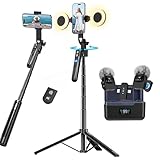
- All-in-One Vlogging Kit--Designed for content creators, featuring an iPhone face-tracking tripod, professional microphone, and dual LED lights. Enables seamless hands-free recording, crystal-clear audio, and professional-grade lighting—freeing your hands for effortless video calls and livestreaming. Perfect for vlogging, live,streaming, and social media video creation.
- No App & Intelligent Face Tracking,Gesture Control --Our stand selfie stick blends simplicity and innovation,no app download is required.Face tracking 360 tripod for cell phone rotating adopts an excellent gesture recognition algorithm, doing the "👌OK" gesture means turn on the tracking, while doing the "🖐️Palm" gesture means pause the tracking,offering intuitive hands-free recording and ease of use
- Upgraded Noise Cancellation and Reverb Mode: This mini wireless microphone features a one-touch noise reduction button to effectively minimize disruptive background noise. It also comes with a windscreen to prevent plosive sounds, ensuring clear and pleasant recordings. The microphone includes a reverb mode, delivering a more professional, rich, and full-bodied sound.
- 25-Hour Extended Battery Life Microphone : The Type-C lapel microphone paired with its charging case delivers up to 25 hours of battery life. Each microphone provides 5 hours of continuous operation on a single full charge, enabling you to maintain creativity and productivity throughout the day.
- 2 in-1 RX Compatible with USB-C Devices and iPhone: 2 IN-1 RX USB-C and Lightning, Our upgraded dual wireless lavalier microphones are compatible with iPhone 17 pro max, Android Phones, iPhone 15(USB-C), iPhone 16, iPad(USB-C), iPhone and more. You can hold the mini lav mic by Magnetic or clip the lapel mic to your shirt. The wireless lavalier mics are suitale for video recording, podcasting, vlogging, tiktok, youtube, instagram, facebook and more.
左右反転
自撮りプレビューは鏡像でも、保存画像は反転されないことがあります。鏡で見慣れた向きを優先するなら反転保存、他人が見る向きや文字・ロゴの正しさを優先するなら非反転を選びます。ほくろ、分け目、服のロゴも左右が変わるため、プロフィール用途では投稿前に確認します。
自然な編集
まず明るさ、色、トリミング、必要なら小さな一時的な肌荒れだけを整えます。輪郭、目、鼻、体型を大きく変える、肌の質感を完全に消す、背景まで歪ませる編集は、本人確認やプロフィール写真では実際の印象とのずれを生みます。
よくある失敗と対策
| 症状 | 主な原因 | 対策 |
|---|---|---|
| 顔や鼻が大きい | 近距離、広角、画面端、低いカメラ位置 | 距離を取り、2倍前後を試し、顔を中央寄りに置く |
| 顔が暗い | 窓が背後、背景が明るすぎる | 窓を正面または斜め前にし、顔をタップして露出を調整する |
| 額や頬が白飛びする | 直射日光、近すぎるライト、露出過多 | 光を拡散し、明部を拡大確認する |
| 目にピントが合わない | 立ち位置のずれ、浅すぎる被写界深度、暗所 | 立ち位置を固定し、光を増やし、必要なら少し絞る |
| 表情が硬い | 一枚で成功させようとしている | 息を吐き、動きながらタイマーや連写で撮る |
| 髪や眼鏡の境界が変 | ポートレートモードの切り抜き | 通常モードで撮り、物理的に背景を整理する |
| 文字が逆 | 鏡越し、反転保存 | 投稿前にロゴや服のプリントを確認する |
| 三脚が倒れそう | 不安定な台、縦位置の重心、風 | 脚を広げ、低く安定した場所を使い、高所や人混みで放置しない |
動画から自然なフレームを切り出す方法もありますが、静止画より解像度やシャッター速度で不利になる場合があります。大きな印刷や高解像度のプロフィール写真では静止画撮影を優先してください。
Recommended Free Tools
目的別のおすすめ方法
| 目的 | 推奨方法 | 設定・注意 |
|---|---|---|
| SNSの気軽な投稿 | フロントカメラ+窓光または日陰 | 顔から離し、撮影後にトリミング |
| 自然なプロフィール写真 | 背面カメラ+三脚+タイマー | 肩を少し斜めにし、過度な加工を避ける |
| マッチングアプリ | 背面カメラ+明るい屋外または窓光 | 実際の印象と大きく異なる補正をしない |
| 全身写真 | 固定撮影+広めの構図 | カメラを低くしすぎず、足元まで確認 |
| 作品としての自画像 | カメラ+三脚+リモコン | 光、背景、焦点、ポーズを設計し、数十枚から選ぶ |
| 旅行の記録 | 通常画角または広角+タイマー | 人物を小さくしすぎず、他人の顔や個人情報に配慮 |
機材を買う順番
- 窓光、日陰、撮影距離を改善する。
- スマホ用三脚で目線の高さを安定させる。
- 必要ならBluetoothリモコンを追加する。
- 夜や逆光を補うLEDライトを導入する。
- 画質や表現の限界を感じてから、瞳AFやバリアングル液晶のあるカメラを検討する。
静止画中心なら、ジンバルより三脚とタイマーの方が画角を固定しやすく、設定も少なくて済みます。
Quick Recap
Product prices and availability are accurate as of the date/time indicated and are subject to change. Any price and availability information displayed on Amazon at the time of purchase will apply.

