
What’s actually slowing this PC down?
Pick the symptom - the matching free tool is one click away.
iTechGuides is reader-supported. When you buy through links on our site, we may earn an affiliate commission. As an Amazon Associate I earn from qualifying purchases. Learn more
A phone that charges slowly in the car usually has one of five explanations: the vehicle’s USB port supplies little power, the cable or charging standard is mismatched, the phone is using power as quickly as it receives it, temperature protection is active, or charging has naturally slowed near a high battery level. A dedicated car charger can help when the built-in port is the bottleneck, but buying one before checking the cable, heat and phone workload can leave the real problem unsolved.
Use the diagnostic sequence below to isolate one variable at a time. It works for iPhone and Android phones, with model-specific limits and messages handled according to the phone maker’s documentation.
What makes a phone charge slowly in a car?
| Likely cause | What you may notice | Best first check |
|---|---|---|
| Low-output built-in USB port | The phone gains battery slowly even with little activity. | Check the vehicle manual and compare the port with a compatible dedicated charger. |
| Incompatible or damaged cable | Charging starts and stops, or a cable swap changes the result. | Inspect both connectors and test a known-good cable that supports the phone’s charging standard. |
| Heavy phone workload | The percentage rises very slowly or falls while navigation, video, gaming or camera use continues. | Pause demanding apps, lower brightness and compare during a short drive. |
| Heat or cold | A temperature warning appears, charging pauses, or the rate changes after the phone sits in sunlight. | Move the phone to a shaded, ventilated location and let it return to a normal temperature. |
| Normal high-battery taper | Charging is quick at a low percentage but slows around the upper part of the charge. | Compare rates at similar battery levels rather than judging only the final few percent. |
| Moisture, debris or physical damage | The phone reports liquid or debris, refuses to charge, or the connector will not seat correctly. | Disconnect it, follow the maker’s drying and cleaning instructions, and do not insert objects into the port. |
Apple notes that a USB port in a car can charge more slowly than a dedicated USB-C charger. The exact output depends on the vehicle, port and charger design, so a familiar USB symbol does not prove that the port can deliver the power your phone can use. See Apple’s charge-speed guidance.
How the car, cable and phone share charging power
The built-in USB port may be the limiting component
Vehicle USB ports are often installed primarily for media or data integration and may provide less power than a modern wall or car charger. Some vehicles have several ports with different functions; one may charge while another is intended mainly for data. The owner’s manual is the reliable way to identify the intended charging port and its specifications.
#1 Best Overall

- Triple-Port 167.5W Max: Seamlessly power up all your essential devices with the first USB-C port delivering a powerful 100W, the second USB-C port providing 45W, and the USB-A port adding an additional 22.5W.
- Ultra-Fast 100W USB-C1 Port: With the first USB-C port offering 100W, quickly charge your 16-inch MacBook Pro from 0 to 50% in only 47 minutes.
- Reliable 45W USB-C2 Port: The second USB-C port offers 45W max of power, providing fast and reliable charging for iPhones and Samsung devices, keeping you connected without any delays.
- Tiny and Mighty: Designed to be unobtrusive, this super-compact charger won't clutter your car's interior.
- What You Get: Anker Car Charger (167.5W, 3 Ports), 3.3 ft USB-C to USB-C cable, welcome guide, 18-month warranty, and our friendly customer service.
If the same phone and cable charge noticeably faster from a compatible dedicated charger connected to the vehicle’s power outlet, the built-in port is a strong suspect. That comparison is meaningful only when the phone is at a similar battery level and doing similar work in both tests.
Charging standards and connectors must match
For iPhone 15 models and later, Apple recommends USB-C Power Delivery with a USB-C cable for faster wired charging. iPhone 14 models and earlier use a USB-C to Lightning cable with a compatible USB-C Power Delivery charger for that type of fast charging. These recommendations are specific to Apple phones; owners of other phones should check the requirements for their exact model.
| Phone or connection | Relevant cable and charger guidance | Specific limit documented by Apple |
|---|---|---|
| iPhone 15 and later | USB-C Power Delivery charger and USB-C cable | Use the supported USB-C Power Delivery combination for faster wired charging. |
| iPhone 14 and earlier | USB-C Power Delivery charger and USB-C to Lightning cable | Use the supported USB-C Power Delivery combination for faster wired charging. |
| iPhone 15 and later on a USB-A charger | USB-A connection rather than the recommended USB-C Power Delivery setup | Apple documents a maximum of 7.5 W for this described connection. |
A cable can fit physically and still limit charging. Damage near either plug, a loose connection, or a cable that does not support the expected standard can reduce the effective rate. A charger’s advertised wattage is not a promise that every phone will draw that amount: the phone, cable and vehicle outlet must all support the same useful combination. Apple also notes that multiport chargers may reduce the output available to each port when several devices are connected.
Windows Errors? Fix Them Before They Spread
Repair common Windows errors and clear accumulated junk for a smoother, more stable PC - no reinstall needed.Free scan · no reinstallCrashes, No Sound, or Screen Glitches?
Random freezes, missing sound and display glitches usually trace back to one bad driver. Find and replace yours safely.Free scan · under a minuteStep-by-step diagnosis
-
Check the phone’s charging message and starting level
Connect the phone and look at its own status area for a slow-charger notice, an incompatible-charger warning, a temperature alert or a charge-limit message. Record the starting battery percentage. Charging behavior changes as the battery fills, so comparing a test that starts at 20 percent with one that starts at 78 percent can produce a misleading conclusion.
-
Identify the vehicle port you are using
If the car has more than one USB socket, consult the owner’s manual for the port intended for charging and for any stated output. Test only while safely parked or before driving; do not reach for a cable while operating the vehicle. A port used for media may not provide the same charging performance as a dedicated charging port.
Rank #2
Sale Anker 40W 2-Port PowerIQ 3.0 USB C Fast Charging Car Charger
- Universal High-Speed Charging: PowerIQ 3.0 ensures rapid charging for USB-C phones, tablets, and more with fast charging capabilities.
- Space-Saving Design: Ultra-Compact build provides easy access to other dashboard functionalities while supporting fast charging for your devices.
- Wide Device Compatibility: Effortlessly powers USB-C devices with fast charging technology, enhancing user experience across gadgets.
- Safe and Reliable Charging: Built-in safety technology helps protect devices with safeguards for stable, high-speed charging.
- What You Get: PowerDrive III Duo car charger, welcome guide, our worry-free 18-month warranty, and friendly customer service.
-
Swap the cable, not everything at once
Inspect the cable for cuts, bent contacts, fraying or a plug that feels loose. Make sure each connector is fully seated. Then test a compatible, known-good cable while keeping the same phone, car port and activity. If the result changes, the original cable is implicated. Apple recommends trying another cable or charger when troubleshooting a charging problem; its instructions are available in this support guide.
-
Test a compatible charger or vehicle outlet
When the vehicle has a suitable 12-volt outlet or another compatible power source, compare the built-in USB port with a dedicated charger that supports the phone’s connector and charging standard. Keep the phone’s battery level, cable and workload as similar as possible. A faster result identifies a port or charger-output difference, not necessarily a defective phone.
Recommended Free Tools
Special offer. See more information about Outbyte and uninstall instructions. Please review EULA and Privacy policy. -
Reduce the phone’s workload for one comparison drive
Pause gaming, high-quality video streaming and camera use, and lower screen brightness. Apple identifies processor- or graphics-intensive activity, camera use and high-quality video as activities that can reduce the observed charging rate. Navigation can also keep the display, location services and mobile data active, so it may contribute to a slower net gain even when the cable and charger are working.
-
Check temperature before interpreting the result
Move the phone away from a hot dashboard and direct sunlight. If it feels hot or displays a temperature warning, stop charging if the phone instructs you to do so and let it cool naturally in a shaded, ventilated place. Do not use extreme cooling methods. Apple’s iPhone guidance gives 0–35 °C (32–95 °F) as its recommended ambient charging range; that range is device guidance for iPhone, not a universal limit for every phone.
-
Inspect for moisture, debris or damage
If the phone reports liquid or debris, unplug it and follow the manufacturer’s procedure. Google Pixel guidance says to check the port and cable without putting anything into them. Do not force a connector, insert a tool or continue using visibly wet or damaged accessories. The Pixel instructions are at Google’s liquid-or-debris support page.
Rank #3
Sale USB C Car Charger Fast Charging 200W, Dual PD 100W Type C Car Charger,
- 【Fast Charging 3 Devices Simultaneously】200W fast car charger with 2 Type-C ports and 1 USB port, allowing you to charge up to 3 electronic devices at the same time.
- 【200W Car Charger USB C Fast Charge】200W (Max) super fast usb c car charger supports Type-C1 100W, Type-C2 100W and USB-A 60W high output and is compatible with QC4.0, QC3.0, PD3.0, PPS, SCP/FCP, AFC fast charging protocols for all devices.
- 【Excellent Heat Dissipation & Safety Car Charger】New heat dissipation process, low temperature charging without burning. With over-current, over-voltage, over-temperature and other protection, safety protection equipment. Intelligent start trickle mode, mobile phones do not overcharge, battery healthier.
- 【LED ambient light】The car charger has an ice blue ring LED ambient light for easier charging at night.
- 【Wide Compatibility】USB C car charger is compatible with most devices, such as for MacBook Pro Air, NoteBook, iPad Pro, iPhone 15 Pro Max 14 13 12 11, AirPods Pro, Steam Deck, Switch, Galaxy S23 Ultra/S22/S21, Steam Deck and more. 12V-24V car charger universal.
Why the battery can fall while the phone is plugged in
“Plugged in” only means that some power is entering the phone. The phone is also consuming power. If navigation, a bright display, a camera session, demanding games or high-quality video use more power than the car connection supplies, the battery can continue to decline. This is a net-power problem rather than proof that the connector has stopped working.
Do these 3 things before closing this tab:
1Repair Windows errors before they cause bigger problems2Scan for outdated or missing drivers - takes under a minute3Clear out junk files and repair common Windows errorsFor a fair test, stop demanding activity and dim the display briefly. If the battery then rises, the phone’s workload was offsetting part of the incoming power. If it still does not rise with a compatible cable and charger, continue with the port, temperature and warning checks rather than assuming that a higher-wattage product will solve it.
Why charging slows near the top of the battery
Phones commonly change their charging rate as the battery fills. Apple says an iPhone charges quickly up to about 80 percent and then uses slower charging to reduce battery stress and heat. A phone that slows from 80 percent onward is therefore not automatically showing a failed car charger. Compare charging over the same percentage range, such as 30 to 50 percent, when evaluating two setups.
Charge-limit or optimized-charging features can also intentionally stop the battery at a chosen level or delay the final portion. Treat any message describing a limit as a phone setting or protection behavior and follow the instructions for that model.
Heat and cold: when protection overrides speed
Charging produces heat, and a hot vehicle adds more. Apple states that the iPhone protects its battery by limiting charging in hot or cold conditions and resumes normal behavior when the battery returns to its operating range. Keeping the phone on a dashboard in direct sun can therefore make a sound charger appear weak or cause charging to pause.
Rank #4
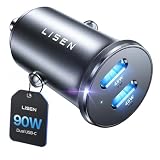
- THROW AWAY THE OLD A+C CAR CHARGER: What sets the LISEN usb c cigarette lighter adapter fast charger for iphone Duo & 18 pro max apart is its dual USB-C ports, each capable of delivering up to 45W of power. This configuration is particularly beneficial for users looking to fast charge two high-power devices at once, such as an iPhone 17 Pro Max and an iPad Pro. The simultaneous 45W output is a game-changer, significantly reducing charging times and ensuring your devices are ready to go when you are
- DUAL USB C FOR VERSATILE CHARGING: The LISEN 90W cigarette lighter adapter usb c car charger for iPhone 18 Pro Max 12v lives up to its promise of super fast charging. It supports Power Delivery (PD) 3.0. In practical terms, this means it can charge an iPhone 18 Pro from 0 to 83% in just about 30 minutes, a claim that holds up under testing. The charger is equally adept at handling other PD-compatible devices, ensuring that everything from smartphones to tablets receives an efficient power boost
- PREMIUM METAL ALLOY SHELL: The LISEN 90W usb c car charger adapter for iPhone 18 Pro Max fast charging impresses right out of the box with its sleek, all-metal design. Not only does the metal construction give it a premium feel and look, but it also aids in heat dissipation, ensuring the charger stays cool even when powering two devices simultaneously
- SMALL SIZE, BIG POWER: The tiny thumb-sized (2.1" (L) x 0.9" (W)) body fits most car 12V cigarette lighter usb c charger, providing a trim, less cluttered look. Its mini size is noteworthy, making it unobtrusive and a perfect fit for most car interiors without sacrificing accessibility
- UL AND FCC CERTIFICATION: LISEN iPhone Duo & iPhone18 Pro Max Car Charger USB C Fast Charging equipped with the intelligent power management chip, and passed UL, CE, FCC, and RoHS certifications. Made with PC fuel barrier V-0 grade material, it won 't get heat, is flame retardant, and is environmentally friendly
Use airflow and shade rather than placing an overheated phone against ice or another extreme cooling source. Remove thick insulation that traps heat, keep the phone out of direct sunlight and wait for the warning to clear. The phone’s own temperature message takes priority over a desire to charge quickly.
Charger hardware has its own environmental limits. Google’s safety guide for its 30W USB-C Charger warns against exposing that charger to temperatures above 45 °C (113 °F), including on a car dashboard. That figure applies to that charger’s safety guidance, not to every phone or vehicle accessory; always follow the instructions supplied with the specific equipment. See Google’s 30W USB-C Charger safety guide.
Independent reader supportYour contribution helps us test, update, and keep practical guides available for everyone.Built-in USB port or dedicated car charger?
A dedicated charger connected to a compatible vehicle power outlet is worth considering when a controlled cable swap and a low-workload test show that the built-in port is the bottleneck. Choose it only after confirming that the vehicle has the required outlet and that the charger supports the phone’s connector and charging standard.
- Compatibility: Match the charger to the phone model, charging standard and cable connector. Apple’s USB-C Power Delivery recommendations are specific to the iPhone generations described above; other phones may have different requirements.
- Output per port: Check the supported output for the port you will use. If two devices are connected, verify how the charger divides power, because combined demand can reduce the output available to each port.
- Physical fit: Confirm that the charger fits the vehicle’s power outlet and does not obstruct controls or prevent the phone from being positioned away from heat.
- Real use case: A single phone, two phones and a phone-plus-accessory setup can have different power needs. Select a configuration that supports the devices you will actually connect.
- Cable condition: A new charger cannot compensate for a damaged or incompatible cable. Replace or test the cable as a separate diagnostic step.
More advertised watts do not guarantee faster charging if the phone, cable or vehicle cannot use them. No specific charger model is necessary to apply these checks; the relevant specifications are the supported standard, output, connectors and vehicle fit.
What to do for common symptoms
It says “slow charger” immediately
Check the vehicle port’s documented function, then test a compatible cable and a dedicated charger if the car provides a suitable outlet. Reduce phone activity and check temperature before concluding that the phone is defective.
Best Value

- 67W 3-Port Super Fast Car Charger: Total 67 Watt USB C car charger Support PD 37W Max (USB C) and QC 30W Max (USB-A) output, can fast Charge for Most USB-A and USBC Devices Simultaneously. One car charger for all your USB A & USBC devices, your ideal travel companion
- 3X Fast Charge Speed: with upgrade PD and QC Fast Charging Technology, it can rapid charging for iPhone and Samsung or other phones from 0-50% in about 30 minutes, up to 3X faster than before, even can fast charge for Macbook air and iPad in high speed
- Broad Compatibility: with USB-C and USB-A output, can charge almost all USB Devices, compatible with iPhone 18 Pro/18 Pro Max, iPhone Duo, iPhone 17/17 Pro Max, iPhone Air, iPhone 16/16e/16 Pro Max/16 Plus, iPhone 15/15 Pro Max/15 Plus, iPad, Samsung Galaxy S26/S25/S24/S23/S22/S21/S20, Note 20/10/9, Google Pixel 11/10/9/8/7/6/5, android Cell Phone and other devices
- Safe & Reliable: USB C Car Charger Cigarette Lighter with intelligent chip inside, the Car Charger Adapter provides multi protections against over-current, over-voltage, over-heating and short-circuit. will automatically stop charging when power is full; the product shell made by ABS + PC fireproof material, ensure Protect your device and charge safely all the time
- What You Get: 1 x 67W 3-Ports USB-C & USB-A car charger Adapter + 1 x 3FT USB C to USB C Cable (Color: Black), 1-Year Replacement
Charging starts and stops
Reseat both connectors and inspect for cable damage. A loose plug, debris, moisture warning or movement-sensitive connection warrants stopping use and following the phone maker’s cleaning or drying directions. Do not force the plug or probe the port.
The phone charges quickly at home but slowly in the car
That pattern points first to the car’s port, charger output, cable arrangement or vehicle heat. Repeat the comparison at a similar battery percentage with the same low workload. If a dedicated car charger is faster while the built-in port is not, use the compatible higher-output setup or the vehicle port specified for charging.
The phone is hot even though the battery barely rises
Stop the demanding activity, move the phone out of sunlight and let it cool. Continuing to charge in a hot location can invoke protective limits. If a warning tells you to disconnect, do so and resume only when the phone returns to a safe operating range.
A Pixel reports liquid or debris
Unplug the cable, keep objects out of the USB-C port and follow the steps in Google’s Pixel support instructions. Do not use visibly wet or damaged accessories.
Safe charging habits during a drive
- Set up the cable before moving and keep it clear of pedals, steering controls and other moving parts.
- Use a cable and charger that are specified for the phone; do not force a connector that does not fit.
- Keep the phone and charger out of direct sun and away from hot dashboard surfaces.
- Disconnect equipment when a liquid, debris, damage or temperature warning appears.
- Follow the phone, charger and vehicle manuals when their instructions differ from general guidance.
The practical answer is to diagnose before purchasing: compare the car port, cable, phone workload, battery level and temperature under controlled conditions. If the built-in port is demonstrably low-output, a compatible USB-C Power Delivery car charger may improve charging; if heat, workload, tapering or a damaged cable is responsible, a higher-wattage charger will not remove that cause.
Quick Recap
Product prices and availability are accurate as of the date/time indicated and are subject to change. Any price and availability information displayed on Amazon at the time of purchase will apply.

