
Quick wins for a faster PC:
Fix the driver behind crashes, sound loss and screen glitchesFind Drivers →Clear out junk files and repair common Windows errorsFree Scan →iTechGuides is reader-supported. When you buy through links on our site, we may earn an affiliate commission. As an Amazon Associate I earn from qualifying purchases. Learn more
Quiet or one-sided wired headphone audio is usually traceable to a setting, an incomplete connection, debris, or a damaged cable or speaker. Start at a moderate listening level, confirm the output and volume, center the left-right balance, then reseat and inspect the plug. The fastest way to separate a headphone fault from a device fault is to test the headphones on another compatible device and a known-working pair on the original device.
First, identify the exact symptom
Play a familiar stereo recording at a moderate volume. Note which of these descriptions fits:
- Both sides are quiet: overall or app volume, the selected output, audio enhancements, an incompatible adapter, an audio format, or a driver is more likely than a single failed speaker.
- One side is silent: left-right balance, an incompletely inserted plug, debris at a contact or mesh, a broken conductor in the cable, or a failed driver deserves priority.
- One side is merely quieter: balance settings, partial contact, a blocked mesh, or damage that has not completely opened the channel can all produce this pattern.
- The sound changes when the plug or cable moves: treat that as a connection or cable warning rather than a volume problem.
Do not keep increasing the volume to compensate. Apple’s headphone-safety guidance gives exposure above 80 dB for a total of 40 hours in the previous seven days as an example that can affect hearing and trigger a notification on its devices; it is not a universal safe-listening threshold or a statistic about headphone failures.
Also rule out the recording itself. A track deliberately mixed to one channel, a damaged video, or a mono source can make a working stereo pair seem faulty. Use the same familiar stereo recording for each test so that you are comparing the hardware and settings rather than changing several variables at once.
#1 Best Overall

- This set of keyboard cleaning brushes is well made, comes in a variety of shapes and sizes for cleaning deep and hard-to-clean areas, enough to meet your daily needs.
- Made of PP handle and nylon bristles, it is durable, the bristles are not easy to fall off or break, and will not generate static electricity during use, preventing damage to your device.
- The computer brush kit is small in size and light in weight, making it easy to carry and use. This is a great tool kit for use at home or at work.
- Mini electronic cleaning brush is suitable for cleaning computer keyboards, home appliances, car interiors, vents, circuit boards, mobile phones, cameras, electronic devices, etc.
- Packaging: 5 different types of anti-static cleaning brushes.
Work through the quick checks in order
1. Confirm output, mute, and volume
- Make sure the headphones are the output selected by the phone, tablet, or computer. A device may still be sending sound to its speakers, a monitor, a wireless device, or another USB audio interface.
- Raise the system volume a small amount and check the application’s own volume control. A media player, browser tab, game, or call app can be muted independently.
- Try a different familiar recording. A mono recording, a deliberately panned track, or a faulty video can make a healthy pair appear defective.
- Pause any call, meeting, or communications mode that may be applying its own audio routing or level.
These checks establish that the symptom is present in the intended playback path before you handle the connector or change advanced settings. If the device shows a headphone icon but produces no sound, still verify the selected output: detection of a plug does not prove that the correct playback endpoint is active.
2. Reseat the plug and remove case interference
Unplug the headphones, then insert the connector fully and straight. A phone or computer case can stop a plug just short of its contacts. If removing the case restores both channels, the case—not the headphone driver—was preventing a firm connection.
Look at the plug and cable under good light. Apple Support specifically says to check the cable, connector, remote, and earbuds for damage such as wear or breakage. A bent plug, split strain relief, exposed conductor, intermittent remote, or loose connector is evidence that the set may need service or replacement.
Free tools Windows power users keep installed
One-click scans. No signup required.
Inspect the device port for visible lint or other debris. Do not push pins, needles, or other sharp metal into the port; a shorted or damaged contact can turn a simple obstruction into a device repair. Never force a connector that requires unusual pressure or does not align with the port.
Center the left-right balance
A balance control can make one channel intentionally quieter or silent. Return it to the center while diagnosing, even if you do not remember changing it. Check balance before assuming that the cable or speaker has failed, because a software slider can reproduce exactly the same one-sided symptom.
iPhone and iPad
- Open Settings.
- Choose Accessibility.
- Open Audio & Visual.
- Set Balance to the center.
Apple’s labels can vary slightly by operating-system version. The important control is the left-right Balance slider. Play the same recording again after changing it. If the slider was already centered, leave it there while you continue with physical and cross-device checks.
Windows 10 and Windows 11
- Open Settings and select System > Sound.
- Select the wired output device currently in use.
- Check the left and right channel levels and make them equal.
- Open Volume mixer and verify the affected application is not muted or assigned an unexpectedly low level.
Windows settings names and placement can change between Windows 10 and Windows 11 updates, but the relevant controls remain the output device’s channel levels and the per-app mixer. Check both the master level and the individual application level; changing only one may leave the other limiting playback.
Fix quiet output on Windows without masking a hardware fault
If both channels remain quiet after selecting the correct output and centering balance, use Windows’ software checks. These steps apply to Windows 10 and Windows 11 and are platform-specific; they do not repair a broken cable or speaker.
Rank #2

- 【 Perfect combination 】: 22pcs small brush, sufficient in quantity, suitable for various tasks, such as cleaning dust, household appliances, painting, sauce baking, barbecue, etc.
- 【Widely used 】: It can also be used to clean difficult to reach areas such as window grooves, blinds, coffee machines, electric shavers, car vents, camera lenses, computer keyboards, fans, printers, sewing machines, etc.
- 【Durable Material】: The small brush is made of high-quality ABS plastic handle and polypropylene fiber,ensuring long-term use without wear or damage.
- 【Portable and compact】: The brush is compact in size, easy to carry and store, and can be used at home, in the office, or during travel.
- 【Satisfied Service】: Any dissatisfaction can be refunded or returned without any risk, so please rest assured to purchase.
Turn off audio enhancements
In the selected output device’s sound properties, turn audio enhancements off and test again. Enhancement processing can reduce or alter level on some driver and device combinations. Record the original setting so you can restore it if it was serving a deliberate purpose. Test with the same recording and volume each time, rather than judging a new song or a different app.
Try another audio format
In the output device’s advanced sound properties, choose a different available default format and test a familiar recording. A format or driver mismatch can produce unexpectedly low output even when the volume slider looks normal. There is no single format that is correct for every computer; use the option that works reliably with your device.
Update or reinstall the audio driver
Use the computer or sound-device maker’s current driver guidance. If an update does not help, reinstalling the driver can clear a damaged configuration. Restart Windows and repeat the output-selection and balance checks afterward. Avoid downloading an unverified driver simply because it promises louder sound; use the computer or audio-device manufacturer’s support channel.
Run Microsoft’s Windows audio troubleshooter
On Windows 11, Microsoft recommends the Get Help audio troubleshooter for general sound problems. Follow its prompts with the headphones connected and the intended output selected. A troubleshooter can correct routing or configuration, but it cannot restore a failed headphone driver.
Understand Mono audio
Windows Mono audio combines stereo channels into one. It can help someone who intentionally listens with one headphone, but it is an accessibility option, not a repair. Do not enable it as a solution for a dead speaker, a damaged cable, or a channel that fails cross-testing. If you turn it on temporarily for accessibility, turn it back off when diagnosing stereo balance.
Clean visible debris safely
Debris over an earbud’s speaker mesh can muffle one side or both. Clean only what you can see and only in the way the headphone maker permits. Apple’s directions for Apple EarPods are model-specific:
- Wipe the exterior with a soft, dry, lint-free cloth.
- Gently brush microphone and speaker meshes with a dry cotton swab or a clean, dry, soft-bristled brush.
- Keep liquid out of every opening.
- Do not use sharp objects or abrasive materials; Apple Support states, “Don’t use sharp objects or abrasive materials to clean your EarPods.”
Those instructions should not be generalized to every brand or model. Do not assume that liquid cleaner, a toothpick, a pin, or compressed air is approved for your headphones. If the manufacturer gives no cleaning procedure, limit yourself to gentle, dry exterior cleaning and avoid pushing material into the mesh. Cleaning the mesh cannot repair a broken conductor, failed driver, or damaged plug.
Outdated Drivers Are Slowing You Down
One free scan finds every outdated or missing driver and matches the right update for your exact hardware.Free scan · exact hardware matchWindows Errors? Fix Them Before They Spread
Repair common Windows errors and clear accumulated junk for a smoother, more stable PC - no reinstall needed.Free scan · no reinstallCross-test to locate the failing part
Cross-testing is the strongest simple isolation step. Perform both tests, using a compatible connection in each case:
Rank #3

- 10 Different Sizes for Versatile Cleaning: This keyboard cleaning brush set includes 10 different sizes, featuring 7 hard brushes and 3 soft bristle brushes, allowing you to clean various components in different locations with ease
- Effective Dust Removal: The brushes are designed to effectively remove debris from keyboard gaps and dust inside computers, ensuring optimal performance and preventing dust buildup that could damage your equipment, saving on costly repairs
- Anti-Static Protection: Made with high-quality nylon material, the anti-static brushes are safe for cleaning electronic components, including computer motherboards, without worrying about damaging sensitive parts. (Note: Yellow bristle brush is not anti-static.)
- Soft Bristles for Delicate Surfaces: The yellow and blue soft bristle brushes are perfect for cleaning delicate surfaces like computer monitors, car screens, and camera lenses, offering a gentle touch for sensitive areas
- Wide Range of Applications: Ideal for cleaning keyboards, computer fans, car vents, door/window tracks, razors, and more, this cleaning brush kit efficiently removes dust and debris from hard-to-reach areas in various environments
| Test | Result | Most useful lead |
|---|---|---|
| Original headphones on another compatible device | The same side is quiet or silent | The headphones, plug, cable, or adapter are more likely involved. |
| Original headphones on another compatible device | Both sides work normally | The original device, its port, output selection, balance, or software is more likely involved. |
| Known-working headphones on the original device | They work normally | The original headphones are the stronger suspect. |
| Known-working headphones on the original device | They show the same fault | Investigate the device port, adapter, output settings, or audio hardware. |
This is a diagnostic clue, not mathematical proof: two devices can share an incompatible adapter or a source recording can be faulty. Repeat with a different known-good recording and ensure both sets use the correct connector. Keep a simple note of which pair, device, adapter, and channel you tested; it prevents returning to a setting that has already been ruled out.
Apple advises trying a second pair; if the second pair works, it recommends contacting the original headphone manufacturer about replacement. If the second pair also fails, the device may need support. Testing the original set on another compatible device adds the counterpart that helps identify whether the fault follows the headphones.
Check connector and adapter compatibility
A connector mismatch can prevent sound or produce an unreliable connection. Apple documents wired EarPods with USB-C, Lightning, and 3.5 mm connectors, with these compatibility conditions:
Recommended Free Tools
| Headphone connection | Works with | Important limitation |
|---|---|---|
| USB-C | A device with a compatible USB-C audio connection | USB-C ports and adapters do not all provide identical audio support; verify the exact device and adapter. |
| Lightning | A compatible Lightning device running iOS 10 or later, according to Apple’s EarPods guidance | It is not a universal connector for USB-C or 3.5 mm ports. |
| 3.5 mm | A device with a standard 3.5 mm headphone jack | A device without that jack needs a compatible adapter. |
| USB-C-to-3.5 mm adapter | A device with USB-C and headphones with a compatible 3.5 mm plug | It addresses connector compatibility only; it cannot fix balance, debris, a damaged cable, or a failed driver. |
| Lightning-to-3.5 mm adapter | A compatible Lightning device and 3.5 mm headphones | Confirm that the adapter is intended for the exact device and operating system. |
Before buying an adapter, identify the phone or computer model, its physical port, the headphone plug, and whether the adapter supports audio in that direction. An adapter that merely fits mechanically may not provide an audio path. If the same adapter is used in both cross-tests, repeat the tests with a confirmed compatible adapter before blaming either the headphones or the device.
Use the symptom to choose the next action
Only one pair fails on every compatible device
If the original headphones have the same one-sided or quiet-channel fault on multiple compatible devices, while a known-working pair operates normally on those devices, stop treating this as a settings problem. Check the cable and plug once more, then contact the headphone maker for service or replacement if the product is covered. Replacement is reasonable when the cable, connector, or driver is damaged and repair is not offered.
Several pairs fail on one device
When multiple known-good headphones reproduce the fault only on one phone or computer, concentrate on that device: remove any case blocking insertion, inspect the port without inserting tools, verify output and balance, test a compatible adapter, and apply the Windows-specific checks if applicable. Persistent failure after those steps points toward a damaged port or audio hardware and may require device support.
The sound changes when you bend the cable
An intermittent change caused by movement strongly suggests a broken conductor or failing strain relief. Do not secure it by repeatedly twisting the cable into a position that restores sound; that can worsen the break and create sudden loud/quiet changes. Replace or service the set after cross-testing confirms the behavior follows it.
The Tool Desk
Outbyte PC Repair FREERepair Windows errors before they cause bigger problemsFix Now →Outbyte Driver Updater FREEScan for outdated or missing drivers - takes under a minuteDriver Scan →Cleaning restores one side briefly
Temporary improvement after removing visible mesh debris means blockage may have contributed, but it does not prove the driver is healthy. Follow the maker’s cleaning method, keep liquids out, and repeat the cross-test. If the channel fades again without new debris, treat the set as potentially damaged rather than escalating to harsher cleaning.
Rank #4
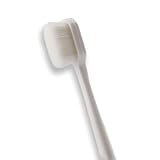
- 🔧 Precision Soft Bristles – 10,000 Ultra-Fine Fibers Engineered with over 10,000 soft bristles (80 µm each) to safely remove flux, dust, and corrosion from delicate PCB and BGA surfaces without scratching.
- 💪 Durable & No-Shed Design Built to last—bristles are securely embedded to prevent shedding during cleaning. Use it repeatedly without losing fibers or performance.
- 🧼 Ideal for Flux Removal & Detail Cleaning Perfect for cleaning around ICs, capacitors, and SMDs after soldering. Easily wipes away soldering flux, oxidation, and micro-debris from hard-to-reach spots.
- 🧲 Anti-Static & Safe for Electronics Designed to be ESD-safe when used with appropriate cleaning agents, reducing the risk of static discharge damage during sensitive repair work.
- 🧰 Versatile Tool for Pros & DIYers Great for repair shops, electronics hobbyists, phone and tablet techs, and PC builders. Use it on motherboards, laptops, graphics cards, and more.
When to stop troubleshooting
- Stop and seek device service if the port is physically loose, visibly damaged, hot, or has signs of liquid exposure.
- Stop using headphones with exposed wires, a cracked plug, or a connector that becomes hot.
- Do not continue high-volume testing to determine whether a channel is working.
- Do not force a plug or adapter that does not seat normally.
- Do not assume a software workaround such as Mono audio makes defective hardware safe or repaired.
A clear cross-test result is more valuable than repeated volume changes: it tells you whether to pursue settings and the device, or service and replacement of the headphones.
Independent reader supportYour contribution helps us test, update, and keep practical guides available for everyone.A compact decision checklist
- Play a familiar stereo recording at a moderate level and identify whether one channel or both are affected.
- Confirm the selected output, system volume, app volume, and mute state.
- Remove any case that may block the plug and reseat the connector fully.
- Inspect the plug, cable, earbuds, and device port for visible damage or debris; do not use sharp tools.
- Center iPhone/iPad Balance under Settings > Accessibility > Audio & Visual, or equalize Windows channel levels under Settings > System > Sound.
- If both sides are quiet on Windows, test with enhancements off, another format, and an updated or reinstalled audio driver; use the Windows 11 Get Help audio troubleshooter when appropriate.
- Clean visible mesh debris only with the headphone maker’s approved dry method.
- Test the original headphones on another compatible device and a known-working pair on the original device.
- Choose service or replacement only after the fault follows the headphones; pursue device or port support when multiple pairs fail only on that device.
Frequently asked questions
Why do wired headphones work in only one ear?
The common possibilities are a shifted balance setting, a plug that is not fully seated, debris at the port or earbud mesh, a damaged cable, or a failed speaker driver. Center balance, reseat and inspect the connector, then cross-test the pair on another compatible device.
Can a phone case cause one-sided sound?
Yes. A case can prevent the plug from reaching all of its contacts. Remove the case, insert the plug straight and fully, and test again. If both channels return, the case was interfering with the connection.
What’s actually slowing this PC down?
Pick the symptom - the matching free tool is one click away.
Will Mono audio fix a dead earbud?
No. Mono audio combines the channels for accessibility and may make a single-ear listening arrangement more usable, but it does not repair a failed speaker, cable, plug, or port.
Should I use alcohol, water, a toothpick, or compressed air to clean the mesh?
Do not assume any of those methods is approved. Apple’s EarPods instructions call for dry, gentle cleaning, keeping liquid out, and avoiding sharp or abrasive materials. Follow the exact instructions for your model; if none are supplied, limit cleaning to a gentle dry exterior treatment.
What if both pairs are quiet on my Windows computer?
Confirm the selected output and app volume, equalize left and right levels, turn enhancements off, try another available audio format, and update or reinstall the manufacturer’s audio driver. Windows 11 also offers the Get Help audio troubleshooter. If several compatible pairs still fail, the port, adapter, or computer audio hardware needs attention.
Can a USB-C-to-3.5 mm adapter solve the problem?
Only when the device has USB-C, the headphones have a compatible 3.5 mm plug, and the adapter supports audio for that exact device. It cannot correct balance, debris, a broken cable, or a failed headphone driver.
How do I know whether to replace the headphones?
Replacement is most justified when the same fault follows the headphones across compatible devices, while a known-good pair works normally on those devices. Contact the manufacturer first if the set is covered or repairable. If multiple pairs fail only on one device, investigate the device instead.
Best Value

- Value Package:6 in 1 different sizes plastic handle anti static brushes kit.
- Material:Anti Static Brushes are made of plastic and nylon,very durable.The contact will not scratch the film, can effectively eliminate the anti-static timely.
- Advantage:Wide variety of brushes, different bristles hardness & sizes for different tasks all the time
- Portable Set:This cleaning kit gets rid of the dust bunnies and crumbs in your keyboard, goes really well with an air blower or compressed air or power duster
- Wide Application:Perfect for cleaning the home appliances,car interior detailing, vent,wall gap,water cup,razor,computers,gaming keyboards and hard-to-reach spaces.
Is it safe to keep turning up the volume during testing?
No. Test at a moderate level and stop once the symptom is clear. Apple cites exposure above 80 dB for 40 total hours in seven days as an example that can affect hearing and trigger a device notification, not as a universal safe limit.
Frequently Asked Questions
Why do wired headphones work in only one ear?
A shifted balance setting, incomplete plug insertion, debris, cable damage, or a failed driver can all cause one-sided sound. Center balance, reseat and inspect the plug, then cross-test the headphones on another compatible device.
Can a phone case cause one-sided sound?
Yes. A case can stop the plug short of its contacts. Remove the case and reseat the plug fully; if both channels return, the case was blocking the connection.
Do these 3 things before closing this tab:
1Scan for outdated or missing drivers - takes under a minute2Clear out junk files and repair common Windows errors3Fix the driver behind crashes, sound loss and screen glitchesWill Mono audio fix a dead earbud?
No. Mono audio is an accessibility setting that combines channels. It does not repair a failed speaker, cable, plug, or device port.
Should I use liquid or a toothpick to clean the mesh?
Do not assume those methods are approved. Apple’s EarPods guidance calls for dry, gentle cleaning, keeping liquid out, and avoiding sharp or abrasive materials. Follow your model’s own instructions.
What if both pairs are quiet on Windows?
Check output and app volume, equalize channel levels, turn enhancements off, try another format, and update or reinstall the manufacturer’s driver. Windows 11 also offers the Get Help audio troubleshooter.
Can a USB-C-to-3.5 mm adapter solve the problem?
Only with a compatible USB-C device, 3.5 mm headphones, and an adapter that supports audio for that exact device. It cannot fix balance, debris, cable damage, or a failed driver.
How do I know whether to replace the headphones?
If the same fault follows the headphones across compatible devices while a known-good pair works, the headphones are the stronger suspect. Contact the manufacturer before replacing a covered or repairable set.
Is it safe to keep turning up the volume during testing?
No. Test at a moderate level. Apple cites exposure above 80 dB for 40 total hours in seven days as an example that can affect hearing and trigger a notification, not as a universal safe limit.
The Bottom Line
Start with output, volume, balance, and a fully seated plug. Inspect and clean only as the manufacturer directs, then cross-test both the headphones and the device. If the fault follows the headphones, pursue service or a compatible replacement; if multiple pairs fail only on one device, seek device or port support instead.
Quick Recap
Product prices and availability are accurate as of the date/time indicated and are subject to change. Any price and availability information displayed on Amazon at the time of purchase will apply.
Free tools Windows power users keep installed
One-click scans. No signup required.

