
iTechGuides is reader-supported. When you buy through links on our site, we may earn an affiliate commission. As an Amazon Associate I earn from qualifying purchases. Learn more
A queue can absorb a temporary burst, but it cannot create processing capacity. If work arrives faster than consumers can complete it, the backlog grows; if that mismatch lasts, the queue only postpones the point when the system must push back or fail. Diagnose growth by comparing arrival and processing rates, then check how old the waiting work is and what is limiting consumers.
What a growing queue actually tells you
A queue converts a gap between incoming work and processing capacity into waiting time. It can smooth short-lived spikes when arrivals later fall below service capacity, but sustained arrivals above capacity add backlog for as long as the gap persists.
For example, an illustrative scenario in an article by snehaup1997 on DEV Community has a system processing 8,000 events per second receive 9,000 per second. The difference—1,000 events per second—adds to the queue while those rates hold. These are scenario values, not a benchmark or a measurement of a real system. DEV Community article by snehaup1997
The first diagnostic question is not simply “How deep is the queue?” It is “Why is it growing?” A depth reading shows accumulated work, but not the rate of accumulation, how long users wait, or what is preventing work from completing.
#1 Best Overall
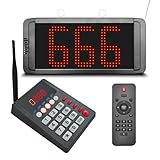
- 【Convenient Keypad Pager】The first orange digit indicates the zone number and the last three red digits indicate the customer number. It can re-call any number from 001-999, press "Next + ENT" and the keypad will quickly call the next one.
- 【Multi-Function Number Display】The display receiver can be mounted on a wall or desktop. Its voice mode, volume and number of prompts can be adjusted. The default voice is "Number XXX", you can choose a voice reminder with only a ding-dong sound (no number is broadcast)
- 【Plug and Play】There is no need for an internet connection with this queue system, we pair the two before shipping and they are ready to use when powered on. If you would like to add additional quantities, please contact us.
- 【Long Distance】This waiting number system has a signal coverage of about 1,000 feet in an open field, and even indoors where there are obstacles, the signal coverage can reach about 100-150 feet.
- 【Clearly Visible Numbers】 The led display uses high-brightness light beads that can be seen in sunlight. But it isn't waterproof and prolonged exposure to sunlight can easily shorten its life.
How to estimate backlog growth and burst tolerance
Compare arrivals with completions
Track arrival rate and processing rate over the same time interval. When arrivals exceed completions, the difference is the approximate backlog growth rate during that interval. In a separate illustrative calculation from the same DEV Community article, 10,000 messages per second arriving while 7,000 are processed produces a 3,000-message-per-second deficit. If both rates remain unchanged for five minutes, the backlog grows by 900,000 messages. This arithmetic assumes steady rates; real systems fluctuate.
Estimate a burst, then check how quickly you can recover
A buffer can hold work through a temporary burst only if it has enough room and the system can later process the excess faster than new work arrives. The article’s illustrative scenario assumes 10,000 arrivals per second against 8,000 processing capacity per second for 60 seconds, creating 120,000 messages of backlog. If arrivals then fall to 6,000 per second and processing rises to 10,000 per second, the net drain rate is 4,000 per second, so clearing that backlog takes 30 seconds under those assumptions.
Rank #2
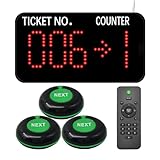
- Power-off memory is one of the highlights of this queue calling system. When this function is switched on, the last number called will be stored automatically. Upon reconnecting the power, the call will start with "Last Number + 1"
- By default, numbers start at 000 and end at 999. You can set the "Start" and "End" numbers as required, for example, you only need to call numbers between 50 and 200. Once the call reaches the "End" number, the system will automatically restart from the "Start" number.
- Quick Zero: Suppose you have set the "Start" number to 10 and are currently calling 35. Press the Up and Down keys at the same time to quickly zero. When pressing the NEXT button, the number will start calling again from 10. Note that the "zero" here is not necessarily the number 0, but the "Start" number you set.
- The receiver consists of 3-digit ticket number and 1-digit counter number. The number display can be mounted on a wall or desktop. Easily adjust the volume, voice mode, number of broadcasts, cycle time, etc. The default voice mode is "Dingdong + Number XXX go to X"
- NEXT Button: It is a waterproof signal transmitter for the service personnel. When the "NEXT" button is pressed, the number will automatically go to the next one, accompanied by an indicator light prompt. It makes our queue wireless calling system simple and easy to use.
Use the net recovery rate—processing minus new arrivals—not the raw processing rate when estimating drain time. A nominal queue capacity alone does not say whether a burst is tolerable: the waiting work must also finish before its useful deadline.
Use Little’s Law carefully
Little’s Law relates average work in a stable system to average arrival rate and average time in the system: L = λW. The DEV Community article illustrates the relationship with 50,000 messages and a rate of 5,000 messages per second, yielding roughly 10 seconds of work at that rate. This is a steady-state mental model, not a precise prediction of how long a live backlog will take to empty; it does not account for changing arrivals, uneven service times, retries, or downstream stalls.
Rank #3

- Keypad: It call number from 001-999 and call back any number and recall any number. It have a NEXT key, press Next + ENT, then number will go to next one.
- Display: It can be wall installed or desktop style. Can dingdong beeper or prompt English voice to announce number change.
- Display voice mode, volume, prompt times, brightness can be adjusted.
- How to work: give a numeric serial number within 999 to the customers, when order is ready just press the number you want to call, the display will voice accompanied by number display on the screen, easy to alert the guests their food is ready, user friendly operation.
- Great for government offices, pharmacies, retail, patient waiting areas and anywhere waiting line flow can be improved. Eliminates waiting lines. Customers can browse and relax without fear of losing their place in line.
Why queue depth is not the same as user-visible delay
Two queues with the same number of messages can have very different consequences. A queue may contain many small, fast tasks or fewer slow tasks; newer arrivals may also be waiting behind older work. Measure message age as well as depth, and use age percentiles to see whether a tail of work is becoming unacceptably old.
Pair queue depth and age with the measurements that explain them:
Rank #4

- Power-off memory is one of the highlights of this queue calling system. When this function is switched on, the last number called will be stored automatically after power off. Upon reconnecting the power, the call will start with "Last Number + 1"
- By default, numbers start at 000 and end at 999. You can set the "Start" and "End" numbers as required, for example, you only need to call numbers between 50 and 200. Once the call reaches the "End" number, the system will automatically restart from the "Start" number.
- Quick Zero: Suppose you have set the "Start" number to 10 and are currently calling 35. Press the Up and Down keys at the same time to quickly zero. When pressing the NEXT button, the number will start calling again from 10. Note that the "zero" here is not necessarily the number 0, but the "Start" number you set.
- The receiver consists of 3-digit ticket number and 1-digit counter number. The number display can be mounted on a wall or desktop. Easily adjust the volume, voice mode, number of broadcasts, cycle time, etc. The default voice mode is "Dingdong + Number XXX go to X"
- NEXT Button: It is a waterproof signal transmitter for the service personnel. When the "NEXT" button is pressed, the number will automatically go to the next one, accompanied by an indicator light prompt. It makes our queue wireless calling system simple and easy to use.
- Arrival and processing rates, measured over comparable intervals.
- Consumer concurrency, utilization, and processing latency.
- Downstream latency and errors, especially for shared dependencies such as databases or external services.
- Retry volume, dead-letter volume, and rejected work.
- Backlog recovery rate: how quickly the queue shrinks while new work continues to arrive.
Find the bottleneck before adding consumers
Check whether consumers are the constraint
If arrivals exceed processing and consumer capacity is fully occupied, insufficient processing capacity may be the issue. More workers can help when work is independently processable and downstream systems have room for the additional load.
Quick wins for a faster PC:
Clear out junk files and repair common Windows errorsFree Scan →Fix the driver behind crashes, sound loss and screen glitchesFind Drivers →Check shared dependencies and contention
More workers do not automatically mean more throughput. If consumers are waiting on a database or external service, that dependency may set the effective processing rate. Raising concurrency can increase contention, add latency, and leave the queue growing just as quickly—or faster. A falling processing rate alongside rising database latency is a reason to investigate the dependency, not to assume that more consumers will fix the problem.
Best Value

- Multi-Window Wireless Queue Calling System: Our queue call system is equipped with 1 LED display and 15 call buttons, specifically designed for multi-window business scenarios such as banks, hospitals, clinics, pharmacies, and barbershops. It effectively eliminates queuing chaos and greatly improves service efficiency and customer satisfaction, making it the ideal queue management system for multi-counter service occasions.
- Counter Calling Button System: The 15 counter call buttons have the functions of NEXT/LAST/RECALL, which are convenient for window/room staff to operate. This design perfectly meets the needs of bank counters, hospital registration offices, doctors' waiting rooms, and government service windows, serving as a practical auxiliary tool for multi-window queue management.
- 3-Digit LED Number Display: The LED digital display shows the current number and window number, ensuring that customers can see their queue status/corresponding window, and not miss their number being called. The default voice prompt mode of the ticket number calling system is “Dingdong~please number xxx (000-999) go to counter xx”, and the voice mode can be changed as needed.
- Power-Off Memory & Custom Number Range: With power-off memory function, the take a number system automatically saves the last called number and restarts from the next number ("last number +1") when powered on again. It supports custom call range from 001 to 999 (i.e. setting it to 50-100), providing stable and flexible operation for different business needs of banks, clinics and hospitals.
- Long-Range Wireless Transmission: The wireless number system for customers can achieve a transmission distance of up to 500 meters in an open area without obstacles, and an indoor transmission distance of 50-100 meters (suitable for 1-2 floors). It delivers stable signal, ideal for open spaces (e.g., bank waiting area) and different rooms (e.g., doctors' waiting rooms).
Look for retries that multiply load
Retries can be useful when failures are temporary, but immediate or excessive retries can send more work to an already struggling dependency. Rising retries together with downstream errors may indicate retry amplification. Use exponential backoff with jitter, a maximum attempt count, and a retry budget; route exhausted work to a dead-letter mechanism for controlled handling. Make operations idempotent where retries could otherwise perform the same action more than once.
Independent reader supportYour contribution helps us test, update, and keep practical guides available for everyone.Choose how the system behaves under overload
A queue’s limit and admission policy define what happens when demand outruns capacity. A larger queue absorbs more burst work but can delay pushback and let old work accumulate. A smaller or bounded queue makes the constraint visible sooner, but has less room for bursts. There is no universal queue size: choose according to the workload’s burst profile, acceptable message age, and recovery capacity.
- Admission control: limit or reject incoming work when the system cannot safely accept more.
- Backpressure: signal upstream producers to slow down rather than allowing unbounded accumulation.
- Rate and concurrency limits: protect constrained consumers and dependencies from excessive simultaneous work.
- Priority policies: admit or process time-sensitive work ahead of lower-priority tasks, while deciding explicitly what lower-priority work may wait or be rejected.
- Workload separation: isolate work with different urgency or resource needs when one class could otherwise block another.
Coalesce superseded updates or expire stale work only when application semantics permit it. For instance, replacing several pending “current status” updates with the latest state may be safe in some systems; discarding individual financial or audit events may not be. The business meaning of the work determines whether it can be merged or dropped.
Crashes, No Sound, or Screen Glitches?
Random freezes, missing sound and display glitches usually trace back to one bad driver. Find and replace yours safely.Free scan · under a minuteWindows Errors? Fix Them Before They Spread
Repair common Windows errors and clear accumulated junk for a smoother, more stable PC - no reinstall needed.Free scan · no reinstallPlan for the full overload and recovery cycle
Capacity planning should answer three separate questions: how large a temporary burst the buffer can absorb, how old work may become before it is no longer useful, and how much spare processing capacity is available to recover while new work still arrives. It should also define what happens when the queue reaches its limit: reject, defer, apply priority, or use another explicit policy.
Monitor queue depth, age, rates, consumer behavior, downstream health, retries, dead letters, rejections, and recovery together. A queue that is deep but draining fast may be less urgent than a smaller queue whose oldest messages are steadily aging while throughput falls. The operational goal is not merely to keep the queue nonempty or shallow; it is to preserve useful work within its time and capacity limits.
Quick Recap
Product prices and availability are accurate as of the date/time indicated and are subject to change. Any price and availability information displayed on Amazon at the time of purchase will apply.

