
iTechGuides is reader-supported. When you buy through links on our site, we may earn an affiliate commission. As an Amazon Associate I earn from qualifying purchases. Learn more
I built 7onic after repeatedly finding small but consequential differences between a Figma design and the interface implemented in code. The project’s premise is to keep design values in one token file and generate code-ready outputs from it, rather than rely on people to keep separate sources of truth in sync. That is my account of the problem and the approach—not an independent test showing that 7onic eliminates design drift.
What pushed me to build 7onic
I had worked across design and frontend development for about ten years when I kept running into the same kind of handoff friction. A card might be two pixels off in its spacing, have an 8px corner radius when the Figma design specified 6px, or use a shadow that looked close but was not quite right. Those are examples from my own work, not measurements of how often teams experience the problem.


The mismatch itself was usually small. The harder issue, as I saw it, was that design and code had separate sources of truth, with no clear owner responsible for keeping them aligned. I described the diagnosis this way: “The actual problem is obvious in hindsight: there was no shared source of truth.” That is my explanation of my experience, not a general finding about every design team.
For example, a developer might choose a Tailwind gray that looks close to a Figma color. Later, another developer can treat that code value as the canonical one. The project then has two similar dark colors, each defensible in isolation, but no reliable rule for which one should be used.
#1 Best Overall
Why my earlier token workflows fell short
I tried several ways of moving design tokens from Figma into a codebase. My experience was that exporting values was only part of the job: the generated data still had to be configured for the project and connected reliably to its code.
| Approach | What I experienced |
|---|---|
| Manual Figma token export into Tailwind | It worked for about three weeks, until an updated Figma file was not synchronized. |
| Style Dictionary | I found it powerful, but configuring the output formats I needed took longer than building the components. I spent a weekend on transforms and formatters. |
| Token Studio for Figma | The exported JSON needed additional processing for my Tailwind project. |
These are personal accounts of the tools and requirements I had at the time, not a controlled comparison or a general judgment about those products. The shared issue in my projects was the last mile: getting exported values to flow into the codebase consistently.
How the 7onic token workflow is described
I wanted visual values to come from tokens rather than from ad hoc utility classes or arbitrary values. In the workflow I described, figma-tokens.json is the central file, and the sync-tokens command generates code-facing outputs for the project.
Rank #2

- Large Active Drawing Space: UGEE M708 V3 graphic drawing tablet features 10 x 6 inch large active drawing space with papery texture surface, provides enormous and smooth drawing for your digital artwork creation, offers no-lag sketch and painting experience
- 16384 Passive Stylus Technology: A more affordable passive stylus technology offers 16384 levels of pressure sensitivity allows you to draw accurate lines of any weight and opacity according to the pressure you apply to the pen, sharper line with light pressure and thick line with hard pressure for artistry design or unique brush effect for photo retouching
- Compatible with Multiple System and Softwares: Powerful compatibility, tablet for drawing computer, perform well with Windows 11/10/8/7, Mac OS X 10.10 or later, Android 10.0 or later, mac OS 10.12 or later, Chrome OS 88 or later and Linux; Driver program works with creative software such as Photoshop, Illustrator, Macromedia Flash, Comic Studio, SAI, Infinite Stratos, 3D MAX, Autodesk MAYA, Pixologic ZBrush and more
- Ergonomically Designed Shortcuts: 8 customizable express keys on the side for short cuts like eraser, zoom in and out, scrolling and undo, provide a lot more for convenience and helps to improve the productivity and efficiency when creating with the drawing tablet
- Easy Connectivity for Beginners: The UGEE M708 V3 offers USB to USB-C connectivity, plus adapters for USB C, ensuring easy connection to various devices and allowing beginner artists to set up quickly and focus on their creativity without compatibility concerns; Whether using a laptop, desktop, chromebook, or tablet, the UGEE M708 V3 provides a seamless experience for those just starting their digital art journey
- CSS custom properties
- A Tailwind v3 preset with RGB channels
- A Tailwind v4
@themeoutput using nativecolor-mix - TypeScript types
- JSON for other uses
I reported that the command generated 11 files. That count describes the output I reported in the article; it is not independently verified as a current count. The article page displays “Apr 16” without a year, so its publication year is not established.
Why 7onic uses editable component files
I described 7onic as a React design system with 42 components built using Radix UI primitives and CVA variants. I said I began with npm installation and later added a CLI distribution option: npx 7onic add button input select copies editable .tsx component files into a project’s own components/ directory.
That copy-to-project model was a deliberate choice. Instead of treating every component as a fixed package interface, a project can own the copied source and change it locally. The trade-off is that consumers also take on responsibility for maintaining those files. The project description and component count reflect what I reported at publication; they are not a current compatibility check.
I chose Radix because implementing behaviors such as dialog focus management, dropdown keyboard navigation, and toast announcements from scratch is difficult. Radix supplies unstyled primitives, while 7onic supplies styling through its design tokens. That rationale should not be mistaken for evidence that 7onic has passed an accessibility audit.
Recommended Free Tools
What the design rules do—and do not—solve
Building the system alone made it easier for me to enforce a no-hardcoding rule: visual values should come from the token file. I also acknowledged that a design system can expand indefinitely and that 7onic was still incomplete. The article mentions five button sizes, with default as the base size; those are reported design decisions, not a universal recommendation.
A shared token source can make consistency easier to pursue, but it does not prove that every component uses the right value, that generated files stay current, or that a team will follow the system. The article offers no independent evaluation or measured reduction in design drift. Its counts and workflow benefits are creator-reported.
Rank #4
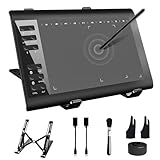
- 【Wide Compatibility】TeinenRon Upgraded Graphics Tablet is compatible with Windows Xp, 7, 8, 10,11. Android 4.4 and above; Mac OS 10.7.0 and above (Not compatible with iPhone/iPad/Chromebook) NOTE: for Mac user, Security & Privacy’s permission is necessary for Accessibility/Input Monitoring/ Full Disk Access when installation completed.
- 【Large Active Drawing Space】This T1060 digital drawing pad features 10 x 6inch large active drawing area, provides a large enough space for your digital artwork creation; The drawing area is 3.3 x 5.8 inch when a mobile phone is connected.
- 【Ergonomically Designed Shortcuts】Designed with 12 customizable shortcut keys and 10 multimedia Keys (Only Compatible for Windows), provides more convenience to help improve productivity and efficiency when creating tablet drivers with graphics tablet that allow shortcuts to many different software.
- 【Stylus with Tilt Function】Outfitted with pen, no need to recharge and we offer 30 PCS replacement pen refills; Features ±60° tilt recognition for accurate cursor positioning at different angles to add shadows to your creations; Features 8192 levels of pressure sensitivity for accurate and smooth control of line thickness; Features 266PPS reporting rate and 5080LPI resolution
- 【Widely Used】(1)TeinenRon computer drawing tablet is well compatible with most major design creative software such as PS, SAI, FlipaClip, Medibang, Adobe illustrator, Adobe premiere, Lightroom, etc. it's a good choice for professionals and beginners.(2)This drawing board is also compatible with Microsoft office Word, Excel, powerpoint and other office software, which is an ideal choice for online teaching, telecommuting, web conferencing and other office software.
Who the original rationale may help
The account is most useful to people wrestling with the same handoff question: how do design values become dependable code, rather than a collection of nearby approximations? The approaches I considered differ along several practical lines:
- Token export: values can be exported from Figma, but export alone may not connect them to project conventions.
- Generated formats: a workflow may need different outputs for CSS, Tailwind, TypeScript, or other consumers.
- Transformation setup: transforms and formatters can require configuration work, depending on the formats and project requirements.
- Last-mile ownership: someone or some process still needs to keep the design file, token source, generated outputs, and codebase aligned.
- Component distribution: installing a package and copying editable source into a project have different maintenance implications.
These are the criteria behind my own decisions, not results from a benchmark. The article described 7onic as an open-source React system with documentation and an interactive playground, and called it free and MIT licensed. Those details can change; check the project’s current documentation and license before relying on them.
Quick Recap
Product prices and availability are accurate as of the date/time indicated and are subject to change. Any price and availability information displayed on Amazon at the time of purchase will apply.

