
iTechGuides is reader-supported. When you buy through links on our site, we may earn an affiliate commission. As an Amazon Associate I earn from qualifying purchases. Learn more
A bad robot-vacuum smell usually comes from trapped debris, a saturated or damaged filter, moisture mixed with dust, or—on vacuum-and-mop models—a dirty water tank, washboard, or mop pad. Emptying and cleaning the contaminated part normally resolves a stale or musty odor. A smell like burning rubber, hot plastic, or electrical insulation is different: stop the robot, disconnect the charging station, and arrange manufacturer service instead of running another cleaning cycle.
The safest fix depends on the exact model. Manufacturers do not use one universal filter-washing rule or one universal cleaning interval, so identify the model number and follow its manual before rinsing any component.
Use the timing and character of the odor as a starting clue
When the smell appears helps you choose the first inspection point. This is a practical diagnostic shortcut, not a manufacturer-validated test; several sources can smell at once.
Recommended Free Tools
| When you notice the smell | Likely area to inspect first | Safe first action |
|---|---|---|
| While the robot is vacuuming | Full dust bin, intake/nozzle, brush roll, or filter | Turn the robot off, empty the bin, and remove visible hair or foreign material from accessible areas. |
| Immediately after a cleaning run | Damp dust, a wet filter, or debris heated by restricted airflow | Stop the run and check whether any washable part was reinstalled before it was fully dry. |
| After mopping | Mop pad, dirty-water tank, washboard or tray, and dust compartment | Empty and rinse the dirty-water tank, clean the tray or washboard, and dry the mop pad according to the manual. |
| Only while docked or charging | Charging area, dock debris, or an electrical fault | Disconnect power at the charging station. Treat a hot, acrid, or burning smell as a stop-use issue. |
| Even when the robot is switched off | Wet residue, a contaminated bin, or a component that remains odorous | Remove and clean the relevant removable parts; replace a damaged filter rather than trying to deodorize it. |
Do not rely on smell alone to distinguish dust from an electrical problem. If the odor is sharp, chemical, smoky, or similar to burning rubber, use the safety procedure below.
#1 Best Overall

- Hepa filters for Ilife Vacuum model V3, V3s V3s pro V5 V5s V5s Pro Vacuum Cleaning Robot. Ilife Filter Replacement.
- ILIFE V3s pro Filters, Made of high quality efficient filter material.
- 100% Compatible with Original Ilife Filters. ILIFE V3s Replacement Filters, ILIFE V3s pro Filters
- Package include: 10 pcs Replacement Filters
- Good quality level of our ILIFE Robot Vacuum Replacement Parts/ ILIFE Hepa Filter, full money back for any quality problem within 2 months
Stop safely when the smell is burning
LG’s robot-vacuum troubleshooting guidance treats a burning smell as a reason to disconnect the charging station and turn off the robot, then have its internal circuit or motor checked by an LG Electronics service technician. Do not keep the robot running to see whether the odor disappears, and do not open the sealed electronics or motor housing yourself.
- Press the robot’s power control to stop it, if it responds.
- Unplug the charging station from the wall outlet. If you cannot safely reach the plug, switch off the relevant circuit at the breaker.
- Move combustible material away from the robot and dock. Do not touch a visibly hot, melted, smoking, or sparking part.
- Allow the unit to cool without restarting it.
- Record when the smell occurred—during suction, brush movement, docking, or charging—and contact the manufacturer or an authorized service provider with the model and serial number.
A burning odor can indicate a motor, circuit, wiring, or charging problem. Cleaning the bin will not make it safe to operate, and a successful restart does not prove the fault is gone.
Common vacuum-side sources of stale or dusty odor
A full dust bin
Collected food particles, pet hair, fine dust, and other organic debris become more noticeable when they remain in a warm, enclosed bin. LG lists a full dust bin as a possible cause of odor and restricted suction. Empty it over a trash container before the contents compact further.
Outdated Drivers Are Slowing You Down
One free scan finds every outdated or missing driver and matches the right update for your exact hardware.Free scan · exact hardware matchPC Slower Than It Used to Be?
A free scan shows the junk files, broken settings and background clutter dragging Windows down - then fixes them in one click.Free scan · Windows 10 & 11Inspect the bin’s corners, gasket, flap, and air channel rather than only dumping the loose contents. A thin layer stuck behind a screen can continue to smell and can reduce airflow. Wipe residue with a dry or barely damp cloth only where the manual permits; keep electrical contacts and sensors dry.
Rank #2

- 【𝐂𝐨𝐦𝐩𝐚𝐭𝐢𝐛𝐥𝐞 𝐌𝐨𝐝𝐞𝐥𝐬】Our BR151 robot vacuum replacement parts perfectly fits for iMartine BR151, for XIEBro Life BR151, for MAMNV BR151, for ZCWA BR151, for ONSON BR151, for MANVN BR151, for ZC WAS BR151, for GOOVI BR151, for GTTVO BR151,for Tuya BR151, for bObsweep Leaf 000-BR-150, for bObsweep Charlotte, for Kilgone G20, for MANVINS G20. NOT compatible with other models. Please double-check your model before ordering
- 【𝐕𝐚𝐥𝐮𝐚𝐛𝐥𝐞 𝐏𝐚𝐜𝐤𝐚𝐠𝐞】The package includes 4 x BR151 robot vacuum filters, 4 x BR151 robot vacuum mop pads, 6 x BR151 robot vacuum brushes, and 1 x cleaning tool. Our BR151 accessory set is designed to save you the trouble of frequently purchasing individual accessories. Everything you need is in one set to keep your vacuum cleaner running smoothly and performing at a high level
- 【𝐒𝐮𝐩𝐞𝐫𝐢𝐨𝐫 𝐐𝐮𝐚𝐥𝐢𝐭𝐲】These BR151 replacement filters can attach 99.97% of particles as small as 0.3 microns, including dust, pollen, dirt, pet dander, hair, and more. The BR151 mop pads are made from premium microfiber material with high absorbency, effectively wiping away stubborn stains. The durable seam design ensures they withstand daily wear and tear. The 3-arm spin BR151 side brushes feature soft bristles that efficiently clean dirt, dust, and debris from corners and edges
- 【𝐃𝐢𝐬𝐭𝐢𝐧𝐠𝐮𝐢𝐬𝐡 𝐒𝐢𝐝𝐞 𝐁𝐫𝐮𝐬𝐡】Our BR151 robot vacuum side brushes are marked with "L" or "R" for easy identification, making replacement simple while ensuring efficient performance comparable to the original brushes. To maintain your robot vacuum cleaner at peak performance, we recommend replacing the brushes based on frequency of use
- 【𝐋𝐨𝐧𝐠-𝐋𝐚𝐬𝐭𝐢𝐧𝐠 𝐏𝐞𝐫𝐟𝐨𝐫𝐦𝐚𝐧𝐜𝐞】Our BR151 robot vacuum accessories are made from durable materials for easy installation and effective cleaning on all floor types. To maintain optimal performance, we recommend replacing them every 3 months - this extends your device's lifespan and ensures a cleaner home
Hair or foreign material at the intake and brush
Hair, thread, paper, and small objects can lodge near the nozzle or brush ends. The restriction makes the motor work harder and leaves debris in a place that warms during operation. Turn the robot off, remove the brush or guard using the model’s release mechanism, and clear only the accessible areas described in the manual. Do not force a jammed shaft or insert a metal tool into the intake.
Check both brush bearings and the opening leading into the dust path. A brush that does not spin freely after cleaning may need a model-specific replacement or service rather than lubricant or continued use.
A clogged or damaged filter
LG identifies a clogged or damaged filter as another odor and suction problem. Fine dust trapped in a filter can smell stale; a torn filter can allow dust into the fan and motor path. Hold the filter under good light and look for tears, gaps, crushed pleats, or a layer of dust that cannot be removed using the approved method.
Filter construction varies. Some models allow rinsing, while others specify dry cleaning only. The cited iRobot instructions explicitly say not to wash the filter for the covered model. Never infer a washing rule from another brand or from the filter’s appearance. Use the exact model number printed on the robot, bin, or app and check that model’s manual before applying water.
Rank #3

- The replacement parts filters fit for MAMNV BR150/BR151, for ZCWA BR150/BR151, for GTTVO BR150/BR151, for ONSON BR150/BR151, for MANVN BR151, for ZC WAS BR151, for iMartine BR151, for Kilgone G20, for MANVINS G20 Robot Vacuum.
- This replacement filters can attach 99.97% particles as small as 0.3-micron in size, such as dust, dirt, pet dander, hair and etc.
- To ensure your vacuum cleaner maintains optimal performance, we recommend replacing the filter every 2-3 months. Regular replacement can extend the device's lifespan, improve cleaning efficiency, and keep your home environment cleaner.
- It is easy to be replaced and installed on br151 robot vacuums, Snap into place for quick and effortless routine replacement without tools.
- Package Include: 8 x br151 robot vacuum filters.
Moisture mixed with dust
LG explains that moisture entering the dust bin can combine with dust and create an odor. This can happen after a damp cleaning cloth, a wet floor encounter, condensation, or a washable part being returned too soon. A wet filter also restricts airflow and can stress the vacuum.
For components that your manual permits you to wash, rinse them as directed and leave them in a ventilated, shaded place until completely dry. LG specifies more than 24 hours for the washable parts covered by its instructions. That is a requirement for those parts and page, not a universal rule for every robot. Do not reinstall a filter merely because its surface feels dry; hidden moisture can remain inside pleats.
Odor sources on vacuum-and-mop robots
Hybrid robots add a wet path that can retain bacteria-laden residue and dirty water. Xiaomi’s X20 Max FAQ names the dirty-water tank, washboard, mop pad, dust compartment, and filter as parts that frequently contact collected waste and can be odor sources. Vacuum-only maintenance will not clean these areas.
Free tools Windows power users keep installed
One-click scans. No signup required.
Dirty-water tank
Stagnant dirty water develops an odor quickly, especially in a warm room. Xiaomi’s X20 guidance recommends emptying and rinsing the dirty-water tank after use. Remove the tank as instructed, pour out the contents, rinse away sediment, and leave it open to dry if the design permits. Keep water away from the tank’s electrical contacts and sensors.
Rank #4
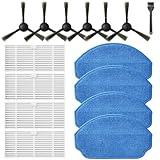
- Compatible Models: These accessories compatible for MAMNV BR151, for ZCWA BR151, for MANVINS G20, for Kilgone G20, for ONSON BR151, for GOOVI BR151, for MANVN BR151, for ZC WAS BR151, for iMartine BR151, for XIEBro Life BR151, for bObsweep Leaf 000-BR-150, for bObsweep Charlotte, for GTTVO BR151,for Tuya BR151 Robot Vacuum and Mop Combo
- Worthwhile Package: Great value br151 robot vacuum replacement parts. The package includes 6 x br151 robot vacuum brushes, 4 x br151 robot vacuum filters, 4 x br151 robot vacuum mop pads, 1 x Cleaning Tools
- Our accessories are designed to enhance cleaning efficiency and fit various models.Made from high-quality materials for durability, they are easy to install. Help your vacuum cleaner maintain peak performance.
- To ensure your vacuum cleaner maintains optimal performance, we recommend replacing the accessories every three months. Regular replacement can extend the device's lifespan, improve cleaning efficiency, and keep your home environment cleaner.
- Long-Lasting Performance: High-quality replacement parts help your vacuum perform like new, reducing wear and the need for frequent replacements. Designed to deliver thorough cleaning on all floor types, helping you save money while keeping your home fresh and tidy.
Washboard, tray, and dock residue
Hair, sludge, and detergent residue can collect where the mop is washed. Xiaomi recommends cleaning the washboard once every two to three mopping uses for the cited X20 models. Treat that interval as model-specific rather than a universal schedule. Remove the tray only through the documented release points, rinse or wipe it as directed, and clear the drain or filter area without pushing debris deeper into the dock.
Mop pad
A mop pad left wet inside the dock is a frequent source of musty odor. Remove it, wash it according to the manual, and dry it fully before the next run. Humid conditions slow drying, so a pad that normally dries overnight may need longer in a poorly ventilated room. Do not seal a damp pad in a storage compartment.
Dust compartment and filter after mopping
Fine wet dust can bridge the dust compartment and filter, creating a paste that smells stronger than dry debris. Empty the compartment, inspect its air path, and follow the model’s instructions for filter cleaning. If the filter is not washable, use the specified dry method and replace it when damaged or persistently odorous.
What’s actually slowing this PC down?
Pick the symptom - the matching free tool is one click away.
Model-safe cleaning procedure
Use this sequence for a normal dusty, sour, or musty smell. Adapt each operation to the exact manual; the sequence does not authorize washing parts your model labels as dry-only.
Best Value

- ⚠️ CRITICAL SIZE WARNING - Replacement side brush HEPA filters compatible with M210/M210S/M210B/M213/M213S/N1/M210 Pro.NOT FIT FOR ALL M210/M210 PRO MODELS! Lefant manufactured the M210 and M210 Pro with MULTIPLE dust bin sizes across different production batches. This filter measures 5.0" x 1.9" (126mm x 47mm) ONLY. It does NOT fit 5.3" x 2.0" bins, 3.62" x 1.9" bins, or any other size variants. MEASURE YOUR ORIGINAL FILTER BEFORE ORDERING.
- VALUE KIT- Includes 8 side brushes, 8 hepa filters, and 1 cleaning tool ❗ READ BEFORE BUYING: The Lefant M210/M210 Pro series has been produced with at least 3 different dust bin filter sizes: (1) 5.0" x 1.9" - THIS product fits this size, (2) 5.3" x 2.0" - NOT compatible, (3) 3.62" x 1.9"- NOT compatible. Please remove your current filter and measure it with a ruler before purchasing. Ordering the wrong size is the #1 cause of returns. Save time and money by confirming your size first.
- HIGH-QUALITY PERFORMANCE- Precision-engineered to match original specifications for optimal suction, quiet operation, and durable cleaning. Extend vacuum life by replacing filters & brushes every 2-3 months
- ADVANCED WASHABLE HEPA FILTRATION- Engineered to prevent gaps and deformation, maintaining filtration integrity. Crafted from reusable HEPA material, these filters capture fine particles down to 0.3 microns. Wash, dry, and reuse as needed
- Customer Service-If you meet any quality or other problems after the purchase we will solve it in 24 hours
- Identify the model. Find the model number on the robot, dust bin, dock label, or companion app. Keep it visible while checking the manual’s filter and mop instructions.
- Power down. Stop the robot and remove it from the dock. Disconnect the dock when you are working near charging contacts or when the odor appeared during docking.
- Empty the dust bin. Dispose of all contents. Inspect the bin, flap, screen, gasket, and intake for caked material, then clean them only by the method permitted for that part.
- Clear the nozzle and brush area. Remove the brush guard if specified, cut away wrapped hair, and remove foreign objects from the accessible intake. Refit the brush and confirm that it turns freely by the manual’s test method.
- Inspect the filter. Look for damage, saturation, or embedded dust. Dry-clean or rinse only if the model explicitly permits that method. A filter that is torn, deformed, or still smells after proper cleaning should be replaced with the exact model-compatible part.
- Dry washed components. Place permitted washable parts in a ventilated, shaded location. For the LG instructions cited, drying takes more than 24 hours. Never use a damp filter or bin in the robot.
- Clean the wet path on hybrid models. Empty and rinse the dirty-water tank, clean the washboard or tray, and wash and dry the mop pad as the manual directs. Remove residue from the dust compartment as well.
- Reassemble completely. Install every gasket, screen, filter, brush guard, and tank correctly. Do not operate without a required filter or with a loose cover.
- Run a supervised check. If there was no burning odor and every part is dry and correctly fitted, run a short test while staying nearby. Stop immediately if the odor becomes hot, acrid, smoky, or electrical.
Clean, replace, or seek service?
| Condition | Preferred response | Reason |
|---|---|---|
| Loose dust in the bin or visible hair around the brush | Clean with the robot powered off | The contamination is accessible and does not by itself indicate a failed component. |
| Filter is dusty but intact and the manual permits its cleaning method | Clean it as specified, then dry completely | Water is safe only for models and parts that explicitly allow washing. |
| Filter is torn, crushed, warped, or remains foul after correct cleaning | Install a model-compatible replacement | A damaged filter can pass dust into the fan; persistent odor may remain in the material. |
| Dirty-water tank, tray, or mop pad smells after mopping | Empty, rinse, clean, and dry the wet-path parts | These parts retain moisture and organic residue that the dry dust path cannot remove. |
| Smell resembles burning rubber, hot plastic, smoke, or electrical insulation | Stop, disconnect the dock, and arrange service | An internal motor or circuit fault requires inspection, not repeated cleaning cycles. |
| Odor continues after all permitted cleaning and a known-good filter | Contact the manufacturer with the model and symptoms | Residue may be inside the fan path, or another component may be damaged. |
Replacement filters are not interchangeable by appearance. Confirm the complete model designation and revision before ordering; a filter that fits physically can still have the wrong seal, media, or airflow specification.
Why an odor can return after cleaning
Hidden moisture
Water trapped in pleats, seams, or the dust-bin channel can remain after the outer surface feels dry. Reinstalling too early lets dust adhere again and recreates the smell. Extend the drying period in humid conditions and follow the manual’s minimum time.
Residue in a seal or air channel
A bin may look clean while a gasket groove or narrow screen retains organic material. Remove only user-serviceable seals and screens, photograph their orientation if needed, and refit them without stretching or pinching the gasket.
A source outside the robot
Check the floor area, dock mat, nearby trash, and mop-washing surface. A robot can pick up a spill or animal waste and transfer the smell into a clean bin. Clean the affected floor and dock surface with products safe for those materials; never pour cleaner into the robot’s air path or water tank unless the manufacturer specifically approves it.
Internal contamination or mechanical damage
If the odor persists despite a clean, dry, correctly assembled dust and mop path, stop escalating home repairs. Continued use can spread dust into the fan or worsen a failing motor. Manufacturer service can determine whether an internal part or sensor needs replacement.
Maintenance habits that prevent bad smells
Use the robot’s maintenance reminders as the primary schedule. The following checklist separates tasks by condition instead of imposing a made-up universal interval.
- Empty the dust bin before it reaches the full indicator, and sooner after collecting wet, fine, or strongly scented debris.
- Inspect the intake and brush whenever suction drops, the brush sounds different, or hair is visible.
- Keep filters dry unless the exact manual labels that filter washable. Replace a damaged filter promptly.
- After every mopping session on models with a dirty-water tank, follow Xiaomi’s cited X20 practice of emptying and rinsing that tank; other models may specify a different procedure.
- Wash and dry the mop pad rather than leaving it sealed and wet in the dock.
- For Xiaomi X20 models, clean the washboard once every two to three mopping uses as the manufacturer advises. Use your own model’s interval when it differs.
- Keep the dock’s charging contacts and surrounding floor free of damp debris.
- Do not store the robot with a wet pad, wet filter, or standing dirty water.
Common mistakes to avoid
- Washing every filter. Some filters are dry-clean-only; the cited iRobot instructions prohibit washing the covered model.
- Using the robot while a filter is damp. Moisture can combine with dust, restrict airflow, and move into areas that are harder to service.
- Spraying deodorizer into the intake. Fragrance masks the source and can contaminate the filter or motor.
- Running repeated test cycles after a burning smell. LG’s guidance is to disconnect power and obtain an internal circuit or motor check.
- Assuming a generic replacement fits. Match the exact model number and part specification.
- Pouring detergent into an unapproved tank. Residue can damage seals, sensors, or the pump; use only products and concentrations the manual permits.
- Removing sealed covers. Opening the electronics, fan, or motor can create shock, fire, warranty, and reassembly risks.
A compact decision checklist
- Is the odor burning, smoky, or electrical? If yes, stop, unplug the dock, and seek service.
- If not, does it occur only after mopping? Start with the dirty-water tank, washboard, mop pad, and wet-path filter.
- Does it occur during vacuuming? Empty the bin and inspect the intake, brush, and filter.
- Was any part recently washed? Verify that the model permits washing and that the part has dried for the required period.
- Is the filter damaged or still odorous after correct cleaning? Replace it with a part matched to the model.
- Does the smell remain after the permitted cleaning and correct reassembly? Stop using the robot and contact the manufacturer with the model, odor description, and when it appears.
A stale smell is usually a maintenance problem with a specific removable part, but a burning smell is a safety signal. Separating those two cases—and checking the model’s own filter and drying rules—prevents both unnecessary replacement and unsafe operation.
Do these 3 things before closing this tab:
1Clear out junk files and repair common Windows errors2Fix the driver behind crashes, sound loss and screen glitches3Repair Windows errors before they cause bigger problemsQuick Recap
Product prices and availability are accurate as of the date/time indicated and are subject to change. Any price and availability information displayed on Amazon at the time of purchase will apply.

