
iTechGuides is reader-supported. When you buy through links on our site, we may earn an affiliate commission. As an Amazon Associate I earn from qualifying purchases. Learn more
A quiet turntable usually has a signal-path or phono-stage mismatch; distortion more often points to the stylus, record, tracking force, alignment, contacts, or drive system. Start by identifying which symptom you have, then change one thing at a time. Do not assume the cartridge is defective until the output mode, input, stylus condition, and setup have been checked.
The exact remedy depends on the turntable, tonearm, cartridge, phono stage, amplifier, and record. Use the manuals for those specific components whenever a setting or mechanical adjustment is involved.
Match the symptom to the first check
| What you hear | Check first | Likely action |
|---|---|---|
| Low volume on every record | Turntable output mode, amplifier input, phono-stage arrangement, and cartridge type | Correct the PHONO/LINE routing and MM/MC gain settings |
| Crackle, harsh sibilance, or loss of detail | Stylus condition and debris on the stylus or record | Clean carefully; replace the stylus only with a compatible part if it is worn or damaged |
| Distortion on both channels, especially in loud passages | Tracking force and cartridge alignment | Set the cartridge to its own specification and verify alignment with the tonearm’s geometry |
| One channel is weak, noisy, or distorted | Cartridge pins, headshell leads, cables, and balance control | Reseat connections carefully and isolate the channel |
| Wrong or unstable pitch | Selected speed, belt, and platter drive | Confirm the intended RPM and inspect the drive system only as the manual permits |
These patterns narrow the search but do not prove a single cause. A dirty record can mimic a setup problem, and a loose connection can look like a cartridge fault.
Free tools Windows power users keep installed
One-click scans. No signup required.
A quick isolation sequence
- Write down whether the problem affects every record or only one, and whether it affects one channel or both.
- Try a clean, familiar record at the correct speed.
- Check the receiver input and the turntable’s PHONO/LINE setting before touching the cartridge.
- Inspect the stylus and record under good light, then clean only with an approved dry method.
- Verify the installed cartridge model, its tracking-force range, and the tonearm alignment geometry.
- Change one variable at a time and retest. Replacing a cable, moving the cartridge, and changing gain together removes useful clues.
This order separates an electronics mismatch from a mechanical or record-specific fault while minimizing unnecessary wear.
#1 Best Overall

- Converts phono signals: a turntable preamp that converts phono signals to line level signals. This state-of-the-art circuitry phono preamp can accommodate magnetic pickups with an input sensitivity of 3mV at 50K ohms
- Low noise operation: offers outstanding performance with it’s low-noise Audio operational amplifiers. The output is 2V max (p-p) at 10K ohms. It’s better to position the preamp close to the source to reduce unwanted noise and interference
- Connects to turntables: connect any Turntable to modern sound equipment without specialized phono input for amplifying music. For the receiver, This can be connected to speakers, computers, laptops and more
- Simple plug & play: This mini preamp has stereo RCA inputs and stereo RCA outputs. Connect the Turntable to the RCA inputs and ground. Then, connect the amplifier Receiver to the RCA outputs
Fix a turntable that sounds too quiet
1. Confirm the source and amplifier input
Make sure the record is actually rotating, the stylus is lowered into the groove, the amplifier is on, and the selected input is the one connected to the turntable. A receiver set to a different source can produce silence or apparent low output even when the turntable is working. Check whether the amplifier has a mute, tape-monitor, or zone setting enabled before raising the volume.
2. Identify the turntable’s output mode
Look for a rear-panel switch or menu labeled PHONO and LINE. The labels describe the signal leaving the turntable:
- LINE: The turntable’s built-in phono preamp is active. Connect it to a normal line input such as AUX, CD, or LINE, according to the amplifier manual.
- PHONO: The turntable is sending the cartridge-level signal. It must feed a suitable phono input on the receiver or a separate phono stage, followed by a line input.
Do not send a PHONO output directly to an ordinary AUX input and expect normal volume; the signal has not received the required phono gain and equalization. Conversely, sending a LINE output into a receiver’s PHONO input can overload that input and sound badly wrong. A turntable with no PHONO/LINE switch may require an external phono stage, so confirm that requirement in its manual rather than guessing from the connector shape.
3. Check MM and MC compatibility
Moving-magnet (MM) and moving-coil (MC) cartridges do not produce the same output. Ortofon’s troubleshooting guidance notes that MC cartridges generally have lower output than MM cartridges and require higher gain. If your phono stage has an MM/MC selector, set it to match the installed cartridge. If it has adjustable gain or loading, use the cartridge and phono-stage manuals rather than copying a setting from another model.
A mismatched MC cartridge can be extremely quiet even when the stylus and wiring are fine. A wrong setting can also make the signal noisy or tonally unbalanced, so correct the cartridge type before increasing the amplifier volume dramatically. Never infer MM or MC from the cartridge’s brand alone; identify the exact model printed on the body or paperwork.
4. Reseat signal and ground connections
Turn the system off, then check both RCA plugs (or the turntable’s specified connector), the cartridge leads, and any removable headshell connection. A partially inserted plug or loose cartridge pin can reduce a channel or attenuate the entire signal. If the turntable has a separate ground wire, attach it to the amplifier or phono stage’s ground terminal as directed by the manuals. A ground problem is usually associated with hum, but poor connections can also degrade or interrupt the audio.
5. Raise volume only after the path is correct
Once the output mode, input, cartridge type, and connections agree, set a normal listening level. A very low signal after these checks is a reason to investigate the phono stage, cartridge, or wiring—not proof by itself that the cartridge needs replacement. If only one channel remains quiet, use the balance control and swap left/right inputs only if the equipment manual permits it; a problem that follows the cable points upstream of the amplifier.
Recommended Free Tools
Rank #2

- Tube MM Phono Preamplifier: This Fosi Audio phono preamplifier removes low-frequency noise and ensures clear sound quality by converting phono signals to line-level signals using high-quality components and low-noise integrated circuits. It is designed to safeguard your turntable thanks to its grounding post
- 3 Switchable Gain Modes: You can switch between 3 modes: 39, 42, or 45 dB. High compatibility and customizable control are provided by the adjustable gain levels. Also, it has very good circuitry and entry-level, high-end analog sound
- Tube Preamplifier: With a 3.5mm AUX input, it's also a tube preamp. Fosi Audio used high-quality component parts for the design and assemblage of this phono preamplifier. You can enjoy a very warm and smooth sound
- Applicable Vacuum Tube Model: The compatible vacuum tube models are 6K4, 6J1, 6J4, GE5654, 6AK5, 66, etc. To make changes to your stereo system yourself, simply swap out the vacuum tubes. Consider that distinct tubes produce various sounds
- Package Content: You will get 1 x Box X2 phono preamp, 2 x vacuum tubes, 1 x RCA cable, 1 x power adaptor, and 1 x user manual
Fix a turntable that sounds distorted
1. Compare another record and both channels
Play a clean, familiar record. Note whether the distortion follows the turntable on every disc or appears only on one pressing. Use the amplifier’s balance control to listen to the left and right channels separately; Ortofon’s test-record guidance describes balance checks as a way to identify channel-specific tracking behavior.
If only one record is affected, inspect that record for dirt, scratches, or groove damage before changing the cartridge setup. If both channels distort on many records, prioritize stylus condition, tracking force, and alignment. An optional test record can provide repeatable tones and channel checks, but ordinary clean records and the balance control are sufficient for an initial diagnosis.
2. Inspect and clean the stylus and record
With the tonearm secured, look at the stylus under strong light. Dust can collect around the tip and produce crackle, fuzz, or a loss of clarity. Clean gently using a method approved for that cartridge and turntable. Ortofon’s FAQ specifically advises against putting liquids on the stylus or records. Do not touch, press sideways on, or bend the cantilever.
Brush or clean the record according to its maker’s care instructions. A record brush can remove loose debris, but it cannot repair groove damage or a worn pressing. If cleaning changes nothing and the stylus looks worn, chipped, or bent, stop playing records until you have identified an exact compatible replacement. A brush is not a substitute for replacing a stylus with a worn suspension or damaged tip.
Quick wins for a faster PC:
Scan for outdated or missing drivers - takes under a minuteDriver Scan →Clear out junk files and repair common Windows errorsFree Scan →Fix the driver behind crashes, sound loss and screen glitchesFind Drivers →3. Verify tracking force for the installed cartridge
Tracking force is not a universal turntable setting. Use the recommended range for the exact cartridge model, not a value from another cartridge or a generic internet chart. Too little or too much force can impair tracking and accelerate record or stylus wear.
The Pro-Ject E1 manual, revision 2022-04-06, demonstrates a model-specific procedure using the supplied gauge and the exact cartridge weight. Treat that as an example of how one model is set up, not as a target for every tonearm. If your turntable includes a gauge, follow its instructions. If it does not, use a suitable stylus-pressure gauge and the cartridge manufacturer’s specification.
4. Check cartridge alignment
A cartridge can have the correct tracking force and still mistrack if it is mounted at the wrong angle or overhang. Use the alignment geometry specified for your tonearm and cartridge. Ortofon’s alignment instructions call for checking the cantilever—not merely the cartridge body—at the tool’s reference points. Tighten the mounting screws only enough to secure the cartridge while you make the alignment, then recheck the force because moving the cartridge can alter it.
Rank #3
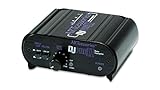
- RCA-type input R/L
- RCA-type output R/L
- Ground terminal
- Power Adapter Included
Do not force an alignment tool designed for a different tonearm geometry. If the cartridge is permanently mounted or the required overhang is unclear, consult the turntable or tonearm manual. A cartridge body may look square while the cantilever is slightly angled, so align the cantilever as the tool instructions require.
PC Slower Than It Used to Be?
A free scan shows the junk files, broken settings and background clutter dragging Windows down - then fixes them in one click.Free scan · Windows 10 & 11Outdated Drivers Are Slowing You Down
One free scan finds every outdated or missing driver and matches the right update for your exact hardware.Free scan · exact hardware match5. Check cartridge pins, leads, and cables
Persistent distortion or a weak channel can come from a loose cartridge pin, oxidized contact, damaged lead, or poorly seated headshell. Disconnect power before touching the cartridge area. Handle the leads by their connectors, not by pulling the wire, and make only the adjustments the manufacturer permits. A channel that changes when a connection is moved should be serviced rather than repeatedly flexed.
6. Confirm speed and drive condition
Verify that the record is being played at its intended RPM. Incorrect speed normally changes pitch, but an unstable drive can also make music sound rough or uneven. Inspect the belt, platter, and bearing only according to the turntable maker’s procedure. Do not add lubricant, remove the platter, or dismantle the bearing unless the manual specifically instructs you to do so.
What particular distortion patterns indicate
Distortion near the end of a side
When the opening tracks sound clean but inner tracks become harsh, check the stylus, tracking force, and cartridge alignment first. Also compare another record, because a damaged or poorly pressed disc can produce the same pattern. Ortofon includes distortion toward inner grooves among the conditions to investigate; the location alone does not identify whether the record or setup is responsible.
Distortion in only one channel
Use the balance control to confirm the channel. Then inspect the corresponding RCA path, cartridge pin, headshell lead, and contact. A channel-specific problem can also arise from alignment or stylus damage on one side of the tip. Avoid changing several wires and setup values at once, or you will lose the clue provided by the affected channel.
Do these 3 things before closing this tab:
1Scan for outdated or missing drivers - takes under a minute2Clear out junk files and repair common Windows errors3Fix the driver behind crashes, sound loss and screen glitchesCrackling that changes after cleaning
A temporary improvement after cleaning points toward dust or debris, but it does not establish that the stylus is healthy. Repeated crackle, fuzzy vocals, or sibilance after careful cleaning warrants a stylus inspection and a check of tracking force.
Pitch that wanders or sounds consistently wrong
Check the speed selector first, then the belt and platter drive. If the platter speed remains unstable after the manual’s permitted checks, stop playback and contact the manufacturer or a qualified repair service. A mechanical fault can worsen if the turntable is repeatedly operated while the drive or bearing is compromised.
Rank #4

- Convert Phono Signal: The turntable preamp converts phono signals to line level for better sounding audio and volume.This state-of-the-art circuitry phono preamp can accommodate magnetic pickups with an input sensitivity of 3mV at 50K Ohms Please make sure that the turntable you are connecting to use does not have a built-in preamp, if it does then using this phono preamp may result in bad noise.
- Low Noise Operation: The phono preamp offers outstanding performance with it’s Low-Noise Audio Operational Amplifiers.The output is 2V max (P-P) at 10K Ohms. It’s better to position the preamp close to the source to reduce unwanted noise and interferenceMake your vinyl records deliver sound exactly as it's read from your turntable's needle.
- RCA Input & RCA Output: This mini preamp has stereo RCA inputs and stereo RCA outputs. Connect the turntable to the RCA inputs and ground Then, connect the amplifier receiver to the RCA outputs(DC 12V Adapter is included).
- Simple Plug & Play: Connect any phono turntable preamps to modern sound equipment without specialized phono input for amplifying music.Simply hook up the preamp to both turntable and audio device so you can enjoy vinyl in no time.For the receiver, this can be connected to speakers, computers, laptops and more
- 1 Year Warrranty: We guarantee this electric phono preamplifier with both a 30-day, no hassle money back return policy and a 1 year manufacturer’s guarantee.
Safe setup procedures
Tracking-force checklist
- Find the exact cartridge model installed on the headshell or in the cartridge documentation.
- Read its recommended tracking-force range and any instructions for the tonearm.
- Balance and set the tonearm only as described in the turntable manual.
- Set the force using the supplied gauge or a compatible stylus-pressure gauge; do not rely on the position of a counterweight alone.
- Recheck the force after cartridge alignment or any change to the headshell.
The pressure gauge sold for this purpose is a verification aid, not a substitute for the cartridge specification. A measurement outside the manufacturer’s range should be corrected before extended listening.
Alignment checklist
- Use an alignment tool intended for the tonearm’s geometry.
- Secure the cartridge loosely enough to make controlled adjustments.
- Position the cantilever at the tool’s reference points, following the tool instructions.
- Tighten the screws evenly without twisting the cartridge.
- Recheck tracking force and channel balance before playing a valuable record.
If the cantilever is visibly bent, do not try to straighten it. Replacement or professional inspection is safer than attempting a repair at home.
What’s actually slowing this PC down?
Pick the symptom - the matching free tool is one click away.
Common setup pitfalls
- Copying a tracking-force number from a different cartridge, even when both cartridges are the same brand.
- Aligning the cartridge body instead of the cantilever.
- Using a PHONO output with AUX, or a LINE output with PHONO, because the sockets look similar.
- Assuming a new record is clean; manufacturing residue and handling debris can still cause noise.
- Applying liquid cleaner to the stylus or record without explicit manufacturer approval.
- Continuing to play records with a bent cantilever or a stylus that visibly carries debris.
These mistakes can create mistracking or accelerated wear, so document the original settings before making adjustments.
When a replacement stylus or accessory makes sense
Buy a replacement stylus only after identifying the installed cartridge model and confirming compatibility. Stylus shapes and mounting systems are not interchangeable merely because they come from the same manufacturer. A stylus-pressure gauge is useful when the tonearm has no reliable built-in measurement, and an alignment protractor can support a careful cartridge setup. Record and stylus brushes address dust, not worn suspension, bent cantilevers, damaged grooves, or incorrect electronics.
Consider a separate phono preamp only when the confirmed signal path requires one—for example, a turntable set to PHONO feeding an amplifier with no suitable PHONO input. Choose its MM or MC capability and gain to match the cartridge. Adding a preamp to a turntable already set to LINE can create an incorrect double-preamp arrangement.
Independent reader supportYour contribution helps us test, update, and keep practical guides available for everyone.When to stop troubleshooting and seek service
- The cantilever is bent, the stylus tip is missing, or the cartridge body has been damaged.
- Distortion remains on multiple clean records after the specified tracking force and alignment are confirmed.
- One channel cuts in and out when a cable or cartridge lead is touched.
- The platter speed is unstable after the manufacturer’s approved belt or speed checks.
- The required bearing, motor, or tonearm adjustment is not covered by the owner’s manual.
Secure the tonearm and stop playing records in these cases. Manufacturer support or a repair shop can prevent a mechanical fault or damaged stylus from causing further record wear.
Prevent the problem from returning
- Keep the stylus and records covered when not in use.
- Clean using only methods approved for the specific cartridge and records; avoid liquids on the stylus or records unless the manufacturer explicitly permits them.
- Check tracking force after moving the turntable, changing the cartridge, or adjusting the headshell.
- Keep the cartridge model, tonearm instructions, and phono-stage settings together so future adjustments use the correct values.
- Use the correct amplifier input for the turntable’s current PHONO or LINE setting.
- Stop playback when a stylus looks damaged or a new mechanical noise appears.
Frequently Asked Questions
Why is my turntable quiet even with the amplifier volume high?
Check whether the turntable is set to PHONO or LINE and whether the amplifier input matches. A PHONO output needs a phono input or separate phono stage; a LINE output belongs on AUX, CD, or another line input. Also verify MM/MC compatibility, since MC cartridges generally need more gain.
Best Value

- CONVERTS PHONO SIGNALS: A turntable preamp that converts phono signals to Line Level Signals. This state-of-the-art circuitry phono preamp can accommodate magnetic pickups with an input sensitivity of 3mV at 50K Ohms
- LOW NOISE OPERATION: Offers outstanding performance with it’s Low-Noise Audio Operational Amplifiers. The output is 2V max (P-P) at 10K Ohms. It’s better to position the preamp close to the source to reduce unwanted noise and interference.
- CONNECTS TO TURNTABLES: Connect any turntable to modern sound equipment without specialized phono input for amplifying music. For the receiver, this can be connected to speakers, computers, laptops and more.
- SIMPLE PLUG & PLAY: This mini preamp has stereo RCA inputs and stereo RCA outputs. Connect the turntable to the RCA inputs and ground. Then, connect the amplifier receiver to the RCA outputs. It also comes with a 12DC adaptor
- 1 YEAR WARRANTY: We guarantee this electric phono preamplifier with both a 30 day no hassle money back return policy and a 1 year manufacturer’s guarantee.
Why does my record player sound distorted on every record?
Inspect the stylus for wear, damage, or debris, then verify the exact cartridge’s tracking-force range and cartridge alignment. Check cartridge contacts and cables before considering replacement.
Why does distortion appear only near the end of a record?
Inner-groove distortion can result from stylus wear, incorrect tracking force, or cartridge alignment. Compare another clean record because a damaged or poorly pressed disc can create the same pattern.
Can I clean a stylus with liquid?
Ortofon’s FAQ advises against putting liquids on the stylus or records. Use only a cleaning method approved for the specific cartridge and never touch or bend the cantilever.
Do I need a stylus-pressure gauge?
It is useful when the tonearm has no reliable built-in measurement or when you want to verify the counterweight setting. The gauge does not replace the tracking-force specification for the installed cartridge.
Should I buy a phono preamp?
Only if the confirmed signal path requires one, such as a turntable set to PHONO feeding an amplifier without a suitable PHONO input. Match the preamp’s MM or MC capability and gain to the cartridge, and do not double-preamp a turntable already set to LINE.
Why is only one channel distorted or quiet?
Use the balance control to isolate the channel, then inspect the corresponding RCA cable, cartridge pin, headshell lead, and contact. A channel-specific alignment or stylus problem is also possible.
When should I stop playing records?
Stop if the cantilever is bent, the stylus tip is missing, distortion persists after correct setup checks, a channel cuts in and out when touched, or platter speed remains unstable. Secure the tonearm and seek manufacturer or qualified repair guidance.
The Bottom Line
For low volume, trace the signal path from cartridge to amplifier: output mode, input, phono-stage compatibility, cartridge type, cables, and ground. For distortion, compare records and channels, clean without liquids, inspect the stylus, then verify the exact tracking force and alignment. Check speed and drive components only within the manufacturer’s instructions. If the stylus is damaged or the fault persists after these checks, replacement or professional service is safer than continued playback.
Quick Recap
Product prices and availability are accurate as of the date/time indicated and are subject to change. Any price and availability information displayed on Amazon at the time of purchase will apply.

