
iTechGuides is reader-supported. When you buy through links on our site, we may earn an affiliate commission. As an Amazon Associate I earn from qualifying purchases. Learn more
A poor energy-efficiency class is a reason to check a mini-LED monitor’s actual consumption—not, by itself, a reason to rule it out. The EU label’s letter is only one part of the picture: its SDR and HDR figures, your hours of use, your settings and your electricity tariff matter when estimating what the monitor may cost to run.
What a poor EU energy rating means
For electronic displays sold under the EU system, the scale runs from A, the most efficient class, to G, the least efficient. The European Commission’s electronic-display guidance explains the scale and the information on the label. A low class signals comparatively lower efficiency under the label’s classification; it does not tell you, on its own, how much electricity your particular household will use or what that use will cost.
Read the label beyond its letter. It reports on-mode energy use separately for SDR and HDR in kilowatt-hours per 1,000 hours, and identifies screen diagonal and resolution. The delegated regulation specifies those consumption figures and their presentation. The Commission notes that HDR can use twice as much energy as other settings; treat this as general guidance, not a guaranteed ratio for every monitor, scene or configuration.
How to judge the energy use that matters to you
For a rough estimate, multiply the relevant kWh-per-1,000-hours figure by your hours of use divided by 1,000, then multiply by your electricity price per kWh. For mixed SDR and HDR use, estimate each mode’s share separately and add the results. This is an estimate based on declared label figures, not a measurement of your actual draw: brightness, content and settings can affect real consumption. A class letter alone cannot produce a household bill estimate.
#1 Best Overall

- Witness virtual worlds come to life on a stunning VA panel equipped with state-of-the-art Mini-LED backlight technology and 336 individual dimming zones that produce true blacks and brighter whites
- With Panel resolution 2560x1440, this monitor boasts a pixel density that delivers brilliantly sharp images with the finest details
- Lightning-fast 180Hz (overclocked, via DP1.4) refresh rate and rapid 1ms GtG response time lets you target moving opponents with precision, putting you ahead of the game. Fast-moving action and dramatic transitions will be rendered smoothly without the effects of ghosting
- Adaptive-Sync ensures ultra-smooth, tear-free team fights for flawless skill shots and stutter-free loading times
- The 3-sided frameless display with calibrated color gamut provides true-to-life images. Impressive 134% sRGB color gamut and VESA DisplayHDR 1000 brings characters to life and creates stunning imagery with rich details and diverse contrast
- Compare the mode you use. Check SDR and HDR consumption separately rather than relying only on the overall class.
- Compare similar screens. Diagonal size and resolution help put two label figures in context.
- Account for your routine. Your usage hours and the share of time spent in SDR or HDR affect the estimate.
- Check model-specific details. Brightness and local-dimming capabilities are relevant context, but a product feature does not establish a universal power draw.
Mini-LED is not a power-consumption figure
Mini-LED describes a display technology, not a single energy class or standard draw. Manufacturer figures illustrate why it is better to assess exact models than generalize across the category:
| Display | Published information | What it establishes |
|---|---|---|
| Cooler Master GM27QPA | EPREL lists 26 W SDR and 28 W HDR for a 27-inch, 2560 × 1440 LED LCD monitor. | These are registry figures for one model, not a mini-LED benchmark. |
| TCL 27G74 | TCL describes a QD mini-LED monitor with 600-nit peak brightness and local dimming; its cited product page does not state an energy-label figure. | Those capabilities do not establish its energy consumption. |
| INNOCN 32M2V | INNOCN states 75 W typical and 215 W maximum power consumption, alongside 450–1000 cd/m² brightness. | These are manufacturer specifications, not independent measurements. |
The Cooler Master figures are available in its EPREL listing; the other details come from the TCL product page and the INNOCN product page. The examples use different specifications and contexts, so they cannot show that mini-LED monitors as a group are either power-hungry or efficient.
Rank #2

- 27" QHD MINI-LED IPS DISPLAY Experience sharp 2560×1440 QHD resolution on a 27-inch mini-LED IPS panel with 1152 local dimming zones, delivering vivid colors, deeper contrast, and detailed visuals for immersive gaming.
- 320HZ REFRESH RATE & 1MS RESPONSE TIME Dominate fast-paced gameplay with an ultra-smooth 320Hz refresh rate via HDMI 2.1 or DisplayPort 1.4 and fast 1ms GtG response time, minimizing blur and ghosting.
- DISPLAYHDR 1000 CERTIFIED Enjoy lifelike HDR visuals with DisplayHDR 1000 certification, featuring 700 nits HDR brightness and 1200 nits peak brightness for stunning highlights and enhanced contrast.
- ADAPTIVE SYNC & EYE COMFORT FEATURES Stay smooth and tear-free with Adaptive Sync, while Flicker-Free technology helps reduce eye strain during extended gaming sessions.
- WHITE GAMING DESIGN WITH FULL ERGONOMICS Stand out with a sleek white finish and fully ergonomic stand featuring height adjustment, tilt, swivel, and pivot for personalized comfort and setup flexibility.
Check the exact model in EPREL
The EU Product Registry for Energy Labelling (EPREL) is a useful way to verify a display’s registered information. Scan the QR code on its energy label or search for the model in EPREL. Check that the result matches the exact model and regional SKU you are considering. Registry details can include standby consumption and panel technology, which are not substitutes for the SDR and HDR on-mode figures.
Crashes, No Sound, or Screen Glitches?
Random freezes, missing sound and display glitches usually trace back to one bad driver. Find and replace yours safely.Free scan · under a minuteWindows Errors? Fix Them Before They Spread
Repair common Windows errors and clear accumulated junk for a smoother, more stable PC - no reinstall needed.Free scan · no reinstallKeep standby and active use separate
Off-mode rules address a different state from active viewing. A 2023 EU regulation sets off-mode limits of 0.50 W initially and 0.30 W after two years for equipment within its scope; these are not on-mode limits or estimates of gaming or desktop use. See the regulation on off, standby and networked standby power consumption for its scope and requirements.
Rank #3

- 27" QHD MINI-LED DISPLAY Experience sharp 2560×1440 QHD resolution on a 27-inch mini-LED VA panel with 1152 local dimming zones, delivering deep contrast, vivid colors, and enhanced detail for immersive gaming.
- 300HZ REFRESH RATE & 1MS RESPONSE TIME Gain a competitive edge with an ultra-smooth 300Hz refresh rate via DisplayPort or HDMI and a fast 1ms GtG response time, minimizing motion blur and ghosting during fast-action gameplay.
- DISPLAYHDR 1000 CERTIFIED Enjoy brighter highlights and deeper contrast with DisplayHDR 1000 certification, delivering enhanced HDR visuals for gaming, streaming, and multimedia content.
- WIDE COLOR GAMUT PERFORMANCE Featuring an expanded color range of 150.2% sRGB (CIE1976), this monitor provides vibrant, accurate colors for immersive visuals and improved content clarity.
- ADAPTIVE-SYNC & ERGONOMIC DESIGN Stay in sync with Adaptive-Sync technology for smooth, tear-free gameplay, while the fully ergonomic stand offers height adjustment (130mm), tilt, swivel, and pivot for optimal comfort during extended sessions.
Why the rating need not decide the purchase
I would treat a poor rating as a prompt to check the relevant consumption figures and estimate use against my own routine and tariff. It does not tell me the cost without those details, and the mini-LED label alone does not tell me how much a monitor draws. If the display’s picture features are worth the trade-off to you, the useful comparison is between exact models, their stated mode-specific consumption and your likely hours—not a technology-wide assumption.
Quick Recap
Rank #4
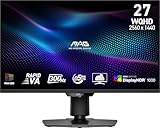
- Mini-LED – Improves HDR with full-array local dimming and 1,152 zones for deeper blacks and brighter highlights
- Rapid VA – Ensures the intensity and purity of colors when gaming
- VESA DisplayHDR 1000 – VESA-certified eye-catching details through precise contrast and shadow adjustment
- 300Hz High Refresh Rate – Delivers smooth visuals for faster in-game response
- 0.5ms (GtG, Min.) Response Time – Eliminates screen tearing and choppy frame rates
Product prices and availability are accurate as of the date/time indicated and are subject to change. Any price and availability information displayed on Amazon at the time of purchase will apply.

