
Outdated Drivers Are Slowing You Down
One free scan finds every outdated or missing driver and matches the right update for your exact hardware.Free scan · exact hardware matchPC Slower Than It Used to Be?
A free scan shows the junk files, broken settings and background clutter dragging Windows down - then fixes them in one click.Free scan · Windows 10 & 11iTechGuides is reader-supported. When you buy through links on our site, we may earn an affiliate commission. As an Amazon Associate I earn from qualifying purchases. Learn more
Several Samsung Galaxy Tab models support S Pen writing and drawing, but S Pen compatibility does not guarantee the same features on every tablet. Check the exact tablet-and-pen combination before buying: some models include a pen, while Bluetooth Low Energy (BLE), Air Actions, charging, and media gestures vary by model.
Which Samsung tablets come with an S Pen?
Samsung says the Galaxy Tab S10 FE and Galaxy Tab S10 FE+ include an S Pen. The included pens support writing and drawing, but Samsung lists BLE as unsupported for these variants. Bundle details can differ by market, so confirm what is included with the specific configuration you are considering.
Other Galaxy Tab generations also support S Pen input. For older models or a tablet you already own, check Samsung’s S Pen compatibility guidance for the exact tablet and pen family rather than relying on a general “S Pen compatible” label.
What can you do with an S Pen?
Samsung documents S Pen use for handwriting, drawing, and navigating the tablet. In Samsung Notes, for example, you can write an equation by hand. These are practical creative and productivity uses; specific remote controls and other pen functions depend on the model.
#1 Best Overall

- PRECISION MEETS STYLE: Use S Pen on your Galaxy Tab S9 FE with precision and control; Whether jotting notes, sketching or navigating your device, S Pen feels natural, is sensitive to pressure and is the ultimate tool for unleashing your creativity
- EASY TO CARRY, EASIER TO STORE: With IP68-certified water resistance, S Pen is ready for any outdoor adventure*; When not in use, attach it with a snap to the S Pen magnetic holder on the tablet, as it stays ready for your next bright idea
- HOVER. CLICK. GO: Pull up Air Command at the click of a button and personalize your S Pen actions; Simply hover S Pen over the screen and press the button to access features such as Smart Select, Screen Write, Live Messages and more
- COMPATIBILITY: Samsung S9 Galaxy Tab FE S Pen is compatible with the Samsung Galaxy Tab S9 FE tablet (sold separately)
How do the Tab S10 FE and S10 FE+ compare?
Both models include an S Pen and share several listed configurations. The main specification differences shown on Samsung’s U.S. product page are screen size, resolution, and battery capacity.
| Specification | Galaxy Tab S10 FE | Galaxy Tab S10 FE+ |
|---|---|---|
| Display | 10.9-inch LCD, 2304 × 1440, 90 Hz | 13.1-inch LCD, 2880 × 1800, 90 Hz |
| Battery capacity | 8,000 mAh | 10,090 mAh |
| Processor | Exynos 1580 | Exynos 1580 |
| Listed memory and storage configurations | 8 GB + 128 GB or 12 GB + 256 GB | 8 GB + 128 GB or 12 GB + 256 GB |
| microSD expansion listed | Up to 1.5 TB | Up to 1.5 TB |
| S Pen included | Yes | Yes |
These specifications are from Samsung’s U.S. Galaxy Tab S10 FE product page. Choose based on the screen area and configuration you need; the listed specs alone do not establish handwriting feel or drawing performance.
Rank #2

- IMPROVED SHAPE. MORE PRECISION: For a steady and familiar hold, S Pen features a hexagonal body modeled after a classic pencil. The cone-shaped tip helps every stroke feel smooth and precise, making note-taking and sketching feel natural.
- EASY TO CARRY, EASY TO STORE: S Pen sits neatly along the side of your Galaxy Tab, staying visible and easy to reach. Just pick it up when inspiration strikes – no searching around your desk.
- PROTECTION FROM THE ELEMENTS: IP68-rated for protection against dust and water, S Pen is designed to handle the unexpected.²
- DEVICE COMPATIBILITY: The Samsung Galaxy Tab S11 S-Pen is compatible with the Samsung Galaxy Tab S11 and Tab S11 Ultra (sold separately).
Will your S Pen work with a particular Galaxy Tab?
Compatibility and features are model-specific. A pen may work for writing or drawing without supporting Bluetooth controls. Samsung’s guidance distinguishes among pen families and tablet models, so check the entry for both devices before purchasing a replacement or expecting remote functions.
- Writing and drawing: Confirm that the pen is listed as compatible with your exact tablet.
- BLE and Air Actions: Do not assume these are available. Samsung identifies some FE and newer Tab pen variants as lacking BLE, and its U.S. guide lists models without Air Actions or media gestures.
- Charging and attachment: Verify the specific pen’s supported charging and attachment behavior; compatibility alone does not promise either feature.
Samsung’s U.S. S Pen guide is the relevant starting point for checking a model pair and its supported functions.
Rank #3
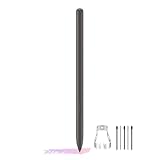
- About the product:Compatible with Samsung Galaxy Tab S10 FE+ | S10 FE | S10 FE 5G | S9 FE+ | S9 FE | S9 FE 5G all version. Compatible with Tab S10, S10 Ultra, S10+, S9, S9 Ultra, and S9+.【 Important note: Bluetooth connectivity is not supported, and Air Action is not available.】
- About Product Function: Air Command, Magnetic attraction tablet. The effect is perfect. 0.7mm Fine Tip for Precision.
- About Product Quality :Brand New High Quality Stylus Pen .Before the product is transported, we check the appearance / touch / color / function of the product one by one to ensure that you receive high-quality products.
- Packing: 1* Tab S9 FE S Pen (Gray), 5*Tips, 1*Tweezer (Show the picture).
- About after-sales :180 days of quality assurance. If there are any non-human factors quality problems, Please contact us in time, we will reply you within 24 hours.
What should you know about replacement S Pens?
Samsung says additional or replacement S Pens are available for the Galaxy Tab S9 series and describes compatibility with earlier Tab generations. That does not mean every replacement fits every tablet or supports every feature. Match the replacement to your model using Samsung’s compatibility guidance, and confirm local availability with the seller.
For the Tab S9 series, Samsung describes the S Pen as IP68-rated and says it attaches magnetically to the tablet’s rear. Samsung also uses the phrase “near-zero latency” in its product description; that is vendor wording, not an independent performance measurement. See Samsung’s Galaxy Tab S9 S Pen and accessories information.
Quick Recap
Rank #4

- DIVE INTO THIS DISPLAY: All of your fun content pops on the 10.9" screen. Catch up on plans for the day while you cook breakfast, scroll your social feed in the evening or read an article in bed. Vision Booster adjusts the brightness to your environment
- BATTERY FOR LONG-LASTING ENTERTAINMENT: Enjoy long-lasting fun. Finish your favorite series or book with a battery that can last up to 16 hours.¹ Need energy quick? Get a full charge in about two hours with Super Fast Charging.²
- WRITE, DRAW, DO IT ALL: S Pen is mightier than your average writing tool. The responsive design and intuitive integration with intelligent features make drawing, jotting down notes and even doing math easier than ever
- SPACE TO KEEP WHAT MATTERS MOST: More storage means deleting less apps, photos, videos and files. Galaxy Tab S10 Lite comes with up to 256GB³ of storage. And if you need even more, you can add up to 2TB with a microSD card.⁹
- THE POWER OF ENHANCED PERFORMANCE: Galaxy Tab S10 Lite boasts an Exynos 1380 processor that lets you stream, scroll, note, search and even multitask with ease
How to choose the right Samsung tablet and pen
- Identify the exact tablet model and size. Check the model name in the tablet’s settings or product listing; do not stop at the Galaxy Tab family name.
- Confirm whether a pen is included. Samsung identifies an included S Pen for the Tab S10 FE and S10 FE+, but package contents should be checked for the specific region and configuration.
- Decide whether you need remote controls. If Air Actions, media gestures, or other Bluetooth-dependent functions matter, verify BLE and feature support for that exact pen and tablet.
- Compare the hardware for your work. Consider display size and resolution, memory and storage configuration, and battery capacity. The larger S10 FE+ offers a larger, higher-resolution display and greater listed battery capacity; those specifications do not establish a better writing or drawing experience.
- For a replacement, match the pen to the tablet. Check Samsung’s compatibility list before ordering, especially if you need more than basic writing and drawing.
Product prices and availability are accurate as of the date/time indicated and are subject to change. Any price and availability information displayed on Amazon at the time of purchase will apply.
Recommended Free Tools

