
PC Slower Than It Used to Be?
A free scan shows the junk files, broken settings and background clutter dragging Windows down - then fixes them in one click.Free scan · Windows 10 & 11Crashes, No Sound, or Screen Glitches?
Random freezes, missing sound and display glitches usually trace back to one bad driver. Find and replace yours safely.Free scan · under a minuteiTechGuides is reader-supported. When you buy through links on our site, we may earn an affiliate commission. As an Amazon Associate I earn from qualifying purchases. Learn more
Lighthouse can help you find accessibility problems, but a passing score is not proof that a page is fully accessible. Start by fixing the underlying contrast, control-name, form-label, and image-alt issues Lighthouse flags, then check the page with a keyboard and screen reader.
These are useful areas to inspect, not an official universal “top four.” Lighthouse covers a much broader set of accessibility audits, including language, landmarks, heading order, and ARIA checks.


What Lighthouse accessibility failures mean
Lighthouse is an automated page-auditing tool. Its failed audits are actionable indicators for improvement, not a complete accessibility verdict. The audits pass or fail, and their weighting reflects axe user-impact assessments; a single failing instance can make an audit fail. See Chrome’s Lighthouse overview and accessibility scoring documentation.
Do these 3 things before closing this tab:
1Repair Windows errors before they cause bigger problems2Fix the driver behind crashes, sound loss and screen glitches3Clear out junk files and repair common Windows errorsThe audit list spans content, semantics, and interaction. A better score comes from fixing the actual text, markup, or styling—not hiding a warning or changing code just to silence the audit.
#1 Best Overall
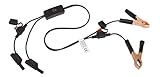
- Replaceable in-line fuses protect both the meter and tester in the event a high current source on the vehicle is left on
- The multimeter is bypassed with the switch during connection in case of a power surge
- The tester and meter can remain connected until other computer systems shut down, isolating the drain
- As a convenience, stacking banana connectors are used on the tester
- This allows voltage to be measured on various locations on the vehicle during the drain test, using standard test leads
1. Correct insufficient text contrast
Lighthouse checks whether text has sufficient contrast against its background. Chrome DevTools can show a contrast ratio in the color picker and suggest colors; adjust the foreground or background until the relevant text meets the applicable requirement. The required contrast depends on the text and applicable accessibility criterion, so do not assume one threshold fits every case. See Chrome DevTools’ contrast guidance.
Chrome DevTools states, “Low contrast text is the top accessibility issue on the web.” Its cited figure is specific: 83.9% of the top million home pages had low-contrast text in February 2022, according to WebAIM Million 2022. That statistic concerns that sample and date; it does not establish that every site has this issue or that these four audits are universally the most common.
Rank #2

- Precision Authentication: Uses pure resonance frequency analysis to verify changes ranging from 1/10 troy ounce to 10 troy ounces. Complies with certification standards, ensuring professional and reliable authentication results
- Comprehensive Authentication Tool kit: Includes acoustic resonance testing and magnetic composition detection for multi factor verification of gold and silver changes. Compatible with mainstream verification systems, meeting comprehensive authentication needs
- Cross Platform System Compatibility: Connects with changes analysis apps, supporting advanced spectral analysis and automated report generation. Conveniently stores complete authentication documents for record keeping
- Easy to Operate: Place the changes in the included stand to start resonance analysis, authenticate authenticity intuitively through sound characteristics. Magnetic buckle design enables simple and efficient metal composition testing, no professional expertise needed
- Portable Design for On the Go Use: Easily fits in pockets, enabling professional grade authentication anytime anywhere. Ideal for collectors and merchants needing on site changes verification
2. Give buttons and links accessible names
A button or link needs a concise accessible name that communicates its purpose. A visual icon alone may not provide that name to assistive technology. For example, an icon-only search button should have a programmatic name such as “Search,” rather than relying on the appearance of the magnifying glass.
After fixing the markup, use a screen reader to confirm that the control announces its name, role, and state. Chrome notes, “Vague labels are common, and they are non-helpful for navigating content.” Its interactive-element guidance discusses these checks.
Rank #3
3. Associate form controls with labels
Give each input or select a meaningful visible label and programmatically associate the label with its control. A placeholder is not a substitute: it may disappear as someone types and does not reliably provide the persistent label a user needs.
For a standard HTML form, a label’s for value can match the input’s id:
Rank #4

- 【Articulated Test Finger】Meets UL60335/UL476/UL1026/UL50762 standards for electrical safety testing. Simulates human finger articulation to verify accessibility to hazardous components during industrial equipment evaluations
- 【Precision Bend Test Probe Design】Total length 234mm with articulated bend sections (30/30/40mm configuration, 97mm effective test length). Features 78mm baffle width for standardized clearance verification
- 【Adjustable Articulated Finger Mechanism】Engineered joints allow 180° articulation to replicate natural finger movement. Locking mechanism maintains preset angles during pressure application (up to 30N force simulations)
- 【Durable Construction】Heat-treated articulated joints maintain structural integrity through repeated bending/straightening cycles. Steel paired with rugged polyethylene handle ensures long-term reliability
- 【Industrial Safety Testing Application】Validates protective barriers on machinery, appliances, and scientific equipment. Prevents accidental contact with live circuits or moving parts under IEC 61032 Clause B requirements
<label for="email">Email address</label>
<input id="email" name="email" type="email">
Use the equivalent association for a select or other labeled control. Then rerun the relevant Lighthouse audit and verify that the control has a clear accessible name.
Quick wins for a faster PC:
Scan for outdated or missing drivers - takes under a minuteDriver Scan →Clear out junk files and repair common Windows errorsFree Scan →4. Choose appropriate alternative text for images
Lighthouse flags image elements without an alt attribute, as well as image input controls without alternative text. If an image conveys information, describe the relevant information in context. If it is purely decorative, use an empty value, alt="", so a screen reader can skip it. Avoid filenames or generic labels that do not explain the image’s purpose.
The right alternative text depends on what the image does in that particular page; the same image may need different treatment in different contexts.
Check the page beyond the Lighthouse score
Test with a keyboard
Tab through the page. Confirm that interactive controls are reachable, focus moves in a logical order, and the focused control is visibly indicated. Prefer native semantic HTML when it fits the interaction: Chrome recommends replacing a div used as a button with a native button. Native elements provide built-in behavior that custom controls would otherwise need to recreate. See Chrome’s logical tab-order guidance.
Test with a screen reader
Check that controls announce their name, role, and state, and that labels and meaningful image descriptions make sense when encountered in the page’s reading order. Chrome recommends combining visual and screen-reader testing; automated checks cannot establish that the experience works for every user.
Rerun Lighthouse after changes
Run the audit again on the page you changed and confirm that the relevant findings are cleared. A clean result is useful feedback on the checks Lighthouse ran, not a guarantee of full accessibility; keep the keyboard and screen-reader checks as part of validation.
Quick Recap
Product prices and availability are accurate as of the date/time indicated and are subject to change. Any price and availability information displayed on Amazon at the time of purchase will apply.

