
Free tools Windows power users keep installed
One-click scans. No signup required.
iTechGuides is reader-supported. When you buy through links on our site, we may earn an affiliate commission. As an Amazon Associate I earn from qualifying purchases. Learn more
WebContainers let Node.js applications and operating-system commands run inside a browser tab. Bytes #183, published May 1, 2023, focused on StackBlitz’s announcement that the technology had arrived on Safari, iOS, and iPadOS. That was a report of a 2023 milestone, not a guarantee that every StackBlitz product or current Safari release supports every WebContainer workflow.
What a WebContainer is
A WebContainer is a browser-based runtime for Node.js applications. Instead of relying on a separate server or virtual machine to run the Node.js environment, it runs within the browser tab. StackBlitz’s WebContainer API also allows developers to run operating-system commands there and build custom interfaces around that functionality. This is one way browser-based development environments can work without a conventional remote Node.js runtime.
That does not mean every Node.js workload behaves exactly as it would on a traditional server. StackBlitz’s troubleshooting documentation says native addons are disabled unless they are implemented in JavaScript or compiled to WebAssembly. Compatibility depends both on the workload and on what the browser permits.
Why the 2023 Safari announcement mattered
Bytes #183 described WebAssembly threads and SharedArrayBuffer as important to WebContainers, and reported that Safari’s support for needed capabilities had opened the way for use on Safari, iOS, and iPadOS. The issue’s announcement was about availability at that time; it should not be read as a present-day compatibility guarantee.
#1 Best Overall
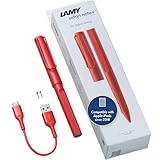
- STARTING IMMEDIATELY: The LAMY safari note+ iPad Pen is ready to use immediately. Simply switch it on and get started straight away - Perfect for writing, drawing, correcting, highlighting, painting or playing. No complicated set-up required!
- COMBINING DESIGN & TECHNOLOGY: The LAMY safari note+ iPad Pencil combines the iconic design of the LAMY safari fountain pen with state-of-the-art technology. The ergonomically certified grip zone of the iPad Pen ensures comfortable, long-term use and the proven Lamy writing experience.
- INTERCHANGEABLE NIB: The soft nib ensures virtually silent writing on the iPad and a perfect typeface. It can also be easily replaced and combined in different colors, and is always protected by the cap with clip.
- LONG-LASTING BATTERY & PRACTICAL CHARGING: With an impressive battery life of up to 10 hours, the LAMY Stylus Pen for iPad reliably accompanies you throughout the day. Thanks to the USB-C charging option, you can even charge the device while using it on your iPad.
- SCOPE OF DELIVERY & COMPATIBILITY: The LAMY Stylus Pen for iPad comes with two replacement tips, a USB-A to USB-C charging cable and a user manual. The product is compatible from iOS 12.2 with these iPad models: iPad: Gen. 6, 7, 8, 9, 10, 11 // iPad Pro: Gen. 3, 4, 5, 6 // iPad Air: Gen. 3, 4, 5, 7 // iPad mini: Gen. 5, 6.
StackBlitz’s browser-support documentation explains that SharedArrayBuffer requires cross-origin isolation. Browser support and isolation rules can affect whether a WebContainer works, and privacy settings may interfere. The documentation also notes possible restrictions involving previews and third-party resources in Firefox and Safari.
Browser support depends on the StackBlitz workflow
StackBlitz’s browser-support page, last updated in February 2023, listed Chrome and Chromium-based browsers as fully supported, Firefox and Safari as beta, and Android browser support as beta. It also listed iOS/iPadOS Safari support beginning with iOS 16.4. These are dated support statements, not a current browser compatibility matrix.
There is also a product-specific caveat: StackBlitz’s Web Publisher compatibility page says Safari compatibility mode does not run the app itself, though users can still render Markdown and submit pull requests. That limitation concerns Web Publisher; it should not be generalized to every standalone or embedded WebContainer use.
Recommended Free Tools
Rank #2
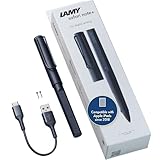
- STARTING IMMEDIATELY: The LAMY safari note+ iPad Pen is ready to use immediately. Simply switch it on and get started straight away - Perfect for writing, drawing, correcting, highlighting, painting or playing. No complicated set-up required!
- COMBINING DESIGN & TECHNOLOGY: The LAMY safari note+ iPad Pencil combines the iconic design of the LAMY safari fountain pen with state-of-the-art technology. The ergonomically certified grip zone of the iPad Pen ensures comfortable, long-term use and the proven Lamy writing experience.
- INTERCHANGEABLE NIB: The soft nib ensures virtually silent writing on the iPad and a perfect typeface. It can also be easily replaced and combined in different colors, and is always protected by the cap with clip.
- LONG-LASTING BATTERY & PRACTICAL CHARGING: With an impressive battery life of up to 10 hours, the LAMY Stylus Pen for iPad reliably accompanies you throughout the day. Thanks to the USB-C charging option, you can even charge the device while using it on your iPad.
- SCOPE OF DELIVERY & COMPATIBILITY: The LAMY Stylus Pen for iPad comes with two replacement tips, a USB-A to USB-C charging cable and a user manual. The product is compatible from iOS 12.2 with these iPad models: iPad: Gen. 6, 7, 8, 9, 10, 11 // iPad Pro: Gen. 3, 4, 5, 6 // iPad Air: Gen. 3, 4, 5, 7 // iPad mini: Gen. 5, 6.
For a particular project, distinguish among the browser’s available APIs, StackBlitz’s support level for that browser and operating system, and the specific product flow you need. Check StackBlitz’s current documentation before relying on a specific Safari or iOS release, and account for cross-origin isolation, memory, previews, and privacy settings.
Independent reader supportYour contribution helps us test, update, and keep practical guides available for everyone.What Bytes #183 covered beyond WebContainers
The May 1, 2023 issue also included a JavaScript event-loop quiz and links on Deno, QA testing, CSS, React Native, and other web-development topics. Its central explainer, reflected in the title “We heard you like containers…,” was the browser runtime and its newly reported Safari-family availability.
Using the WebContainer API commercially
StackBlitz’s WebContainer API documentation says for-profit production use requires a license and discusses usage-based charging for high commercial request volumes. The documentation reviewed does not establish an affiliate or referral program.
Quick Recap
Product prices and availability are accurate as of the date/time indicated and are subject to change. Any price and availability information displayed on Amazon at the time of purchase will apply.

