
What’s actually slowing this PC down?
Pick the symptom - the matching free tool is one click away.
iTechGuides is reader-supported. When you buy through links on our site, we may earn an affiliate commission. As an Amazon Associate I earn from qualifying purchases. Learn more
To stop a release from shipping broken links, run a link checker in the build or CI workflow and configure its nonzero result to fail that workflow. For a generated website, scan the built output—not just the source—so the check sees the links that will actually be published. This guide uses Lychee and its GitHub Action as a concrete example; the same principle applies to other build pipelines.
What should the link check scan?
Choose the scan target based on what gets published. Lychee can check directories, individual files, and website URLs, and supports Markdown, HTML, reStructuredText, and other text inputs. If your build generates a site, check the generated directory after the generation step. Source-only checking can miss links added or changed during generation. See Lychee’s documentation for supported inputs and options.
| # | Preview | Product | Price | |
|---|---|---|---|---|
| 1 |
|
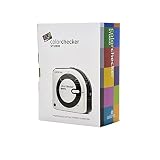
Calibrite ColorChecker Studio Spectrophotometer for Complete Color Management for Display,... | $569.00 | Buy on Amazon |
How do I make CI fail when a link is broken?
Run the checker as a required build step, then let its exit status determine whether the workflow succeeds. Lychee’s command-line interface returns 0 for success and 2 when link-check failures occur; codes 1 and 3 indicate runtime/input or configuration problems. In a shell-based job, a failing command ordinarily makes the step fail; avoid suppressing or ignoring that status if it must block publication.
Free tools Windows power users keep installed
One-click scans. No signup required.
With the GitHub Action, set fail to keep the workflow failing when Lychee reports a nonzero result. The separate failIfEmpty option can also fail a run if no links are found, which is useful for catching an incorrect scan target or an empty input set. The action repository provides workflow examples and reporting options: lychee-action.
#1 Best Overall
- SPECIFICATIONS: All in one spectrophotometer for camera to print color control, supports monitor display and projector profiling plus printer paper and scanner profiling with Calibrite PROFILER software, includes ColorChecker Classic Mini target for camera profiling, includes USB cable and monitor profiling holder pouch.
- ALL IN ONE: Profiles the devices that impact your final results including monitors, laptops, and projectors plus printers, paper, cameras and scanners, helping photographers maintain consistent color across capture, edit, and output workflows.
- INTELLIGENT PROFILING: Adaptive iterative profiling optimizes results for each unique display every time you calibrate, improving accuracy over repeat sessions and reducing the frustration of color drift and inconsistent screen performance.
- PRINT MATCHING: Ambient light measurement helps set optimal display luminance for comparing prints to your screen, improving print to monitor consistency and supporting more reliable proofing and final output decisions.
- CAMERA SUPPORT: Includes ColorChecker Classic Mini for camera profiling with Calibrite PROFILER software, enabling custom profiles for RAW workflows and a more consistent starting point before you begin editing and grading.
Where does the check belong in the workflow?
- Generate the release artifact. Run the normal site or documentation build first.
- Check the artifact. Point Lychee at the generated output directory or files, rather than relying only on source files.
- Keep the failure blocking. Use the CLI’s exit status or the action’s
failsetting; do not configure the check as advisory if release must stop on errors. - Publish only after success. Make deployment or publication depend on the successful check job or step.
This ordering ensures that the tested files are the ones intended for release. A scan that runs separately from the build, or whose result does not gate deployment, can report problems without preventing publication.
How should the team handle unreliable external links?
A third-party server may reject automated requests, apply rate limits, or respond intermittently. Such a failure is not always proof that the published link is permanently broken, but automatically allowing every failure through would weaken the gate. Start by checking the reported URL and response, then tune request behavior narrowly. Lychee documents request-method configuration, including a head,get sequence for servers that reject HEAD requests, along with timeout and caching options. Fragment checks require the response body, so they are not performed when a link succeeds through a non-GET request.
- Adjust request behavior when a target demonstrably rejects the checker’s request method.
- Use timeouts and caching deliberately to manage slow endpoints and repeated requests; neither guarantees consistent responses from third parties.
- Exclude only specific problem links or patterns when necessary. Lychee supports exclusion patterns and a
.lycheeignorefile. Document the reason for each exception and revisit it so ignored failures do not accumulate into a bypass.
The GitHub Action also documents cache configuration and configurable arguments. Its fail: false mode makes checking non-blocking; that can help during an intentional reporting-only rollout, but it does not meet a requirement to stop publication on errors.
How do I keep the check dependable over time?
Pin the action or checker version used by CI, then update it through deliberate dependency maintenance. The action project recommends a fixed version and demonstrates pinning to a commit SHA; it also recommends Dependabot for updates. Review those changes as part of normal workflow maintenance rather than letting CI behavior drift unnoticed.
Keep local and CI versions reasonably aligned as well. An OpenTelemetry project example uses Lychee locally and installs a pinned copy in CI, while advising that the local version remain reasonably close. Version consistency helps developers reproduce results before a change reaches the pipeline.
What should you decide before enforcing the gate?
- Scan scope: identify the exact generated files and formats that ship, plus any source files that need separate coverage.
- Failure policy: choose whether all unresolved links block publication or whether a time-limited advisory rollout is needed first.
- Exceptions: define narrow exclusion rules and an owner or review habit for revisiting them.
- Request behavior: select suitable methods, timeouts, concurrency, caching, and fragment-checking behavior for your targets.
- Maintenance: pin and update dependencies, and keep local checks close enough to CI to make failures reproducible.
These are configuration choices, not evidence of a universal best checker. The cited projects provide implementation options and example workflows, not a controlled comparison across tools. The lychee-action repository gives one illustrative run of approximately one minute for 576 links; it is a single example, not a general performance benchmark or runtime promise.
Quick Recap
Product prices and availability are accurate as of the date/time indicated and are subject to change. Any price and availability information displayed on Amazon at the time of purchase will apply.

