
Recommended Free Tools
iTechGuides is reader-supported. When you buy through links on our site, we may earn an affiliate commission. As an Amazon Associate I earn from qualifying purchases. Learn more
Start with the school’s device rules—not a shopping list. Check whether the student will receive a device, which software and accessories classes require, and whether personal devices are allowed. Then buy only what fills a real gap: the right computer may be essential, while several accessories may not be.
Check school requirements before shopping
Ask the school or college, or check its current technology guidance, for the required device type, operating system, software, account access, BYOD rules, and any required accessories. Find out whether the student will be issued a device; a school-provided computer can make a duplicate purchase unnecessary. For college, check the requirements for the student’s actual courses, since specialist software can change what is compatible.
That first check matters for families’ budgets. In its 2026 U.S. back-to-school survey, the National Retail Federation said electronics account for roughly one-third of K–12 back-to-school spending and one-quarter of college back-to-school spending. Those are shares of total spending, not a recommended electronics budget for an individual family. The NRF also reported that 20% of shoppers not buying electronics said the school provides them, and that laptops remained the most popular electronics purchase, although fewer shoppers were buying them. National Retail Federation, 2026.
For any education technology product, the U.S. Department of Education’s 2026 guidance poses a useful question: “What learning problem does it solve?” The department frames selection around instructional value, evidence, educator judgment, transparency for parents, and student outcomes. U.S. Department of Education, 2026.
#1 Best Overall

- 45 PIECE SET: Bulk pack contains everything your K-12 students need to get organized & start the school year off right
- WHAT’S INCLUDED: 5 # 2 pencils, pencil sharpener with lid cover, canvas pencil case, 5 ink pens (black, red, & blue ink), 5 (primary colors) colored pencils, 3 highlighters, 4 paper pocket folders, non-toxic wax crayons, righty/lefty scissors, 4 art erasers, 2 1-subject notebooks, composition book, 2 glue sticks, & standard/metric ruler!
- BASIC SCHOOL SUPPLIES: Why shop & pay separately for 1 of every essential for your kids when you can get them all in 1 convenient packaged set?
- DETAILS: Products are safety compliant and made for kids! Highlighters are water-based, pencilsharpener collects shavings, scissors are made for little hands, “lead” pencils are graphite, ruler measures inches and centimeters both, & can be tucked into a 3-ring binder (spiral notebooks too!), rubber erasers work well as art erasers or for small/big mistakes, & zipper pencil holder stores all included accessories!
- PERFECT FOR TEACHERS & PARENTS: Whether your child is homeschooled or goes off to preschool, kindergarten, 1st-5th grades, or middle school (junior high), or even summer camp, this school supply pack is ideally suited to meet their needs as they grow & learn
Choose a laptop, Chromebook, or tablet that fits the work
Do not choose by screen size or price alone. Check compatibility with required software and school systems, security-update support, warranty, battery life, keyboard and webcam needs, weight, durability, repairability, accessibility, and likely replacement cost. Consider the student’s age and how the device will be carried and used.
| Option | May fit when | Check before buying |
|---|---|---|
| Laptop or Chromebook | Assignments involve substantial typing, or classes require software that works best on a computer. | Required operating system and applications, update-support window, keyboard, webcam, battery, warranty, and school compatibility. |
| Tablet | Reading, note-taking, or app-based work suits the student and the school’s software supports the device. | Whether all required tools work on it, whether a keyboard is needed, the device’s support life, and its compatibility with school accounts and platforms. |
This is a compatibility decision, not a universal ranking: a laptop is generally the safer fit for keyboard-heavy work or required desktop software, while a tablet can suit reading, notes, and app-based tasks when the school supports it. These are practical inferences from published guidance, not rules for every student.
Rank #2
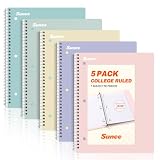
- AWESOME 5-PACK: Ideal for color-coding by subject or child, this 5-pack of 1 Subject Notebooks comes in elegant shades of Pink,Purple, Blue, Green, Yellow, with 70 college ruled pages per notebook.
- COLLEGE RULED: Each 8" x 10-1/2" notebook features 70 double-sided sheets with red margin lines and is 3-hole punched, allowing for easy transfer to your binder.
- CLEAN TEAR-OUT: Micro-perforated pages ensure a neat tear-out, leaving you with 10 1/2" x 7 1/2" sheets. Accommodates double-sided writing and prevents ink bleed-through from your favorite gel pens.
- DURABLE COIL LOCK SPIRAL: The sturdy coil lock spiral keeps pages securely in place and resists snags. The coated cover withstands frequent transfers in and out of backpacks, briefcases, and vehicles.
- 3-HOLE PUNCHED DESIGN: Easily organize and store your notes in a 3-ring binder, reducing clutter in your study or work area.
New Zealand Ministry of Education parent guidance suggests considering a screen of at least 10 inches, at least 64 GB storage and 4 GB RAM, a battery lasting a six-hour school day, a keyboard, Wi-Fi, Bluetooth, and a webcam. It also advises checking durability, splash resistance, weight, school-software compatibility, repairability, and several years of operating-system updates; tablet buyers should consider an attachable keyboard. These are general New Zealand recommendations, not universal minimum standards or a guarantee that a device will meet a particular school’s needs. The ministry says second-hand devices can cost less upfront but may need replacement sooner, and that new Chromebooks are supported for 10 years; verify the update window for the specific device and check school requirements. New Zealand Ministry of Education device guidance.
For an additional durability benchmark, the UK Department for Education’s school and college standards, updated 16 September 2026, specify three years of manufacturer support and security patches for tablets and five years for laptops and desktops. They specify warranties of two years for tablets and three years for laptops and desktops, and at least 802.11ac Wave 2 Wi-Fi, with Wi-Fi 6 recommended. These are UK institutional standards, not household purchase requirements; they are useful points to consider when comparing expected support and warranty. The standards also recommend considering whether existing devices can be repurposed before buying. UK Department for Education device standards.
Rank #3

- Visible Application: Disappearing purple formula helps kids see where the glue is.
- Mess-Free: Applies smoothly and dries clear for a neat finish.
- Educator’s Choice: The #1 teacher brand, ideal for younger learners' crafting and projects.
- Safe and Non-toxic: Acid-free formula is perfect for classrooms and homes.
- Bulk Value: Contains 30, 0.24-ounce (7-gram) Elmer’s craft glue sticks.
Use this 10-item list as a needs check
“Ten gadgets” is a checklist of possibilities, not a prescription to buy ten products. Mark each item as already supplied, required by the school, useful for the student, or unnecessary.
- School-approved laptop or Chromebook. Buy one only if the student needs a personal device and the school’s software and policies support the model and operating system.
- Compatible tablet. Consider it when the student’s work is app-based or centered on reading and notes, and required school tools work on it.
- Attachable tablet keyboard. Consider this if a tablet is the chosen device and the student needs to type assignments. New Zealand Ministry of Education guidance specifically advises tablet buyers to consider a keyboard.
- Protective case or carry bag. Match it to the exact device and how it will be transported. Check dimensions and access to ports before buying.
- Screen protector. Treat it as optional protection, not a school requirement; confirm it fits the exact model.
- Headphones or earbuds. Buy them if classes or school rules call for them. Requirements vary by school: for example, a San Antonio school’s 2026–27 requirements PDF calls for headphones or earbuds. That is a local rule, not a nationwide one. St. Thomas Episcopal School device requirements.
- Compatible spare charger. Check whether one is required or useful for the student’s routine. Verify the connector and power rating against the device; a charger that merely fits may not be appropriate.
- Mouse or keyboard accessories for home. Optional. Consider them only if they suit the student’s workspace and way of working.
- External storage. Optional, and only if the school’s software, account rules, and privacy policies permit it.
- Webcam or headset. Consider one only if the device lacks the necessary equipment or remote learning requires it. First check whether the built-in webcam and microphone meet the need.
Check device rules, phone policies, and account access
Device rules can be local and specific. NYC Public Schools’ 2026–27 family checklist tells families to check their school’s device policy, have an internet-connected device available for remote learning, and help the child log into the student account used for online tools. It also notes that New York State law bars students from using personal internet-enabled devices, such as cell phones, on school grounds during the school day. That rule is location-specific; check current local and school policies rather than assuming a phone or wearable is permitted. NYC Public Schools family checklist.
Rank #4

- BUY A BIC AND WE’LL GIVE A BIC: This back to school season, when you purchase BIC highlighters, we will donate one to teachers and classrooms in need
- BACK TO SCHOOL ESSENTIAL: One 5-count pack of BIC Brite Liner Highlighters in assorted fluorescent colors, sized right for a student's backpack, pencil case, or a teacher's classroom supply drawer
- BUILT FOR STUDENTS: Chisel tip highlights broad lines across textbook passages or fine-underlines key terms in notes, making it the right tool for studying, test prep, and everyday class work
- TRANSLUCENT INK THAT STAYS OUT OF THE WAY: Ink emphasizes what matters on the page without covering the text below, so students can highlight and still read every word they marked
- LONG-LASTING INK: Each highlighter writes up to eight hours without drying out, even with the cap left off, so a 5-pack carries students from the first day of school through the end of the semester
In UK guidance updated 29 June 2026, the Department for Education says schools should be phone-free by default. Laptop and tablet bring-your-own-device arrangements are governed by school BYOD and acceptable-use policies. A phone or smartwatch should not be treated as an in-school essential without checking the rules that apply to the student. UK Department for Education phone guidance.
Quick wins for a faster PC:
Repair Windows errors before they cause bigger problemsFix Now →Scan for outdated or missing drivers - takes under a minuteDriver Scan →Clear out junk files and repair common Windows errorsFree Scan →Quick Recap
Best Value

- Premium Thick Paper: 180gsm weight resists bleed-through and withstands frequent handling
- Key Ring Design: Perfect for attaching to bags, backpacks, or keys - always have your notes handy
- 5 Color Assortment: Choose from 5 vibrant colors (purple, blue, green, pink, white) to suit your style and organizational needs
- Generous Quantity: 50 sheets per color (totaling 250 cards) provides plenty of space for all your notes
- Ideal Size: The 3x5 inch size index card is perfect for quick jotting, to-do lists, flashcards
Make the final purchase decision
- Confirm the school will not provide the device or accessory.
- Match the device to the required software, platforms, and course work.
- Check how long the exact model will receive security updates, plus its warranty and repair options.
- Compare battery life, weight, keyboard and webcam needs, and durability against the student’s daily routine.
- Check the total cost, including any keyboard, case, charger, or likely replacement—not just the device’s upfront price.
- Verify every accessory against the exact device model and school policy.
Product prices and availability are accurate as of the date/time indicated and are subject to change. Any price and availability information displayed on Amazon at the time of purchase will apply.

