
Free tools Windows power users keep installed
One-click scans. No signup required.
iTechGuides is reader-supported. When you buy through links on our site, we may earn an affiliate commission. As an Amazon Associate I earn from qualifying purchases. Learn more
ColorOS 16 is OPPO’s mobile operating system based on Android 16. OPPO announced it in October 2025 with the Find X9 series as the launch device. The release combines OPPO’s new rendering and performance engines with AI tools, a redesigned interface, photo and video editing features, and options for connecting OPPO devices with iPhone, Mac, and PC.
The important qualification is availability: an eligible model does not guarantee the same date or feature set everywhere. OPPO says rollout timing depends on the exact model, region, carrier, and hardware, while some AI and connectivity functions require particular languages, accounts, companion software, or later over-the-air updates.
What ColorOS 16 is
ColorOS is the Android-based software platform used on OPPO phones and tablets. ColorOS 16 is its release announced in October 2025, and the Find X9 series launched with it. OPPO’s global description presents the version as a combined update to system responsiveness, visual design, artificial-intelligence tools, media editing, and cross-device connectivity rather than a single new application.
Recommended Free Tools
OPPO describes the release in terms of smoother motion, better coordination between software and phone hardware, and a more continuous experience when moving between screens or devices. Those descriptions are the company’s product claims. They should not be read as independent benchmark results or as a promise that every supported phone will perform identically.
#1 Best Overall

- 6.82 inches, LTPO AMOLED, 1B colors, 1440 x 3168 pixels
- 512GB Storage, 12GB RAM
- Android 16, Qualcomm SM8850-AC Snapdragon 8 Elite Gen 5 (3 nm), Octa-core (2x4.6 GHz Oryon V3 Phoenix L + 6x3.62 GHz Oryon V3 Phoenix M)
- Rear: 200 MP, f/1.5, 23mm (wide), 1/1.12", PDAF, OIS, 200 MP, f/2.2, 70mm (periscope telephoto), 1/1.28", PDAF (15cm - ∞), OIS, 3x optical zoom, 50 MP, f/3.5, 230mm (periscope telephoto), 1/2.75", PDAF, OIS, 10x optical zoom, 50 MP, f/2.0, 14mm, 123˚ (ultrawide), 1/1.95", PDAF, Front: 50 MP, f/2.4, 21mm (wide), 1/2.75", PDAF
- 163.2 x 77.0 x 8.7 mm or 9.1 mm
For OPPO’s feature list and current regional information, see the official ColorOS 16 page. OPPO’s announcement describing the launch is dated October 15, 2025, and is available from its India newsroom.
Is ColorOS 16 based on Android 16?
Yes. OPPO explicitly states that ColorOS 16 on the Find X9 series is based on Android 16. That answers the Android-version question for the launch series. It does not establish that every phone receiving an upgrade will get exactly the same Android components, release date, or ColorOS feature set.
Android upgrades are delivered as a combination of the Android platform, OPPO’s interface and services, hardware drivers, regional requirements, and sometimes carrier testing. Consequently, two phones with the same family name can receive an update at different times, and an older model may omit functions that require newer cameras, processors, sensors, or connectivity hardware. OPPO’s Find X9 specifications and launch information identify Android 16 for that series.
The main ColorOS 16 features
Luminous Rendering Engine
OPPO says the Luminous Rendering Engine revises Android’s rendering framework to make on-screen drawing and transitions more consistent. In practical terms, this is the part of the system intended to coordinate how frames are produced when you open an app, scroll through a feed, or move between screens. The goal is a steadier visual response, not a guarantee that every application will run at a particular frame rate.
Trinity Engine
The Trinity Engine is OPPO’s name for software that coordinates system behavior with chip-level resources. It is intended to balance responsiveness, sustained performance, and energy use as workloads change. The phone’s processor, thermal design, software version, network conditions, and the individual app still affect the result.
Seamless Animations
ColorOS 16 applies connected motion across system interactions. OPPO’s launch statement says, “ColorOS 16 introduces Seamless Animation, allowing every interaction to feel instantaneous and perfectly connected across the entire operating system.” The wording is a description of the design objective, not an independently measured latency claim. The effect can be most noticeable when an action flows from one screen to another, such as opening a notification, switching apps, or returning to a previous view.
Rank #2

- 6.59 inches, AMOLED, 1B colors, 1256 x 2760 pixels
- 512GB Storage, 12GB RAM
- Android 16, Mediatek Dimensity 9500 (3 nm), Octa-core (1x4.21 GHz C1-Ultra & 3x3.5 GHz C1-Premium & 4x2.7 GHz C1-Pro)
- Rear: 50 MP, f/1.6, 23mm (wide), 1/1.4", 1.12µm, multi-directional PDAF, OIS, 50 MP, f/2.6, 73mm (periscope telephoto), 1/1.95", 0.61µm, 3x optical zoom, multi-directional PDAF, OIS, 50 MP, f/2.0, 15mm, 120˚ (ultrawide), 1/2.76", 0.64µm, multi-directional PDAF, Front: 32 MP, f/2.4, 21mm (wide), 1/2.74", 0.8µm
- 157 x 73.9 x 8 mm (6.18 x 2.91 x 0.31 in)
AI Mind Space and other AI tools
AI Mind Space is presented as a place to capture and organize text, images, and voice notes. Instead of leaving information scattered across screenshots, recordings, and copied text, the feature is designed to collect those items so they can be revisited or organized later.
Do these 3 things before closing this tab:
1Clear out junk files and repair common Windows errors2Scan for outdated or missing drivers - takes under a minute3Repair Windows errors before they cause bigger problemsOPPO also lists AI assistance for writing, transcription, and image work. Depending on the tool, processing may require an internet connection, a supported language, an account, or a particular software version. OPPO notes that some capabilities can be delivered after the initial launch through an over-the-air update. Availability therefore cannot be inferred solely from the ColorOS 16 label on a phone’s settings screen.
Interface redesign and personalization
The visual update includes refreshed icons and motion effects. OPPO also highlights motion-photo wallpapers and additional personalization controls. These changes affect the look and behavior of the home screen and system interface; they do not necessarily alter the underlying Android app compatibility model.
Motion effects can consume additional processing or battery in some situations. If a phone feels less responsive after enabling a visual option, test the same workflow with that effect disabled before assuming the operating-system update is defective.
AI photo and video editing
OPPO’s announced image tools include AI Portrait Glow, AI Eraser, AI Unblur, and AI Reflection Remover. Their intended uses are, respectively, improving portrait lighting, removing unwanted objects, reducing blur, and minimizing reflections in a photograph. Results depend on the source image and the scene; these tools are assistive edits, not a guarantee that every artifact can be reconstructed accurately.
The built-in video editor is described as supporting trimming, playback-speed changes, music, cropping, text, filters, and manual image adjustments. The availability of a tool can still vary by model and software build, especially where an effect depends on a particular image-signal processor or neural-processing unit.
Rank #3

- 6.78 inches, LTPO AMOLED, 1B colors, 1272 x 2772 pixels
- 512GB Storage, 16GB RAM
- Android 16, up to 5 major Android upgrades, ColorOS 16, Mediatek Dimensity 9500 (3 nm), Octa-core (1x4.21 GHz C1-Ultra & 3x3.5 GHz C1-Premium & 4x2.7 GHz C1-Pro)
- Rear: 50 MP, f/1.5, 23mm (wide), 1/1.28", 1.22µm, multi-directional PDAF, OIS, 200 MP, f/2.1, 70mm (periscope telephoto), 1/1.56", 0.5µm, 3x optical zoom, multi-directional PDAF, OIS, 50 MP, f/2.0, 15mm, 120˚ (ultrawide), 1/2.76", 0.64µm, multi-directional PDAF, Front: 50 MP, f/2.0, 21mm (wide), 1/2.76", 0.64µm, PDAF
- 161.3 x 76.5 x 8.3 mm (6.35 x 3.01 x 0.33 in)
O+ Connect and device-to-device features
OPPO describes O+ Connect as a way to connect OPPO devices with iPhone, Mac, and PC systems. Depending on the supported combination, features include file transfer, screen mirroring, clipboard sharing, and sharing calls or messages.
For transfers between an OPPO device and an iPhone or Mac, OPPO’s global page specifies O+ Connect and ColorOS 16.0 or later, along with compatible iOS and macOS versions. Call and message sharing with an iPhone has an additional requirement: the iPhone must have OPPO’s Odialer preinstalled. These requirements mean that “works with iPhone” is not a universal promise for every iPhone, OPPO phone, or regional software build.
What OPPO’s performance figures mean
OPPO publishes laboratory comparisons between ColorOS 16 and ColorOS 15.0. The figures below are OPPO’s measurements, not independent tests. The company says outcomes can change with software and hardware optimization, network conditions, and user habits.
| Published metric | OPPO’s reported figure | How to interpret it |
|---|---|---|
| Tap responsiveness in top apps | 40% | OPPO laboratory comparison with ColorOS 15.0; the exact app mix and test procedure should not be generalized to every app. |
| Scrolling stability in third-party apps | 52% | OPPO laboratory comparison; behavior can vary by app, display mode, processor, and software build. |
| Overall stability | 37% | OPPO laboratory figure, not an independent reliability rate for every phone. |
| Temperature rise after two launch-switch cycles | 4.1°C | Measured in OPPO’s stated test scenario; it is not a universal temperature limit. |
| Power consumption | 13% | OPPO’s published comparison metric; it should not be converted directly into a guaranteed battery-life increase. |
OPPO also describes longer-duration examples involving 4K recording, gaming while on a call, and social-feed use. Those examples were tested with the Find X9 and ColorOS 16. They illustrate scenarios OPPO chose for its demonstration; they do not establish that every supported Reno, Find, K, F, or Pad device will deliver the same endurance or temperature behavior.
Which phones will get ColorOS 16?
OPPO’s global rollout page lists eligible products from the Find, Reno, K, and F families, plus Pad tablets. The published schedule begins in November 2025, continues in December 2025, and includes a larger group planned for the first quarter of 2026. The page calls this an approximate plan. A model’s appearance on the list is not a real-time confirmation that the update is available in your market.
| Product family or models listed by OPPO | Published rollout context |
|---|---|
| Find N5, Find N3, Find N3 Flip, Find N2 Flip | Included in OPPO’s foldable-phone rollout list; exact timing depends on market and variant. |
| Find X8 Pro and Find X8 | Included in the Find-series list; carrier and regional schedules can differ. |
| Reno14 and Reno13 family variants | Several variants are listed; check the exact suffix and local model number. |
| Reno12, Reno11, and Reno10 models | Selected models appear on the published plan, not necessarily every regional variant. |
| F31, F29, F27, and F25 models | Listed F-series phones with timing assigned by OPPO’s regional schedule. |
| K13 and K12x | Listed K-series models; local availability can depend on sales channel and carrier. |
| Pad 3 Pro, Pad 3, Pad 2, and Pad SE | Tablet models included in the rollout plan, subject to hardware and regional support. |
The list groups products by planned windows rather than promising one worldwide release day. OPPO says the schedule can change by device model, region, and carrier. Carrier-exclusive models follow the carrier’s schedule, and the order shown on the page does not prove the order in which updates will arrive.
Rank #4
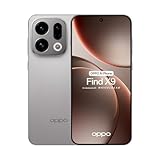
- 6.59 inches, AMOLED, 1B colors, 1256 x 2760 pixels
- 512GB Storage, 12GB RAM
- Android 16, Mediatek Dimensity 9500 (3 nm), Octa-core (1x4.21 GHz C1-Ultra & 3x3.5 GHz C1-Premium & 4x2.7 GHz C1-Pro)
- Rear: 50 MP, f/1.6, 23mm (wide), 1/1.4", 1.12µm, multi-directional PDAF, OIS, 50 MP, f/2.6, 73mm (periscope telephoto), 1/1.95", 0.61µm, 3x optical zoom, multi-directional PDAF, OIS, 50 MP, f/2.0, 15mm, 120˚ (ultrawide), 1/2.76", 0.64µm, multi-directional PDAF, Front: 32 MP, f/2.4, 21mm (wide), 1/2.74", 0.8µm
- 157 x 73.9 x 8 mm (6.18 x 2.91 x 0.31 in)
How to check your phone’s actual update status
- Identify the exact model. Open Settings and look under About device or the equivalent device-information page. Record the complete model name and model number, not just “Reno,” “Find,” or “Pad.”
- Check the installed software build. In the same area, note the ColorOS version, Android version, and security-update date. This helps distinguish a pending ColorOS upgrade from a normal security patch.
- Use the local update channel. Open Settings > About device > Software update (the wording can vary by build), then check for updates over a reliable Wi-Fi connection.
- Compare your market and carrier. Use OPPO’s support page for the country where the phone was sold. An imported handset, a carrier edition, and an unlocked local model can have different approval schedules.
- Read the release notes. If ColorOS 16 is offered, review the listed Android version, download size, battery requirements, and any model-specific limitations before installing.
If the update is not shown, that does not by itself prove the phone is unsupported. Staged releases, carrier certification, regional software branches, and hardware-specific testing can delay an eligible device.
Windows Errors? Fix Them Before They Spread
Repair common Windows errors and clear accumulated junk for a smoother, more stable PC - no reinstall needed.Free scan · no reinstallOutdated Drivers Are Slowing You Down
One free scan finds every outdated or missing driver and matches the right update for your exact hardware.Free scan · exact hardware matchWhy two ColorOS 16 phones may have different features
- Hardware support: Some camera, display, connectivity, or AI functions require components that are absent from another model.
- Region and language: AI transcription, writing, and image services can launch in different languages or countries, and regulations may affect availability.
- Account and internet requirements: Cloud-assisted features may need an OPPO account, a network connection, or both.
- Later OTA delivery: A feature announced for ColorOS 16 may arrive after the base operating-system update.
- Carrier software: Carrier-exclusive phones can wait for carrier testing and may use a separate release schedule.
These conditions are why a feature list should be treated as a menu of capabilities for the platform, not a guarantee that every item appears on every installation.
Independent reader supportYour contribution helps us test, update, and keep practical guides available for everyone.Should you upgrade or buy a ColorOS 16 phone?
If you already own an OPPO phone
First verify the exact model and local rollout status. If the update is offered, back up important photos, messages, and authentication data, keep the phone charged, and install with stable Wi-Fi. Afterward, allow time for app optimization and indexing before judging battery life or warmth. If a specific AI or editing feature is missing, check its regional, language, account, and hardware requirements rather than assuming the update failed.
If you are choosing a new device
The Find X9 series is the launch example for ColorOS 16 and is specified with Android 16. That makes it a straightforward way to obtain the platform, but it is not evidence that replacing an otherwise suitable phone is necessary. Compare the exact model sold in your country, its hardware, support policy, and the features you actually need.
If cross-device work matters
Confirm the companion-device requirements before relying on O+ Connect. Check the iOS or macOS version, whether the OPPO phone has ColorOS 16.0 or later, and whether Odialer is preinstalled when iPhone call or message sharing is important.
Common rollout problems and practical fixes
No update appears
Recheck the model number and sales region, install any prerequisite security update, and try again later. Staged distribution can make the update visible to one device and unavailable on an identical device in another market.
Best Value

- 6.82 inches, LTPO AMOLED, 1B colors, 1440 x 3168 pixels
- 512GB Storage, 12GB RAM
- Android 16, Qualcomm SM8850-AC Snapdragon 8 Elite Gen 5 (3 nm), Octa-core (2x4.6 GHz Oryon V3 Phoenix L + 6x3.62 GHz Oryon V3 Phoenix M)
- Rear: 200 MP, f/1.5, 23mm (wide), 1/1.12", PDAF, OIS, 200 MP, f/2.2, 70mm (periscope telephoto), 1/1.28", PDAF (15cm - ∞), OIS, 3x optical zoom, 50 MP, f/3.5, 230mm (periscope telephoto), 1/2.75", PDAF, OIS, 10x optical zoom, 50 MP, f/2.0, 14mm, 123˚ (ultrawide), 1/1.95", PDAF, Front: 50 MP, f/2.4, 21mm (wide), 1/2.75", PDAF
- 163.2 x 77.0 x 8.7 mm or 9.1 mm
The download fails
Use Wi-Fi, free enough internal storage, charge the phone, and retry from the software-update screen. Avoid interrupting installation after the device has rebooted into the update process.
A feature is missing after installation
Read the release notes, update system applications, and verify language, account, network, and hardware requirements. Some announced functions are enabled server-side or delivered in a later OTA package.
Battery drain or warmth increases temporarily
Immediately after a major update, the phone may optimize applications and rebuild indexes. Give that process time, then check battery usage by app. If one application is responsible, update or reinstall it; if the problem persists across normal use, contact OPPO support for the local build rather than assuming the laboratory figures apply to your handset.
The Tool Desk
Outbyte Driver Updater FREEScan for outdated or missing drivers - takes under a minuteDriver Scan →Outbyte PC Repair FREEClear out junk files and repair common Windows errorsFree Scan →The practical takeaway
ColorOS 16 is OPPO’s Android 16-based operating-system release, launched with the Find X9 series and expanded through a planned update program for selected Find, Reno, K, F, and Pad devices. Its headline changes are the Luminous Rendering Engine, Trinity Engine, Seamless Animations, AI Mind Space and other AI utilities, refreshed personalization, editing tools, and O+ Connect.
Eligibility and experience depend on the precise model, region, carrier, hardware, language, account, and software build. Treat OPPO’s performance percentages as company laboratory claims, and use the local OPPO update channel to determine whether your particular phone has ColorOS 16 now.
Quick Recap
Product prices and availability are accurate as of the date/time indicated and are subject to change. Any price and availability information displayed on Amazon at the time of purchase will apply.

