
Quick wins for a faster PC:
Scan for outdated or missing drivers - takes under a minuteDriver Scan →Clear out junk files and repair common Windows errorsFree Scan →iTechGuides is reader-supported. When you buy through links on our site, we may earn an affiliate commission. As an Amazon Associate I earn from qualifying purchases. Learn more
A digital audio input receives audio that is already encoded as digital data. Unlike a microphone or line input, it does not need to convert an incoming analog signal with an analog-to-digital converter (ADC) before the interface can record or process it. The phrase describes the signal arriving at the port—not its connector, channel count, sample rate, or compatibility.
How a digital audio input differs from an analog input
A microphone, instrument, or line-level source normally delivers an analog electrical signal. An ADC converts that signal into digital data for recording or processing. A digital input instead accepts data that has already been converted, typically from another audio device. Focusrite’s glossary defines an ADC as the component that converts an analog input signal to a digital word: Focusrite audio glossary.
“Digital input” is therefore a broad description, not a single standard. To determine what a particular input can receive, identify its protocol, connector and port mode, channel capacity at the intended sample rate, and clocking requirements.
What’s actually slowing this PC down?
Pick the symptom - the matching free tool is one click away.
Which connections can carry digital audio?
ADAT optical
ADAT is a multichannel digital audio format carried over an optical cable. In the Focusrite Red range documentation, one ADAT connection carries eight channels at 44.1 or 48 kHz, four at 88.2 or 96 kHz, and two at 176.4 or 192 kHz. These are the documented capabilities of that product range, not a guarantee for every device. Focusrite describes ADAT and its channel capacity in its ADAT interface overview and Red range operation guide.
#1 Best Overall

- PROZOR 192KHz Digital to Analog Audio Converter: Converts coaxial or Toslink/SPDIF digital PCM audio signals to analog L/R RCA and 3.5mm jack audio simultaneously ——⚠️Set TV audio output format to PCM | 📌Adjust TV volume via settings or output devices | 📌Optical output not supported
- Supports Uncompressed 2 channel LPCM or PCM Digital Audio Signal Output: Provides Electromagnetic-noise-free Transmission. ⚠️Ensure the audio output is set to PCM or LPCM to avoid potential audio distortion. For 5.1 decoding/output, check out our upgraded 5.1 model.
- Supports High-Resolution Audio: 192kHz Sampling Rate achieved, Supports Sampling Rate at 32, 44.1, 48, 96 and 192kHz, and 24-bit SPDIF Incoming Bit Stream on Left and Right Channels, ensuring that your audio experience is rich in detail and accuracy
- Built-in Audio Amplifier Chip: Equipped with a professional audio amplifier chip, addresses the common issue of low output volume, resulting in pure and crisp sound quality
- Easy to Install and Use: Multiple inputs and outputs for simple setup. Easily converts digital audio from devices like HD TVs, TV boxes, DVD/Blu-ray players, and gaming consoles (PS3/PS4/PS5) to analog audio, connecting to home audio systems, AV Amps, and headphones
ADAT is commonly useful for adding channels from an external preamp or converter: connect that device’s ADAT output to an interface’s ADAT input, then set both devices to a supported sample rate and configure their clock relationship.
S/PDIF
S/PDIF (Sony/Philips Digital Interface Format) is generally a two-channel digital connection in the Focusrite documentation cited here. It may use coaxial RCA or optical TOSLINK, but the port and device must support the chosen form. See the Red range operation guide and Red range controls and connections.
Rank #2

- 【Upgraded DAC Converter】Converts Coaxial or Toslink digital PCM/ LPCM audio signals to analog L/ R RCA and 3.5mm Jack audio (✅Not capable of being reversed). Can be Used for PS3, PS4, Xbox, Blu-ray Player, HD DVD, Home Cinema Systems, AV Amps, Etc
- 【Sampling Rate Achieved: 192KHz】Hdiwousp digital-to-analog signal converters actually Support sampling rate at 32, 44.1, 48, 96, and 192 kHz; 24-bit S/PDIF incoming bit stream on left and right channels, provides crystal clear electromagnetic noise-free transmission
- 【Plug and Play】Simple installation and easy operation, needn't install extra driver. In addition, the DAC adapter comes with an optical cable and a power adapter for transmitting digital and providing power respectively, everything is arranged for you! (✅ Please set PCM/LPCM audio format when using)
- 【Audio In and Out】Input Audio Connector: 1xToslink, 1xCoaxial (coaxial cable is not included); Output Audio Connector: 2 x RCA (R/L, RCA cable isn't included), 1x3.5mm Jack; Powered by 5V/1A Power Adapter. (✅ NOTE: can not support AC3, Dolby, DTS, and any other SPDIF audio that is not in PCM format.)
- 【NOTE】Please set the correct audio format PCM / LPCM before use, otherwise it will not work. If you don't know how to set it, please refer to the picture on the page or contact our customer service team, we will help you to solve the problem!
AES/EBU and other digital links
AES/EBU is a professional digital audio connection family. Connector type and channel arrangement depend on the equipment, so consult the exact device manual before choosing a cable or assuming compatibility. Some professional audio equipment also carries audio over network connections; the supported protocol and interoperability are product-specific.
USB is not necessarily the external digital input
USB often carries audio between an interface and a computer. That host connection is different from an interface’s optical or coaxial input for external audio gear. For example, Focusrite lists USB Type-C as the computer connection and separately describes optical input uses on its 18i8 hardware features page.
Rank #3

- Digital to Analog: DAC audio converter is designed for converting coaxial or toslink digital PCM audio signals to analog L/R RCA and 3.5mm Jack audio simultaneously. ( Not support Analog to Digital)
- Excellent Performance: The sound of the digital to analog audio adapter is synchronized when connected, without delay. The durable and stable transmission makes you do not have to worry about poor sound quality after long-term use.
- Wide Compatibility: The signal converter supports sampling rate at 32KHz, 44.1KHz, 48KHz, 96KHz, 192KHz and 24-bit SPDIF Incoming Bit Stream on left and right Channels. It can be used for PS3, PS4, Xbox, Blu-ray Player, HD DVD, Home Cinema Systems, AV Amps, etc.
- Multi-Point Connection: Optical to rca adapter supports uncompressed 2.1-channel PCM or LPCM digital audio signal output, will not supports 5.1 channel Dolby sound.
- Thoughtful Service: The package includes DAC Converter*1, Toslink Cable (Optical cable)*1, USB Power Cable*1, User Manual*1. We provides 24-hour online technical support and 30-day refund. We are at your service. If you have any questions, please feel free to contact us.
Why an optical port may not accept your source
TOSLINK describes an optical connector, not one guaranteed audio protocol. Depending on the interface, an optical port may carry ADAT, optical S/PDIF, or only one of them. Some interfaces let you select the mode in control software; others have fixed capabilities. Check the manual and settings for the exact model. Focusrite explains the distinction in its Digital I/O Modes guide.
Matching the cable ends is not enough: a TV’s optical output will not work with an interface whose optical input accepts ADAT only. Likewise, a coaxial S/PDIF output requires an interface with a compatible coaxial S/PDIF input.
Rank #4
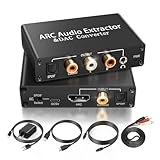
- 【ARC Function - Check Your TV First】: This hdmi arc audio extractor lets your TV send audio Extractor the Audio from TV to Soundbar or Amplifier, allowing you to enjoy an immersive home theater experience instead of the poor sound of TV.(Note:Your TV must have an HDMI port labeled "ARC" or "eARC" – otherwise it won't work. Please check your TV's HDMI ports before purchasing.)
- 【Digital to Analog Audio Converter】: Equipped with coaxial and optical (Toslink/SPDIF) digital audio inputs, this converter transforms PCM/LPCM digital signals into analog stereo output, allowing connection to amplifiers, headphones, or speakers. The input selection switch on the panel enables quick and easy switching between optical and coaxial modes. (Note: Supports PCM input only, not compatible with decoding function.)
- 【Simultaneous Audio Output】: The ARC audio extractor allows optical, coaxial, L/R, and 3.5 mm headphone outputs to work at the same time, providing flexible connection options for different audio devices. Please ensure the audio format is set to PCM or LPCM before use. (Note: Not compatible with Dolby, DTS, or other surround sound formats.)
- 【Wide Compatibility】:Enjoy seamless integration with a wide range of home entertainment devices. ✓ ARC Mode – Connect ARC/eARC-enabled TVs; ✓ DAC Input – Connect Blu-ray players, DVD players, set-top boxes, gaming consoles (PS3/PS4), Bluetooth receivers, and other digital audio sources; ✓ Audio Output– Connect speakers, amplifiers, soundbars, headphones, and audio systems via Optical, Coaxial, or 3.5 mm audio outputs. This flexible design ensures reliable compatibility with virtually any home audio setup.
- 【Full Accessories Included & Ready to Use】: Package Contents:HDMI ARC audio extractor ×1, USB power cord ×1(Power adapter included), HDMI Cable x 1, Optical cable ×1, L/R to 3.5mm Cable x1, Manual ×1. Simply connect and enjoy. Perfect for enhancing your home entertainment system!
Connecting a TV or console to an interface
- Check the ports and formats. Confirm that the source has an optical output and that the interface accepts optical S/PDIF on its optical input. Do not infer support from the TOSLINK connector alone.
- Connect the optical cable. Use a TOSLINK cable between compatible ports.
- Set the source to Linear PCM. In the TV or console’s audio settings, choose Linear PCM for the optical output rather than DTS or Dolby Digital. Focusrite says its interfaces cannot decode those surround-encoded formats in the described connection; they require a separate decoder.
- Select the correct interface mode if needed. Set the optical input to S/PDIF in the interface’s control software when the model offers that choice.
See Focusrite’s TV and other-device connection guidance for its supported setup details.
Quick Recap
Best Value

- 【Rybozen 192KHz Audio Converter】For the convenience of use, we are equipped with an optical fiber cable and a power adapter. This audio converter with 3.5mm jack audio can convert coaxial or optical digital PCM audio signals to analog RCA L/R and 3.5mm jack audio simultaneously.
- 【How to Use】In order to enjoy pleasant music, please set your DVD or music player audio output to PCM or LPCM. This audio converter supports uncompressed 2-channel LPCM or PCM digital audio signal output. Not available for 5.1 channel.
- 【Multiple Sampling Rates to Meet Your Needs】This digital to analog audio converter supports sampling rates of 32, 44.1, 48, 96 and 192KHz. And it is the 24*bit S/PDIF input bit stream of the left and right channels. Provides perfect noise-free, no electromagnetic transmission.
- 【Wide Application Scenarios】Easy installation, simple operation, plug and play. Familiar Signal Input: Toslink, RCA (coaxial); Output: RCA(R/L), 3.5mm jack; Suitable for party and home, such as PS3, PS4, Blu-ray player, HD DVD, home theater system, AV amplifier.
- 【Thoughtful Service】Rybozen provides 24-hour online technical support and 30-day refund. We are at your service. If you have any questions, please feel free to contact us.
Adding channels with an ADAT input
- Verify the ports. The external preamp or converter needs an ADAT output, and the interface needs an ADAT input.
- Connect the optical cable. Connect the output to the input; an optical connector alone does not establish that both ports are set to ADAT.
- Agree on a sample rate. Choose a rate supported by both devices and check the interface’s channel capacity at that rate. For the Focusrite Red range figures above, capacity decreases as the sample rate rises.
- Set synchronization. Decide which device supplies the clock. If the expansion unit is the clock leader, configure the interface to follow its ADAT clock. Focusrite explains clock-source choices in its Sync/Clock Source guide.
What to check before choosing or using a digital input
- Protocol: Identify whether the connection is ADAT, S/PDIF, AES/EBU, or another named format.
- Connector and mode: Establish whether the port is optical TOSLINK or coaxial RCA and, for optical ports, whether it supports the protocol your source sends.
- Channels at your sample rate: Confirm the channel count available at the rate you plan to use; some implementations carry fewer ADAT channels at higher rates.
- Source format: Check the supported audio format and sample rate. A device may not accept a surround-encoded signal even if it has a compatible-looking port.
- Clock and synchronization: Set the devices to compatible clock sources when sending digital audio between them.
- Computer connection: Treat USB or another host link as a separate connection unless the product documentation specifically says otherwise.
Product prices and availability are accurate as of the date/time indicated and are subject to change. Any price and availability information displayed on Amazon at the time of purchase will apply.

