
iTechGuides is reader-supported. When you buy through links on our site, we may earn an affiliate commission. As an Amazon Associate I earn from qualifying purchases. Learn more
A command-line interface (CLI) is a text-based way to use a computer or software: you enter commands and receive results, usually as text. In a typical setup, a terminal displays the interaction, a shell interprets your commands, and command-line tools perform specific tasks.
What is a CLI?
CLI stands for command-line interface. It describes an interaction style in which you type instructions instead of relying solely on graphical controls such as menus, buttons, and icons. The term can refer broadly to a text-command interface provided by an operating-system shell or by a particular program.
For example, in a Unix-like shell, pwd displays the current working directory. The command is only illustrative: available commands vary by operating system and shell.
The Tool Desk
Outbyte PC Repair FREERepair Windows errors before they cause bigger problemsFix Now →Outbyte Driver Updater FREEFix the driver behind crashes, sound loss and screen glitchesFind Drivers →What is the difference between a terminal and a shell?
They work together but have different roles. A terminal is the interface that accepts typed text and displays output; a shell reads and evaluates the input. Microsoft’s documentation describes a command shell as an interactive command-line interface, or Read-Eval-Print Loop (REPL). In everyday conversation, people sometimes use “terminal,” “shell,” and “CLI” loosely, so it helps to identify which role you mean.
#1 Best Overall

- WIDELY APPLICATIONS: Suitable for U disk, keyboard, mouse, camera, printer, mobile phone and other devices with USB interface. Terminal blocks make it easy to test electronics equipment or power up.
- DURABLE: Nickel-plated interface, anti-friction, strong oxidation resistance, effectively reduce resistance. The signal is more stable and has a longer service life.
- EASY to USE: No soldering required. Just use a small screwdriver to open up the terminal blocks, slide in your stranded or solid-core wire, and re-tighten. Save you from solder trouble, no need to purchase expensive tool. Great time and money saver.
- FLEXBILITY: The terminal block itself is removable from the body. It's more durable than soldering wires onto a connector. Can extend the length of the USB cable,ideal for you electronic DIY projects and test the equipment that with USB interface ports.
- All the pins are clearly labeled, which is really nice because we keep forgetting the order.
| Term | Role | Example |
|---|---|---|
| CLI | The text-command way of interacting with a computer or program. | A shell-based command interface. |
| Shell | Reads and evaluates commands, then runs them or passes work to the operating system. | PowerShell, Windows Command Shell, bash, or zsh. |
| Terminal | Provides the text input and output surface for a command-line application; it can host one or more shells. | Windows Terminal or Terminal on Mac. |
| Command-line tool | A program launched from a shell to carry out a particular task. | Azure CLI. |
Microsoft’s Windows Console and Terminal Definitions explain the roles of terminal applications and command-line applications. Apple describes Terminal on Mac as an app for communicating with macOS through a command-line interface.
What happens when you enter a command?
- You type a command into the terminal’s text interface.
- The shell reads and evaluates the input.
- The shell runs a shell command or invokes a program or tool, sometimes passing work to the operating system.
- The result is returned as output for the terminal to display.
The shell is more than a one-command-at-a-time interpreter. Many shells can run commands from files and provide programming features such as variables, flow control, and functions. Bash also supports interactive features including command history, aliases, command-line editing, and job control. See the GNU Bash Reference Manual for Bash’s description of a shell.
Rank #2

- WIDELY APPLICATIONS: Suitable for U disk, keyboard, mouse, camera, printer, mobile phone and other devices with USB interface. Terminal blocks make it easy to test electronics equipment or power up.
- DURABLE: Nickel-plated interface, anti-friction, strong oxidation resistance, effectively reduce resistance. The signal is more stable and has a longer service life.
- EASY to USE: No soldering required. Just use a small screwdriver to open up the terminal blocks, slide in your stranded or solid-core wire, and re-tighten. Save you from solder trouble, no need to purchase expensive tool. Great time and money saver.
- FLEXBILITY: The terminal block itself is removable from the body. It's more durable than soldering wires onto a connector. Can extend the length of the USB cable,ideal for you electronic DIY projects and test the equipment that with USB interface ports.
- All the pins are clearly labeled, which is really nice because we keep forgetting the order.
What is a command-line tool?
A command-line tool is an application you invoke from a shell, often to handle a focused task. Microsoft’s Azure CLI documentation describes Azure CLI as a cross-platform tool for administering Azure resources. It can be used interactively or from scripts; a shell such as cmd.exe or Bash can launch it in a terminal.
Free tools Windows power users keep installed
One-click scans. No signup required.
That distinction matters: the terminal provides the text surface, the shell accepts and processes the command, and the tool performs the specialized operation. A tool may also expose its own command interface once launched.
Rank #3

- [WIDELY APPLICATIONS]: Suitable for U disk, keyboard, mouse, camera, printer, mobile phone and other devices with USB interface. Terminal blocks make it easy to test electronics equipment or power up.
- [DURABLE]: Nickel-plated interface, anti-friction, strong oxidation resistance, effectively reduce resistance. The signal is more stable and has a longer service life.
- [EASY to USE]: No soldering required. Just use a small screwdriver to open up the terminal blocks, slide in your stranded or solid-core wire, and re-tighten. Save you from solder trouble, no need to purchase expensive tool. Great time and money saver.
- [FLEXBILITY]: The terminal block itself is removable from the body. It's more durable than soldering wires onto a connector. Can extend the length of the USB cable,ideal for you electronic DIY projects and test the equipment that with USB interface ports.
- All the pins are clearly labeled, which is really nice because we keep forgetting the order. Equipped with both a dedicated screwdriver and a commonly used power cord
What are command-line interfaces used for?
- Managing a computer: Shell commands can manage files, configure settings, or query information.
- Working with a service: A specialized tool such as Azure CLI can administer cloud resources.
- Automating repeated work: A sequence of commands can be saved in a script and run again.
CLI or graphical interface: which should you use?
Neither interface is universally better. Choose based on the task and how you expect to do it:
- Check whether the task is supported: A particular action may be available in one interface and not another.
- Consider repetition or automation: If you need to repeat a sequence or run it from a script, command-line access may suit the workflow.
- Consider discoverability: Graphical controls make visible options easier to browse; commands require knowing or looking up the relevant syntax.
- Factor in familiarity: Use the interface you can operate confidently, especially when commands affect important settings or data.
These are practical selection criteria, not a claim that one interface is faster or more capable in every situation.
Quick Recap
Best Value
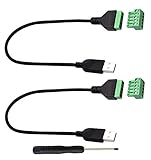
- Size:Length(30CM/12Inch)Colour:(Black) Package Quantity:(2packs) Material: Plastic & Metal Features:DIY USB 2.0 A Male Bolt Screw Terminal Pluggable Type Block Connector Cable
- Can extend the length of the USB 2.0 A cable,5-pin (way) bolt screw terminal pluggable connector can be plugged into the USB A 2.0 plug, Then connect the socket to the other wires, The length of the USB cable can be extended.
- Product Applicable Equipment: Computer and other USB interface devices, Data transmission and charge extension function.
- Wire range: AWG28~16, Pin: 5way/pin, Compact design and reliable connection for the male USB to secrew terminal adapter cable
- No soldering required, easy to use, Requires only a screwdriver and a wire stripper to terminate USB cables, Saves time and hassle for installers.
Rank #4

- Package And Specifications: this set includes 2 pcs of portable pluggable type adapter connectors with a 1.6 by 0.7 inch port and a 2.8 inch screwdriver featuring plated connectors and copper conductors
- Solderless DIY Design: the 5 pin terminal design allows for easy diy or repair via screw terminals without the need for soldering saving you time and money while ensuring a quick and simple installation
- Durable And Stable Structure: crafted with pure copper conductors and flame retardant insulation these adapters offer low resistance and strong oxidation resistance for reliable signal transmission and long life
- Universal USB Compatibility: these versatile connectors support a wide range of devices including keyboards mice cameras and printers making them ideal for testing electronic equipment or extending cable length
- Flexible And User Friendly: featuring clearly labeled pins for easy wiring and a removable terminal block this adapter is perfect for custom projects and supports various wire specifications from 16 to 28 awg
Product prices and availability are accurate as of the date/time indicated and are subject to change. Any price and availability information displayed on Amazon at the time of purchase will apply.

