
What’s actually slowing this PC down?
Pick the symptom - the matching free tool is one click away.
iTechGuides is reader-supported. When you buy through links on our site, we may earn an affiliate commission. As an Amazon Associate I earn from qualifying purchases. Learn more
Short answer: a smart lock can lose its connected features without losing its basic ability to unlock locally. A Wi‑Fi or internet outage may disable remote control, notifications, scheduling and integrations while a keypad, code, physical key or nearby Bluetooth connection still works. A completely dead battery is more serious: electronic entry may stop, and the emergency method depends on the exact lock model. Before an outage, identify your lock’s backup entry method and keep the correct replacement batteries available.
What fails—and what usually keeps working
Smart locks have separate systems for mechanical operation, electronic power and network services. Understanding which layer has failed prevents the most common mistake: treating a Wi‑Fi problem as if the lock itself has no power, or assuming an app can operate a lock whose batteries are exhausted.
| Problem | What may stop | What may still work | First action |
|---|---|---|---|
| Household power outage | Router, hub, internet and other mains-powered networking equipment | Battery-powered lock electronics, keypad and mechanical key | Try local entry; restore the network when power returns |
| Home Wi‑Fi or internet outage | Remote unlocking, live notifications, code scheduling and integrations that require the network | Keypad, physical key and sometimes nearby Bluetooth control | Use a local method, then check the router and service |
| App failure | App-based commands and account features | Keypad, code, physical key and any documented Bluetooth fallback | Use local entry; troubleshoot the phone or app afterward |
| Dead lock batteries | Electronic keypad, motor, radio and app control | Only a mechanical override or manufacturer-documented emergency power, if fitted | Follow the exact model’s emergency-entry procedure |
Schlage Residential says its electronic and smart locks are battery-operated and “will continue to function even during a power outage.” The same support statement warns that communication depending on Wi‑Fi or cellular data may not be available. That distinction applies broadly: a lock can remain powered while its online services are unreachable.
If the smart-lock batteries die
What a fully depleted battery looks like
When the batteries are completely depleted, the lock may not illuminate its keypad, move the motor, accept a code or respond to an app command. Schlage’s troubleshooting guidance says fully dead batteries prevent electronic operation on the cited Connect models. A phone cannot supply power through the app, and a Wi‑Fi connection cannot revive an unpowered lock.
#1 Best Overall

- Zero Downtime: Stay connected with a fully charged spare battery always ready to go. Just swap and go—no delay, no lockout.
- Smart Lock Compatibility: Specifically designed and approved for the myQ Video Smart Lock and myQ Smart Lock, this is the only battery guaranteed for perfect fit and reliable performance. Beware of knockoffs that can damage your lock or void your warranty.
- Tool-Free Swap: Easily replace your battery in seconds. Slide off the cover and insert a new one—no tools, screws, or hassle.
- Recharge and Reuse: Use the included USB-C charging cable to recharge your spare battery, so it’s always ready to go when you need it.
Use the model’s emergency-entry method
There is no universal dead-battery procedure. Check the manual or support page for the exact model and regional variant before relying on any technique.
- Mechanical key: Some Yale Assure models include a key cylinder. Insert the key and operate the lock as you would a conventional deadbolt.
- Exterior emergency terminals: Compatible Yale Assure Bluetooth deadbolts can be powered temporarily by touching a 9V battery to the exterior terminals. Once the lock has power, enter a valid code. This method applies only to models designed with those terminals.
- Another documented method: Some locks use a different external contact or removable cover. Do not force a keypad, pry a battery compartment or apply voltage unless the manufacturer specifies the procedure.
If you are outside, a 9V battery is useful only when the lock’s manual confirms exterior emergency-power support. Carrying one does not make every smart lock recoverable.
Replace batteries before they are exhausted
Low-battery alerts are an instruction to replace the batteries, not a guarantee that the lock will continue operating for a fixed period. Yale’s Assure Lock with Bluetooth FAQ estimates approximately one year of battery life with normal usage and describes advance warnings; the estimate is specific to that model and is not an industry-wide average. The same FAQ uses both “approximately one month” and “approximately five weeks” when describing warning timing, so treat the alert as an early prompt rather than a precise countdown.
Free tools Windows power users keep installed
One-click scans. No signup required.
Rank #2
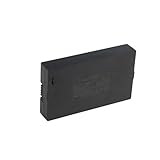
- Compatibility:Simply check that the size and connector pin order of our battery match the original—if they’re identical, it will work.
- Long-Lasting Backup Power: 7.4V-38Wh / 5000 mAh capacity, up to 4~6 months of use from a single charge.
- Charge with USB-C: Power it up with the same cable you use for other devices.Use only a standard 5V/2A charger—avoid fast chargers to prevent swelling or overheating. A red-to-blue/green light indicates a full charge.
- Security and Ease of Use: Over-charging, over-power,short-circuit, high-temperature,over voltage and battery PTC protection. Intuitive clasp is designed to be simple and quick to use.
- For the first charge, we recommend 8–12 hours to fully activate the battery and extend its service life; routine recharges afterward usually take 4–8 hours.
Battery chemistry, temperature, traffic, radio activity and installation all affect service life. Use the type and quantity in the manual. For example, Schlage’s cited Arrive troubleshooting guidance calls for four quality alkaline AA batteries for that family. Do not substitute a different size or rechargeable chemistry unless the manufacturer explicitly allows it.
If Wi‑Fi goes down
Local entry often continues
Wi‑Fi loss is not the same as loss of lock power. Schlage documents that Encode locks can be operated with their keypad or physical key without Wi‑Fi. The lock’s local code validation and motor are inside the lock, so they do not need an internet connection for each use.
Yale says Assure Lock 2 with Wi‑Fi can connect to the Yale Access App over Bluetooth when the home Wi‑Fi connection is down. The connection may take a few seconds, depending on the phone. This is a model-family capability, not a promise that every Yale lock—or every smart lock—has offline Bluetooth control.
Rank #3

- 【ONE-TOUCH FINGERPRINT ACCESS】Slide down the protective cover to expose the sensor, then touch to unlock in seconds. During setup, press and hold your finger until the blue light appears, then scan from several angles for more reliable recognition.
- 【SHARED ACCESS FOR FAMILY OR TEAMS】Store up to 20 fingerprints, making it easy for family members, roommates, coworkers, or gym users to share one lock without carrying or copying keys. Add fingerprints using a previously registered finger.
- 【REPLACEABLE BATTERY, NO CHARGING CABLE】Uses a replaceable CR2032 coin cell, with 2 batteries pre-installed and 2 spare batteries included. Delivers up to 9–12 months of standby time or approximately 2,500 unlocks per battery, with mechanical keys available as backup.
- 【DURABLE, WATER-RESISTANT DESIGN】Built with a zinc-alloy body, ABS protective cover, and IPX5 water resistance to help protect against rain and splashes. Suitable for gym lockers, gates, sheds, toolboxes, cabinets, and other everyday storage areas. For best long-term performance, use under cover when possible.
- 【KEYLESS CONVENIENCE WITH BACKUP KEYS】The sturdy padlock design provides quick everyday access without searching for a key, while 2 included mechanical keys help provide access if the battery is depleted or fingerprint recognition is unavailable. A screwdriver is included for battery replacement.
Connected features disappear first
Without Wi‑Fi, an Encode lock may lose real-time notifications and access-code scheduling, along with remote commands and integrations that depend on the network or cloud service. Existing keypad codes can still work locally, but you may not be able to add, remove or schedule codes from a remote location until connectivity returns.
Separate the failed link before troubleshooting:
- Router or home Wi‑Fi: The lock and phone may be powered, but they cannot reach the local network.
- Internet service: The router may be functioning while cloud access and remote control fail.
- Cloud or app service: Your home network may be healthy, but the provider’s service or account session is unavailable.
- Phone Bluetooth: A nearby Bluetooth fallback will not work if Bluetooth is disabled, permissions are blocked or the phone is incompatible.
- Lock batteries: No network troubleshooting helps if the lock itself has no usable power.
When you need to enter immediately, try the keypad code or physical key first. Restore remote features later by checking the router, internet connection, app status and lock battery.
If the app stops working
App failure does not necessarily lock you out
An app can crash, sign out, lose permissions, fail to reach its service or become incompatible after a phone update. Those failures remove app-based control, but a powered lock may continue accepting a keypad code or physical key. If the manufacturer documents nearby Bluetooth control, you may also be able to connect while standing near the lock.
Rank #4
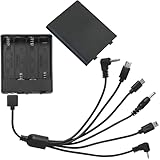
- 6 head with cover and switch external safe battery box, 4 AA batteries, voltage 6V, suitable for various brands of safe.
- Multi-functional interfaces to meet the needs of different situations: 6 interfaces are Type-c header, Micro-USB, 3.5MM hollow header, 2.5MM, 3.5MM and Mini-USB.
- Features: 6 kinds of interfaces, stable performance, plug and play, universal, suitable for various types of safes
- Material: PP, selected excellent plastic material, strong and fall-resistant, not easy to deform, beautiful appearance
- Package contents: 1 general safe emergency power supply (not including battery)
Do not assume that an app “works offline.” Some apps cache limited local information; others require an account, cloud session or Bluetooth handshake for every command. The official support material does not establish one recovery process that covers every brand, phone, firmware version and total cloud outage.
Practical recovery order
- Try local entry: Enter a previously configured code or use the physical key.
- Check lock power: Look for keypad lights, sounds or motor activity. If there is no response, treat it as a battery problem.
- Move close to the lock: If the model supports Bluetooth, enable Bluetooth and the required app permissions, then attempt a nearby connection.
- Check the phone: Confirm the correct account, Bluetooth, location or nearby-device permissions, and an up-to-date app.
- Check the service and network: Test another internet connection and verify that the router is online. A service outage may require waiting while local entry remains available.
- Use the manual: Follow the model-specific reset or recovery instructions only after you have a reliable way to enter. A factory reset can erase codes or ownership settings.
Model-specific figures and limits
Published battery figures are estimates tied to particular products and conditions. Yale’s Assure Lock 2 with Wi‑Fi FAQ states “up to 3 months” under typical conditions with Wi‑Fi enabled. Yale’s Assure Lock with Bluetooth FAQ states approximately one year with normal usage. Neither figure should be presented as the expected life of every smart lock. Schlage’s troubleshooting guide uses “less than 6 months” as a threshold for investigating Encode battery life; that is a support trigger, not a promised average.
Recommended Free Tools
| Product reference | Published figure or behavior | How to interpret it |
|---|---|---|
| Yale Assure Lock with Bluetooth | Approximately one year with normal usage; advance low-battery warnings | Manufacturer estimate for that model, accessed in 2026 |
| Yale Assure Lock 2 with Wi‑Fi | Up to 3 months in typical conditions with Wi‑Fi enabled | Model-specific FAQ figure, not a cross-brand benchmark |
| Schlage Encode | Keypad and physical key can operate without Wi‑Fi; notifications and scheduling may be unavailable | Local entry and connected features have different dependencies |
| Schlage Arrive guidance | Four quality alkaline AA batteries for the cited low-battery resolution | Battery requirement for that family; verify your own model |
How to prepare before an outage
Document your fallback
- Write down the exact lock model and save its manual where you can reach it without the app.
- Confirm whether the lock has a keypad, physical key cylinder, exterior emergency terminals or Bluetooth fallback.
- Test the backup method while the lock is powered and the door is open. Never wait for a crisis to discover that a key cylinder is hidden under a cover.
- Give a trusted household member a permitted local code or physical key, following your security policy.
Maintain power and access
- Replace batteries immediately after a low-battery warning.
- Keep the specified replacement set at home. If your exact Yale Assure Bluetooth deadbolt supports emergency terminals, keep a compatible 9V alkaline battery available for that purpose.
- Inspect contacts and the battery compartment for corrosion, moisture or loose connections.
- Keep a physical key outside the home only in a genuinely secure, authorized location; avoid obvious hiding places.
Plan for network and app outages
Make sure at least one person can use a local code or key without relying on a phone account. Record which features require internet access, such as remote unlocking, live alerts, scheduling and integrations. If your lock depends on a hub or cellular backup, include that device in your battery and outage plan.
Best Value
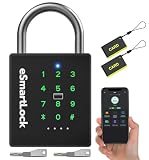
- 🔐【5 Ways to Unlock】: The P12 padlock has 5 unlocking ways: RFID card unlock, passcode unlock, simple control via mobile App, support Apple Watch unlock, and spare key unlock. A perfect smart lock to help you create a smarter and more convenient life.
- 🔐【Sturdy and Durable】: This pad lock is heavy duty high-security design, upgraded for 3200N pull resistance, a hardened stainless steel shackle for superior cut resistance, a strong zinc alloy body for crack resistance, an advanced keyhole for pick-resistance lock.
- 🔐【Works in Any Environment】: IP67 waterproof & dustproof & antirust & anti-corrosion, proven to work through extreme environmental conditions, operational temperature range of -4°F to 122°F, fully competent in inside and outdoor use under rain, snow, or sun.
- 🔐【Ultra Long Battery Life】: This padlock built-in ultra-large capacity 500mAh rechargeable li-ion battery, which can last standby for 24 months and be unlocked about 8000 times after fully charged, and is equipped with a USB-C cable for fast recharging within 3 hrs.
- 🔐【Excellent Customer Service】: Anweller offers a 12-month warranty and free lifetime technical support. It is hassle-free to get a replacement in 12 months and get a refund in 6 months. You are welcome to contact us if you have any queries.
What not to assume
- A household power cut does not automatically turn off a battery-powered lock.
- Wi‑Fi loss does not automatically disable keypad or key entry.
- A working app does not guarantee a dead lock can be opened.
- A 9V battery does not provide emergency entry unless the exact model has compatible external terminals.
- A battery-life number from one model is not a general smart-lock average.
- Resetting the lock is not a safe first step if you have no other way inside; it may erase codes and account settings.
Choosing a lock for outage resilience
When comparing models, evaluate the failure paths rather than simply counting online features.
| Evaluation area | Questions to ask |
|---|---|
| Local entry | Does a keypad code or physical key work without internet, a hub or a phone? |
| Dead-battery recovery | Is there a mechanical override, exterior emergency power or another documented method? |
| Connectivity fallback | Can a nearby phone use Bluetooth, and does that require an account, hub or cloud service? |
| Feature loss | Which remote commands, notifications, scheduling tools and integrations stop when Wi‑Fi or service is unavailable? |
| Battery maintenance | What battery type and quantity are required, how are warnings delivered, and what conditions affect expected life? |
Verify the precise variant and regional edition. A lock family may contain versions with different key cylinders, radios, battery compartments and emergency procedures.
Bottom line for each scenario
Battery dead: electronic operation may stop. Use only the mechanical key or emergency-power method documented for that model.
PC Slower Than It Used to Be?
A free scan shows the junk files, broken settings and background clutter dragging Windows down - then fixes them in one click.Free scan · Windows 10 & 11Crashes, No Sound, or Screen Glitches?
Random freezes, missing sound and display glitches usually trace back to one bad driver. Find and replace yours safely.Free scan · under a minuteWi‑Fi down: local keypad and key entry often remain available, while remote control, notifications, scheduling and integrations may disappear. Some models offer nearby Bluetooth control.
App unavailable: use the lock’s local entry method first, then troubleshoot the phone, Bluetooth, network and account. There is no universal offline-app guarantee.
Quick Recap
Product prices and availability are accurate as of the date/time indicated and are subject to change. Any price and availability information displayed on Amazon at the time of purchase will apply.

