
Quick wins for a faster PC:
Repair Windows errors before they cause bigger problemsFix Now →Fix the driver behind crashes, sound loss and screen glitchesFind Drivers →Clear out junk files and repair common Windows errorsFree Scan →iTechGuides is reader-supported. When you buy through links on our site, we may earn an affiliate commission. As an Amazon Associate I earn from qualifying purchases. Learn more
Bent CPU pins or socket contacts can stop a processor from seating, being detected, or working correctly. The first step is to identify where the damaged contacts are: on a PGA processor or inside an LGA motherboard socket. Do not force the CPU into place or power on a system with visible contact damage. Whether repair is sensible depends on the contact’s location and condition, warranty eligibility, and your ability to work precisely.
Where are the bent CPU pins?
“CPU pins” can mean two different things, and the distinction determines what may need repair or replacement:
- PGA (pin grid array): The pins are on the processor. A bent or broken pin is physical damage to the CPU.
- LGA (land grid array): The processor has flat contact pads; delicate pins are inside the motherboard socket. Damage is to the motherboard socket, not to pins on the CPU.
Check your processor and motherboard documentation to identify the socket type before handling anything. Intel’s LGA115x installation guidance describes contact damage specific to that socket family; socket construction and details vary by platform.
What can happen if a pin or socket contact is bent?
A displaced contact may not make the electrical connection the processor needs. The CPU might not sit correctly, the motherboard might not detect it, or the system might fail to operate. Socket damage can also be associated with memory-channel problems. The result depends on the contact and platform; appearance alone cannot reliably predict whether the system will work.
#1 Best Overall
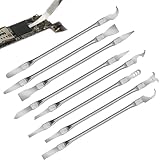
- Versatile Repair Kit:Perfect for safely removing BGA chips, CPUs, and other small components from smartphones and motherboards.
- Precision Design:Ultra-thin tools allow for easy maneuvering between chips and board without damage.
- Durable Material:Made from high-quality alloy, resistant to corrosion and bending, ensuring longevity.
- Time-Saving:Integrated blade and handle design eliminates the need for assembly, making repairs quicker.
- Comfortable Use:Ergonomic design ensures a comfortable grip, reducing hand fatigue during extended use.
These are possible symptoms, not a diagnosis. Installation errors or other faulty components can cause similar problems. The cited manufacturer and repair guidance does not establish a universal failure rate, map every contact position to a symptom, or provide a reliable repair-success percentage. A slightly bent-looking contact is not proof that the CPU will work, and a bent contact does not automatically mean the processor is destroyed.
How to inspect safely
- Power down and disconnect the system. Do not handle processor or socket contacts while the computer is powered.
- Identify the damaged part. Determine whether the contacts are on the PGA CPU or in the LGA motherboard socket.
- Use good light and inspect from multiple angles. Look across the rows for contacts that lean differently from their neighbors, sit at a different height, appear crossed, or are missing. Intel’s LGA115x guidance specifically recommends viewing socket contacts from different angles.
- Stop if you find visible damage. Intel advises not using an LGA115x motherboard with damaged socket contacts. Do not install the CPU or power on the system while the damage remains unassessed.
AMD’s handling guidance says a correctly oriented processor should drop into its socket without force. If it does not settle freely, it may be misaligned or have bent pins: stop and check rather than pressing it down. AMD’s specific insertion advice is in its processor handling guidance.
Rank #2

- PRECISION CHIP REMOVAL TOOL: Specifically designed for removing power supply units, scraping CPU adhesive, dismantling chips, cutting glue bonding strips with surgical precision. Ideal for BGA chip repair and motherboard maintenance tasks
- ULTRA-THIN KNIFE DESIGN: Features 0.38mm/0.015in ultra-thin blades smaller than solder points, this professional knife repair kit enables seamless movement between chips and baseplates. Dual functionality enhances BGA chip restoration efficiency
- CIRCUIT BOARD REPAIR APPLICATIONS: Essential circuit board repair kit for chip restoration, motherboard servicing, and electronics disassembly. Compatible with various PCB components and integrated circuit maintenance procedures
- SECURE NON-SLIP HANDLING: Ergonomic proof-drop handle with burr-easy blades ensures safe operation. Simplified cleaning process with alcohol wipes maintains tool between repairs
- SK5 STEEL CONSTRUCTION: Professional-grade blades made from special quenching processed SK5 steel offer 550°F/287°C heat tolerance with enhanced oxidation proof, maintaining sharpness through extended repair sessions
Can you fix bent CPU pins?
Sometimes a bent PGA pin can be carefully realigned, but this is delicate work, not a guaranteed fix. Repeated bending can break a pin, and some damage cannot be repaired. For LGA damage, the contacts are part of the motherboard socket; broken, crossed, or badly displaced contacts are better assessed by a qualified board-repair service or addressed by replacing the motherboard than treated as a routine CPU repair.
Recommended Free Tools
If the pins are on a PGA processor
A third-party iFixit CPU-pin repair guide describes aligning bent pins carefully, including using fine tweezers for severely bent pins. It warns that pins are extremely fragile, may break after repeated bending, and that some cases are unfixable. This is repair guidance, not manufacturer endorsement or a promise of success. The work calls for steady hands and close inspection; a tool that seems convenient can still slip and cause more damage.
Rank #3

- 【High-quality Material】Metal spudger is made of high-quality stainless steel, with high hardness, high toughness, rust resistance, high temperature resistance, and is not easy to break when used.
- 【Multiple Specifications】Include 8 flat spudger opening tools, double head design, a total of 16 different flat spudgers blade, which can meet your different needs.
- 【Perfect Design】Soft and lightweight, not easily deformed. The blade has a thinness of 0.1mm and high elasticity, making it easy to disassemble, weld, and layer the baseband CPU.Also can solve the dead corner of digital products,can quickly separate the tin point,fast degumming
- 【Widely Applications】Repairing disassembly tools are suitable for disassembling the casings of digital electronic products such as smart phones, tablet computers, cameras, etc., and can also be used for IC chip CPU desoldering and delamination.
- 【Features】CPU pry tool set with a variety of flat pry head designs, High temperature resistance, non deformation, non sticking tin, able to quickly separate tin points
If the contacts are in an LGA motherboard socket
Do not treat socket contacts as though they were PGA pins on a removable CPU. They are delicate motherboard contacts, and damage may affect CPU detection or memory channels. If contacts are broken, crossed, badly displaced, or difficult to inspect, seek professional board-repair advice or consider motherboard replacement. DIY correction is not an assured repair.
When not to attempt a repair
- The component arrived damaged and you have not contacted the seller or manufacturer.
- A contact is broken or missing, or several contacts are displaced.
- You cannot inspect the contact pattern clearly or work with steady control.
- The CPU will not seat freely, or the damage could create an incorrect connection.
Do not force insertion. Visible damage can make powering on imprudent because of the possibility of an incorrect contact or short, but the available guidance does not establish that every bent contact will cause a short or damage other components.
Rank #4

- 【Wide Application】STREBITO precision screwdriver set has 120 bits, complete with every driver bit you'll need to tackle any fix or DIY project. In addition, this PC tool kit comes with 22 accessories, such as magnetizer, magnetic mat, suction cup, spudger, cleaning brush, tweezers, etc. Whether you're a professional technician or a amateur, this essential electronics toolkit has what you need to repair all PC, iphone, laptop, PS5, switch, game controller, tablets, glasses, watch, etc
- 【Humanized Design】Our iphone repair tool kit has been designed with the professional in mind to maximize your repair capabilities. The screwdriver features a rubberized, ergonomic handle with swivel top, provides a comfort grip and smoothly spinning. Magnetic bit holder transmits magnetism through the bit, helping you handle small screws and parts. The blade can be extended for working in hard-to-reach areas. And flexible extension shaft is useful for removing screw in tight spots
- 【Magnetic Design】We put 2 magnetic tools in this computer repair tool kit that save your energy and time, make your fixing job easier. The 5.7 x 3.3" magnetic project mat can keep all tiny screws and parts organized, prevent from losing and messing up, make your repair work more efficient. Magnetizer demagnetizer tool helps strengthen the magnetism of the screw driver tips to grab screws, or weaken it to avoid damage to your sensitive electronics
- 【Organize & Portable】All screwdriver bits are stored in rubber bit holder which marked with type and size for fast recognizing. And the repair tools are held in a tear-resistant and shock-proof oxford bag, offering a whole protection and organized storage, no more worry about losing anything. The tool bag with nylon strap is light and handy, suit for your tool case, easy to carry out, or placed in the home, office, car, drawer and other places
- 【Lifetime Warranty】The precision bits are made of 60HRC Chromium-vanadium steel which is resist abrasion, oxidation and corrosion, sturdy and durable, ensure long time use. This computer screwdriver kit is covered by STREBITO lifetime warranty and 30 days money-back. If you have any issues with your phone repair tool kit, simply contact customer service for troubleshooting help, parts, replacement or refund. Buy the STREBITO electronic screwdriver set with confidence
Check warranty and return options before bending anything back
If the CPU or motherboard arrived damaged, pause before attempting repair and contact the seller or manufacturer. Intel says returned processors are visually inspected for external damage; AMD says processors submitted for claims are inspected and tested. An attempted repair can complicate a damage or warranty claim.
Outdated Drivers Are Slowing You Down
One free scan finds every outdated or missing driver and matches the right update for your exact hardware.Free scan · exact hardware matchPC Slower Than It Used to Be?
A free scan shows the junk files, broken settings and background clutter dragging Windows down - then fixes them in one click.Free scan · Windows 10 & 11Warranty rules depend on the product, purchase channel, and applicable terms. Intel’s physical-damage guidance, last reviewed July 31, 2026, says externally caused physical damage can affect boxed-processor warranty coverage and that tampering violates its boxed-processor limited warranty. It also says marks left by a motherboard socket during normal use are not considered external-cause damage. Intel describes three years as the typical limited warranty period for boxed processors, but advises checking the terms for the exact product.
Best Value

- Comfortable hand feel, humanized design, double‑headed SK5 blade, can be used to separate solder joints.
- Comfortable hand feel, humanized design, double‑headed SK5 blade, can be used to separate solder joints.
- Used for BGA repair, disassembling mobile phone CPU chip and mobile phone repair.
- The blade is made of flexible steel, which is not easy to deform when bent, and sturdy.
- Wide range of applications, support motherboard repair, hardware repair, instrument repair.
AMD’s retail boxed CPU warranty service guidance and boxed-processor warranty guide list bent, damaged, missing, or contaminated pins or pads as examples of physical damage not covered for retail boxed processors. These statements do not automatically define OEM CPU coverage, motherboard warranties, retailer return policies, or local consumer rights. Check the terms that apply to your purchase before modifying the component.
Quick Recap
Prevent contact damage during installation
- Hold the processor by its edges and avoid touching the pins, pads, or socket contacts.
- Align the orientation indicators before lowering the processor vertically into place.
- Let the correctly oriented CPU settle without force; stop if it does not.
- Avoid dragging the processor across socket contacts, tilting it during installation or removal, or dropping the processor or socket cover. Intel’s LGA115x material identifies these as potential causes of contact damage for that platform.
Choose the next step by damage type
| Situation | Practical next step |
|---|---|
| Bent PGA pin, not broken | Check seller and warranty options first. Careful realignment may be possible, but the pin can break and success is not guaranteed. |
| Broken or missing PGA pin | Contact the seller or manufacturer if applicable; otherwise seek qualified repair advice or assess CPU replacement. |
| Bent LGA motherboard contact | Do not use the motherboard with visible damage. Seek professional board-repair advice, especially if contacts are crossed or badly displaced. |
| Damage found on arrival | Photograph and report it to the seller or manufacturer before attempting repair. |
Product prices and availability are accurate as of the date/time indicated and are subject to change. Any price and availability information displayed on Amazon at the time of purchase will apply.

