
iTechGuides is reader-supported. When you buy through links on our site, we may earn an affiliate commission. As an Amazon Associate I earn from qualifying purchases. Learn more
DDR5 RDIMM and DDR5 UDIMM describe how a memory module connects to the memory controller. An RDIMM includes a register that buffers and manages signals between the DRAM chips and the controller. A UDIMM has no such register. That difference affects which computers can use the module, how systems are populated, and how much memory a supported platform can handle.
Registration is separate from error-correcting code (ECC). An unbuffered module can be an ECC UDIMM, while an RDIMM commonly provides ECC on platforms designed for it. The two types are not interchangeable, so the system or motherboard manual—not the word DDR5 on a product listing—must determine what you buy.
What the two names actually describe
RDIMM means registered DIMM
In a registered dual in-line memory module, a register sits between the DRAM chips and the memory controller. The register buffers communication and manages the timing of signals before they reach the controller. Micron describes this organization as a way to improve signal integrity and support greater capacity and stability in server systems.
Outdated Drivers Are Slowing You Down
One free scan finds every outdated or missing driver and matches the right update for your exact hardware.Free scan · exact hardware matchPC Slower Than It Used to Be?
A free scan shows the junk files, broken settings and background clutter dragging Windows down - then fixes them in one click.Free scan · Windows 10 & 11The register is part of the module’s electrical design. It does not mean the memory is a different generation of DDR, and it is not a synonym for ECC. DDR5 identifies the memory technology; RDIMM identifies the module organization.
#1 Best Overall

- Samsung DDR5 Memory RAM | Part Number: M321R8GA0BB0-CQK
- Single 64 GB Module; DDR5 DIMM 288-Pin; Speeds up to 4800 MHz, PC5-38400 (PC5-4800B)
- ECC Registered RDIMM; 2Rx4 (EC8, 10x4); JEDEC DDR5 standard 1.1V
- Compatible for select DDR5 Servers and Workstations; *Not Compatible with Desktop or Laptop Computers*
- Note: EC8 (10x4) ECC Registered modules can not be mixed with EC4 (9x4) ECC Registered modules or with different ECC types such as ECC Unbuffered, ECC Load Reduced or Non-ECC Unbuffered; (Refer to your system's manual for memory seating and channel guidelines)
UDIMM means unbuffered DIMM
An unbuffered DIMM connects the DRAM chips directly to the memory controller without the RDIMM register. UDIMMs are common in desktops and mobile systems, although some entry-level servers and workstations also use them when their platform documentation specifically allows it.
UDIMM is likewise a structural description, not a guarantee that the memory lacks error correction. A UDIMM can be ordinary non-ECC memory or an ECC UDIMM.
ECC is a separate decision
Error-correcting code adds extra data bits and logic so certain memory errors can be detected and, depending on the design, corrected. Kingston explains that an unbuffered module can include the additional DRAM and data width needed for ECC; that product is called an ECC UDIMM. Registration and ECC therefore answer different questions:
Recommended Free Tools
- Registered or unbuffered: Is there a register buffering signals between the DRAM and memory controller?
- ECC or non-ECC: Does the module and platform support the relevant error-correction function?
A module may be registered and ECC, or unbuffered and ECC. The platform must support both characteristics for the complete configuration to work.
Rank #2

- EXACT-MATCH UPGRADE — 32GB (2X16GB) kit DDR5-5600 (PC5-44800), 1Rx8 Registered ECC, 1.1V, CL46, 288-pin. The precise rank, voltage, and timing your server's memory controller expects, so it's recognized at full capacity and runs at its rated speed.
- VERIFIED FITMENT — Compatible with Emerald Rapids, Xeon Scalable, PowerEdge, ProLiant, ThinkSystem, Supermicro. Spec-matched to your board's memory-population rules.
- ENTERPRISE STABILITY — Registered (buffered) architecture offloads the memory controller so every slot runs fully populated at full capacity, while ECC catches and corrects single-bit errors on the fly — stopping silent data corruption and unplanned reboots before they reach production.
- CHECK YOUR CONFIG — Server and motherboard memory support varies by model. Consult your system or motherboard manual for supported capacities, approved DIMM population order, and installation steps before purchase.
- LIFETIME SUPPORT — Backed by a lifetime replacement warranty and free US-based technical support.
DDR5 RDIMM versus DDR5 UDIMM at a glance
| Reader concern | DDR5 RDIMM | DDR5 UDIMM |
|---|---|---|
| Signal path | Uses a register or registered clock driver to buffer and manage signals. | No RDIMM register; the module is unbuffered. |
| ECC | DDR5 RDIMM products commonly support ECC, but the platform must also support ECC. | May be non-ECC or ECC UDIMM. ECC does not make it registered. |
| Typical systems | Servers and supported workstations or high-end desktop platforms. | Many desktops and mobile systems, plus some entry server and workstation boards. |
| Physical compatibility | Requires a motherboard or system designed for registered memory. | Requires a platform designed for unbuffered memory. |
| Buying priority | Follow the system’s registered-memory rules, validated parts, capacity limits and population order. | Check the exact UDIMM type, ECC requirement, speed, capacity and population rules. |
These are typical uses rather than guarantees. A server can use UDIMMs, and a workstation can require RDIMMs; the manufacturer’s documentation is authoritative.
Why a register is useful in supported systems
Every memory channel carries control, address and data signals. As a system adds more chips or higher-capacity modules, the electrical load and timing requirements become harder for the memory controller to manage directly. An RDIMM’s register provides an intermediate buffering point. That can improve signal integrity and make larger, more stable memory configurations practical on platforms designed around registered modules.
This benefit is about platform scalability, not a universal speed advantage. The register changes the electrical path and the supported configuration rules. Whether one compatible RDIMM configuration performs better, worse or about the same as a UDIMM configuration depends on the processor’s memory controller, firmware, DIMM population, transfer rate, rank or density and workload. There is no sound basis for saying that RDIMMs are always faster or always slower.
Do not confuse DDR5 on-die ECC with module-level ECC
DDR5 DRAM components include on-die ECC. This operates inside an individual DRAM chip and helps that component manage its own internal data reliability. It does not add a register to the module, turn a UDIMM into an RDIMM or prove that the computer provides the wider module-level ECC function.
Rank #3
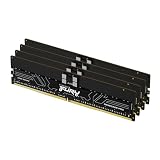
- Allow convenient and fast access to the stored information your computer is actively using for maximum efficiency
- Up to 5600 MHz speed with CL28 latency for smooth computer performance
- DIMM 128 GB of memory can produce approx. 10K MIPS and as a result, your system gets more room to run complex apps.
- With DDR5 SDRAM get efficient data transfer rate and enhanced computer's performance
- 4 x 32GB modules for enhanced memory reliability and productivity
Module-level ECC is a separate property exposed by the memory module and supported by the memory controller, motherboard and firmware. When a specification says ECC UDIMM, it is describing an unbuffered module with the additional data width and ECC capability. When it says ECC RDIMM, it is describing a registered module with ECC capability. Read the complete system specification rather than treating any mention of ECC as proof of registration or platform support.
Compatibility: the check that prevents the most expensive mistake
Kingston’s server-memory FAQ states: “DDR5 Registered DIMMs and ECC Unbuffered DIMMs are not interchangeable.” DDR5 versions use different module keys or notches, so the wrong class may be physically unable to fit the motherboard. Never force a module into a slot.
Even when a module appears to fit, a system may reject it because the memory controller and firmware support only one module class. A generic DDR5 label does not tell you whether the part is RDIMM, ECC UDIMM or non-ECC UDIMM.
Do these 3 things before closing this tab:
1Scan for outdated or missing drivers - takes under a minute2Repair Windows errors before they cause bigger problems3Fix the driver behind crashes, sound loss and screen glitchesWhat to verify before ordering
- Exact module class: Confirm RDIMM, ECC UDIMM or non-ECC UDIMM in the system or motherboard manual.
- Capacity: Check the maximum capacity per slot, per channel and for the complete system.
- Transfer rate: Use the speed validated for that processor and board. A module’s advertised rating may be reduced to the platform’s supported rate.
- Rank and density: Confirm that the board accepts the module’s rank and DRAM density.
- DIMMs per channel: Server population tables can restrict which slots are filled together and which combinations are allowed.
- ECC requirement: Determine whether ECC is required, optional or unsupported.
- Firmware: Check whether a particular memory density or processor generation requires a BIOS or system update.
- Validated parts: Prefer the manufacturer’s memory support list or configurator for the exact system model.
How to choose the right type step by step
- Identify the exact computer. Record the complete motherboard or server model, processor generation and current BIOS version. A family name is not precise enough when several revisions exist.
- Open the manufacturer’s memory documentation. Look for labels such as Registered DIMM, RDIMM, Load-Reduced DIMM, ECC UDIMM or unbuffered ECC. Do not infer the answer from the DDR5 label alone.
- Read the population table. Note the allowed slots, maximum DIMMs per channel, supported capacities, rank or density restrictions and any rules for balanced channels.
- Match the module specification. Compare the exact type, capacity, validated transfer rate, ECC status, rank and density with the documentation. If any item is not stated, treat it as unverified rather than assuming compatibility.
- Plan a balanced installation. Populate the slots in the order specified by the vendor. Matching modules across channels generally makes it easier to follow the documented configuration and avoid down-clocking or a boot failure.
- Update firmware when required. Apply the system maker’s approved BIOS or firmware update before installing a capacity or density that the release notes identify as newly supported.
- Install and verify. Power down, observe electrostatic precautions, seat each DIMM evenly and confirm that latches close. After booting, check the firmware’s memory information and the operating system’s reported capacity and ECC status.
Where each type is normally used
Servers
Servers frequently use RDIMMs because their platforms are designed for high-capacity configurations and strict population rules. The register helps the supported memory controller maintain signal quality as the system uses more chips and DIMMs. Server documentation still determines the permitted capacity, speed, rank and slot combinations.
Rank #4

- A-Tech RAM Memory compatible for select DDR5 Server systems; (WILL NOT WORK with Desktop Computers/PCs or Laptop Computers)
- 128GB RAM Kit (4 x 32GB Modules); DDR5 DIMM 288 Pin; Speeds up to 4800MHz PC5-38400 (PC5-4800B)
- ECC Registered RDIMM; 1Rx4 (EC8, 10x4) - Single Rank x4; JEDEC DDR5 standard 1.1V
- Improves system performance, workload capacity, and reduces bottlenecks by increasing memory (RAM) resources
- Note: EC8 (10x4) ECC Registered modules cannot be mixed with EC4 (9x4) ECC Registered modules or with different ECC types such as ECC Unbuffered, ECC Load Reduced or Non-ECC Unbuffered; (Memory compatibility can vary among different system models and their installed components; please verify compatibility and follow memory channel guidelines to ensure maximum performance)
Workstations and high-end desktops
Some professional systems support or require RDIMMs, particularly when they use server-class processors and large validated memory configurations. Others use ECC UDIMMs or ordinary UDIMMs. The presence of a workstation label does not identify the module type.
Consumer desktops and mobile computers
Many desktops and mobile systems use UDIMMs or smaller form factors without registered buffering. An ECC UDIMM may work in a professional desktop that explicitly supports it, but an RDIMM is not a drop-in upgrade for a consumer board.
Independent reader supportYour contribution helps us test, update, and keep practical guides available for everyone.Common failure symptoms and what they mean
| Symptom | Likely cause | Action |
|---|---|---|
| The DIMM will not enter the slot. | The notch or key differs because the module class is wrong. | Stop and verify the board’s required RDIMM or UDIMM type. Never force the module. |
| The system powers on but gives a memory error or no display. | Unsupported registration, ECC mode, capacity, rank, density or slot order. | Remove the new modules, consult the population table and test a documented configuration. |
| Only part of the installed memory appears. | A capacity or density limit, an unrecognized DIMM, a disabled channel or firmware limitation. | Check firmware detection, reseat the DIMMs, update firmware if documented and verify each module against the support list. |
| The system boots at a lower transfer rate. | The processor, board, DIMM population or firmware limits the operating rate. | Use the platform’s validated rate as the reference; advertised module speed is not a guarantee of the system’s operating speed. |
| ECC is not reported. | The module may be non-ECC, or the platform may not expose or support module-level ECC. | Confirm the exact ECC specification for both the DIMM and the motherboard rather than relying on DDR5 on-die ECC. |
Comparing compatible options without making false performance claims
Once the platform has established the module class, compare real options in this order:
- Compatibility first: Reject any part that is not explicitly validated as the required RDIMM or UDIMM type.
- Capacity and population: Choose a configuration that reaches the needed total without violating per-channel or slot limits.
- Validated transfer rate: Prefer the rate listed for the processor and board rather than paying for an unsupported rating.
- ECC and reliability requirements: Match the system’s required error-correction function.
- Rank and density: Ensure the electrical organization is supported, especially in multi-DIMM configurations.
- Latency and price: Compare these only among modules that meet the preceding requirements and under the same platform conditions.
Product pages can document the specifications of a particular DDR5 RDIMM family, including different capacities, speeds and kit sizes, but those figures describe the listed products. They are not market-wide evidence that every RDIMM has a particular speed, capacity or reliability advantage over every UDIMM.
A practical pre-purchase checklist
- Have you confirmed the exact system or motherboard revision?
- Does its manual explicitly name RDIMM, ECC UDIMM or non-ECC UDIMM?
- Are the planned capacity, rank, density and transfer rate listed as supported?
- Does the installation follow the required channel and slot order?
- Are all modules from a configuration the vendor validates, or can you explain any deviation?
- Is the required BIOS or firmware version installed?
- Are you relying on module-level ECC requirements rather than assuming DDR5 on-die ECC is enough?
The decision in one sentence
Choose an RDIMM only when the system documentation calls for registered DDR5 memory; choose a UDIMM only when the platform specifies unbuffered memory, and treat ECC as a separate compatibility requirement in either case.
Quick Recap
Product prices and availability are accurate as of the date/time indicated and are subject to change. Any price and availability information displayed on Amazon at the time of purchase will apply.

