
PC Slower Than It Used to Be?
A free scan shows the junk files, broken settings and background clutter dragging Windows down - then fixes them in one click.Free scan · Windows 10 & 11Outdated Drivers Are Slowing You Down
One free scan finds every outdated or missing driver and matches the right update for your exact hardware.Free scan · exact hardware matchiTechGuides is reader-supported. When you buy through links on our site, we may earn an affiliate commission. As an Amazon Associate I earn from qualifying purchases. Learn more
Strong malware defense has three jobs: prevent infections, detect and contain threats that get through, and limit damage with a recovery plan. No single tool guarantees safety. A practical approach layers people, technology, and operating procedures so that a missed update or malicious attachment does not become a lasting loss.
What do the three layers of malware defense mean?
They are a useful way to organize security controls, not a universal consumer standard issued by NIST or CISA. NIST defines defense in depth as a strategy that integrates “people, technology, and operations capabilities” to create barriers across multiple layers. NIST SP 800-172 does describe three strategic dimensions, but for specialized protection of certain high-value controlled unclassified information (CUI) environments—not as a household checklist. NIST glossary · NIST SP 800-172

For a home user or small organization, the practical sequence is prevention, detection and containment, then response and recovery. The layers overlap: a control may help prevent an infection and also limit what it can do.
Layer 1: Prevent malware from entering or running
Prevention reduces the likelihood that malware reaches a device or executes. NIST’s malware-prevention guidance groups relevant measures around policy, user and IT awareness, vulnerability mitigation, threat mitigation, and defensive architecture. It includes capabilities such as patching, antivirus, and firewalls; sandboxing, browser separation, and virtualization can also reduce the impact of a compromise. NIST SP 800-83 Rev. 1
Keep software and protection current
- Install operating-system, browser, and application security updates promptly. Patching addresses known vulnerabilities that attackers could otherwise exploit.
- Use malware protection and keep it updated. For systems protecting CUI, NIST SP 800-171 Rev. 3 specifies malicious-code protection at system entry and exit points, updated as releases are available, and configured to scan and take mitigation actions such as blocking or quarantining code. That publication is for nonfederal systems protecting CUI; its control language is technical guidance, not a requirement for every household. NIST SP 800-171 Rev. 3
- Use a firewall and a secure configuration appropriate to the device and network.
Reduce risky execution
Awareness matters because users and IT staff can encounter malicious links, attachments, or downloads. For a small organization, clear reporting steps and practical awareness guidance complement technical controls. Where the device or organization supports it, sandboxing, separating browsing from sensitive work, or virtualization can add a boundary that limits the consequences of a compromised application.
Layer 2: Detect and contain threats that slip through
Prevention cannot block every threat. CISA recommends automatically updated antivirus and anti-malware tools, and application allowlisting and/or endpoint detection and response (EDR) across assets in its ransomware guidance. NIST endpoint-security measures also describe reducing attack surface and exposure to known threats, and allowing only verified software to execute as possible capabilities. CISA ransomware guide · NIST endpoint-security measures
Rank #2

- Stateful firewall throughput: 250 Mbps
- Recommended maximum clients: 50
- Managed centrally over the web
- Layer 7 traffic analysis and shaping
- Licensing sold separately, POE (Power Over Ethernet)
Understand what the controls do
- Antivirus and anti-malware: scan for and block or quarantine malicious code. Keep automatic updates enabled where available.
- Application allowlisting: restricts which software is permitted to load. NIST’s explanation contrasts it with antivirus: allowlisting permits selected trusted software rather than permitting all activity except what is known to be bad. This is a description of the control, not a current product comparison. NIST explanation of application whitelisting
- EDR: helps organizations monitor endpoints and respond to suspicious activity. Its suitability depends on the systems covered, alert handling, and the ability to act on detections.
These capabilities are not interchangeable, and adding tools is useful only if they fit the devices and can be maintained. When evaluating endpoint protection, check operating-system support and device coverage, detection and alerting features, update behavior, manageability, and how it complements controls already in place. The cited guidance does not establish a product ranking or comparative test result.
Layer 3: Limit damage and recover
Assume that an infection may still occur. CISA recommends backing up data often, keeping backups offline or using cloud-to-cloud backups, and protecting storage against deletion or overwriting where appropriate. NIST’s measures for EO-critical software call for backing up data, exercising restoration, and preparing to recover it. CISA ransomware guide · NIST measures for EO-critical software
Rank #3

- The WatchGuard Trade Up Program allows customers to exchange eligible older WatchGuard or competitive firewall models for the latest WatchGuard appliances at a reduced cost, making it easier and more affordable to upgrade to current-generation hardware with the newest performance capabilities and security features.
- Trade Up to Watchguard T125 Firebox with 5 Year Total Security Suite License (WGT125675) - The Firebox T125 provides enterprise-grade protection for branch offices and remote sites. Featuring 2.5Gb and 1Gb ports, it delivers fast throughput, advanced malware detection with IntelligentAV, and SD-WAN compatibility in a compact form factor.
- The Total Security Suite is WatchGuard’s most comprehensive security package, bundling every advanced service into one subscription. It delivers layered defense with AI-driven malware detection, DNS filtering, cloud sandboxing, and security correlation. Ideal for organizations that demand maximum protection and visibility across their network.
- The Total Security Suite equips your WatchGuard Firebox with the full set of advanced defenses. It adds AI powered malware detection, DNS filtering, cloud sandboxing, threat correlation, and automated response, all managed in WatchGuard Cloud. Ideal for organizations that need maximum protection, compliance ready reporting, and end to end visibility.
- Interfaces and deployment: 1x 2.5Gb and 4x 1Gb Ethernet to simplify uplinks, carve out segmented zones, and keep branch wiring minimal.
Make backups that malware cannot easily alter
Keep at least one backup copy offline or otherwise protected from routine access and alteration by malware. An external hard drive can serve as an offline copy if it is disconnected when not in use; cloud-to-cloud backup is another approach CISA identifies. The protection depends on setup, not merely on the storage type: a constantly connected or easily deletable copy may be vulnerable alongside the original.
Set a schedule and prove restoration works
Choose backup frequency according to how much recent work you can afford to lose. A backup is useful only if it can be restored, so periodically exercise the recovery process and check that important files are intact. NIST’s June 17, 2026 guidance for operational technology likewise calls for regular backups, testing, and review during recovery exercises; that guidance is specific to OT, while the practical value of testing applies to other environments too. NIST SP 1339
Rank #4
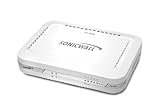
- Firewall Protection: Remote Access Authentication, Content Filtering, Malware Protection, URL Filtering, Web Content Filtering, Deep Inspection Firewall, Reassembly-free Deep Packet Inspection, and
- Firewall Protection (continued): Gateway Antivirus, Anti-spyware, Denial of Service (DoS), Distributed Denial of Service (DDoS), Egress Filtering, Cookies Blocking, Dead Peer Detection
- Encryption Standard: DES, 3DES, AES (142-bit), AES (128-bit), AES (256-bit), SHA-1, MD5 Intrusion Prevention, NAT, PAT, IPSec NAT Traversal, 5 Network (RJ-45) Ports, Fast Ethernet, 10/100Base-TX
- Virtualization: 8000 x Maximum UTM/DPI Connections, 8000 x Maximum Connections, 1000 x New Connections/Sec, 1 x SonicPoints Supported, 5 x Site-to-Site VPN Tunnels, 5 x VLANS
- USB Port, AC Adapter (Power Source) 12 V DC, Management Port, 32 MB Flash Memory, 256 MB Standard Memory, Secure Digital (SD) Card , Height: 1.4", Width: 7.5", Depth: 5.6
Prepare the response, not just the storage
Decide who will take action and how to access recovery information before an incident. For a household, that can mean knowing how to disconnect an affected device from the network and where protected backups are kept. A small organization should identify who handles alerts, isolates affected equipment, and coordinates restoration. Prevention guidance itself recognizes that incidents can still happen because of unknown threats or human error; response and recovery therefore belong in the design, not as an afterthought. NIST SP 800-83 Rev. 1
Free tools Windows power users keep installed
One-click scans. No signup required.
Quick Recap
A practical malware-defense checklist
- Prevent: apply security updates, keep malware protection current, use a firewall, and give users clear guidance on suspicious files and links.
- Detect and contain: enable automatic protection and updates; consider allowlisting or EDR where the environment can support and manage them.
- Recover: keep a protected backup, run it on a schedule matched to acceptable data loss, and test a restoration.
- Coordinate: know who responds to an alert and how affected devices and data will be recovered.
Product prices and availability are accurate as of the date/time indicated and are subject to change. Any price and availability information displayed on Amazon at the time of purchase will apply.

