
Recommended Free Tools
iTechGuides is reader-supported. When you buy through links on our site, we may earn an affiliate commission. As an Amazon Associate I earn from qualifying purchases. Learn more
An audio-visual (AV) port is a physical connector that receives or sends audio, video, or both. It is a functional label, not one specific connector: HDMI commonly carries digital picture and sound, optical connections carry audio only, and composite AV uses separate connections for video and stereo audio. To know what a particular port does, check its label, direction and device specifications.
What does “AV port” mean?
“AV” stands for audio-visual. An AV port is a connection on a device used to bring audio or video in, send it out, or carry both. The term does not identify a single plug shape or guarantee a particular capability. A television’s HDMI input, optical audio output and older composite input can all be described as AV connections, but they carry different signals. Sony’s TV connection guide distinguishes these functions, while HDMI’s official overview describes HDMI as a digital audio-and-video interface.
Which ports carry sound, picture or both?
| Connection | Typical signal and role | What to check |
|---|---|---|
| HDMI | Digital audio and video between compatible source and display or audio equipment; common on TVs, consoles and set-top boxes. | Features depend on the devices, specific port and cable. Consult the product specifications for the modes you need. HDMI overview |
| DisplayPort | Digital display connection often found on computers and monitors. | Check supported modes and adapter compatibility for the exact equipment. VESA DisplayPort FAQ |
| USB-C with DisplayPort Alt Mode | Can carry DisplayPort audio and video through a USB-C connector when the device supports the mode. | A USB-C-shaped port alone does not establish video output. Verify the device specifications; compatible adapters may connect to HDMI, DVI, VGA or DisplayPort displays. VESA: DisplayPort over USB-C |
| Optical digital audio | Audio output to compatible audio equipment; it does not carry the TV picture. | Confirm the receiving device has a compatible optical input. Sony TV connection guide |
| Composite RCA AV | Legacy analog video plus separate left/right analog audio, commonly using yellow for video and red/white for stereo sound. | Composite video combines picture information into one signal; it is not the same connection as HDMI. Sony TV connection guide |
| Coaxial / RF | TV antenna or cable signal input for high-frequency television signals. | Read the jack label to confirm whether it is intended for antenna, cable or another signal. Sony TV connection guide |
| USB | Often used for peripherals, storage or media functions on TVs and other devices. | A USB port is not automatically an AV input; the device manual specifies its supported functions. Sony TV connection guide |
Why port direction matters
An input receives a signal; an output sends one. For example, a console’s HDMI output sends picture and sound to a TV’s HDMI input. A TV’s optical output sends sound to a compatible audio system. Sony’s guide also distinguishes an AV IN jack, which receives audio and video from an external device, from a headphone output. Matching connector shapes is not enough if both ends are inputs or both ends are outputs.
Free tools Windows power users keep installed
One-click scans. No signup required.
How to choose the right connection
- Identify the source output. Start with the console, computer, player or camera and find its available outputs in the manual or specifications.
- Identify the destination input. Check the TV, monitor or audio system and confirm the matching connection is an input.
- Match the signal and direction. Determine whether you need audio, video or both, and whether the source sends the signal that the destination receives.
- Check supported modes and features. Confirm the required resolution, refresh behavior, audio support and any other feature for the source, destination and connection. The connector alone does not establish what modes will work. See VESA’s DisplayPort FAQ and its monitor and cable compatibility guidance.
- Confirm adapter compatibility before buying. Check the adapter’s direction and the capabilities of both devices. A USB-C-to-HDMI cable or adapter only provides display output when the source’s USB-C port supports video. For a straightforward compatible HDMI connection, choose an HDMI cable that supports the features specified for your devices.
What to know about USB-C video
USB-C describes the connector shape; it does not by itself promise display output. VESA explains that DisplayPort over USB-C allows the connector and cable to support DisplayPort audio/video transport. That capability depends on the source device supporting DisplayPort Alt Mode on that port. Check the manufacturer’s specifications or port markings rather than assuming every USB-C connection can drive a monitor. VESA’s DisplayPort over USB-C explanation
#1 Best Overall
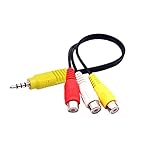
- RCA connectors provide composite video and stereo audio signal transmission.
- The av adapter work well connecting Game Consoles/ VHS/ VCD/ VCR/ DVD Player to TCL TV.
- TCL TV+AV adapter+male RCA cable, connect with other RCA device.
- The 3.5mm jack: Tip/ Ring/ Ring/ Sleeve iswired to Red /White /Ground /Yellow.
- Cable length: 6 inch.
How AV ports differ from one another
- Signal: A connection may carry audio only, video only, or audio and video together.
- Direction: A port can be an input that receives a signal or an output that sends it.
- Device support: Actual formats and modes depend on the source, destination, port implementation, cable and any adapter.
- Legacy compatibility: Older and newer connector families may require a compatible adapter; not every adapter works in both directions or supports every mode.
Is an AV port the same as HDMI?
No. HDMI is one kind of AV connection, commonly carrying digital picture and sound over one cable. “AV port” is a broader description that can include HDMI, audio-only optical connections, legacy composite connections and other interfaces. The device’s port label and specifications tell you what that specific connection supports.
Which port should you use on a TV?
For a compatible console, set-top box or computer sending both picture and sound, HDMI is commonly the simplest connection. For sound from a TV to compatible audio equipment, an optical output may be appropriate, but it carries no picture. For older equipment, composite connections may be needed. Check the labels and specifications at both ends before connecting.
Rank #2

- RCA Female to HDMI Video Converters Adapter : The cable is used to convert analog composite input to HDMI 1080p output, displayed on a 1080p HD TV/TV/monitor.
- Input ports: 1xRCA Female (Yellow, White, Red), Output ports: 1xHDMI 1.3 1080p. NOT support 3D and 4K, NOT support HDMI Converts to AV
- AV to HDMI Converter: Plug and Play, Easy to Install and Operate, Powered by External USB Cable. Note: Please hook up the USB power cable (included) to 5V 1Apower source during use (not included power supply ).
- Support PAL, NTSC3.58, NTSC4.43, SECAM, PAL/M, PAL/N standard TV formats input. For PS2,PS3,Xbox,N64,STB, VHS, VCR, DVD Players and other devices with standard composite AV input.
- You Will Get : 1x RCA Female TO HDMI Converter, 1xHDMI cable, 1xUSB cable, 1xUser Manual. ONE YEAR WARRANTY - if you are not satisfied for any reason whatsoever, do not hesitate to contact us .
Are all USB ports AV ports?
No. A TV’s USB connection may support storage, peripherals or media playback, but the supported functions vary by model. USB-C may carry video when the device implements DisplayPort Alt Mode, but the shape alone is not proof. Consult the device documentation.
Quick Recap
Rank #4

- Convert RCA to HDMI Instantly – BD&M RCA to HDMI Converter easily converts analog RCA/composite AV signals to HDMI output, allowing you to connect older devices to modern HDTVs, monitors, and projectors with clear video and audio quality.
- Wide Device Compatibility – Supports VHS players, VCRs, DVD players, camcorders, retro gaming consoles, and more including PS1, PS2, PS3, Xbox, N64, Wii, and older AV devices with standard RCA output.
- 1080P HDMI Output – Advanced signal processing delivers stable and sharp video output with support for 720P/1080P HDMI resolution, improving compatibility with modern TVs and displays.
- Plug & Play Setup – No drivers or software required. Simply connect the RCA cables, HDMI cable, and included USB power cable for quick and easy installation in minutes.
- Compact & Reliable Design – Lightweight mini converter design makes it perfect for home entertainment setups, retro gaming, travel, or converting old media collections while maintaining stable performance.
Rank #3
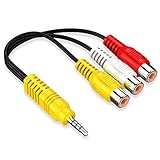
- 【Compatibility】High-quality connectors can provide excellent stereo audio transmission and video transmission, and the video AV adapter cable can be used with various TCL TVs.
- 【 Focus on TCL TV】This AV cable is professionally used for TCL TVs without any plug conversion.Note: Not compatible with SONY TV/Samsung TV /LG TV/Hisense TV
- 【High Quality】Environmental-friendly PVC Materials of cable, more soft, flexible bend, can use for a long time.High quality pure copper wire core with ultra-high speed data transmission.
- 【Plug and Play】 Don't want to wait to show your home movies to your family? This high-quality stereo 3.5mm mini AV male to 3 RCA female adapter Plug and Play, easy to use video display. Plays high quality audio such as music or movie sound effects.
- 【NOTE】 NOT compatible for SONY TV, LG TV, SAMSUNG TV.
Product prices and availability are accurate as of the date/time indicated and are subject to change. Any price and availability information displayed on Amazon at the time of purchase will apply.

