
iTechGuides is reader-supported. When you buy through links on our site, we may earn an affiliate commission. As an Amazon Associate I earn from qualifying purchases. Learn more
A VPN is not a reliable way to change the location Bumble displays. Bumble says your phone’s GPS determines your general location and specifically advises turning off a VPN when location detection is inaccurate. If you want to browse profiles in another city, Bumble’s supported option is Travel Mode, a Premium or Premium+ feature that creates a virtual Bumble location without changing your phone’s GPS.
The direct answer: a VPN does not change your Bumble GPS location
VPNs and GPS solve different problems. A VPN routes internet traffic through a server and can change the public IP address that websites see. GPS is a location signal supplied by the phone’s hardware and operating system. Bumble says the phone’s GPS automatically determines the general location shown in the app, so changing an IP address does not establish that Bumble will show a different city.
This distinction matters because many guides promise that choosing a VPN server in another country will move a dating profile there. Bumble’s own support guidance does not support that promise. It warns that VPNs can interfere with accurate location detection and tells users to disable one when the displayed location is wrong.
Do these 3 things before closing this tab:
1Fix the driver behind crashes, sound loss and screen glitches2Repair Windows errors before they cause bigger problems3Scan for outdated or missing drivers - takes under a minuteTherefore, there is no evidence-based list of five “best VPNs for Bumble” that can reliably change your Bumble location. A VPN may have a separate network-privacy purpose, but it should not be purchased or configured as a GPS-location tool.
#1 Best Overall

- 1. 【Ultra-Portable for Minimalism & Travel】 Tired of bulky screens? Measuring just 3.54 x 1.97 inches, this mini phone fits effortlessly into any pocket or small clutch. It’s the perfect compact companion for minimalist travel, outdoor running, or as a lightweight backup device. 【❌WiFi ONLY! No SIM Support】
- 2. 【Ideal Smart Start for Kids & Students】 Specifically designed for small hands, this tiny phone provides essential connectivity without the distractions of a massive screen. It's a thoughtful birthday gift for students, allowing parents to stay in touch via WiFi and GPS while keeping the device "kid-sized" and manageable. Available in 3 trendy colors to match every personality.
- 3. 【Instant Security with Face ID & Dual Cameras】 Capture memories on the go with a 5MP rear and 3MP front camera. Beyond photos, the advanced Facial Recognition technology ensures your data stays private and secure, offering the same modern convenience as full-sized flagship smartphones in a pocket-sized frame.
- 4. 【Smooth Android 9 & Essential App Support】 Powered by a Quad-Core processor, this mini smartphone runs Android 8.1, allowing you to download essential apps like WhatsApp, Instagram, and YouTube from the Google Play Store. It’s an excellent tool for "Digital Detox"—staying connected to what matters without getting lost in endless scrolling.
- 5. 【Expandable Storage】 Use the second slot for a MicroSD card (not included) to expand your storage. Easily store your favorite music, photos, and emergency files, making it a reliable secondary phone for business trips and international roaming.【If you have any questions about the product, please feel free to contact us at any time.】
GPS, IP addresses and app permissions are different signals
Your phone can provide several kinds of location information, and they are not interchangeable. GPS uses satellite signals and device sensors to estimate where the phone is. Wi-Fi and cellular networks can provide additional positioning clues. An IP address identifies a network connection and is usually mapped to an approximate region by a database. A VPN changes the route and the visible IP, but it does not move the phone’s sensors.
Bumble’s general-location statement refers to the phone’s GPS. That means an IP checker showing a server in London, Toronto or Sydney is not proof that Bumble will place you there. The app may still receive the device location for which you granted permission. Bumble’s privacy policy says location can be collected when device permission is enabled and used to personalize the service and show nearby profiles.
Location permission is therefore a practical checkpoint. If permission is denied, restricted, or set to an option that does not allow the app to obtain the needed location, Bumble may not be able to update the displayed city correctly. The exact permission screens differ by iOS and Android release, so use your phone’s current app-permission settings rather than assuming a particular menu name.
How Bumble determines and displays your location
General location comes from phone GPS
Bumble distinguishes between the general location shown for matching and profile fields such as where you live or where you are from. Those profile fields can be edited. The general location, however, cannot be directly customized in the ordinary profile editor. Bumble’s explanation is unambiguous: “Your phone’s GPS location automatically determines your location on Bumble.”
A VPN changes network routing, not the GPS coordinates reported by the phone. Even if an IP lookup places your connection in another city, Bumble can still receive the device location for which it has permission. Bumble’s privacy policy also explains that location may be collected when device permission is granted and used to personalize the app and show nearby profiles. A VPN should not be described as preventing that app-level location access.
Why an IP-location test can be misleading
Websites commonly estimate location from an IP address. That is useful for some regional content and network diagnostics, but it is not the same signal as phone GPS. An IP database can show the city of a VPN server while the phone remains physically elsewhere. Seeing the VPN city in a browser test therefore does not prove that Bumble will use it for matching.
There can also be ordinary variation between databases. One service may identify a provider’s address by headquarters, another by a data-center region, and a third by an outdated entry. Even if every database agrees on the VPN server’s city, that agreement still says nothing about Bumble’s GPS reading.
Rank #2

- 1. 【Ultra-Compact Design】Measuring just 3.54 x 1.97 inches, this mini phone is the world's smallest mobile phone, fitting perfectly in your palm for effortless portability. 【❌WiFi ONLY! No SIM Support】
- 2. 【High-Performance Quad-Core Processor】Powered by an efficient quad-core processor and Android 9.0, this phone delivers smooth operation. It's compatible with popular apps like Facebook, YouTube, Instagram, WhatsApp, TikTok, and Twitter via the Google Play Store. Note: Always use the included charging cable to prevent battery or internal damage from high-voltage fast chargers.
- 3. 【Dual-Camera with Facial Recognition】Capture every moment crisply with a 3MP front camera and 5MP rear camera, ideal for landscapes, dynamic scenes, and selfies. Built-in facial recognition ensures enhanced privacy and security, making it easy to protect your data.
- 4. 【Adorable Gift-Ready Option】With its playful, lightweight design and kid-friendly features, this mini phone comes in Black, Blue, and Pink—perfect as a Christmas or New Year gift. It's not only captivating for children's small hands but also serves as a practical backup for travel and business trips.
- 5. 【Expandable Storage】 Use the second slot for a MicroSD card (not included) to expand your storage. Easily store your favorite music, photos, and emergency files, making it a reliable secondary phone for business trips and international roaming.【If you have any questions about the product, please feel free to contact us at any time.】
What Bumble recommends when the city is wrong
If Bumble shows an inaccurate location, follow its troubleshooting order rather than trying more VPN servers. Check that the app has permission to access device location, turn off any VPN, try mobile data instead of Wi-Fi, update Bumble, and restart the phone. These steps address the signals Bumble says it uses; they are not methods for selecting an arbitrary city.
Travel Mode is Bumble’s supported way to explore another city
Travel Mode is designed for people who want to see profiles in a place they are visiting or planning to visit. It changes the location Bumble uses inside the service, but it does not fake the phone’s GPS. Bumble describes the result as being in the chosen place “virtually,” while the device remains at its real location.
| Travel Mode detail | What Bumble states |
|---|---|
| Purpose | Browse and match with profiles in a selected city or area. |
| Subscription | Requires Bumble Premium or Premium+. |
| Where it works | Available in the Bumble mobile app, not through the web experience. |
| Duration | The selected virtual location is available for seven days. |
| GPS effect | It does not change the phone’s actual GPS location. |
| Visibility | Your profile displays a Travel Mode banner to other members. |
| Controls | You can change or turn off the selected location from profile settings. |
How to activate Travel Mode
- Open the Bumble mobile app. Travel Mode is not provided through Bumble’s web experience.
- Open your profile and go to the profile settings area.
- Select Travel Mode and choose the city or place you want to explore.
- Confirm the selection. Bumble will show profiles from that area for the seven-day Travel Mode period.
- When you no longer want the virtual location, return to profile settings to change it or turn it off.
Bumble’s feature description also says a city can be selected up to seven days before travel. The service does not present Travel Mode as a way to conceal your physical location: the feature is visible through the banner, and the phone’s GPS itself remains unchanged.
Planning around the seven-day window
The seven-day period is a practical limit to include in your planning. If you are preparing for a short trip, you can select the destination in advance, then use the app to begin meeting people before arrival. If your plans change, return to profile settings and change or disable the selected place rather than leaving an outdated city active. Bumble’s pages do not state that unused days can be banked, extended, or transferred, so do not assume they can.
The Tool Desk
Outbyte PC Repair FREEClear out junk files and repair common Windows errorsFree Scan →Outbyte Driver Updater FREEScan for outdated or missing drivers - takes under a minuteDriver Scan →What Travel Mode does not do
- It does not rewrite the GPS coordinates supplied by your phone.
- It does not make a VPN necessary.
- It does not remove the Travel Mode indication from your profile.
- It is not documented as a free feature; Bumble identifies Premium and Premium+ as the eligible tiers.
- It does not promise that every profile or feature will behave exactly as it does in your home area.
Bumble’s cited support information confirms the subscription requirement and seven-day period, but it does not establish a current price, regional price differences, trial terms, or complete country availability. Check the offer shown in your own Bumble account before subscribing.
If Bumble’s location is inaccurate, use this fix sequence
Use the following sequence when the app displays the wrong city. The order matters because a VPN can add another source of discrepancy.
- Check location permission. In your phone’s app-permission settings, confirm that Bumble is allowed to access location. The exact menu wording varies between iOS and Android versions.
- Disconnect the VPN. Bumble specifically says, “If you’re using a VPN, turn it off—VPNs can interfere with accurate location detection.” Do not switch repeatedly among VPN servers while diagnosing the problem.
- Test mobile data. Temporarily use your cellular connection instead of Wi-Fi. This helps distinguish a local Wi-Fi or network-routing issue from a device-location issue.
- Update Bumble. Install the latest version offered for your phone. Location behavior can be affected by app-version bugs or changes in operating-system permissions.
- Restart the phone. A restart can refresh the location service and the app’s permission state.
Also check for simple environmental causes: use the app outdoors or near a window if the phone cannot obtain a GPS fix, and ensure that system-wide location services are enabled. These checks do not select a new city; they only help the phone report its real one accurately.
If the location remains wrong after these checks, the support guidance does not suggest using a different VPN as a workaround. Contact Bumble support with the device, operating-system version, permission state, and the city shown in the app.
Quick wins for a faster PC:
Fix the driver behind crashes, sound loss and screen glitchesFind Drivers →Repair Windows errors before they cause bigger problemsFix Now →Scan for outdated or missing drivers - takes under a minuteDriver Scan →Rank #3

- 1.【Suitable all the phone】: suitable for all the smartphone with case and under 8 inch tablets without a case. For example iphone, ipad, Samsung galaxy, Google Nexus,HTC One, Blackberry, Oneplusone,Motorola Droid,Nokia Lumia.
- 2.【Portable everywhere】: perfect for travel, Portable, just simply put it in a pocket or wallet, purse, backpack, bag, you can use it everywhere, cafe, coffee shop, dining table, airplane tray table...ect. Easy Storge and Carrage.
- 3.【6 Angles Viewing】: 6 different adjustable Multi angles for viewing to meet different needs of watching movies. Free hands to reduce cervical and arm pain. Supporting portrait and landscape modes, offer you the best viewing point.
- 4.【Lightweight but sturdy】: The material is engineering plastic ABS. Small pocket size: (3.3 * 2.8 * 0.5 inches) and lightweight (0.8 ounces) are also strong and durable.
- 5.【What You Get】: 2 Pcs Kemoxan office adjustable cell phone stand holder, black and white.
What a VPN can do while you use Bumble
A VPN can still be useful for a different objective: network-level privacy. Depending on the provider and configuration, it can route traffic through an encrypted tunnel and replace your connection’s apparent public IP address with the VPN server’s address. That may reduce the amount of local-network information visible to the network carrying your traffic.
Those benefits should be kept separate from Bumble’s location system. A VPN does not prove that Bumble cannot access device GPS, does not guarantee a different matching city, and is not a substitute for Travel Mode. Bumble’s own troubleshooting advice makes the practical trade-off clear: if accurate location matters, disabling the VPN is the recommended step.
When a VPN may be useful
- Using public Wi-Fi where you want an encrypted connection between the phone and the VPN service.
- Reducing exposure of your public IP address to websites and network operators.
- Keeping a consistent privacy configuration across other apps, provided it does not interfere with their location features.
These are network considerations, not dating-location controls. A VPN also shifts trust to the VPN provider, which can see connection information needed to operate the service. Read the provider’s policy and understand what diagnostics, account data, or connection records it retains.
Privacy claims require careful reading
VPN providers describe logging, diagnostics, audits, and retention differently. A provider’s privacy policy is a statement of its practices and terms; an independent audit is evidence about a defined audit scope and date, not a blanket guarantee about every app, server, or future configuration. Neither type of document demonstrates that a VPN changes Bumble’s GPS behavior.
| Provider material | What it can tell you | What it cannot establish |
|---|---|---|
| Proton VPN’s published account of a Securitum external no-logs audit | The provider reports an external review of specified no-logs controls; the account was published in 2022 and updated June 16, 2026. | It does not show that Bumble will accept the VPN server’s IP as your location or that GPS data is unavailable to Bumble. |
| ExpressVPN’s privacy policy | The policy explains its treatment of activity and connection data, including limited diagnostic information. | It is not a controlled Bumble-location test and does not promise a different Bumble city. |
There are no comparable, independent tests in the cited pages measuring these or other VPNs for Bumble speed, reliability, matching results, or location consistency. Current prices, promotions, and regional availability are also not established here. A ranked five-provider chart would imply evidence that is not available.
Choose the tool for your actual goal
| Your goal | Use | Expected result | Important limitation |
|---|---|---|---|
| See profiles in another city | Bumble Travel Mode | A virtual Bumble location for seven days | Requires Premium or Premium+, is app-only, and shows a Travel Mode banner. |
| Correct a location Bumble shows incorrectly | Location permission checks, VPN disconnection, mobile-data test, update, and restart | Improves the accuracy of the real device location | It does not let you select an arbitrary city. |
| Change the IP address visible to networks | A VPN | Different network routing and apparent public IP | Does not establish a different Bumble GPS location. |
| Reduce exposure of app traffic on an untrusted network | A reputable VPN configured for privacy | Network-level privacy benefits that depend on provider and setup | It does not prevent Bumble from receiving permitted device-location data. |
This decision framework prevents the most common purchase mistake: paying for a VPN while expecting a feature only Bumble controls. If city selection is the requirement, start with Travel Mode. If privacy on a particular network is the requirement, evaluate a VPN’s policy and audit evidence independently of Bumble’s location behavior.
Common mistakes and how to avoid them
Assuming the VPN server city equals your Bumble city
An IP-location checker and Bumble can use different signals. The former may report the VPN server; Bumble can continue using phone GPS. Treating the two as interchangeable leads to a failed location change and sometimes an inaccurate location reading.
Rank #4
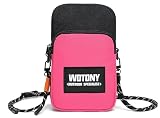
- Built‑in RFID blocking zipper pocket shields your credit cards, ID cards and driver license from unauthorized scanning and identity theft. Safely store your bank cards, cash and small valuables together with your phone, no need to carry extra bulky wallet. Keep your personal private information secure during travel and daily outings.
- Made of premium water‑resistant fabric against light rain, splashes and beach water spray to protect your phone and belongings from moisture. Dual‑layer outer design offers classified storage. Main compartment comes with inner fabric slip pocket plus dedicated RFID zipper pocket, helping you sort phone, cards and small essentials neatly.
- Features flexible adjustable woven lanyard strap, you can freely modify strap length to fit your needs for neck hanging or crossbody wearing. Quick‑release buckle allows you to remove the strap easily. Lightweight design releases your hands, great for walking, workout and sightseeing, effectively prevent phone dropping or losing.
- External dimension: 8*5*2.5 inch. Spacious main pouch is compatible with most mainstream smartphone models. Compact slim profile will not add extra bulk. You can use it as standalone small crossbody pouch, or slip it into your larger backpack or tote bag as inner accessory bag.
- This multi‑functional mini phone purse adapts to wide range of scenarios. Perfect for daily commuting, beach vacation, gym fitness, hiking, shopping, travelling and outdoor activities. Simple stylish appearance matches different outfits for men and women, a practical daily‑carry companion for indoor and outdoor usage.
Leaving a VPN enabled while troubleshooting
Bumble explicitly lists VPN use as a possible source of inaccurate detection. Keep it off until the location problem is resolved, then decide whether its separate privacy purpose is worth using.
What’s actually slowing this PC down?
Pick the symptom - the matching free tool is one click away.
Expecting Travel Mode to be invisible
Travel Mode places a banner on the profile. It is a deliberate, disclosed feature rather than a stealth location-spoofing method.
Buying a subscription without checking the account offer
The cited Bumble material identifies Premium and Premium+ as requirements but does not provide a universal current price, trial, or country-by-country availability table. Review the terms displayed in your region before paying.
Using GPS-spoofing apps as a substitute
No evidence here establishes that third-party GPS-spoofing tools are supported by Bumble or reliably produce the intended result. They also do not replace the official Travel Mode workflow. Installing one can introduce privacy, account, and device-stability risks that are outside Bumble’s documented feature set.
Confusing editable profile fields with live location
You may be able to edit where you live or where you are from, but those fields are not the same as the general location Bumble uses for nearby discovery. Editing a biography field will not move your matching radius to another city.
Free tools Windows power users keep installed
One-click scans. No signup required.
Assuming web and app features are identical
Bumble’s support page identifies Travel Mode as an app feature, not a web feature. If the control is missing in a browser, switching VPN servers will not reveal it; use the current mobile app and check the subscription tier shown there.
Independent reader supportYour contribution helps us test, update, and keep practical guides available for everyone.Bottom line for the “five best VPNs” question
The accurate answer is not a five-item ranking. Bumble’s general location is GPS-based, and Bumble warns that VPNs can interfere with detection. Travel Mode is the supported way to choose another city: it requires Premium or Premium+, works in the mobile app, lasts seven days per selection, and visibly labels the profile. A VPN can be evaluated separately for network privacy, using its policy and any independently scoped audit, but no provider is established as a reliable way to change the location Bumble displays.
Frequently Asked Questions
Can a VPN change my Bumble location?
No reliable method is established. Bumble says the phone’s GPS determines general location, while a VPN changes network routing and the apparent IP address. Bumble also advises turning off a VPN when location detection is inaccurate.
Best Value
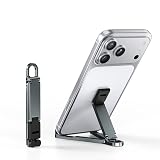
- 【Keychain-Sized Convenience】Compact and lightweight, this mini phone stand easily fits in your pocket, backpack, or travel bag for convenient everyday carry. Perfect for Zoom calls, videos, recipes, gaming, or work anytime, anywhere.
- 【Ultra-Light Aircraft-Grade Aluminum】Weighing only 20g, this portable phone stand is precision CNC-machined from aircraft-grade aluminum alloy, offering exceptional durability without added weight. Easily carried on your keychain, in your pocket, or in your travel bag for everyday use.
- 【Stable Support & Flexible Angles】Featuring an upgraded triangular design, this foldable phone stand delivers enhanced stability and supports multiple viewing angles for comfortable hands-free use. Ideal for video calls, streaming, gaming, meetings, browsing, and everyday use at home or while traveling.
- 【Fits Most Phones Under 8 Inches】The widened groove securely fits phones with thick protective cases and supports most smartphones under 8 inches in both portrait and landscape mode for convenient use at home, in the office, or while traveling.
- 【Premium Aluminum EDC Gift】Made from durable aluminum alloy with a sleek matte finish, this portable mini phone stand combines lightweight convenience with everyday practicality, making it a great gift for travelers, students, coworkers, and tech lovers.
How can I appear in another city on Bumble?
Use Bumble Travel Mode in the mobile app. It requires Bumble Premium or Premium+, lets you select another place, lasts seven days, and displays a Travel Mode banner. It changes your virtual Bumble location, not your phone’s GPS.
PC Slower Than It Used to Be?
A free scan shows the junk files, broken settings and background clutter dragging Windows down - then fixes them in one click.Free scan · Windows 10 & 11Outdated Drivers Are Slowing You Down
One free scan finds every outdated or missing driver and matches the right update for your exact hardware.Free scan · exact hardware matchDoes Travel Mode work on Bumble’s website?
Bumble Support describes Travel Mode as available in the mobile app, not the web experience.
Will people know I am using Travel Mode?
Yes. Bumble says a Travel Mode banner appears on your profile to other members.
How long does Bumble Travel Mode last?
The selected virtual location is available for seven days. Bumble also says you can choose a city up to seven days before travel.
Why is Bumble showing the wrong city?
Check Bumble’s location permission, disable any VPN, try mobile data instead of Wi-Fi, update the app, and restart your phone. If the problem continues, contact Bumble Support rather than changing VPN servers.
Recommended Free Tools
Can a VPN stop Bumble from seeing my GPS?
No. A VPN does not establish that app-level GPS data is unavailable. Bumble’s privacy policy says location may be collected when device permission is granted.
Which VPN is best for Bumble?
There is no supported evidence-based ranking for Bumble location changes. Choose a VPN only for a separate network-privacy goal, and compare its privacy policy, audit scope and date, mobile support, and reliability while remembering that it will not change Bumble’s GPS location.
The Bottom Line
Bottom line: A VPN is not a dependable Bumble location changer. Bumble uses phone GPS and warns that VPNs can interfere with accurate detection. To browse another city, use Travel Mode in the mobile app with Premium or Premium+; it lasts seven days and is visibly disclosed. Use a VPN only when you want network-level privacy, not to spoof Bumble’s GPS location.
Quick Recap
Product prices and availability are accurate as of the date/time indicated and are subject to change. Any price and availability information displayed on Amazon at the time of purchase will apply.

