
iTechGuides is reader-supported. When you buy through links on our site, we may earn an affiliate commission. As an Amazon Associate I earn from qualifying purchases. Learn more
Short answer: A USB-C car charger plugged into a vehicle’s 12 V accessory socket can charge faster than a built-in USB port when its compatible output is higher. It is not automatically faster, however. The vehicle port, phone, cable and charging protocol must all support the same mode, and the phone—not the charger’s printed maximum—sets the power it actually accepts.
What determines which one charges faster?
Charging speed is the result of the complete connection rather than the USB-C connector alone. Four parts matter:
- Vehicle port or charger output: Its voltage, current limit and supported charging standards establish the available ceiling.
- Phone charging specification: The phone negotiates a compatible mode and may deliberately draw less power than the source can provide.
- Cable capability: A cable must safely carry the negotiated current and use the connector and wiring required by the phone and source.
- Operating conditions: Battery state, temperature, simultaneous use and the phone’s own charging controls can reduce the instantaneous rate.
For example, a 60 W USB-C car charger does not force a phone to accept 60 W. If that phone supports only a lower input or the cable cannot support the offered mode, charging occurs at the lower negotiated rate. Conversely, a built-in port rated for a phone’s supported mode can be just as effective as an accessory charger.
Windows Errors? Fix Them Before They Spread
Repair common Windows errors and clear accumulated junk for a smoother, more stable PC - no reinstall needed.Free scan · no reinstallCrashes, No Sound, or Screen Glitches?
Random freezes, missing sound and display glitches usually trace back to one bad driver. Find and replace yours safely.Free scan · under a minute“USB-C” describes the plug, not the speed
USB-C identifies a reversible connector and port shape. It does not, by itself, tell you whether the port supports USB Power Delivery, a particular voltage, a current limit or data transfer. Two ports that look identical can have different ratings, and a USB-A port can sometimes provide a charging mode that is faster than a poorly specified USB-C port. Read the vehicle or charger documentation instead of using the connector as a shortcut.
#1 Best Overall

- Triple-Port 167.5W Max: Seamlessly power up all your essential devices with the first USB-C port delivering a powerful 100W, the second USB-C port providing 45W, and the USB-A port adding an additional 22.5W.
- Ultra-Fast 100W USB-C1 Port: With the first USB-C port offering 100W, quickly charge your 16-inch MacBook Pro from 0 to 50% in only 47 minutes.
- Reliable 45W USB-C2 Port: The second USB-C port offers 45W max of power, providing fast and reliable charging for iPhones and Samsung devices, keeping you connected without any delays.
- Tiny and Mighty: Designed to be unobtrusive, this super-compact charger won't clutter your car's interior.
- What You Get: Anker Car Charger (167.5W, 3 Ports), 3.3 ft USB-C to USB-C cable, welcome guide, 18-month warranty, and our friendly customer service.
Built-in USB ports are not standardized across vehicles
Automakers assign different ratings and functions to ports, sometimes changing them between model years, trims or locations. The owner’s manual for the exact vehicle is therefore the authoritative source. Chevrolet’s support guidance likewise directs owners to check their vehicle manual because charging options vary by vehicle.
Documented examples from vehicle manuals
| Vehicle documentation | Published charging information | What it means |
|---|---|---|
| Renault multimedia USB-C port | Maximum 15 W at 5 V per covered USB-C multimedia port | A phone that can use more than 15 W cannot obtain that additional power from this documented port. |
| Kia NQ5KH owner manual (2024) | Up to 9.0 V and 3.0 A for compatible fast-charging digital devices; up to 5.0 V and 3.0 A for normal charging | The maximums calculate to 27 W and 15 W respectively (voltage multiplied by current). The 27 W figure applies only when the device and connection support the fast mode. |
| Hyundai USB ports | Some modes charge only; others charge while transferring data to infotainment. Some devices may not charge through a given port. | A port’s data role and compatibility can matter as much as its power rating. |
These are examples from particular manuals, not a universal rating for all Renault, Kia or Hyundai vehicles. A second-row port, console port and dashboard port in the same car can have different capabilities. Some ports are intended mainly for infotainment data and may provide a lower charging rate than a dedicated charging port.
Look for labels such as “charging,” “multimedia,” “data,” or a phone-integration symbol. A port located beside an infotainment screen may prioritize a wired phone connection, while a rear-seat port may be intended primarily for passenger charging. Only the manual can confirm the distinction for your vehicle.
Quick wins for a faster PC:
Scan for outdated or missing drivers - takes under a minuteDriver Scan →Clear out junk files and repair common Windows errorsFree Scan →Fix the driver behind crashes, sound loss and screen glitchesFind Drivers →What a 12 V USB-C car charger can offer
An accessory charger converts power from the 12 V socket into USB output. Its label or manual should state the output for each port, the charging standards it supports and whether the rating changes when more than one port is occupied.
Higher ratings can provide more headroom
One Gearmo GM-UCPDCARB product manual, published in 2017, documents up to 60 W on USB-C and up to 15 W on USB-A. That is a dated product specification example, not a current market survey or a recommendation of that model. It illustrates why a socket-powered USB-C Power Delivery (PD) charger may offer more headroom than a vehicle port documented at 15 W.
Before buying, verify the current specifications of the charger you are considering. A headline total may describe the combined output, while the individual USB-C port has a lower limit. Some multi-port chargers also reduce USB-C output when another device is connected.
PD is a negotiation, not a guaranteed wattage
USB Power Delivery lets a source and device negotiate an appropriate voltage and current. The charger advertises supported power profiles; the phone requests one it recognizes; and the cable and safety circuitry remain part of the decision. A charger marked “60 W” can therefore deliver 60 W to a compatible device under the manufacturer’s stated conditions, while a different phone may draw 18 W, 15 W or less.
Recommended Free Tools
Rank #2

- Universal High-Speed Charging: PowerIQ 3.0 ensures rapid charging for USB-C phones, tablets, and more with fast charging capabilities.
- Space-Saving Design: Ultra-Compact build provides easy access to other dashboard functionalities while supporting fast charging for your devices.
- Wide Device Compatibility: Effortlessly powers USB-C devices with fast charging technology, enhancing user experience across gadgets.
- Safe and Reliable Charging: Built-in safety technology helps protect devices with safeguards for stable, high-speed charging.
- What You Get: PowerDrive III Duo car charger, welcome guide, our worry-free 18-month warranty, and friendly customer service.
Do not compare a charger’s total headline number with a vehicle’s per-port number unless the measurements refer to the same thing. A “100 W total” two-port unit may reserve most of that capacity for one port or divide it when both ports are occupied. Record the USB-C port’s single-device rating and its shared-output rule.
Built-in port versus 12 V charger
| Consideration | Built-in vehicle USB port | USB-C charger in the 12 V socket |
|---|---|---|
| Rated output | Read the exact vehicle manual. Documented examples include Renault’s 15 W maximum at 5 V and Kia’s 9 V/3 A fast-compatible mode. | Read the charger’s per-port rating, protocol support and multi-port sharing rules. A dated Gearmo example lists up to 60 W USB-C. |
| Compatibility | The port, phone, cable and charging protocol must work together. | The phone and cable must support a mode offered by the charger; the phone can still draw less than the maximum. |
| Data and infotainment | Some ports carry data for the infotainment system; others are charging-only. | Designed for power. Use the vehicle’s data-capable USB port when a wired infotainment connection is required. |
| Convenience | No extra accessory, and the port is integrated into the vehicle. | Requires a compatible 12 V socket and an additional charger, but can provide a higher documented output. |
| Availability | Capability depends on the vehicle’s equipment, trim and port location. | Capability depends on the accessory’s current specifications and whether the socket is powered in the needed ignition state. |
The accessory does not replace the vehicle’s data connection. If your phone must run wired Android Auto, Apple CarPlay or another infotainment function, connect it to the data-capable vehicle port even if you use the 12 V charger for faster power. A separate charger supplies electricity only.
How to determine the faster option in your car
- Identify the exact vehicle configuration. Record the model year, trim and the location of the port you use. Do not assume that two USB-C-shaped ports have the same rating.
- Find the port specification in the owner’s manual. Look for terms such as USB output, charging voltage, maximum current, fast charging, multimedia USB, charging-only or data connection. If the manual gives voltage and current rather than watts, multiply them to calculate the maximum theoretical power.
- Check the port’s purpose. A port may be intended for infotainment data, charging only or both. Hyundai documentation describes separate charging-only and charging-plus-data modes and warns that some devices may not charge through a particular port.
- Check the phone’s supported input. Use the phone manufacturer’s specifications or official documentation to identify supported voltage, current and charging standards. A higher-rated source cannot make the phone accept power beyond its designed behavior.
- Use a suitable cable. Kia recommends the device manufacturer’s official cable. Replace damaged, unusually thin or unreliable cables before comparing sources, because the cable can prevent the intended charging mode.
- Read the accessory charger’s per-port output. Confirm the USB-C port’s individual rating, supported PD profiles and whether output is shared when USB-A or a second USB-C port is occupied.
- Compare compatible ceilings, not headline numbers. If the built-in port offers only 5 V at 3 A (15 W maximum) and the phone can use a higher compatible PD mode, the accessory charger has potential to be faster. If the phone accepts only 15 W, a 60 W charger supplies no practical speed advantage.
- Compare under the same conditions. Use the same phone, cable, battery percentage, screen activity and temperature when switching sources. Treat the result as specific to that setup rather than a universal claim about every vehicle or phone.
Reading the numbers correctly
Watts are calculated from voltage and current
The basic relationship is watts = volts × amps. Kia’s documented fast-compatible maximum of 9.0 V and 3.0 A calculates to 27 W. Its normal-charging maximum of 5.0 V and 3.0 A calculates to 15 W. Those are source-side maximums for the stated modes; they are not promises that every phone will continuously draw those values.
Renault’s documented 15 W maximum at 5 V is a separate vehicle example. It should not be used to infer the output of another model or port. Similarly, the Gearmo manual’s 60 W USB-C specification describes that product as documented in 2017, not the current capability of every 12 V charger.
What’s actually slowing this PC down?
Pick the symptom - the matching free tool is one click away.
Maximum output is not charging time
No fixed number of minutes saved can be stated without naming the phone, vehicle, cable, battery state and test conditions. Phones commonly reduce power as the battery fills, and thermal protection or simultaneous navigation can lower the rate. A charger with a higher ceiling may shorten charging in one setup and show little difference in another.
Battery percentage matters particularly when comparing results. A phone at a very low percentage may request a higher rate than the same phone near full charge. Screen use, navigation, mobile-data activity and heat can consume part of the incoming power, so the battery percentage may rise slowly even when the charger is operating normally.
When the built-in port is adequate
- The manual lists an output that matches the phone’s supported charging mode.
- You need a wired data connection to the infotainment system and the port supports both charging and data.
- You prefer an integrated connection with no accessory occupying the 12 V socket.
- The phone is used mainly for navigation or maintenance charging rather than rapid recovery of a low battery.
In these cases, replacing the built-in port is unlikely to improve charging unless the documented output is below what the phone can use. An integrated port also avoids adding another plug, cable strain point and device to the dashboard.
Rank #3

- 【Fast Charging 3 Devices Simultaneously】200W fast car charger with 2 Type-C ports and 1 USB port, allowing you to charge up to 3 electronic devices at the same time.
- 【200W Car Charger USB C Fast Charge】200W (Max) super fast usb c car charger supports Type-C1 100W, Type-C2 100W and USB-A 60W high output and is compatible with QC4.0, QC3.0, PD3.0, PPS, SCP/FCP, AFC fast charging protocols for all devices.
- 【Excellent Heat Dissipation & Safety Car Charger】New heat dissipation process, low temperature charging without burning. With over-current, over-voltage, over-temperature and other protection, safety protection equipment. Intelligent start trickle mode, mobile phones do not overcharge, battery healthier.
- 【LED ambient light】The car charger has an ice blue ring LED ambient light for easier charging at night.
- 【Wide Compatibility】USB C car charger is compatible with most devices, such as for MacBook Pro Air, NoteBook, iPad Pro, iPhone 15 Pro Max 14 13 12 11, AirPods Pro, Steam Deck, Switch, Galaxy S23 Ultra/S22/S21, Steam Deck and more. 12V-24V car charger universal.
When a USB-C car charger is a sensible upgrade
- The vehicle manual documents a low-output or charging-only port, while your phone supports a higher compatible USB-C PD mode.
- The available built-in port is reserved for infotainment data and charges too slowly for your use.
- You regularly charge more than one device and the accessory’s per-port ratings meet both devices’ needs.
- Your vehicle has a working 12 V socket in a convenient location and you have verified the charger’s current specifications.
Choose a charger based on compatible profiles and per-port output, not simply the largest watt number printed on the package. Pair it with a cable recommended by the phone maker or otherwise rated for the required mode.
The Tool Desk
Outbyte Driver Updater FREEScan for outdated or missing drivers - takes under a minuteDriver Scan →Outbyte PC Repair FREERepair Windows errors before they cause bigger problemsFix Now →Troubleshooting slow charging
The phone says “charging” but the battery still falls
High screen brightness, navigation, cellular activity and heat can consume as much power as the source supplies. Stop unnecessary loads, improve ventilation and check whether another device is sharing the charger. If the phone remains unable to gain charge, inspect the cable and test the source against the specifications in the manual.
The accessory charger is no faster than the dashboard port
Confirm that you are using the charger’s USB-C port rather than a lower-rated USB-A port. Check whether multi-port use has reduced output. Then verify that the phone and cable support one of the charger’s advertised PD modes. A high maximum that the phone cannot negotiate will not improve the result.
The built-in port will not charge a device
Check whether that port is data-only or limited to specific devices. Hyundai documentation notes that some devices may not charge through a given port. Try the vehicle’s designated charging port, use the manufacturer-recommended cable and consult the manual for the correct mode.
Charging works only with the ignition on
Accessory-socket and USB power behavior varies by vehicle. If charging stops when the vehicle is switched off, that may be normal power-management behavior rather than a faulty charger. The vehicle manual should identify when each outlet is energized.
Charging becomes slower after connecting a second device
Read the charger’s sharing table. Some products lower the USB-C port’s limit when USB-A or another USB-C output is occupied. Re-test with one device connected, then compare that result with the documented shared limit rather than the single-port maximum.
Safety and compatibility checks
- Use a charger and cable from a reputable manufacturer with clearly stated input and output ratings.
- Do not exceed the 12 V socket’s specified electrical limit.
- Stop using a charger, cable or socket that becomes unusually hot, smells burnt or disconnects repeatedly.
- Keep cables clear of pedals, steering controls and airbag deployment paths.
- Do not confuse a USB-C connector with USB Power Delivery; connector shape alone does not identify output or charging standard.
- When the phone maker specifies an official cable, follow that recommendation for the most predictable compatibility.
Decision guide
| Your situation | Most practical choice | Reason |
|---|---|---|
| The manual documents a port that supports the phone’s charging mode. | Use the built-in port. | It already meets the phone’s compatible requirement without an extra accessory. |
| The built-in port is limited to 15 W, while the phone supports a higher compatible PD mode. | Consider a USB-C PD charger for the 12 V socket. | The accessory may offer more headroom, subject to phone and cable negotiation. |
| You need wired infotainment data. | Use the vehicle’s data-capable port. | A 12 V charger supplies power but is not the vehicle’s data connection. |
| You cannot find a clear vehicle or accessory rating. | Do not assume it is fast charging. | Connector shape and marketing maximums are insufficient evidence of a compatible output. |
Frequently asked questions
Is every USB-C car port fast charging?
No. USB-C is a connector format, not a guaranteed charging standard. The port may be limited to 5 V, support a higher negotiated mode, or be intended mainly for data. Check the vehicle manual.
Rank #4
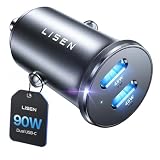
- THROW AWAY THE OLD A+C CAR CHARGER: What sets the LISEN usb c cigarette lighter adapter fast charger for iphone Duo & 18 pro max apart is its dual USB-C ports, each capable of delivering up to 45W of power. This configuration is particularly beneficial for users looking to fast charge two high-power devices at once, such as an iPhone 17 Pro Max and an iPad Pro. The simultaneous 45W output is a game-changer, significantly reducing charging times and ensuring your devices are ready to go when you are
- DUAL USB C FOR VERSATILE CHARGING: The LISEN 90W cigarette lighter adapter usb c car charger for iPhone 18 Pro Max 12v lives up to its promise of super fast charging. It supports Power Delivery (PD) 3.0. In practical terms, this means it can charge an iPhone 18 Pro from 0 to 83% in just about 30 minutes, a claim that holds up under testing. The charger is equally adept at handling other PD-compatible devices, ensuring that everything from smartphones to tablets receives an efficient power boost
- PREMIUM METAL ALLOY SHELL: The LISEN 90W usb c car charger adapter for iPhone 18 Pro Max fast charging impresses right out of the box with its sleek, all-metal design. Not only does the metal construction give it a premium feel and look, but it also aids in heat dissipation, ensuring the charger stays cool even when powering two devices simultaneously
- SMALL SIZE, BIG POWER: The tiny thumb-sized (2.1" (L) x 0.9" (W)) body fits most car 12V cigarette lighter usb c charger, providing a trim, less cluttered look. Its mini size is noteworthy, making it unobtrusive and a perfect fit for most car interiors without sacrificing accessibility
- UL AND FCC CERTIFICATION: LISEN iPhone Duo & iPhone18 Pro Max Car Charger USB C Fast Charging equipped with the intelligent power management chip, and passed UL, CE, FCC, and RoHS certifications. Made with PC fuel barrier V-0 grade material, it won 't get heat, is flame retardant, and is environmentally friendly
Will a 60 W car charger make any phone charge at 60 W?
No. The phone requests a supported mode and can draw less than the charger’s maximum. The cable and charger’s protocol support must also match.
Is Kia’s 27 W figure guaranteed?
No. The 27 W value is calculated from Kia’s stated 9.0 V and 3.0 A maximum for compatible fast-charging devices. A phone that does not support that mode will use a lower one.
Do these 3 things before closing this tab:
1Scan for outdated or missing drivers - takes under a minute2Clear out junk files and repair common Windows errors3Fix the driver behind crashes, sound loss and screen glitchesCan I use the 12 V charger for Apple CarPlay or Android Auto?
Not as the vehicle’s wired data connection. Use the vehicle USB port documented for infotainment data; the 12 V charger is a power source.
Should I buy a charger with the biggest watt number?
Choose the per-port rating and supported charging profiles that match your phone. A larger number that the phone cannot negotiate provides no corresponding speed increase.
Why does the same phone charge differently in two USB-C ports?
Vehicle ports can differ by location, trim and purpose. One may be data-capable or limited to normal charging while another supports a faster mode.
Does a manufacturer cable really matter?
Kia recommends the device manufacturer’s official cable. A suitable, undamaged cable helps the phone and source negotiate the intended mode reliably.
Free tools Windows power users keep installed
One-click scans. No signup required.
Can a faster charger shorten charging by a fixed number of minutes?
There is no universal figure. Battery state, temperature, phone controls, cable, vehicle port and simultaneous use all affect the observed rate.
Best Value

- 67W 3-Port Super Fast Car Charger: Total 67 Watt USB C car charger Support PD 37W Max (USB C) and QC 30W Max (USB-A) output, can fast Charge for Most USB-A and USBC Devices Simultaneously. One car charger for all your USB A & USBC devices, your ideal travel companion
- 3X Fast Charge Speed: with upgrade PD and QC Fast Charging Technology, it can rapid charging for iPhone and Samsung or other phones from 0-50% in about 30 minutes, up to 3X faster than before, even can fast charge for Macbook air and iPad in high speed
- Broad Compatibility: with USB-C and USB-A output, can charge almost all USB Devices, compatible with iPhone 18 Pro/18 Pro Max, iPhone Duo, iPhone 17/17 Pro Max, iPhone Air, iPhone 16/16e/16 Pro Max/16 Plus, iPhone 15/15 Pro Max/15 Plus, iPad, Samsung Galaxy S26/S25/S24/S23/S22/S21/S20, Note 20/10/9, Google Pixel 11/10/9/8/7/6/5, android Cell Phone and other devices
- Safe & Reliable: USB C Car Charger Cigarette Lighter with intelligent chip inside, the Car Charger Adapter provides multi protections against over-current, over-voltage, over-heating and short-circuit. will automatically stop charging when power is full; the product shell made by ABS + PC fireproof material, ensure Protect your device and charge safely all the time
- What You Get: 1 x 67W 3-Ports USB-C & USB-A car charger Adapter + 1 x 3FT USB C to USB C Cable (Color: Black), 1-Year Replacement
Bottom line
The faster choice is the source that offers a charging mode your phone and cable can actually negotiate. Check the exact vehicle manual first. If its port is limited and a properly specified USB-C PD charger offers a higher compatible mode through the 12 V socket, the accessory can charge faster. If the phone is the limiting component, a higher-rated charger will not change the result, and the built-in port may already be adequate.
Frequently Asked Questions
Which charges faster, a USB-C car charger or a built-in USB port?
A USB-C car charger can be faster when its compatible output exceeds the vehicle port’s output. The phone, cable and charging protocol must support that higher mode; otherwise the speeds may be similar.
How do I know my built-in port’s maximum output?
Check the owner’s manual for the exact model year, trim and port location. Look for voltage, current, wattage and whether the port is charging-only or data-capable.
Does USB-C automatically mean Power Delivery?
No. USB-C identifies the connector shape. It does not guarantee USB Power Delivery, fast charging or a particular wattage.
Why can a 60 W charger charge my phone at less than 60 W?
The charger advertises its available profiles, but the phone requests only a mode it supports. Cable capability, temperature, battery state and phone controls can reduce the actual rate further.
Can a 12 V charger replace the vehicle USB port for infotainment?
No. A 12 V charger supplies power. Use the vehicle’s documented data-capable USB port for a wired infotainment connection.
What should I check on a multi-port car charger?
Check the individual USB-C output, supported PD profiles and the sharing rules when another USB-A or USB-C port is occupied.
Quick Recap
Product prices and availability are accurate as of the date/time indicated and are subject to change. Any price and availability information displayed on Amazon at the time of purchase will apply.

