
Do these 3 things before closing this tab:
1Repair Windows errors before they cause bigger problems2Fix the driver behind crashes, sound loss and screen glitches3Clear out junk files and repair common Windows errorsiTechGuides is reader-supported. When you buy through links on our site, we may earn an affiliate commission. As an Amazon Associate I earn from qualifying purchases. Learn more
If your homelab needs separate trusted, IoT, guest, or server networks with rules governing traffic between them, UniFi is the stronger fit of these two based on the vendors’ documented features. Ubiquiti documents gateway firewall policies between network zones and a network-isolation feature for blocking inter-VLAN traffic. eero Pro 7 is built around app-managed household mesh Wi-Fi; in bridge mode it can provide Wi-Fi behind another router, but its own routing and several management features are disabled.
That is a requirements-based verdict, not a claim that eero is unusable in every homelab. If you mainly want straightforward mesh Wi-Fi—or already have a capable router—eero may still suit the Wi-Fi part of your setup.

What matters most for a homelab: control at the gateway
A homelab often benefits from separating devices into networks—for example, keeping servers apart from household devices or putting less-trusted IoT equipment on its own segment. The practical question is not just whether a system provides Wi-Fi. It is whether the gateway can enforce the traffic boundaries you want.
UniFi documents network segmentation and policy controls
Ubiquiti documents Zone-Based Firewall policies for managing traffic between network zones. It also documents Network Isolation, which automatically configures firewall rules to block inter-VLAN traffic. Those capabilities directly address a common homelab need: allowing devices to occupy separate networks while controlling whether they can communicate.
#1 Best Overall

- Create a reliable wireless business network with this wireless access point that features a high-speed data transfer rate
- 3 Gbit/s wireless transmission speed provides high and efficient communication with maximum efficiency
- IEEE 802.11 a/b/g/n/ac/ax wireless LAN standard ensures trouble-free and convenient connectivity
- Gigabit Ethernet port for ultra-fast wired network speeds
- PoE+ port to receive data and power of up to 25.5W through a single cable in places where a power outlet is not available
UniFi Cloud Gateways combine gateway, routing, security, and UniFi Network management functions. Ubiquiti recommends starting with a Cloud Gateway for an integrated UniFi setup. Its control-plane guidance also describes hosted, CloudKey, and self-hosted options for deployments with different management needs. The exact gateway features and interfaces depend on the model.
eero Pro 7 prioritizes managed household mesh Wi-Fi
eero Pro 7 is an app-managed Wi-Fi 7 mesh router. Setup and management require the Android or iOS eero app. The reviewed eero documentation describes bridge mode, but it does not establish VLAN or inter-VLAN policy controls comparable to the UniFi features above. That distinction is about what these reviewed pages document; it should not be read as proof that every eero model lacks every advanced capability.
Rank #2

- Four stream 802.11AC Wave2 technology
- Supports 200+ concurrent users
- 802.3af PoE compatibility
- Optional covers (sold separately) allow the Unifi nanohd AP TO discreetyly blend into its setting
How the two systems compare for a homelab
| Decision | UniFi | eero | What it means for your setup |
|---|---|---|---|
| Inter-network controls | Ubiquiti documents zone-based gateway firewall policies and Network Isolation for blocking inter-VLAN traffic. | The reviewed eero pages describe bridge mode, not equivalent VLAN policy controls. | If gateway-enforced segmentation is essential, UniFi has the stronger documented fit. |
| Management | UniFi Network can run on Cloud Gateways; Ubiquiti also documents hosted, CloudKey, and self-hosted control-plane choices. | Pro 7 setup and management use the Android or iOS eero app. | Choose between a networking platform with multiple control-plane options and an app-managed mesh system. |
| Using a separate router | A UniFi Cloud Gateway can serve as the gateway and UniFi management platform. | In bridge mode, eeros continue providing Wi-Fi behind an existing router, while eero routing and several features are unavailable. | eero can be the Wi-Fi layer in a network controlled by another router, but bridge mode is not full eero router functionality. |
| Hardware and Wi-Fi | Gateway specifications vary by model; a setup may use separate access points. | eero Pro 7 is a tri-band Wi-Fi 7 mesh unit with two 5 GbE ports per device, according to eero. | Check the specific gateway, access-point placement, wired-backhaul plan, and port requirements before choosing. |
What the published specifications do—and do not—tell you
eero Pro 7 figures are manufacturer specifications
eero’s Pro 7 support page lists up to 4.7 Gbps wired speeds, up to 3.9 Gbps wireless speeds, coverage up to 2,500 sq. ft. per device, and support for 200+ connected devices. These are vendor-stated specifications, not independent test results. Actual throughput and coverage depend on the home, placement, configuration, and other conditions.
UniFi gateway figures vary by model
Ubiquiti’s control-plane guide describes the UCG-Ultra as an entry-level solution with 1 Gbps routing and the UCG-Max as offering 2.3 Gbps routing. These are Ubiquiti’s model figures, not independent measurements. Compare the gateway’s stated capabilities with your internet service and expected network traffic rather than assuming every UniFi gateway has the same throughput.
Rank #3
When eero still makes sense in a homelab
You want mesh Wi-Fi, not a new gateway platform
If your existing router already handles the segmentation and firewall policies you need, eero can be used in bridge mode to provide Wi-Fi behind it. One eero must remain wired. The tradeoff is that bridge mode turns off eero routing and removes access to features including IP reservations, port forwarding, custom DNS, and Smart Queue Management.
Your priority is household connectivity
If the main goal is app-managed mesh Wi-Fi and broad device support, eero Pro 7’s documented features may be more relevant than gateway policy controls. Whether its coverage or port arrangement suits your home still depends on your floor plan, wired connections, and devices.
Rank #4

- FREE Omada Essential Platform Centralized Remote Management: Unlock numerous advanced features by integrating with Omada Cloud Management Platform, such as network monitoring, remote network configuration, AI features, ZTP (Zero Touch Provisioning) etc. More possibilities you can find with your network management
- Dual-Band 4-Stream Wi-Fi 7: Up to 5.0 Gbps, 4324 Mbps on 5 GHz + 688 Mbps on 2.4 GHz. Powered by Wi-Fi 7 technology, enjoy faster speeds with Multi-Link Operation, increased reliability with Multi-RUs, and 120% more data capacity with 4K-QAM, delivering enhanced performance for all your devices
- Future Proof 2.5G Port: Equipped with a 2.5 Gigabit Ethernet port to support high-speed networking and future broadband upgrades-no hardware replacement required when switching to multi-gig internet plans
- Abundant Networking Features Available to Develop: Network monitoring, VLAN segmenting, Bandwidth management, Schedule Setup, Security features, PPSK all seated and right there waiting to be developed for you
- Premium WiFi Experience: Seamless roaming, Mesh, Airtime fairness and other business level wifi experience features are provided here
How to choose for your setup
- List the networks you need. If you need separate trusted, IoT, guest, or server networks and rules controlling traffic among them, UniFi’s documented zone firewall and isolation tools align with that requirement.
- Decide which device will be the gateway. If you want UniFi to handle routing and network management, evaluate a Cloud Gateway against your ISP speed and feature needs. If another router already does that job, eero bridge mode is an option for Wi-Fi.
- Check ports and Wi-Fi coverage. Compare the exact gateway and access-point models with the number and speed of wired connections you need. For eero Pro 7, eero lists two 5 GbE ports per device and up to 2,500 sq. ft. coverage per device; those are manufacturer figures, not guarantees for a particular home.
- Choose the management style you prefer. UniFi offers Cloud Gateway integration as well as documented hosted, CloudKey, and self-hosted control-plane paths. eero Pro 7 setup and management require its Android or iOS app.
Verdict
For a homelabber who wants VLAN segmentation and policy control at the gateway, choose UniFi over eero on the basis of the documented features. eero is not automatically a poor choice: it can provide mesh Wi-Fi behind a separate router, provided you accept the feature losses that come with bridge mode. The choice turns on whether gateway control or convenient managed mesh Wi-Fi is the more important job.
Windows Errors? Fix Them Before They Spread
Repair common Windows errors and clear accumulated junk for a smoother, more stable PC - no reinstall needed.Free scan · no reinstallCrashes, No Sound, or Screen Glitches?
Random freezes, missing sound and display glitches usually trace back to one bad driver. Find and replace yours safely.Free scan · under a minuteQuick Recap
Best Value
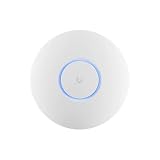
- Ubiquiti U6+ AP WiFi6 access point for network expansion
- Features 1xGbE PoE connection with dual-display support
- 2x2 dual-band technology for optimal wireless coverage
Product prices and availability are accurate as of the date/time indicated and are subject to change. Any price and availability information displayed on Amazon at the time of purchase will apply.

