
iTechGuides is reader-supported. When you buy through links on our site, we may earn an affiliate commission. As an Amazon Associate I earn from qualifying purchases. Learn more
Short answer: The Elder Scrolls Online is not officially supported on Macs with Apple-silicon processors. Rosetta can translate Intel (x86_64) Mac code on Apple-silicon Macs, but the available official documentation does not establish that ESO has a native Apple-silicon build, nor does it provide a reliable native-versus-Rosetta benchmark. You may be able to launch the game with the display workarounds suggested by ESO Support, but success and performance are not guaranteed.
What the official position means
ESO Support states: “The Elder Scrolls Online is not officially supported on Mac computers with Apple silicon ARM-based CPUs.” That is the controlling compatibility answer for M-series Macs. It does not necessarily mean that every Apple-silicon Mac will fail to launch. It means ZeniMax does not promise that the game will install, start, render correctly, remain stable, or continue working as macOS and the game change.

ESO Support presents its Apple-silicon guidance as possible workarounds rather than supported configurations. The same guidance cautions that the methods are not guaranteed. Treat a successful launch as an individual result, not as proof that Apple-silicon Macs are officially compatible.
Recommended Free Tools
This distinction matters because the ordinary Mac requirements page and the Apple-silicon support article answer different questions. The requirements page lists a baseline Mac environment, while the separate ARM-Mac article explicitly excludes official support for Apple-silicon CPUs. Meeting the baseline requirements therefore cannot turn an unsupported Apple-silicon configuration into a supported one.
#1 Best Overall
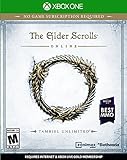
- Unlimited Adventures, No Subscription Required
- The Fight for Tamriel Begins: Three alliances vie for control of the Empire. As these powers battle for supremacy, darker forces move to destroy the world.
- Play the Way You Like: Battle, craft, fish, steal, siege, or explore. The choice is yours to make in a persistent Elder Scrolls world.
- A Multiplayer RPG: Adventure alone, quest with friends, or join an army of hundreds in epic PVP battles.
- Tell Your Own Story: Discover the secrets of Tamriel as you quest to regain your lost soul and save the world from Oblivion.
Native code, Intel code and Rosetta
What Rosetta does
Apple describes Rosetta as a translation environment that lets an Apple-silicon Mac run Mac software compiled for Intel’s x86_64 architecture. Translation allows an Intel-targeted application to execute on an ARM-based Mac; it does not rewrite the application into a native ARM build or make the developer’s compatibility promises broader.
Apple’s developer documentation also says macOS runs a native version of an application whenever possible. That is a general platform rule, not a statement about ESO’s executable. The official material reviewed for this question does not identify a native Apple-silicon ESO build.
What cannot be concluded from Rosetta alone
- Rosetta support does not prove that ESO will launch successfully.
- It does not prove that the game will be stable for a long session.
- It does not establish a particular frame rate, frame-time pattern or visual quality.
- It does not show that a hypothetical native build would be faster.
Apple Support provides guidance for identifying whether an installed Mac application is Intel-based. That check can tell you how macOS classifies the application you have installed; it cannot supply an ESO performance benchmark or override ESO Support’s unsupported-status statement.
Is there a native Apple-silicon version of ESO?
No native build is established by the authoritative sources used for this guide. The sources explain Rosetta and Apple’s handling of Intel applications, but they do not document an ESO executable compiled for Apple silicon. Do not assume that an application labelled “Mac” is ARM-native: a Mac application can still contain Intel code and rely on translation.
Conversely, do not infer from a launch that the game is native. A translated Intel application can appear to the player as an ordinary Mac game. To make a native-versus-translated claim, you would need a current build identification or reproducible technical test that distinguishes the executable architecture.
Why the label matters
“Runs on a Mac” describes a platform target, not necessarily a processor architecture. Intel Macs and Apple-silicon Macs can both satisfy that broad label while using different binaries or translation layers. The only defensible architecture statement about ESO from the cited documentation is that Apple silicon is outside official support and that Rosetta is Apple’s mechanism for running x86_64 software. A menu option, launcher screen or successful login cannot by itself reveal which architecture is executing.
What is known about performance
There is no ESO-specific, authoritative comparison of native Apple-silicon performance against Rosetta performance in the cited material. No verified frame-rate difference, frame-time result, crash rate or stability percentage is available. User anecdotes may describe individual machines, but they are not a controlled comparison and should not be presented as benchmark data.
Performance and compatibility are separate outcomes. A game can launch but exhibit inconsistent frame times, display problems or crashes. It can also fail before rendering, making frame rate irrelevant. Any serious comparison must report those outcomes separately rather than reducing the result to one FPS number.
What a valid future comparison would need
If you test ESO on an Apple-silicon Mac, compare the same ESO build, macOS version, graphics settings, resolution and workload in each configuration. Record the Mac model and chip, installed memory, display resolution, test location, frame-rate measurement method and session length. Note launch success, frame rate, frame-time consistency, crashes, freezes and visual artifacts as separate observations.
Those controls are reporting requirements, not results. Until such a test exists, the responsible conclusion is simply that the official sources leave native-versus-Rosetta performance unresolved.
Rank #2

- Save Morrowind: Stop a meteor from crashing into Vivec City by helping a demi-god regain his lost powers.
- Become the Warden: Harness the nature-based magic of an all-new class with a War Bear battle companion at your side.
- Partner with an Assassin: Aid a legendary elite member of the Morag Tong who will guide you through deadly political intrigue.
- Fight Together in PvP Battlegrounds: Take the battle to the Ashlands with new 4v4v4 player vs. player combat set in competitive arena-style environments.
Separate the tests you are actually making
A useful report should identify at least four different questions: Does the launcher open? Can the account reach a character or game world? Does the display remain usable during ordinary play? Does the session stay stable over the intended play period? These checkpoints prevent a short launch test from being mistaken for a complete compatibility result. They also make reports easier to compare when two players use different displays, resolutions or macOS releases.
What’s actually slowing this PC down?
Pick the symptom - the matching free tool is one click away.
Published Mac requirements and their limits
ESO’s Mac requirements page lists the following figures. The page warns that requirements may change and requires a persistent internet connection.
| Requirement | Published Mac baseline | How to interpret it on Apple silicon |
|---|---|---|
| Operating system | Mac High Sierra version 10.13 | A listed minimum is not an Apple-silicon support guarantee. |
| Mac model | Mid-2017-or-newer Mac models | Model year alone does not establish support for an ARM-based CPU. |
| Graphics memory | At least 4 GB of GPU memory | The page’s figure is a published baseline, not an ESO benchmark on Apple silicon. |
| Free storage | 105 GB of free HDD space | Reserve at least the published amount before installation; the source warns requirements can change. |
| Network | Broadband internet and a persistent internet connection | Required for the online game; network access does not resolve CPU-architecture compatibility. |
The requirements page directs readers to the ARM-Mac support article because some Mac systems are incompatible. Read the two pages together: the baseline describes a general Mac environment, while the ARM article says Apple-silicon Macs are not officially supported.
The 105 GB figure is free storage for the published installation baseline, not a guarantee that every future patch, temporary file or macOS update will fit with no additional headroom. Likewise, “4 GB of GPU memory” is a requirement-page figure, not evidence that a particular integrated Apple GPU will deliver a specific quality preset or frame rate. Keep those limits in mind when comparing a specification sheet with an actual play experience.
Before you try ESO on an Apple-silicon Mac
Confirm the platform you actually have
Check whether your Mac uses an Apple-silicon processor rather than an Intel processor. If it is an ARM-based model, apply the unsupported-status warning before spending time troubleshooting the launcher. If it is Intel-based, the Apple-silicon restriction does not describe your CPU, although the ordinary Mac requirements and any current ESO changes still apply.
Free tools Windows power users keep installed
One-click scans. No signup required.
Check storage and connectivity
- Make at least 105 GB of free storage available, treating that number as the published baseline rather than a promise that future updates will fit within it.
- Use a broadband connection and expect the game to require persistent internet access.
- Leave additional headroom if your Mac needs space for macOS updates, temporary installer files or other applications; ESO’s published figure is not a statement about total free-space needs for the rest of the system.
Set expectations before troubleshooting
Decide what “working” means for you. Launching to the character screen, completing a short session, and maintaining a stable long play session are different tests. Because ESO does not officially support Apple silicon, you should be prepared for a workaround to stop working after a game or macOS update.
Keep a reversible setup
Change one variable at a time and write down the previous display setting. That makes it possible to return to a known configuration if a workaround produces a worse image or prevents the launcher from appearing. Do not interpret a changed resolution, a different monitor or windowed mode as evidence that the CPU translation layer has changed; these steps affect presentation and launch behavior, not the architecture of the game code.
ESO’s suggested display and windowing workarounds
ESO Support lists four possible approaches. They address launch or display behavior; they are not advertised as frame-rate improvements. The support article says none is guaranteed.
1. Use windowed mode
- Start ESO using its available windowed display mode rather than forcing full-screen mode.
- Attempt to sign in and enter the game.
- If the game launches, test a normal play session instead of assuming that reaching the menu proves stability.
Windowed mode changes how the game presents its display surface. ESO does not state that it increases performance, reduces translation overhead or fixes every Apple-silicon issue.
2. Select a scaled display setting with “More Space”
- Open the Mac display settings.
- Choose the scaled option labelled “More Space.”
- Start ESO again and check whether the launch or rendering behavior changes.
This is a display-configuration workaround, not a recommendation to lower graphics quality and not a measured performance optimization. If the result is worse, return to the previous display setting.
Rank #3
- Unlimited Adventures, No Subscription Required
- The Fight for Tamriel Begins: Three alliances vie for control of the Empire. As these powers battle for supremacy, darker forces move to destroy the world.
- Play the Way You Like: Battle, craft, fish, steal, siege, or explore. The choice is yours to make in a persistent Elder Scrolls world.
- A Multiplayer RPG: Adventure alone, quest with friends, or join an army of hundreds in epic PVP battles.
- Tell Your Own Story: Discover the secrets of Tamriel as you quest to regain your lost soul and save the world from Oblivion.
3. Launch on an external display, then move the window
- Connect an external display.
- Launch ESO on that display in windowed mode.
- Sign in and enter the game.
- Move the game window to the Mac’s primary display.
The external display appears in ESO’s support guidance as a way to work around a display or launch problem. It is not evidence that an external monitor supplies more graphics performance, and it should not be purchased as a guaranteed fix.
4. Try a fixed resolution with Display Menu
- Use the Display Menu application referenced by ESO Support to select a fixed display resolution.
- With that resolution active, launch ESO and test windowed mode.
- If the application is unavailable or behaves differently on your macOS version, stop rather than treating the reference as an endorsement of current availability.
ESO’s article mentions Display Menu as support guidance. The source does not establish the application’s current App Store availability, version compatibility or effectiveness on every Mac.
A practical troubleshooting path
The game does not launch
- Verify that the Mac is Apple silicon; if it is, remember that the platform is outside ESO’s official support.
- Confirm the published storage, operating-system and network prerequisites as far as they apply to your system.
- Try windowed mode, then the “More Space” scaled display setting.
- If available, test the external-display sequence or a fixed resolution as described above.
- If all approaches fail, treat the result as an unsupported-configuration failure rather than a missing performance setting.
The game launches but the display is wrong
- Use windowed mode first.
- Test the scaled “More Space” setting.
- Try the external-display launch sequence, then move the window to the primary display.
- Test a fixed resolution through the Display Menu approach if it is available to you.
Change one display variable at a time so you know which change affected the result. None of these steps demonstrates native execution.
The game runs but is unstable
Record when the failure occurs: during launch, sign-in, zone loading, a graphics transition or extended play. Keep the ESO build and macOS version with your notes. Since no official Apple-silicon support is promised, a reproducible failure may have no guaranteed settings-based fix. Avoid describing a single successful short session as proof of long-term stability.
A macOS or ESO update changes the result
Recheck the support status and requirements after updates. The Mac requirements page says requirements may change, and the ARM article does not promise that its workarounds will remain effective. An update can alter launch behavior even when your Mac hardware has not changed.
Independent reader supportYour contribution helps us test, update, and keep practical guides available for everyone.How to evaluate reports claiming “native is faster”
Ask what executable was tested. A claim about a native build must identify evidence that the ESO code was compiled for Apple silicon; a claim based only on owning an M-series Mac is insufficient.
Also ask whether the comparison used the same game build, macOS release, resolution, graphics settings and workload. A change in any of those can produce a different result without proving anything about Rosetta. Frame rate alone is incomplete: frame-time consistency, crashes, visual artifacts and session duration can change the practical experience.
Do these 3 things before closing this tab:
1Repair Windows errors before they cause bigger problems2Fix the driver behind crashes, sound loss and screen glitches3Clear out junk files and repair common Windows errorsBecause the official material contains no named ESO native-versus-Rosetta benchmark, numerical claims should be treated as unverified unless the publisher supplies reproducible methods and current hardware details.
Should you buy an Apple-silicon Mac for ESO?
Do not choose an Apple-silicon Mac on the assumption that ESO is officially supported or that Rosetta guarantees a particular frame rate. The available evidence supports only a conditional decision: an Apple-silicon Mac may work for some players using the listed display workarounds, but the outcome is not guaranteed and no authoritative performance comparison is available.
If ESO is a primary requirement, give greater weight to a platform with explicit current support than to a theoretical advantage from native ARM execution. If ESO is one of many uses for an Apple-silicon Mac, treat the game as an unsupported experiment and maintain a fallback option rather than relying on it for an important play session.
Rank #4
An external display, fixed-resolution utility or other accessory may help with the specific display behavior described by ESO Support. None is established as a performance upgrade, and none changes the game’s official support status.
The Tool Desk
Outbyte PC Repair FREEClear out junk files and repair common Windows errorsFree Scan →Outbyte Driver Updater FREEScan for outdated or missing drivers - takes under a minuteDriver Scan →Bottom line on ESO, Apple silicon and Rosetta
ESO’s official position is that Apple-silicon Macs are not supported. Rosetta explains how Intel Mac code can run on an ARM-based Mac, but the cited Apple documentation does not identify ESO as native and the cited ESO documentation does not provide a native-versus-Rosetta benchmark. Use ESO’s windowed-mode and display-configuration workarounds only as non-guaranteed troubleshooting steps. Until a current, controlled ESO test or an official native-build statement appears, claims about a specific FPS advantage, guaranteed stability or superior native performance are not established.
Frequently Asked Questions
Can I run ESO on an ARM-based Mac?
ESO Support says the game is not officially supported on Macs with Apple-silicon ARM-based CPUs. Some players may reach the game using the listed windowing or display workarounds, but ESO does not guarantee installation, launch, stability or continued operation.
Does Rosetta make ESO a native Apple-silicon game?
No. Rosetta translates x86_64 Mac code so it can run on Apple-silicon hardware. Translation is different from an application compiled for ARM, and the official ESO material does not document a native Apple-silicon build.
Will ESO run faster natively than through Rosetta?
There is no authoritative ESO-specific benchmark in the cited documentation. Do not assign an FPS advantage to a hypothetical native build or treat an individual user report as a controlled comparison.
Quick wins for a faster PC:
Clear out junk files and repair common Windows errorsFree Scan →Scan for outdated or missing drivers - takes under a minuteDriver Scan →Do ESO’s normal Mac requirements guarantee support on an M-series Mac?
No. The requirements page lists High Sierra 10.13, mid-2017-or-newer Mac models, at least 4 GB of GPU memory, 105 GB of free storage and broadband internet, but it separately directs readers to the ARM-Mac article, which excludes official Apple-silicon support.
Which workarounds does ESO Support suggest?
The support article suggests windowed mode, a scaled display setting labelled “More Space,” launching in windowed mode on an external display before moving the window to the primary display, and selecting a fixed resolution with the Display Menu app. It says these approaches are not guaranteed.
Is an external monitor a performance upgrade for ESO on Apple silicon?
No such benefit is established. ESO mentions an external display only as a possible launch or display workaround. It is not evidence of higher frame rates and should not be purchased as a guaranteed solution.
The Bottom Line
Apple-silicon Macs are outside ESO’s official support. Rosetta may translate Intel code, but no official native build or reliable performance comparison establishes how ESO will perform. Treat the listed display workarounds as non-guaranteed experiments, not promises of compatibility or FPS.
PC Slower Than It Used to Be?
A free scan shows the junk files, broken settings and background clutter dragging Windows down - then fixes them in one click.Free scan · Windows 10 & 11Crashes, No Sound, or Screen Glitches?
Random freezes, missing sound and display glitches usually trace back to one bad driver. Find and replace yours safely.Free scan · under a minuteQuick Recap
Product prices and availability are accurate as of the date/time indicated and are subject to change. Any price and availability information displayed on Amazon at the time of purchase will apply.

