
iTechGuides is reader-supported. When you buy through links on our site, we may earn an affiliate commission. As an Amazon Associate I earn from qualifying purchases. Learn more
Short answer: choose a TCL NXTPAPER phone if you need one fast, colorful Android phone that also makes long reading sessions more comfortable. Choose a true e‑ink phone if your priority is static black-and-white text, direct-sun readability, minimal display light and fewer distractions. NXTPAPER can feel more paper-like than a conventional LCD, but its reading modes do not turn the phone into an e‑ink display.
The decision in one view
| What matters most | Better choice | Why |
|---|---|---|
| Long novels or documents in bright outdoor light | True e‑ink phone | Reflective e‑paper remains readable in direct sun and does not need a continuously emitting display backlight for a static page. |
| Color comics, magazines, photos and normal web pages | TCL NXTPAPER | Its active full-color screen preserves color and supports ordinary Android rendering. |
| Video, maps, cameras and rapid scrolling | TCL NXTPAPER | LCD-based hardware handles motion and mainstream apps more responsively than most e‑ink panels. |
| Fewest notifications and least temptation to switch apps | E‑ink phone, or NXTPAPER Max Ink mode | A dedicated e‑ink device creates friction by design; Max Ink restricts apps and can suppress unwanted messages. |
| One device for reading and everything else | TCL NXTPAPER | You keep a conventional Android app library, cameras, color and fast interaction. |
| Static-page battery endurance | Usually e‑ink | E‑paper pixels can retain a page with little continuing display power. TCL quotes up to seven days of immersive reading for the TCL 60 NXTPAPER under a specified internal simulation. |
There is no universal winner because these phones optimize different physical displays. NXTPAPER is a comfort-oriented version of an active screen; e‑ink is a reflective reading technology first.
What TCL NXTPAPER actually changes
TCL introduced NXTPAPER in 2021 as a combination of display hardware, optical treatment and software intended to produce a “paper-like, full-color display.” TCL’s technology material reports 106 patents and 143 awards, with that count stated as accurate in July 2025. Those figures describe TCL’s development record, not a guarantee that every NXTPAPER generation has identical hardware.
Quick wins for a faster PC:
Clear out junk files and repair common Windows errorsFree Scan →Scan for outdated or missing drivers - takes under a minuteDriver Scan →The system can include a matte, anti-glare surface; hardware blue-light filtering; ambient-light adaptation; software color controls; and, on selected generations, circularly polarized light. The layers are designed to reduce reflections and alter the spectrum reaching your eyes while retaining color and normal phone functions.
#1 Best Overall
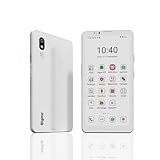
- DISPLAY: Features a 6.13-inch color E-ink display that's easy on the eyes and provides a paper-like reading experience
- STORAGE: Equipped with generous 8GB RAM and 256GB storage capacity for smooth multitasking and big space for apps and files
- OPERATING SYSTEM: Runs on Android 14 OS, offering access to a wide range of applications and regular security updates
- Combination on ePaper ereader and Smartphone -- with 5G connectivity, this small e-ink mobile phone can access many places with internet, keep working and entertainment just in one device.
TCL states that its multilayer filtration can reduce harmful blue light “down to 3.41%.” That is an internal vendor test figure under the company’s cited test conditions. It is not an independent clinical result and does not establish that NXTPAPER prevents eye disease, eliminates fatigue or is medically safer for every reader.
The TCL 60 NXTPAPER reading modes
The TCL 60 NXTPAPER has a 6.8-inch FHD+ display. Its Ink Paper Mode shifts the presentation toward a paper-like, low-color treatment for chapters, news, PDFs and documents. Color Paper Mode is intended for comics and magazines when retaining color is important.
Max Ink is a more restrictive reading environment. It can block unwanted messages, whitelist selected applications and close running apps so that a reading session is not constantly interrupted. This is a software restriction layered over the phone’s display; it does not replace the panel.
The Tool Desk
Outbyte PC Repair FREEClear out junk files and repair common Windows errorsFree Scan →Outbyte Driver Updater FREEFix the driver behind crashes, sound loss and screen glitchesFind Drivers →TCL’s Europe product page claims up to seven days of immersive reading and up to 26 days of standby. The seven-day result is described in a footnote as an internal simulation based on at least four hours of reading per day. Treat it as a manufacturer scenario rather than an independently tested battery guarantee. Actual endurance changes with cellular signal, brightness, refresh behavior, audio, wireless radios and the apps left active.
How a true e‑ink phone differs
E‑paper is reflective. Instead of producing the page primarily with a continuously lit display, it uses ambient light to make the text visible. E‑ink pixels are bistable: once a page is drawn, the particles can hold that image while using little or no continuing display power. A front light, when a particular device includes one, is an illumination layer for dark environments rather than the same type of backlight used by an LCD.
This physical behavior is why e‑ink phones are strongest for long, static reading sessions. In sunlight, more ambient light can make the page easier to see. The trade-off is slower refresh, visible flashes or ghosting during page changes, limited color on many models and less fluid animation.
Dedicated e‑ink smartphones vary widely. Some are monochrome; others use muted color e‑paper. Models such as the Hisense A5c and A5 Pro CC illustrate the category, but availability, cellular-band support, software updates and regional stock must be checked for the country where you intend to use one.
Free tools Windows power users keep installed
One-click scans. No signup required.
Why NXTPAPER modes are not e‑ink
Ink Paper, Color Paper and Max Ink modes can change color rendering, filtering, brightness behavior and which applications are allowed. They do not change the underlying active display or its backlight. Android Central’s hands-on explanation makes the same distinction: NXTPAPER readability can improve substantially, yet harsh sunlight can still expose a gap versus reflective e‑ink.
Rank #2

- 【 ePaper E-ink Phone & Eyes Friendly 】Bigme HiBreak Pro mobile android phone equipped with 6.13 inch E-ink screen & 300PPI, it provides you paper-like visual experience on smart device, that’s eyes friendly for day or night usage with 36 level adjustable light
- 【NFC & Fingerprint Unlock Features】The android ebook readers ePaper phone launched with android 14 operating system, 8GB+256GB large internal storage, dual camera (front 5MP & rear 20MP), NFC, GPS, Compass, Gyroscope, 2.4G & 5G wifi connection,bluetooth connection and 3rd-party apps etc.,and this android E-ink smartphone reader supports fingerprint unlock as well, thus quickly improve work efficiency
- 【5G/4G Connectivity & Calling Support】This bigme phone e ink e-reader integrated 5G/4G connectivity features, it allows you to surf the web and smoothly makes calling in outside, which always to stay connected on-the-go
- 【Octa-Core CPU & Ultra Fast Refresh Rate】This bigme HiBreak Pro phone e-reader equipped with advanced dimensity 1080 Octa-Core processor(2.6GHz), and comes with super blazing-fast refresh & auto-ghosting clearance ,which provides better compatibility for browsing gallery, listen to music,enjoy using App for seamless ePaper experiences
- 【 Low-power Consumption & Long Battery Life】The bigme android phone E-ink eReader built-in 4500mAh rechargeable battery and supports 18W safe fast charging, it's equipped with a low-power E Ink screen, low-power CPU and intelligent background activity scheduling, this effectively extends its battery life, let you say goodbye to the trouble of frequent charging
That distinction matters when choosing based on a specific expectation. If “paper-like” means a matte surface, reduced glare and a warmer, less saturated image, NXTPAPER may meet it. If it means a page that becomes easier to read as sunlight increases, remains static without a continuously driven display and refreshes slowly like an e-reader, only e‑ink provides that behavior.
Reading comfort, sunlight and eye considerations
Static text comfort
E‑ink has the closest physical resemblance to printed paper because the page is reflective and static. NXTPAPER adds a matte finish and spectral filtering to an active display, which can reduce reflections and harshness compared with a glossy phone. The subjective result depends on font size, viewing distance, room lighting, prescription needs and how sensitive you are to flicker or glare.
Outdoor use
In direct sun, e‑ink generally wins. Its contrast is produced by reflected light, while an NXTPAPER screen still has to compete with sunlight washing over an active panel. NXTPAPER may be comfortable under shade, overcast skies or controlled indoor lighting, but do not buy it expecting e‑ink-level legibility on a bright beach or snowfield.
PC Slower Than It Used to Be?
A free scan shows the junk files, broken settings and background clutter dragging Windows down - then fixes them in one click.Free scan · Windows 10 & 11Crashes, No Sound, or Screen Glitches?
Random freezes, missing sound and display glitches usually trace back to one bad driver. Find and replace yours safely.Free scan · under a minuteBlue light and fatigue
Blue-light reduction can make an evening screen look warmer and may be more comfortable for some readers, but the cited 3.41% figure is a TCL internal measurement, not proof of a health outcome. Reading fatigue also comes from small text, close focus, dry eyes, glare, poor posture and uninterrupted duration. Set a readable type size, keep the screen at a sensible distance and take periodic distance breaks regardless of display type.
Color, motion and app compatibility
Color content
NXTPAPER is the clear choice for full-color comics, magazines, illustrations, shopping pages, photographs and any document where hue carries meaning. Color Paper Mode is designed for those cases. Color e‑paper phones can show color, but they commonly use a narrower palette, lower saturation and slower refresh than an active color display.
Scrolling and animation
Social feeds, maps, video, games and rapidly scrolling web pages remain smoother on NXTPAPER because its active panel is built for frequent updates. E‑ink can display these apps, but refresh artifacts, lag and deliberate screen flashes make them less pleasant. An e‑ink phone is best when you read, pause, tap and turn a page rather than continuously animate content.
Android applications
NXTPAPER behaves like a conventional Android phone. You can install reading apps, library apps, browsers, note tools, messaging, banking and camera software without accepting e‑ink-specific compromises. E‑ink phones may run Android too, but app interfaces designed around animation, video or rapid scrolling can be awkward, and some manufacturers provide fewer updates or regional services.
Battery behavior and distraction control
Why e‑ink often lasts longer for reading
A static e‑ink page does not require the display to be refreshed continuously, so reading a book can consume mainly the phone’s processor, radio and optional front light. Battery life still depends on the modem, Wi‑Fi, synchronization and background services; “e‑ink” does not make the rest of a smartphone power-free.
Rank #3

- Ultra-Thin & Lightweight Design: Weighing only 138g with a super-slim 6.7mm body, the VIWOODS e reader features a compact 6.13-inch screen that perfectly balances portability and usability. Its sleek design fits effortlessly in your pocket, making it ideal for commuting, traveling, or enjoying your favorite reads anytime, anywhere
- Stunning Carta 1300 Display: Enjoy a premium reading experience with the advanced Carta 1300 E-Ink display. It delivers faster refresh rates, reduced glare, and a true paper-like feel for comfortable, long reading sessions
- Adjustable Front Light: Read comfortably in any environment with 20 levels of adjustable cool light, designed without warm light. Whether in low light or bright sunlight, the VIWOODS e-reader adapts to your needs for strain-free reading
- AI Button for Instant Assistance: Access AI-powered assistance with ease using the dedicated AI side button. Long-press for voice input or short-press for text-based queries, providing you with quick solutions, learning tools, or helpful summaries in seconds
- AI Screenshot Q&A: Struggling with a complex topic? Simply take a screenshot, let the AI analyze it, and receive a detailed summary or explanation. Dive deeper into any subject with follow-up questions, making learning easier than ever
For the TCL 60 NXTPAPER, TCL’s published scenario is up to seven days of immersive reading and 26 days of standby, with the reading figure based on an internal simulation of at least four hours per day. Use those numbers to understand the intended mode, not to predict your personal result.
Managing interruptions
A dedicated e‑ink phone naturally limits impulse switching because animation and rapid app interactions are less inviting. On NXTPAPER, Max Ink can provide a similar session boundary by restricting the app list, suppressing unwanted messages and closing running apps. You retain the option to leave the restricted mode and use the full phone, so it is a choice rather than a permanent hardware limitation.
Independent reader supportYour contribution helps us test, update, and keep practical guides available for everyone.Choose by the reading you actually do
Novels and long-form articles indoors
If you read mostly at home, on a commute or in an office, NXTPAPER is a strong compromise when you also need messaging, navigation and other Android tasks. Use Ink Paper Mode, increase the type size until you stop squinting and enable a warm color setting at night.
Do these 3 things before closing this tab:
1Clear out junk files and repair common Windows errors2Scan for outdated or missing drivers - takes under a minute3Repair Windows errors before they cause bigger problemsPDFs and technical documents
NXTPAPER’s 6.8-inch FHD+ screen and normal Android PDF tools make it flexible for searchable documents, color diagrams and occasional annotation. E‑ink can be calmer for continuous text, but a phone-sized e‑ink panel may require more zooming and panning on fixed-layout pages. For dense A4 PDFs, neither phone replaces a larger tablet or reader.
Comics and magazines
Use NXTPAPER Color Paper Mode when color and page-turn responsiveness matter. A monochrome e‑ink phone removes the visual information that makes these formats useful.
Beach, hiking and other bright locations
Choose e‑ink when direct-sun readability is a primary requirement. NXTPAPER’s matte treatment helps, but it cannot remove the underlying active-display limitation.
Minimalist communication
An e‑ink phone is preferable if you want calls, texts, maps and occasional reading without a screen that encourages constant media use. NXTPAPER with Max Ink is the more flexible alternative when you need a full smartphone but want a deliberate reading mode.
How to set up a TCL NXTPAPER for reading
- Install and update your reading apps. Add your ebook, library, browser or PDF applications before starting a focused session so you do not need to leave the mode repeatedly.
- Choose the display mode for the material. Select Ink Paper Mode for novels, news, PDFs and ordinary documents. Select Color Paper Mode for comics, magazines and image-heavy pages.
- Set practical typography. Increase font size and line spacing until paragraphs can be read without leaning toward the phone. Reflowable ebooks are usually more comfortable than fixed-layout PDFs.
- Control reflections. Keep the screen clean, turn the phone away from a hard light source and use shade outdoors. The matte layer reduces glare; it does not make glare impossible.
- Use Max Ink for a protected session. Add only the apps you need, allow the mode to suppress unwanted messages and close other running apps, then start reading.
- Recheck battery assumptions. Cellular reception, wireless syncing, audio and high brightness can reduce endurance far below TCL’s internal seven-day reading scenario.
How to use an e‑ink phone effectively
- Confirm network compatibility first. Check supported cellular bands, voice-over-LTE requirements and local carrier approval before buying; e‑ink phone availability is often regional.
- Load books for offline reading. Download files or chapters over Wi‑Fi so weak cellular service does not become the main battery drain.
- Choose a comfortable refresh setting. A faster mode reduces ghosting in apps, while a slower mode generally favors cleaner static text. The labels differ by manufacturer.
- Accept deliberate page turns. Avoid judging the phone by video or animated interfaces; the hardware is optimized for text that changes one page at a time.
- Use the front light sparingly at night. It is useful in darkness, but lower brightness and a warm tone can be more comfortable than maximum illumination.
Common mistakes and how to avoid them
- “NXTPAPER is an e‑ink replacement.” It is not. The modes alter an active display’s rendering and restrictions; they do not convert the panel into reflective e‑paper.
- “The 3.41% figure proves it prevents eye strain.” It is a vendor internal test result. Treat it as a description of filtration, not a medical guarantee.
- “Seven days means seven days for every owner.” TCL’s figure assumes an internal simulation with at least four reading hours per day. Your radios, brightness and apps can change the result.
- “Any e‑ink phone will work everywhere.” Verify bands, carrier certification, language support, warranty and update policy for your region.
- “A matte screen removes all glare.” Matte treatment scatters reflections; direct sunlight can still reduce contrast on NXTPAPER.
- “E‑ink is automatically better for every app.” Video, animation, games and fast feeds expose e‑ink’s refresh limits. Match the display to your content rather than to the label.
A practical buying checklist
- Identify your largest reading block: novels, PDFs, comics, web pages or mixed media.
- Decide whether direct-sun readability is essential or merely desirable.
- Count the Android functions you cannot give up: camera, video, navigation, banking, messaging and fast search.
- For NXTPAPER, confirm the exact generation, screen size, available paper modes and whether Max Ink is included.
- For e‑ink, verify color capability, front-light behavior, refresh controls, storage and app compatibility.
- Check carrier bands, warranty and software support in your country before ordering an imported model.
- Use manufacturer battery figures only with their stated test conditions; do not compare a simulated reading estimate directly with your own mixed-use day.
Verdict
Pick the TCL 60 NXTPAPER when reading is one important activity among many. Its 6.8-inch FHD+ screen, color modes, anti-glare and filtering can make Android reading more comfortable without sacrificing cameras, video or app speed. Max Ink gives you an optional low-distraction boundary.
Pick a true e‑ink phone when reading is the main purpose and you value reflective, direct-sun performance, static-page efficiency and deliberate interaction above color and fluidity. The decisive difference is the display physics: NXTPAPER improves an active screen, while e‑ink changes how the page is produced and held.
Quick Recap
Product prices and availability are accurate as of the date/time indicated and are subject to change. Any price and availability information displayed on Amazon at the time of purchase will apply.

