
iTechGuides is reader-supported. When you buy through links on our site, we may earn an affiliate commission. As an Amazon Associate I earn from qualifying purchases. Learn more
To switch a Honeywell thermostat from cooling to heating, select Heat using the thermostat’s SYSTEM switch, System button, or touchscreen mode control. The exact control depends on the model. Once Heat is selected, set the temperature above the displayed room temperature to call for heat.
Switch modes using the control on your thermostat
Choose Heat on the thermostat itself; do not change installer settings just to switch seasons. Honeywell controls vary by model, so use the instructions below that match what you see.
If your thermostat has a physical SYSTEM switch
- Move the SYSTEM switch to HEAT.
- Set the desired temperature above the displayed room temperature.
On the PRO TH4110B, the SYSTEM switch selects Heat, Cool, or Off. Heat controls the heating system, Cool controls the cooling system, and Off turns both off. See the PRO TH4110B operating manual.
Do these 3 things before closing this tab:
1Fix the driver behind crashes, sound loss and screen glitches2Repair Windows errors before they cause bigger problems3Scan for outdated or missing drivers - takes under a minuteIf your thermostat has buttons or a touchscreen
- Use the System or mode control to select Heat.
- Raise the setpoint above the room temperature to request heating.
The button names and menu steps differ among models. For example, the RTH6400 manual describes manual changeover options of Heat, Off, and Cool, with Auto available on models configured for automatic changeover. Follow the instructions for your thermostat rather than assuming another model’s sequence applies. See the RTH6400 manual.
#1 Best Overall

- High use of the scheduling feature of the T5 thermostat saved customers between 8 and 16% on heating and cooling bills. Dollar savings range based on nationwide average annual single-family detached home's heat and cooling bills; actual savings varies based on consumption.
- Save Energy and Get Rewarded. Check with your energy provider about available energy savings rebates to save on your purchase. Plus, eligible customers can enroll in their local Utility's "DEMAND RESPONSE PROGRAM" which can reward you for allowing the utility to slightly adjust your AC or furnace temperature settings when there is high energy demand.
- 7-Day Flexible Scheduling or Location Based Temperature Control. It’s your choice. 7-day scheduling programs your thermostat. Geofence technology helps make you comfortable by using your smartphone’s location to know when you’re away and when you return.
- Auto Home and Away Mode. Enjoy ideal temperatures at home, then save when away.
- ENERGY STAR certified. Help save energy, track your heating and cooling with monthly energy reports and get personalized tips on reducing energy use.
Identify the model if the controls are unclear
Find the model number on the thermostat label or in its manual. For PRO 1000 models, Honeywell’s instructions say to pull the thermostat from its wallplate and turn it over to find the model number; the method may differ on other product families. Use the matching manual or Honeywell Home support if you cannot identify the control.
PRO 1000 models do not all support the same equipment. Some support heat pumps, and emergency or auxiliary heat is available on select models. Check your model’s labels and manual before selecting those options. The PRO 1000 manual describes its model-specific controls.
Rank #2

- ENERGY STAR certified to help save energy, track your heating and cooling and send personalized tips on reducing energy use..Includes : Thermostat, Wall Plate, Screws, Anchors, Quick Start Guide, Thermostat ID Card, Wire Labels, User Guide
- SAVE ENERGY AND GET REWARDED by checking with your energy provider about available energy savings rebates to save on your purchase (rebate finder link above). Plus, eligible customers can enroll in ongoing energy savings incentives with their energy provider to keep saving all year long.
- CONTROL FROM ANYWHERE by using the app or compatible smart home partners including AMAZON ALEXA, GOOGLE ASSISTANT, MICROSOFT CORTANA, and more. Flexible programming options are also available if you'd rather set it and forget it but still benefit from energy savings.
- CUSTOMIZABLE COLOR SCREEN: Easily change the high-definition display of the Wi-Fi thermostat to any color you choose.
- ON-SCREEN COMFORT INFORMATION: See indoor and outdoor temperature and humidity information right on the home screen, plus daily weather forecast available on the smart thermostat.
Understand Heat, Cool, Off, and Auto
- Heat: The thermostat can call for heating when the setpoint is above room temperature.
- Cool: The thermostat can call for cooling when the setpoint is below room temperature.
- Off: The thermostat does not call for heating or cooling.
- Auto: On compatible models with automatic changeover enabled, the thermostat can select heating or cooling based on room temperature and its settings.
Auto is not available on every thermostat, and its setup varies. The RTH6400 manual documents an optional automatic changeover setting; the RTH8500 guide describes a separate installer setting that enables or disables automatic changeover. Do not enter installer setup merely to select Heat. See the RTH6400 manual and RTH8500 guide.
What’s actually slowing this PC down?
Pick the symptom - the matching free tool is one click away.
If the heating does not start
- Confirm the mode. Check that the display or switch shows Heat, not Cool or Off.
- Check the setpoint. Raise it above the displayed room temperature; a lower setpoint will not prompt heating.
- Check the schedule or hold. If the thermostat follows a schedule, it may change the setpoint after you adjust it. Review the model’s instructions for schedule and hold controls.
- Give the system time to respond. Follow any delay shown by the thermostat or specified in its manual. Do not repeatedly toggle modes to force a start.
- Consult the model manual or get service. If the system still does not respond after these checks, use the exact model’s troubleshooting guidance and contact a qualified HVAC professional as appropriate. Do not open wiring or alter installer settings for a routine mode change.
Cooling safety when switching seasons
Honeywell manuals warn against operating cooling when the outdoor temperature is below 50°F (10°C) because compressor damage may result. This manufacturer warning appears in the PRO TH4110B operating manual, the PRO 1000 manual, and the T8132 manual. Some models also delay cooling for compressor protection; follow the manual and allow the indicated delay.
Quick Recap
Rank #4
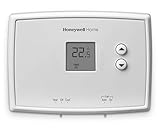
- PRECISE TEMPERATURE CONTROL: Precise temperature control of +/- 0.5 degree Celsius.
- DIGITAL DISPLAY: Easy-to-read digital display.
- SIMPLE TO USE: Simple, soft-touch buttons allow you to select the temperature quickly and easily.
- EASY-ACCESS: Easy-access battery compartment and change battery reminder.
- SET POINT RETAINED: Set point is retained in memory in the event of a power outage.
Rank #3

- Scheduling your heating/cooling cycles to fit your lifestyle is easy to do, with options to program day-to-day, over the weekend, or for an entire week. .Includes : Package includes thermostat and receiver | Thermostat Type : Programmable
- The crystal-clear display on the T5 Touchscreen Thermostat provides a seamless blend of function and style.
- The screen is brightly backlit with a cool blue color and provides an easy-to-read indoor temperature, including indoor humidity readouts.
- For added convenience, reminders to change air filters appear on the screen.
- The advanced design of this thermostat provides maximum comfort by sensing whether your home needs heating or cooling with the Smart Response Learning technology.
Product prices and availability are accurate as of the date/time indicated and are subject to change. Any price and availability information displayed on Amazon at the time of purchase will apply.

