
Do these 3 things before closing this tab:
1Repair Windows errors before they cause bigger problems2Fix the driver behind crashes, sound loss and screen glitches3Clear out junk files and repair common Windows errorsiTechGuides is reader-supported. When you buy through links on our site, we may earn an affiliate commission. As an Amazon Associate I earn from qualifying purchases. Learn more
Use the included Steam Frame Wireless Adapter for PC streaming. Valve designed it as a dedicated 6GHz direct link between the gaming PC and headset, and recommends placing it with clear line of sight to the playspace, ideally within about 20 feet. That path avoids much of the contention found on ordinary home Wi‑Fi.
Ethernet is still worthwhile when it connects the gaming PC to the router: it removes the PC’s Wi‑Fi hop and can make the host side more consistent. It does not turn the headset into a wired device; the headset-to-PC stream remains wireless. Valve has not published a universal adapter-versus-Ethernet latency number, so the defensible comparison is about network architecture, placement and failure behavior rather than a promised millisecond difference.
What each connection actually does
The included Wireless Adapter
The Steam Frame has built-in Wi‑Fi 7 for normal network access. The included Wireless Adapter adds a separate, dedicated 6GHz connection directly between the host PC and headset. Valve describes that adapter as the intended primary path for the Steam Frame streaming experience. The adapter is therefore more than a generic Wi‑Fi dongle: it provides a link reserved for the high-bandwidth, time-sensitive stream instead of putting that stream on the same home network used by phones, televisions, laptops and smart-home devices.
The Tool Desk
Outbyte PC Repair FREERepair Windows errors before they cause bigger problemsFix Now →Outbyte Driver Updater FREEFix the driver behind crashes, sound loss and screen glitchesFind Drivers →The adapter still needs to be connected to the gaming PC, normally through a USB 3.0 port. The headset remains free to move because no cable runs from the headset to the computer.
#1 Best Overall
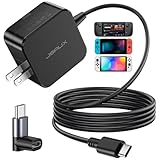
- Intelligent Output Adjustment: The JSAUX 45W USB C Power Delivery charger passed the UL 62368-1 test, with intelligent output adjustment function, support 45W 36W 27W 15W output, has the power to charge your steam deck, phone, tablet, and MacBook
- Fast Charge for Steam Deck & Switch: Equipped with 45W output, this USB C fast charger fully replaces the original Steam Deck charger and charges the device to 100% in about 2.5 hours. Also supports full-speed charging for Steam Frame / Nintendo Switch / Switch OLED models (up to 39W), ensuring fast, reliable power for uninterrupted gaming
- 5FT USB C Charging Cable: Come with an extra-long 5 Feet type C Integrated cable giving you plenty of cord to reach an outlet. Passed 10000+ times swing tests, the built-in USB C cable is more durable & flexible to bend at any angle and withstand daily wear. No low-power issue while you playing time
- Universal Compatibility: High-speed charging, compatible with Steam Frame, Steam Deck, Nintendo Switch 2, Switch, Switch OLED/Lite, iPhone 18 Pro/18 Pro Max/Air/17/16/15 Series, Samsung Galaxy S26/S25/S24/S23/S22/S21/S20 Series, Galaxy Note 10/Note 20, Google Pixel 2/3/4/5/6/7/8/9, Pixel XL, LG G5/G6/G7, LG V20/V30, iPad Pro 11"/12.9", Galaxy Tab S8 S7, MacBook Pro/Air and more USB C devices. Note: Does not support the Switch 2 console mode, does not support full-speed charging for Switch 2.
- Universal Compatibility: High-speed charging, compatible with Steam Deck, Nintendo Switch 2, Switch, Switch OLED/Lite, iPhone 18 Pro/18 Pro Max/Air/17/16/15 Series, Samsung Galaxy S26/S25/S24/S23/S22/S21/S20 Series, Galaxy Note 10/Note 20, Google Pixel 2/3/4/5/6/7/8/9, Pixel XL, LG G5/G6/G7, LG V20/V30, iPad Pro 11"/12.9", Galaxy Tab S8 S7, MacBook Pro/Air and more USB C devices. Note: Does not support the Switch 2 console mode, does not support full-speed charging for Switch 2.
Streaming over ordinary home Wi‑Fi
Steamworks documentation says the Frame can stream over a home Wi‑Fi network. In that arrangement, the PC and headset communicate through the wireless infrastructure already serving the rest of the home. That can work, but the path is more exposed to congestion, competing traffic, access-point placement and interference than the dedicated adapter path.
What “wired” means for Steam Frame
A wired setup means running Ethernet from the gaming PC to the router or access point. It does not provide a headset Ethernet socket or a cable-free-to-wireless conversion. The adapter or the headset’s Wi‑Fi connection is still required for the final PC-to-headset link.
Steam support recommends testing a direct wired connection when wireless interference produces intermittent failures, and Steam’s networking guidance treats Ethernet as the best option when the streaming client supports it. Applied to Steam Frame, that advice means wiring the host PC while retaining the wireless headset link. Ethernet can remove variability between the PC and router, but radio conditions around the headset still matter.
Latency: why the adapter can feel better, and what it cannot promise
The adapter’s architectural advantage
Streaming latency is the total time needed to capture a frame on the PC, encode it, move it across the network, decode it in the headset and display it. The network portion is only one component, but it is sensitive to queueing and retransmissions. A direct dedicated 6GHz link gives the stream a path that is less likely to compete with ordinary household Wi‑Fi traffic.
Rank #2
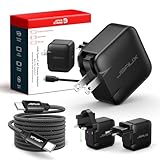
- Supports TV Mode & Handheld Mode Charging for Switch 2: JSAUX 65W USB C charger fully supports charging for Nintendo Switch 2 in both TV Mode (via dock) and Handheld Mode (direct USB C connection). Designed to meet the power requirements of Switch 2 for smooth gameplay without interruption. Important: This charger supplies power only and does NOT transmit HDMI, video, or audio signals
- 65W GaN USB C Fast Charger for Most USB C Devices: Powered by advanced GaN technology, this 65W USB C fast charger delivers efficient, high-output Power Delivery for Nintendo Switch 2, Switch OLED, and Switch in both docked and handheld use. Ideal as a Xbox Ally charger, Steam Deck charger, ROG Ally charger, MacBook charger, USB C laptop charger, tablet charger, and fast phone charger for iPhone, Galaxy, Pixel, and more. Compact yet powerful — replace multiple chargers with one versatile 65W GaN power adapter
- International Travel USB C Charger with US, UK & EU Plugs: JSAUX 65 watt travel USB C charger features a built-in foldable US plug and includes interchangeable UK and EU plug adapters, supporting worldwide 100–240V input for use in over 150 countries. Ideal for international travel, business trips, vacations, and portable gaming setups, it combines global compatibility with a compact, space-saving design that replaces multiple country-specific adapters
- Includes 6.6FT (2M) Braided USB C to USB C Cable: Comes with a durable 6.6ft braided USB C cable supporting Power Delivery 3.0 fast charging and high-speed data transfer. Reinforced connectors improve longevity, while the extended length gives you flexibility for dock setups, desks, hotel rooms, or couch gaming
- Wide Compatibility & Safe Charging: Compatible with Steam Frame, Nintendo Switch 2, ROG Xbox Ally, Switch OLED, Steam Deck, ROG Ally, MacBook Pro/Air, iPad Pro, iPhone 18 Pro/18 Pro Max, iPhone Duo, iPhone Air, iPhone 17/16/15 Series, Galaxy S26/S25/S24/S23/S22/S20, Pixel 9/8/7, and more. Features built-in protection against over-voltage, over-current, and short-circuit for worry-free charging
That is a mechanism-level advantage, not a guaranteed numerical result. Valve has not published a universal adapter-versus-Ethernet latency benchmark. A particular room can produce a different outcome depending on radio interference, distance, walls, USB placement, router load, host performance, encoding settings and the selected streaming mode. Quoting a single millisecond figure as if it applies to every Steam Frame would be misleading.
What Ethernet changes
Ethernet removes the wireless hop between the PC and router. If the PC previously used congested Wi‑Fi, wiring it can reduce queueing and variation on that segment. The headset still communicates wirelessly, however, so Ethernet cannot eliminate interference at the playspace or improve a poorly positioned adapter by itself.
In a home where the PC is close to the router and the dedicated adapter has a clean path to the headset, adding Ethernet may produce little visible change. In a home where the PC is separated from the router by walls, shares a busy access point or suffers upload/download bursts from other devices, Ethernet can make the host side steadier. The improvement is usually consistency rather than a universally lower baseline latency.
Recommended Free Tools
Factors that can dominate the result
- Radio interference: Other access points, electronic equipment and neighboring networks can add retries or delay.
- Distance and obstructions: Walls, floors and metal attenuate the signal between adapter and headset.
- Adapter placement: A dongle hidden behind a PC chassis can have a worse path than one positioned toward the playspace.
- Router and household load: Home Wi‑Fi traffic can compete with a conventional streaming path; Ethernet removes only the PC’s wireless segment.
- Host performance: Capture, encoding and game rendering time remain part of end-to-end latency regardless of network type.
- Encoding and stream settings: Different modes and quality settings change the amount of data and processing work.
Range and placement: the practical 20-foot recommendation
How far the adapter is intended to work
Valve recommends clear line of sight and positioning the adapter within approximately 20 feet of the playspace. Treat that distance as guidance for best performance, not as a hard cutoff at which the connection must stop. A room with favorable radio conditions may work beyond it; a room with dense construction or interference may need the adapter closer.
Rank #3

- PREMIUM MATERIAL CONSTRUCTION – This wireless charging pad is built with a durable plastic body complemented by a sleek aluminum alloy frame, delivering a modern, premium look while maintaining lightweight portability for everyday use.
- COMPACT & PORTABLE DIMENSIONS – Measuring just 3.9 inches in diameter and 0.24 inches in thickness, this slim wireless charger is ultra-compact and travel-friendly, slipping easily into bags or pockets without adding bulk.
- INSTANT DROP-AND-CHARGE – Simply place your Qi-enabled device onto this fast wireless charger and charging begins immediately – no cables to plug in. The non-slip surface keeps your phone securely in place even when incoming calls vibrate, while the built-in LED indicator lets you know your device is actively charging.
- 10W RAPID CHARGING PERFORMANCE – Delivering 10W of power output, this Qi wireless charging station charges compatible smartphones efficiently and quickly. It works seamlessly even with phone cases on, so you never need to remove your protective cover before charging.
- COMPREHENSIVE SAFETY PROTECTION – Equipped with built-in over-current, over-voltage, over-temperature, and short-circuit protection, this wireless charger stand ensures safe, reliable charging every time. Charging time varies by phone model – most devices reach a full charge in approximately 2.5 hours.
The recommendation concerns the adapter’s distance to the playspace, not the length of an Ethernet cable from the PC to the router. You can place the PC elsewhere in the home and run Ethernet to the router, but the dedicated wireless link still needs a favorable path to the headset.
Using a USB extension
A USB 3.0 extension cable can let you move the adapter away from the PC chassis and closer to the playspace. This is useful when the computer sits under a desk, inside a cabinet or against a wall that blocks the preferred direction. The extension changes placement; it does not inherently lower latency. Its value is giving the radio a clearer, shorter path.
Obstacles and interference
Walls, floors and metal structures can weaken the signal. Other wireless networks and nearby electronic equipment can also contribute to intermittent failures. If performance changes when a door closes, a person stands between the adapter and headset, or another access point becomes busy, treat placement and interference as the first variables to test.
Reliability and dropout behavior
Dual-link fallback
Valve engineer Jeremy Leinbaugh described a fallback design in which two active links can cover for one another when interference or range affects one path. As he put it, “If something happens to one of those links, the other one will immediately pick up and cover the gap.” The design allows the dedicated link and local Wi‑Fi path to cooperate rather than making the stream depend on only one radio route.
Rank #4

- Intelligent Output Adjustment: The JSAUX 45W USB C Power Delivery charger passed the UL 62368-1 test, with intelligent output adjustment function, support 45W 36W 27W 15W output, has the power to charge your steam deck, phone, tablet, and MacBook.
- Fast Charge for Steam Deck & Steam Frame: Equipped with 45W output, this USB C fast charger fully replaces the original Steam Deck charger and charges the device to 100% in about 2.5 hours. Also supports full-speed charging for Steam Frame / Nintendo Switch / Switch OLED models (up to 39W), ensuring fast, reliable power for uninterrupted gaming.
- 10FT USB C Charging Cable: Come with an extra-long 10 Feet type C Integrated cable giving you plenty of cord to reach an outlet. Passed 10000+ times swing tests, the built-in USB-C cable is more durable & flexible to bend at any angle and withstand daily wear. No low-power issue while you playing time.
- Multiple Protection: The built-in Smart charging chip and IOA 2.0 intelligent charging system in the JSAUX USB C Wall charger efficiently protect your phone and personal safety by preventing over-current, over-voltage, overheating, and short-circuit.
- Universal Compatibility: High-speed charging, compatible with Steam Deck, Steam Frame, Nintendo Switch 2, Switch, Switch OLED/Lite, iPhone 18 Pro/18 Pro Max/Air/17/16/15 Series, Samsung Galaxy S26/S25/S24/S23/S22/S21/S20 Series, Galaxy Note 10/Note 20, Google Pixel 2/3/4/5/6/7/8/9, Pixel XL, LG G5/G6/G7, LG V20/V30, iPad Pro 11"/12.9", Galaxy Tab S8 S7, MacBook Pro/Air and more USB C devices. Note: Does not support the Switch 2 console mode, does not support full-speed charging for Switch 2.
Fallback is protection against short disturbances, not a guarantee of uninterrupted play. Valve also states that an extended dropout still causes the stream to fail and returns the user to the default environment. A room with a weak or persistently obstructed signal can therefore remain unreliable even though the headset has a second path available.
Independent review evidence
A PC Gamer reviewer reported that the included adapter was the best way to play, saw no connection issues at home or in a busy office, and described the headset as selecting between the dedicated link and local Wi‑Fi for low packet loss and robustness. That is a single reviewer’s observation, not a controlled benchmark. It demonstrates that the design can be robust in those environments, but it does not establish the result for every router, room, firmware version or office.
What Ethernet can and cannot stabilize
Wiring the PC gives the host a stable path to the router and avoids contention on the PC’s Wi‑Fi radio. It cannot repair a weak signal between the adapter and headset, a blocked line of sight or interference in the playspace. If dropouts continue after the PC is wired, investigate the adapter’s position and local radio conditions rather than assuming the Ethernet cable failed.
PC Slower Than It Used to Be?
A free scan shows the junk files, broken settings and background clutter dragging Windows down - then fixes them in one click.Free scan · Windows 10 & 11Crashes, No Sound, or Screen Glitches?
Random freezes, missing sound and display glitches usually trace back to one bad driver. Find and replace yours safely.Free scan · under a minuteAdapter versus wired host network: side-by-side comparison
| Axis | Included Wireless Adapter | Wired host-network setup |
|---|---|---|
| Headset freedom | Full movement with no headset cable | Still wireless at the headset; Ethernet helps only the host network |
| Latency mechanism | Dedicated direct 6GHz PC link, with Wi‑Fi cooperation for fallback | Removes PC-to-router Wi‑Fi variability; the headset leg remains wireless |
| Range | Best with clear line of sight and approximately 20 feet or less to the playspace | Ethernet length determines PC-to-router placement; the wireless headset range still applies |
| Reliability | Dual-link fallback can cover short disruptions; extended dropouts still fail the stream | More stable host-to-router segment, while headset-side radio conditions remain relevant |
| Setup | Pair the included adapter, use a USB 3.0 connection and position it well | Add Ethernet from the PC to the router while keeping the adapter for headset streaming |
Recommended setup for PC streaming
1. Start with the intended adapter path
- Connect the included Wireless Adapter to a USB 3.0 port on the gaming PC.
- Pair or enable the adapter according to the Steam Frame’s setup prompts.
- Place the adapter where it faces the playspace rather than leaving it hidden behind the computer.
- Begin with clear line of sight and a distance of approximately 20 feet or less.
- Run a game or streaming session long enough to expose movement-related issues, not just a stationary menu test.
This establishes the path Valve intends for the headset. If it is stable, there is no requirement to add Ethernet solely because the headset is wireless.
Best Value

- Share what's on your tablet, laptop, smartphone, or Surface onto an HDTV or monitor. Works with all Miracast enabled Windows 10 phones, tablets, and laptops, including the Surface line up.
- Stream movies, view photos, or display a presentation on a big screen all wirelessly. Compatibility: Surface devices, including Surface Book/Surface Laptop/Surface Pro/Surface Pro 4/Surface 3/Surface Pro 3/Surface 2/Surface Pro 2, and other Miracast enabled Windows 10/Windows 8.1 devices. Full functionality not available with non HDCP devices; Windows app support: Supported Platforms X86, X64 and ARM, with Windows 10 and Windows 8.1+ operating system
- Modernize your meetings by displaying business applications, Office documents, videos and websites through a conference room projector or monitor
- Simply plug into an HDTV, connect, then wirelessly mirror or extend your screen
- Snap the ends together to pack and travel
2. Add Ethernet when the host side is the variable
- Connect an Ethernet cable from the gaming PC’s network port to a LAN port on the router or access point.
- Disable or disconnect the PC’s Wi‑Fi temporarily so the operating system uses the wired interface for the test.
- Keep the Wireless Adapter connected to the PC; Ethernet does not replace it.
- Repeat the same game and playspace test under similar household network activity.
- Compare interruptions and consistency rather than expecting a guaranteed published latency reduction.
If the wired test removes problems that occurred only when the PC used Wi‑Fi, the host segment was contributing to the issue. If the same dropouts remain, focus on adapter distance, obstructions and radio interference near the headset.
3. Use a USB extension only to improve placement
If the adapter is blocked by the chassis or cannot face the playspace, attach a USB 3.0 extension and reposition the dongle. Keep the extension as a placement aid, not as a claim of faster signaling. Re-test after each placement change so you know which adjustment helped.
Troubleshooting by symptom
Intermittent stutter or packet loss
- Move the adapter toward the playspace and restore clear line of sight.
- Test within approximately 20 feet before experimenting with longer distances.
- Move the adapter away from the PC chassis with a USB 3.0 extension.
- Temporarily reduce competing wireless activity to determine whether congestion is involved.
- Wire the PC to the router and repeat the test; this isolates host-side Wi‑Fi variability.
If stutter disappears after wiring the PC, the former PC-to-router link was a likely contributor. If it persists, the headset-side radio path remains the stronger suspect.
Connection works nearby but fails across the room
Shorten the adapter-to-playspace distance and remove obstructions before changing other settings. The approximately 20-foot guidance is a best-performance target, and walls, floors or metal can reduce practical range well before a nominal distance limit.
Dropouts when another device starts using Wi‑Fi
This pattern points toward contention on a shared home-Wi‑Fi path. Use the dedicated adapter as the primary stream route, and consider Ethernet for the PC if the computer itself is on Wi‑Fi. The adapter’s second link may cover brief disturbances, but an extended interruption still ends the stream.
Persistent failures after adding Ethernet
Ethernet only stabilizes the PC-to-router segment. Verify that the adapter is still paired and connected through USB 3.0, then inspect line of sight, distance and local interference. Steam support’s recommendation to test wired networking is an isolation step, not evidence that the headset can operate as a fully wired client.
Which setup should you choose?
Choose the adapter alone when
- The PC is already near the router or has a clean, stable network path.
- The adapter can sit near the playspace with clear line of sight.
- You want the simplest setup and full headset mobility.
Choose adapter plus Ethernet when
- The PC currently relies on congested or distant Wi‑Fi.
- Other household traffic causes host-side variability.
- You want to remove one source of contention while preserving wireless headset movement.
Do not expect Ethernet to solve
- A headset that is too far from the adapter.
- Walls, floors, metal or equipment blocking the radio path.
- Interference occurring directly around the playspace.
- Extended outages that exceed the dual-link fallback’s ability to cover them.
Bottom-line guidance for latency, range and reliability
The included Wireless Adapter is the correct starting point because it creates the dedicated direct 6GHz link Valve designed for Steam Frame PC streaming. Position it near the playspace, keep a clear line of sight and begin within approximately 20 feet. Add Ethernet from the gaming PC to the router when you need to remove host-side Wi‑Fi contention or variability. The headset will remain wireless, and no authoritative source establishes a universal adapter-versus-wired millisecond advantage. Judge the result by the conditions in your room: placement, interference, distance, router load and whether dropouts are brief enough for fallback to cover.
Quick Recap
Product prices and availability are accurate as of the date/time indicated and are subject to change. Any price and availability information displayed on Amazon at the time of purchase will apply.

